SpeedFan problem

Difusal

New member
Hi!

I've tried the BETA version, the latest version and older versions of SpeedFan. None of them detects my correct ChipSet and none of them detects my fan.

I want to change the fan speed and I don't know how to do it withou SpeedFan. I have a ATI, and I tried CCC, but I don't kknow how to do it, neither if it's possible to do so..

Please HELP!
 

My Computer

Computer Manufacturer/Model Number
HP
OS
Windows 7 Ultimate x64
CPU
Intel Core i7-720QM 1,60 GHz
Motherboard
Hewlett-Packard 1448 65.35
Memory
6 GB DDR3 (1 x 2.048 MB + 1 x 4.096 MB)
Graphics Card(s)
ATI Mobility Radeon HD 5650
Sound Card
Altec Lansing
Monitor(s) Displays
Monitor LED HP BrightView HD
Screen Resolution
1.366 x 768
Argos Monitor (30 day trial version) could do it. Three year license costs € 14.95 or US $ 19.95 if it's right for you.

I tried this a while back on an old machine at the recommendation of a friend though ended up using SpeedFan.
 

My Computer

Computer type
PC/Desktop
OS
Windows 7
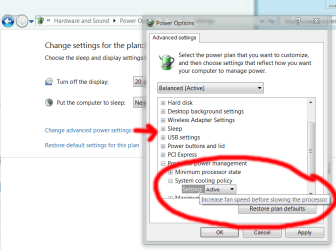
you could try the following, although i don't know if it will work for you.

control panel >> hardware and sound >> power options >> change plan settings >> change advanced power settings >> processor power management >> system cooling policy >> change to 'active'

cool.png

this should make your fan work harder, keeping your laptop cooler.
 

My Computer

Computer Manufacturer/Model Number
mickey megabyte 1234
OS
ultimate 64 sp1
CPU
i5 2500K [email protected]
Motherboard
MSI P67A-GD53
Memory
8 gigs GSkill Ripjaws 1600
Graphics Card(s)
amd hd6950
Sound Card
creative x-fi gamer
Monitor(s) Displays
samsung 24"
Screen Resolution
1920x1080
Hard Drives
ocz vertex 2e 60 gig, samsung f3 1tb, buffalo 2tb ext
PSU
antec 550
Case
antec three hundred
Cooling
i'm a cooling fan
Keyboard
saitek eclipse ii
Mouse
logitech g3
Internet Speed
about 4 Mbps
Other Info
i love win7
you could try the following, although i don't know if it will work for you.

control panel >> hardware and sound >> power options >> change plan settings >> change advanced power settings >> processor power management >> system cooling policy >> change to 'active'

View attachment 158969

this should make your fan work harder, keeping your laptop cooler.

Those are already active :x SpeedFan seems to be the only option, don't know why it doesn't work..
 

My Computer

Computer Manufacturer/Model Number
HP
OS
Windows 7 Ultimate x64
CPU
Intel Core i7-720QM 1,60 GHz
Motherboard
Hewlett-Packard 1448 65.35
Memory
6 GB DDR3 (1 x 2.048 MB + 1 x 4.096 MB)
Graphics Card(s)
ATI Mobility Radeon HD 5650
Sound Card
Altec Lansing
Monitor(s) Displays
Monitor LED HP BrightView HD
Screen Resolution
1.366 x 768

My Computer

Computer Manufacturer/Model Number
HP
OS
Windows 7 Ultimate x64
CPU
Intel Core i7-720QM 1,60 GHz
Motherboard
Hewlett-Packard 1448 65.35
Memory
6 GB DDR3 (1 x 2.048 MB + 1 x 4.096 MB)
Graphics Card(s)
ATI Mobility Radeon HD 5650
Sound Card
Altec Lansing
Monitor(s) Displays
Monitor LED HP BrightView HD
Screen Resolution
1.366 x 768
sorry, i'm all out of ideas - i use the beta of notebook hardware control to control the fan on my little netbook, but it's currently 32bit only, so not much use for you.

maybe there's a dedicated forum for your laptop model somewhere? that's how i found out about the above software for my netbook - some forum member there managed to hack the ACPI (Advanced Configuration and Power Interface) section of the program so it ran well for the netbook. oddly the problem there was how to make the fan run less, and not more! :)
 

My Computer

Computer Manufacturer/Model Number
mickey megabyte 1234
OS
ultimate 64 sp1
CPU
i5 2500K [email protected]
Motherboard
MSI P67A-GD53
Memory
8 gigs GSkill Ripjaws 1600
Graphics Card(s)
amd hd6950
Sound Card
creative x-fi gamer
Monitor(s) Displays
samsung 24"
Screen Resolution
1920x1080
Hard Drives
ocz vertex 2e 60 gig, samsung f3 1tb, buffalo 2tb ext
PSU
antec 550
Case
antec three hundred
Cooling
i'm a cooling fan
Keyboard
saitek eclipse ii
Mouse
logitech g3
Internet Speed
about 4 Mbps
Other Info
i love win7
sorry, i'm all out of ideas - i use the beta of notebook hardware control to control the fan on my little netbook, but it's currently 32bit only, so not much use for you.

maybe there's a dedicated forum for your laptop model somewhere? that's how i found out about the above software for my netbook - some forum member there managed to hack the ACPI (Advanced Configuration and Power Interface) section of the program so it ran well for the netbook. oddly the problem there was how to make the fan run less, and not more! :)

how did you find a forum just about yur laptop? I will search one for mine :b
 

My Computer

Computer Manufacturer/Model Number
HP
OS
Windows 7 Ultimate x64
CPU
Intel Core i7-720QM 1,60 GHz
Motherboard
Hewlett-Packard 1448 65.35
Memory
6 GB DDR3 (1 x 2.048 MB + 1 x 4.096 MB)
Graphics Card(s)
ATI Mobility Radeon HD 5650
Sound Card
Altec Lansing
Monitor(s) Displays
Monitor LED HP BrightView HD
Screen Resolution
1.366 x 768
google was my friend, and i found the hpmini forum :)

google also helped me find this sevenforums too!
 

My Computer

Computer Manufacturer/Model Number
mickey megabyte 1234
OS
ultimate 64 sp1
CPU
i5 2500K [email protected]
Motherboard
MSI P67A-GD53
Memory
8 gigs GSkill Ripjaws 1600
Graphics Card(s)
amd hd6950
Sound Card
creative x-fi gamer
Monitor(s) Displays
samsung 24"
Screen Resolution
1920x1080
Hard Drives
ocz vertex 2e 60 gig, samsung f3 1tb, buffalo 2tb ext
PSU
antec 550
Case
antec three hundred
Cooling
i'm a cooling fan
Keyboard
saitek eclipse ii
Mouse
logitech g3
Internet Speed
about 4 Mbps
Other Info
i love win7
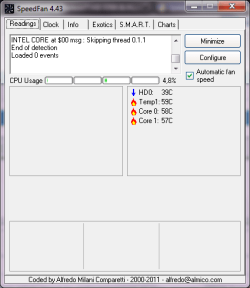
I haven't found anything yet.. According to Everest my fan is only working at 30%! I need to change this.. any ideas?
 

My Computer

Computer Manufacturer/Model Number
HP
OS
Windows 7 Ultimate x64
CPU
Intel Core i7-720QM 1,60 GHz
Motherboard
Hewlett-Packard 1448 65.35
Memory
6 GB DDR3 (1 x 2.048 MB + 1 x 4.096 MB)
Graphics Card(s)
ATI Mobility Radeon HD 5650
Sound Card
Altec Lansing
Monitor(s) Displays
Monitor LED HP BrightView HD
Screen Resolution
1.366 x 768
I have found that if a fan is running at too slow of a speed, that SF may not detect it, or at least not display a reading for it. Since Everest is showing it as being slow, I would tend to think that the fan is going bad and needs to be replaced. Which fan is this? Have you visually checked to see if it appears to be spinning normally? If it is only running at 30%, you should be able to tell, simply by watching the fan label turn.
 

My Computer

Computer Manufacturer/Model Number
DIY
OS
W7x64 Pro, SuSe 12.1/** W7 x64 Pro, XP MCE
CPU
Phenom II 1090T w/Noctua NH-D14 /**4400+ X2 w/CM Hyper TX 3
Motherboard
ASRock 890FX Deluxe 4/**A8N-SLI
Memory
2 x 2GB Patriot PGS34g1600LLKA/**4x1GB Corsair VS
Graphics Card(s)
EVGA GTX460 SC/**EVGA 8800GTS
Sound Card
Asus Xonar D2X/**Xonar D1
Monitor(s) Displays
Acer X233H, Dell E152FPc /**LG M237-WD
Screen Resolution
1920x1080 & 1024x768/**1980x1080
Hard Drives
WDC 2TB, 1.5TB, 1TB, 500GB,Seagate 500GB , Maxtor 80GB /**500GB Seagate & WDC 1TB Black
PSU
CM RS600 w/ APC BX1000G/**Antec 500 TP w/ APC BX1000
Case
HAF922/**Antec 1040IIB
Cooling
3x200mm, 1x140 and 1x120mm/**5x80mm fans
Keyboard
Logitech Media USB/**Saitek Eclipse
Mouse
Cordless Trackman Wheel/**Ditto
Internet Speed
3.3Mbps
Other Info
SB 560 5.1 w/ Sennheiser RS140/**Creative T20 speakers, Dvico FusionHDTV7 Gold RT, Cisco E3000, HP 5510V AIO, Linksys E3000, Belkin F5U237 hub and **F5D8055 adapter
(** = 2nd rig)
I have found that if a fan is running at too slow of a speed, that SF may not detect it, or at least not display a reading for it. Since Everest is showing it as being slow, I would tend to think that the fan is going bad and needs to be replaced. Which fan is this? Have you visually checked to see if it appears to be spinning normally? If it is only running at 30%, you should be able to tell, simply by watching the fan label turn.

The fan is normal it is not going bad... And it is spinning normally, it makes a very smooth sound and spins correctly
 

My Computer

Computer Manufacturer/Model Number
HP
OS
Windows 7 Ultimate x64
CPU
Intel Core i7-720QM 1,60 GHz
Motherboard
Hewlett-Packard 1448 65.35
Memory
6 GB DDR3 (1 x 2.048 MB + 1 x 4.096 MB)
Graphics Card(s)
ATI Mobility Radeon HD 5650
Sound Card
Altec Lansing
Monitor(s) Displays
Monitor LED HP BrightView HD
Screen Resolution
1.366 x 768
Here's a pic:
 

Attachments

  • Sem Título.png
    Sem Título.png
    47 KB · Views: 7

My Computer

Computer Manufacturer/Model Number
HP
OS
Windows 7 Ultimate x64
CPU
Intel Core i7-720QM 1,60 GHz
Motherboard
Hewlett-Packard 1448 65.35
Memory
6 GB DDR3 (1 x 2.048 MB + 1 x 4.096 MB)
Graphics Card(s)
ATI Mobility Radeon HD 5650
Sound Card
Altec Lansing
Monitor(s) Displays
Monitor LED HP BrightView HD
Screen Resolution
1.366 x 768
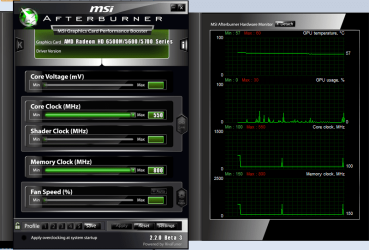
So, I've installed MSI Afterburn.. but it doesn't detect my fan!!
 

Attachments

  • Sem Título.png
    Sem Título.png
    172.7 KB · Views: 427

My Computer

Computer Manufacturer/Model Number
HP
OS
Windows 7 Ultimate x64
CPU
Intel Core i7-720QM 1,60 GHz
Motherboard
Hewlett-Packard 1448 65.35
Memory
6 GB DDR3 (1 x 2.048 MB + 1 x 4.096 MB)
Graphics Card(s)
ATI Mobility Radeon HD 5650
Sound Card
Altec Lansing
Monitor(s) Displays
Monitor LED HP BrightView HD
Screen Resolution
1.366 x 768
Back
Top