Spell checker recognizes errors but does not correct them

Dollar Bill

New member
Local time
9:18 AM
Messages
16
My spell checker in Word works fine. However in Gmail, Google, Facebook and some other progs it finds the error, underlines it in red, I click on the word and it shows the correct spelling, but does not correct it.

This is the first time I have had this problem. It is intermittent. Sometimes it works as it should, others, no.

I typed this sentence

spel thas wurd lut me knsw yuo hsve anu preblums

and it corrected it to,

spel thas wurd lut me knsw you hsve anu problems


Apprecaiet any help
 

My Computer

Computer type
PC/Desktop
OS
Windows 7 Professional 32bit
Hi there ... What other programs do you have problems with the Spell Checker ... I know Google has a bug with theirs only works some times ... No idea about Facebook as i don't use it
 

My Computer

Computer Manufacturer/Model Number
W530-3630QM1
OS
windows 7 home 64bit
CPU
INTEL-CORE I7
Memory
16GB
Hard Drives
750GB
Browser
Chrome
Maxie, I have problems with all the other programs except Liber Office suite. Is there some overall Windows 7 Spell checker that I can fix?
 

My Computer

Computer type
PC/Desktop
OS
Windows 7 Professional 32bit
Hi there ... Spell check is not a function built into operating systems. It us usually included in other programs you install, such as word processors and e-mail clients... So you would need to check which programs you have problems with..
 

My Computer

Computer Manufacturer/Model Number
W530-3630QM1
OS
windows 7 home 64bit
CPU
INTEL-CORE I7
Memory
16GB
Hard Drives
750GB
Browser
Chrome
Hi there ... Spell check is not a function built into operating systems. It us usually included in other programs you install, such as word processors and e-mail clients... So you would need to check which programs you have problems with..


Maxie, there is something weird across the board about this. Having the same problem with too many programs. Could there be some malware affecting so many programs?

I understand what you are saying about each program having its own spell checker, but don't understand how all these programs could be affected in the same way at the same time.

An oft-asked question, Do I have a ghost in the machine?
 

My Computer

Computer type
PC/Desktop
OS
Windows 7 Professional 32bit
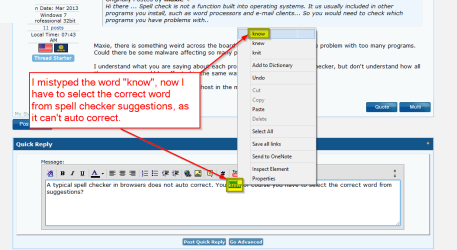
A typical spell checker in browsers does not auto correct. You know of course you have to manually select the correct word from suggestions?

2013-11-23 13_54_55-Spell checker recognizes errors but does not correct them - Windows 7 Help F.png

Kari
 

My Computer

Computer type
Laptop
Computer Manufacturer/Model Number
HP ENVY 17-1150eg
OS
Windows 10 Pro x64 EN-GB
CPU
1.6 GHz Intel Core i7-720QM Processor
Memory
6 GB
Graphics Card(s)
ATI Mobility Radeon HD 5850 Graphics
Sound Card
Beats sound system with integrated subwoofer
Monitor(s) Displays
17" laptop display, 22" LED and 32" Full HD TV through HDMI
Screen Resolution
1600*900 (1), 1920*1080 (2&3)
Hard Drives
Internal: 2 x 500 GB SATA Hard Disk Drive 7200 rpm
External: 2TB for backups, 3TB USB3 network drive for media
Cooling
As Envy runs a bit warm, I have it on a Cooler Master pad
Keyboard
Logitech diNovo Media Desktop Laser (bluetooth)
Mouse
Logitech Performance Mouse MX
Internet Speed
50/10 Mbps VDSL
Antivirus
Windows Defender 4.3.9431.0
Browser
Maxthon 3.5.2., IE11
Kari,

Thanks for the screenshot. I appreciate the effort you made here.

The boggle is that when I DO select the correct word, it does not (always - sometimes it works) replace the incorrect word. I never really learned to type, so I make lots of errors.
 

My Computer

Computer type
PC/Desktop
OS
Windows 7 Professional 32bit
Which browser you use?
 

My Computer

Computer type
Laptop
Computer Manufacturer/Model Number
HP ENVY 17-1150eg
OS
Windows 10 Pro x64 EN-GB
CPU
1.6 GHz Intel Core i7-720QM Processor
Memory
6 GB
Graphics Card(s)
ATI Mobility Radeon HD 5850 Graphics
Sound Card
Beats sound system with integrated subwoofer
Monitor(s) Displays
17" laptop display, 22" LED and 32" Full HD TV through HDMI
Screen Resolution
1600*900 (1), 1920*1080 (2&3)
Hard Drives
Internal: 2 x 500 GB SATA Hard Disk Drive 7200 rpm
External: 2TB for backups, 3TB USB3 network drive for media
Cooling
As Envy runs a bit warm, I have it on a Cooler Master pad
Keyboard
Logitech diNovo Media Desktop Laser (bluetooth)
Mouse
Logitech Performance Mouse MX
Internet Speed
50/10 Mbps VDSL
Antivirus
Windows Defender 4.3.9431.0
Browser
Maxthon 3.5.2., IE11
Hi there ... Would have to agree with Kari .. Its more than likely your browser is the problem
 

My Computer

Computer Manufacturer/Model Number
W530-3630QM1
OS
windows 7 home 64bit
CPU
INTEL-CORE I7
Memory
16GB
Hard Drives
750GB
Browser
Chrome
It's quite obvious the issue is in your browser. All services you mentioned in your original post are web services, used on browser (Gmail, Google, Facebook etc.).

I do not know nor do I use Chrome, I'm afraid I am not able to help you further.
 

My Computer

Computer type
Laptop
Computer Manufacturer/Model Number
HP ENVY 17-1150eg
OS
Windows 10 Pro x64 EN-GB
CPU
1.6 GHz Intel Core i7-720QM Processor
Memory
6 GB
Graphics Card(s)
ATI Mobility Radeon HD 5850 Graphics
Sound Card
Beats sound system with integrated subwoofer
Monitor(s) Displays
17" laptop display, 22" LED and 32" Full HD TV through HDMI
Screen Resolution
1600*900 (1), 1920*1080 (2&3)
Hard Drives
Internal: 2 x 500 GB SATA Hard Disk Drive 7200 rpm
External: 2TB for backups, 3TB USB3 network drive for media
Cooling
As Envy runs a bit warm, I have it on a Cooler Master pad
Keyboard
Logitech diNovo Media Desktop Laser (bluetooth)
Mouse
Logitech Performance Mouse MX
Internet Speed
50/10 Mbps VDSL
Antivirus
Windows Defender 4.3.9431.0
Browser
Maxthon 3.5.2., IE11
Kari, Maxie, I am willing to change browsers. There are a lot of them out there. What do you like?
 

My Computer

Computer type
PC/Desktop
OS
Windows 7 Professional 32bit
I do use Chrome just not the Spell Checker .. There are lots of Browsers to choose from have used Firefox in the past that is not to bad .But its down to personal taste
 

My Computer

Computer Manufacturer/Model Number
W530-3630QM1
OS
windows 7 home 64bit
CPU
INTEL-CORE I7
Memory
16GB
Hard Drives
750GB
Browser
Chrome
Back
Top