Solved Spent a year travelling while my desktop at home, crashes upon booting

*Update*

Last night I brought my machine to my friend's place to see if we could both try and figure out what the real issue with my pc was. He had a brand new HD and we swapped mine out. At first my pc wouldn't recognized it but we tested connections, different SATA ports and finally it recognized it.

We then inspected my machine and noticed that the graphics card was really dirty (lots of dust clogging up the fan). We took it out, cleaned it by blowing out all the dust, and then reseated it.

I noticed my pc was running much faster after that :)

I then swapped my old HD back in and ran SeaTools DOS Long Scan on it. My HD passed! :D

However, my PC is still crashing upon boot. I try in safe mode and as it is loading, it crashes just after loading one of the drivers (not sure which one but I can run again and let you know).

I will run Memtest86+ to see if it is my motherboard/ RAM.

It is at least good to know I can rule out HD failure and that it must be another piece of hardware :)

Again, I apologize for my ignorance. This is all so new to me and I greatly appreciate all the help I've received!

Further input would be greatly appreciated :)
I will now try and test my Motherboard/RAM with Memtest86+
 

My Computer My Computer

At a glance

Windows 7 Home Premium 64-bitAMD Phenom (tm) II X4 925 Processor4.0 GBATI Radeon HD 5570
Computer type
PC/Desktop
Computer Manufacturer/Model Number
Custom build (iBUYPOWER NZXT)
OS
Windows 7 Home Premium 64-bit
CPU
AMD Phenom (tm) II X4 925 Processor
Motherboard
Asus MSO-M4N68T-MV2(B)
Memory
4.0 GB
Graphics Card(s)
ATI Radeon HD 5570
Hard Drives
Hitachi HDS721010CLA332
Antivirus
McAfee
Browser
Chrome
Two days ago I had suggested to reinstall the video card. Glad that got done.

The troubleshooting tutorial which has also been given several times also shows how to read the logs to help figure out what is crashing your system. Use the Diagnostics-Performance log. Have you completed all of the Troubleshooting steps yet?

There are perhaps a dozen steps that have been given that have not been performed so what would help now is to go back to the top of the thread and check off each one. In cases like this the fix is almost always a step which has been given and skipped or ignored.

Sounds like it might also be video card. Make sure you have the latest driver, consider reinstalling the card itself.

Since you have a bootable install go over your install thoroughly using Troubleshooting Steps for Windows 7 which start with the hardware tests and also go over the OS to access all of the troubleshooting resources.
 
Last edited:
Two days ago I had suggested you reinstall the video card. Glad that got done.

The troubleshooting tutorial which has also been given severa times also shows you how to read the logs to help figure out what is crashing your system. Use the Diagnostics-Performance log. Have you completed all of the Troubleshooting steps yet?

There are perhaps a dozen steps you've been given that have not been performed so what woudl help now is for you to go back to the top of the thread and check off each one. In cases like this the fix is almost always a step which has been given and skipped or ignored.

Sounds like it might also be your video card. Make sure you have the latest driver, consider reinstalling the card itself.

Since you have a bootable install go over your install thoroughly using Troubleshooting Steps for Windows 7 which start with the hardware tests and also go over the OS to access all of the troubleshooting resources.


Thanks again Greg! I will follow your advice and keep you update. Your patience and knowledge make you a saint, really :)
 

My Computer My Computer

At a glance

Windows 7 Home Premium 64-bitAMD Phenom (tm) II X4 925 Processor4.0 GBATI Radeon HD 5570
Computer type
PC/Desktop
Computer Manufacturer/Model Number
Custom build (iBUYPOWER NZXT)
OS
Windows 7 Home Premium 64-bit
CPU
AMD Phenom (tm) II X4 925 Processor
Motherboard
Asus MSO-M4N68T-MV2(B)
Memory
4.0 GB
Graphics Card(s)
ATI Radeon HD 5570
Hard Drives
Hitachi HDS721010CLA332
Antivirus
McAfee
Browser
Chrome
*Update*

I went back to step 1 for the Troubleshooting Steps for Windows 7 and ran the Drive Fitness Test. It ran over the course of 2 hours and upon almost completing the media testing it crashed again. Do I have to run this if I already passed the SeaTools DOS Long Scan to check my HD?
 

My Computer My Computer

At a glance

Windows 7 Home Premium 64-bitAMD Phenom (tm) II X4 925 Processor4.0 GBATI Radeon HD 5570
Computer type
PC/Desktop
Computer Manufacturer/Model Number
Custom build (iBUYPOWER NZXT)
OS
Windows 7 Home Premium 64-bit
CPU
AMD Phenom (tm) II X4 925 Processor
Motherboard
Asus MSO-M4N68T-MV2(B)
Memory
4.0 GB
Graphics Card(s)
ATI Radeon HD 5570
Hard Drives
Hitachi HDS721010CLA332
Antivirus
McAfee
Browser
Chrome
*Update*

As of last night we tested the HD again and it was fine. After doing so we tried booting into Windows 7 again and were successful. We then ran Chkdsk twice. The first time ran it stopped half way and displayed a notification that there was a dirty drive. The second time I ran it, it completed successfully and found nothing. I also ran Microsoft Security Essentials, malwarebytes, and avast to check software and everything passed.

We left the machine idling while updates were installing, however; we were greeted with a BSOD during installation. We let it rest overnight and tried again this morning.

As of now, I am unable to even boot into any mode, as well as from my Reinstallation Disk. PC always crashes upon boot.

I know my next step in Troubleshooting would be to run chkdsk again, but I am unable to even get into System Recovery Options to access a command prompt.

Thanks again for your wisdom and patience
 

My Computer My Computer

At a glance

Windows 7 Home Premium 64-bitAMD Phenom (tm) II X4 925 Processor4.0 GBATI Radeon HD 5570
Computer type
PC/Desktop
Computer Manufacturer/Model Number
Custom build (iBUYPOWER NZXT)
OS
Windows 7 Home Premium 64-bit
CPU
AMD Phenom (tm) II X4 925 Processor
Motherboard
Asus MSO-M4N68T-MV2(B)
Memory
4.0 GB
Graphics Card(s)
ATI Radeon HD 5570
Hard Drives
Hitachi HDS721010CLA332
Antivirus
McAfee
Browser
Chrome
How were you running MSE and Avast scans? Are both of these AV's installed? This is never a good idea. I would uninstall Avast if so.

Can you boot into Safe Mode to post up the BSOD output so our analysts can determine the cause? Blue Screen of Death (BSOD) Posting Instructions - Windows 7 Forums

If not what exactly happens when you try to boot? We need the exact error message and behavior. Can you take a video and upload it?

Try also every method given to boot into System Recovery Options and report back the exact failure there too.

Have you checked all of your hardware connections? Try unplugging the DVD drive to see if it is causing the problem. Try unplugging the hard drive to see if you can run a boot disk uninterrupted: Peppermint3 - Create Live CD/DVD/USB To Use For Emergency Backup - Windows 7 Forums
 
Hi Greg, today I relocated my pc back to my own home. I turned it on and it was able to boot normally int Windows 7. I then took your advice and ran the DM Log Collector and posted my BSOD output in this thread: http://www.sevenforums.com/bsod-help-support/331931-bsod-desktop-after-being-gone-year.html

As far as behavioral patterns, my pc will boot normally into Windows 7 and run fine until I initiate a process such as opening a web browser, opening a folder on my desktop, etc. It will then freeze, switch to the BSOD, and then restart. I'm able to do this roughly twice before my pc begins to crash upon boot. I'll try and boot in any mode and it will show the "windows is loading files" white bar and load % on the bottom of the screen, load all the way, turn to a black screen and the shut off.

Thanks again
 

My Computer My Computer

At a glance

Windows 7 Home Premium 64-bitAMD Phenom (tm) II X4 925 Processor4.0 GBATI Radeon HD 5570
Computer type
PC/Desktop
Computer Manufacturer/Model Number
Custom build (iBUYPOWER NZXT)
OS
Windows 7 Home Premium 64-bit
CPU
AMD Phenom (tm) II X4 925 Processor
Motherboard
Asus MSO-M4N68T-MV2(B)
Memory
4.0 GB
Graphics Card(s)
ATI Radeon HD 5570
Hard Drives
Hitachi HDS721010CLA332
Antivirus
McAfee
Browser
Chrome
*Update*

Last night I brought my machine to my friend's place to see if we could both try and figure out what the real issue with my pc was. He had a brand new HD and we swapped mine out. At first my pc wouldn't recognized it but we tested connections, different SATA ports and finally it recognized it.

We then inspected my machine and noticed that the graphics card was really dirty (lots of dust clogging up the fan). We took it out, cleaned it by blowing out all the dust, and then reseated it.

I noticed my pc was running much faster after that :)

I then swapped my old HD back in and ran SeaTools DOS Long Scan on it. My HD passed! :D

However, my PC is still crashing upon boot. I try in safe mode and as it is loading, it crashes just after loading one of the drivers (not sure which one but I can run again and let you know).

I will run Memtest86+ to see if it is my motherboard/ RAM.

It is at least good to know I can rule out HD failure and that it must be another piece of hardware :)

Again, I apologize for my ignorance. This is all so new to me and I greatly appreciate all the help I've received!

Further input would be greatly appreciated :)
I will now try and test my Motherboard/RAM with Memtest86+
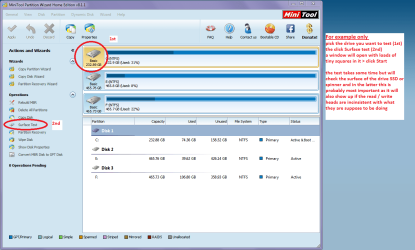
Mate try this one it is a physical test as opposed to a file type test it is usually used on spinners
. Best Free Partition Manager Freeware and free partition magic for Windows 7, Windows 8, Windows Vista and Windows XP 32 bit & 64 bit. MiniTool Free Partition Manager Software Home Edition.

See my pic for how to run it
 

Attachments

  • MINI TOOL SURFACE.PNG
    MINI TOOL SURFACE.PNG
    51 KB · Views: 1

My Computer My Computer

At a glance

Desk1 7 Home Prem / Desk2 10 Pro / Main lap A...Desk1 i5 3750K / Laptop i7 GTX 860M / Desk2 i...Desk1 8GB (1866) / Desk2 16GB (1333) / Laptop...Desk 1& 2NVidia GTX 650 & Laptops on board Intel
Computer type
PC/Desktop
Computer Manufacturer/Model Number
Own build (new) Desk1 / Asus ROG Win 7 / Desk2 1st build
OS
Desk1 7 Home Prem / Desk2 10 Pro / Main lap Asus ROG 10 Pro 2 laptop Toshiba 7 Pro Asus P2520 7 & 10
CPU
Desk1 i5 3750K / Laptop i7 GTX 860M / Desk2 i5 2500
Motherboard
Desk1 Asus P877-V / Desk2 Gigabyte H67 UD3H / Laptop ?
Memory
Desk1 8GB (1866) / Desk2 16GB (1333) / Laptop 8Gb DDR3
Graphics Card(s)
Desk 1& 2NVidia GTX 650 & Laptops on board Intel
Sound Card
Desk 1 & 2 -XONAR DG Realtek High Def audio Laptop
Monitor(s) Displays
Desk 1 Benq HD 2450 / Desk2 Philips 24" / Laptop 17.5"
Screen Resolution
1920x1080 D1 & D2 & Laptop 1
Hard Drives
Desk1 Samsung 120GB 830 SSD
Asus ROG 256GB 850 Pro SSD
Desk2 Samsung 840 256 SSD
Toshiba 120GB EVO
PSU
Desk 1 Corsair HX 1050/ Laptop ? / Desk 2 Corsair HX 650
Case
Desk 1 Cooler HAF XM ? Toshiba laptop / Desk2 Coolermaster
Cooling
Fans on all Desk1 -2 Desk2 - all Coolermasters 5 Laptop ?
Keyboard
Desk 1 MS Sidewinder X6 Desk 2 MS Sidewinder X 4
Mouse
Desk 1&2 - Gigabyte MS 900 gamer - laptop - Logitec wireless
Internet Speed
ADSL2+
Other Info
One other Desktop (tester) and spare Toshba laptop both with SSD's
Running Kaspersky 2016 ISS on all machines config'd identically
Logitec audio stereo systems on each machine (x3)
Canon MG5250MFC
Router/modem TP-Link running WPA2SK
At this stage, I wouldn't rule out the possibility of the processor heating up due to dried thermal paste and causing all sorts of problems.

May be your friend can take out the processor heat sink clean it as well as the processor top plate, apply fresh thermal paste and fasten everything.

Check whether this would resolve your problem.
 

My Computer My Computer

At a glance

Windows 7 Home Premium 32 bit
OS
Windows 7 Home Premium 32 bit
At this stage, I wouldn't rule out the possibility of the processor heating up due to dried thermal paste and causing all sorts of problems.

May be your friend can take out the processor heat sink clean it as well as the processor top plate, apply fresh thermal paste and fasten everything.

Check whether this would resolve your problem.
:ditto:Personally I would make sure the friend uses these

Arctic Silver Incorporated - Arctic Silver 5 < compound and this
Arctic Silver Incorporated - ArctiClean < for the surface preparation a tad expensive but I believe no better cleaning materials than these around - I know folks say alcohol is good enough but in my view it really doesn't clean as thoroughly as this stuff:)
 

My Computer My Computer

At a glance

Desk1 7 Home Prem / Desk2 10 Pro / Main lap A...Desk1 i5 3750K / Laptop i7 GTX 860M / Desk2 i...Desk1 8GB (1866) / Desk2 16GB (1333) / Laptop...Desk 1& 2NVidia GTX 650 & Laptops on board Intel
Computer type
PC/Desktop
Computer Manufacturer/Model Number
Own build (new) Desk1 / Asus ROG Win 7 / Desk2 1st build
OS
Desk1 7 Home Prem / Desk2 10 Pro / Main lap Asus ROG 10 Pro 2 laptop Toshiba 7 Pro Asus P2520 7 & 10
CPU
Desk1 i5 3750K / Laptop i7 GTX 860M / Desk2 i5 2500
Motherboard
Desk1 Asus P877-V / Desk2 Gigabyte H67 UD3H / Laptop ?
Memory
Desk1 8GB (1866) / Desk2 16GB (1333) / Laptop 8Gb DDR3
Graphics Card(s)
Desk 1& 2NVidia GTX 650 & Laptops on board Intel
Sound Card
Desk 1 & 2 -XONAR DG Realtek High Def audio Laptop
Monitor(s) Displays
Desk 1 Benq HD 2450 / Desk2 Philips 24" / Laptop 17.5"
Screen Resolution
1920x1080 D1 & D2 & Laptop 1
Hard Drives
Desk1 Samsung 120GB 830 SSD
Asus ROG 256GB 850 Pro SSD
Desk2 Samsung 840 256 SSD
Toshiba 120GB EVO
PSU
Desk 1 Corsair HX 1050/ Laptop ? / Desk 2 Corsair HX 650
Case
Desk 1 Cooler HAF XM ? Toshiba laptop / Desk2 Coolermaster
Cooling
Fans on all Desk1 -2 Desk2 - all Coolermasters 5 Laptop ?
Keyboard
Desk 1 MS Sidewinder X6 Desk 2 MS Sidewinder X 4
Mouse
Desk 1&2 - Gigabyte MS 900 gamer - laptop - Logitec wireless
Internet Speed
ADSL2+
Other Info
One other Desktop (tester) and spare Toshba laptop both with SSD's
Running Kaspersky 2016 ISS on all machines config'd identically
Logitec audio stereo systems on each machine (x3)
Canon MG5250MFC
Router/modem TP-Link running WPA2SK
jumanji and ICit2lol hit the nail on the head :D

I followed your advice and cleaned out my cpu heatsink/ fan which were incredibly filthy to the point where I wasn't sure if there had been a large accumulation of dust or if someone had ripped off part of a sweater and shoved it into my heat sink. It was that clogged...

I took your advice and bought the ArtiClean and Arctic Silver 5 off of Amazon.com for I think around $10 USD altogether which was well worth it. I cleaned out the heat sink and fan, removed old thermal paste, which at that point looked incredibly dry, and then reapplied new thermal paste.

Booted PC and everything is running smoothly now. Downloaded Core Temp to monitor heat levels and nothing is exceeding 30 degrees Celsius :D

Bravo friends, thank all of you for all of your wisdom and suggestions. This is a great community with great people! Cheers :D
 

My Computer My Computer

At a glance

Windows 7 Home Premium 64-bitAMD Phenom (tm) II X4 925 Processor4.0 GBATI Radeon HD 5570
Computer type
PC/Desktop
Computer Manufacturer/Model Number
Custom build (iBUYPOWER NZXT)
OS
Windows 7 Home Premium 64-bit
CPU
AMD Phenom (tm) II X4 925 Processor
Motherboard
Asus MSO-M4N68T-MV2(B)
Memory
4.0 GB
Graphics Card(s)
ATI Radeon HD 5570
Hard Drives
Hitachi HDS721010CLA332
Antivirus
McAfee
Browser
Chrome
That's good use that it is running smoothly. I guess you could mark this problem as solved. Wait, you already did.
 

My Computer My Computer

At a glance

Windows 7 Professional 32-bit/Windows 8 64-bi...Intel Core 2 Quad Q6600/Intel Core i7 4790/In...2GB/16GB/4GBIntel G33/G31 Express(Vostro)/NVIDIA GeForce ...
Computer type
PC/Desktop
Computer Manufacturer/Model Number
Dell Vostro 400/Dell XPS 8700(Slightly Customized for me by Dell)/Toshiba Satellite T135
OS
Windows 7 Professional 32-bit/Windows 8 64-bit/Win7 Pro64-bit
CPU
Intel Core 2 Quad Q6600/Intel Core i7 4790/Intel Pentium
Memory
2GB/16GB/4GB
Graphics Card(s)
Intel G33/G31 Express(Vostro)/NVIDIA GeForce GTX 745(XPS)
Monitor(s) Displays
HP 2009m(Vostro)/ViewSonic VX2250wm-LED(XPS)
Screen Resolution
1600x900(Vostro)/1920x1080(XPS)
Hard Drives
Seagate ST3160815AS(Vostro)/Western Digital Blue(Satellite)
External:
Western Digital My Passport 0748
Samsung HM121HC
Keyboard
Dell L100)(Vostro)/Dell KB2133p(XPS)
Mouse
Dell M-UAV-DEL8(XPS)
Internet Speed
100 Mbit/s(Only when IPTV is plugged out)
Antivirus
Avast, Malwarebytes PRO
Browser
Internet Explorer 11
Other Info
Note: Names with slashes between two different parts mean that the left is my old desktop and the right is my old laptop and the middle is my new desktop.(Unless specified)
Ping is horrible for servers overseas in US and Europe.
New laptop:LG Gram(Not available in US) Processor:Intel Core i3 4th Gen Ultra Low Power RAM:4GB Hard Drive:SK Hynix OEM MSATA or M.2 Graphics:Intel HD
Well glad you got it sorted Moodus and personally I find always good to check temps from time to time because even Arctic silver compound is not infallible.:)

Another good one is the Noctua NT-H1 but again always check for time to time takes a few seconds and saves a lot of grief. Noctua.at - sound-optimised premium components "Designed in Austria"! a little thicker but the cleaning stuff from Arctic is just the only thing to use in my mind.
 

My Computer My Computer

At a glance

Desk1 7 Home Prem / Desk2 10 Pro / Main lap A...Desk1 i5 3750K / Laptop i7 GTX 860M / Desk2 i...Desk1 8GB (1866) / Desk2 16GB (1333) / Laptop...Desk 1& 2NVidia GTX 650 & Laptops on board Intel
Computer type
PC/Desktop
Computer Manufacturer/Model Number
Own build (new) Desk1 / Asus ROG Win 7 / Desk2 1st build
OS
Desk1 7 Home Prem / Desk2 10 Pro / Main lap Asus ROG 10 Pro 2 laptop Toshiba 7 Pro Asus P2520 7 & 10
CPU
Desk1 i5 3750K / Laptop i7 GTX 860M / Desk2 i5 2500
Motherboard
Desk1 Asus P877-V / Desk2 Gigabyte H67 UD3H / Laptop ?
Memory
Desk1 8GB (1866) / Desk2 16GB (1333) / Laptop 8Gb DDR3
Graphics Card(s)
Desk 1& 2NVidia GTX 650 & Laptops on board Intel
Sound Card
Desk 1 & 2 -XONAR DG Realtek High Def audio Laptop
Monitor(s) Displays
Desk 1 Benq HD 2450 / Desk2 Philips 24" / Laptop 17.5"
Screen Resolution
1920x1080 D1 & D2 & Laptop 1
Hard Drives
Desk1 Samsung 120GB 830 SSD
Asus ROG 256GB 850 Pro SSD
Desk2 Samsung 840 256 SSD
Toshiba 120GB EVO
PSU
Desk 1 Corsair HX 1050/ Laptop ? / Desk 2 Corsair HX 650
Case
Desk 1 Cooler HAF XM ? Toshiba laptop / Desk2 Coolermaster
Cooling
Fans on all Desk1 -2 Desk2 - all Coolermasters 5 Laptop ?
Keyboard
Desk 1 MS Sidewinder X6 Desk 2 MS Sidewinder X 4
Mouse
Desk 1&2 - Gigabyte MS 900 gamer - laptop - Logitec wireless
Internet Speed
ADSL2+
Other Info
One other Desktop (tester) and spare Toshba laptop both with SSD's
Running Kaspersky 2016 ISS on all machines config'd identically
Logitec audio stereo systems on each machine (x3)
Canon MG5250MFC
Router/modem TP-Link running WPA2SK
Glad to see the solved tick mark on this thread and I had some little part in it.. :)

Sometimes we miss little things and run around in circles but what surprised me was how your knowledgeable friend, who cleaned the video card missed to look at the processor and heat sink.

Anyway all is well that ends well.
 

My Computer My Computer

At a glance

Windows 7 Home Premium 32 bit
OS
Windows 7 Home Premium 32 bit
Glad to see the solved tick mark on this thread and I had some little part in it.. :)

Sometimes we miss little things and run around in circles but what surprised me was how your knowledgeable friend, who cleaned the video card missed to look at the processor and heat sink.

Anyway all is well that ends well.
:ditto:Jumanji the solutions I mentioned are the best for them too:)
 

My Computer My Computer

At a glance

Desk1 7 Home Prem / Desk2 10 Pro / Main lap A...Desk1 i5 3750K / Laptop i7 GTX 860M / Desk2 i...Desk1 8GB (1866) / Desk2 16GB (1333) / Laptop...Desk 1& 2NVidia GTX 650 & Laptops on board Intel
Computer type
PC/Desktop
Computer Manufacturer/Model Number
Own build (new) Desk1 / Asus ROG Win 7 / Desk2 1st build
OS
Desk1 7 Home Prem / Desk2 10 Pro / Main lap Asus ROG 10 Pro 2 laptop Toshiba 7 Pro Asus P2520 7 & 10
CPU
Desk1 i5 3750K / Laptop i7 GTX 860M / Desk2 i5 2500
Motherboard
Desk1 Asus P877-V / Desk2 Gigabyte H67 UD3H / Laptop ?
Memory
Desk1 8GB (1866) / Desk2 16GB (1333) / Laptop 8Gb DDR3
Graphics Card(s)
Desk 1& 2NVidia GTX 650 & Laptops on board Intel
Sound Card
Desk 1 & 2 -XONAR DG Realtek High Def audio Laptop
Monitor(s) Displays
Desk 1 Benq HD 2450 / Desk2 Philips 24" / Laptop 17.5"
Screen Resolution
1920x1080 D1 & D2 & Laptop 1
Hard Drives
Desk1 Samsung 120GB 830 SSD
Asus ROG 256GB 850 Pro SSD
Desk2 Samsung 840 256 SSD
Toshiba 120GB EVO
PSU
Desk 1 Corsair HX 1050/ Laptop ? / Desk 2 Corsair HX 650
Case
Desk 1 Cooler HAF XM ? Toshiba laptop / Desk2 Coolermaster
Cooling
Fans on all Desk1 -2 Desk2 - all Coolermasters 5 Laptop ?
Keyboard
Desk 1 MS Sidewinder X6 Desk 2 MS Sidewinder X 4
Mouse
Desk 1&2 - Gigabyte MS 900 gamer - laptop - Logitec wireless
Internet Speed
ADSL2+
Other Info
One other Desktop (tester) and spare Toshba laptop both with SSD's
Running Kaspersky 2016 ISS on all machines config'd identically
Logitec audio stereo systems on each machine (x3)
Canon MG5250MFC
Router/modem TP-Link running WPA2SK
^ No doubt.

I think most BIOS do check temps and we never care to get into and look at them - me included.:D
 

My Computer My Computer

At a glance

Windows 7 Home Premium 32 bit
OS
Windows 7 Home Premium 32 bit
Yep I know Jumanji there are a few temp measurers around and I guess form what I have seen they are only really reliant on the sensors within any given device.
I did get one of those infra red measurers but it is only good enough for heat sources you can actually track directly onto - for example the cooler fins of a stock cooler.
 

My Computer My Computer

At a glance

Desk1 7 Home Prem / Desk2 10 Pro / Main lap A...Desk1 i5 3750K / Laptop i7 GTX 860M / Desk2 i...Desk1 8GB (1866) / Desk2 16GB (1333) / Laptop...Desk 1& 2NVidia GTX 650 & Laptops on board Intel
Computer type
PC/Desktop
Computer Manufacturer/Model Number
Own build (new) Desk1 / Asus ROG Win 7 / Desk2 1st build
OS
Desk1 7 Home Prem / Desk2 10 Pro / Main lap Asus ROG 10 Pro 2 laptop Toshiba 7 Pro Asus P2520 7 & 10
CPU
Desk1 i5 3750K / Laptop i7 GTX 860M / Desk2 i5 2500
Motherboard
Desk1 Asus P877-V / Desk2 Gigabyte H67 UD3H / Laptop ?
Memory
Desk1 8GB (1866) / Desk2 16GB (1333) / Laptop 8Gb DDR3
Graphics Card(s)
Desk 1& 2NVidia GTX 650 & Laptops on board Intel
Sound Card
Desk 1 & 2 -XONAR DG Realtek High Def audio Laptop
Monitor(s) Displays
Desk 1 Benq HD 2450 / Desk2 Philips 24" / Laptop 17.5"
Screen Resolution
1920x1080 D1 & D2 & Laptop 1
Hard Drives
Desk1 Samsung 120GB 830 SSD
Asus ROG 256GB 850 Pro SSD
Desk2 Samsung 840 256 SSD
Toshiba 120GB EVO
PSU
Desk 1 Corsair HX 1050/ Laptop ? / Desk 2 Corsair HX 650
Case
Desk 1 Cooler HAF XM ? Toshiba laptop / Desk2 Coolermaster
Cooling
Fans on all Desk1 -2 Desk2 - all Coolermasters 5 Laptop ?
Keyboard
Desk 1 MS Sidewinder X6 Desk 2 MS Sidewinder X 4
Mouse
Desk 1&2 - Gigabyte MS 900 gamer - laptop - Logitec wireless
Internet Speed
ADSL2+
Other Info
One other Desktop (tester) and spare Toshba laptop both with SSD's
Running Kaspersky 2016 ISS on all machines config'd identically
Logitec audio stereo systems on each machine (x3)
Canon MG5250MFC
Router/modem TP-Link running WPA2SK
I'm guilty.

I to take for granted that everybody cleans their PC and changes their compound as often as I do. I'm also guilty of thinking that everybody has a temp monitoring program on the Taskbar and checks it often.

At the end you all got it figured out. Good Job.
 

My Computer My Computer

At a glance

Windows 10 Pro. 64/ version 1709 Windows 7 Pr...Intel i7-6800K @ 4.3Corsair Platinum 16 gig @2400EVGA GTX 1070 OC
Computer type
PC/Desktop
Computer Manufacturer/Model Number
Home made Desktop
OS
Windows 10 Pro. 64/ version 1709 Windows 7 Pro/64
CPU
Intel i7-6800K @ 4.3
Motherboard
ASUS X-99 Deluxe II
Memory
Corsair Platinum 16 gig @2400
Graphics Card(s)
EVGA GTX 1070 OC
Monitor(s) Displays
Asus 27" LED LCD/VE278Q
Screen Resolution
1920-1080 or 1280-720 HDMI
Hard Drives
INTEL SSD 730-240 Gb Sata 3.0/
PSU
EVGA Platium 1200W
Case
Phanteks Luxe Tempered Glass 8 fans/ one radiator
Cooling
XSPC/ Water Cooled CPU
Keyboard
Das 4 Professional
Mouse
Logitech M705/MX Anywhere 2-S
Internet Speed
100 mbits
Antivirus
Microsoft Security Essentials/ Malwarebytes Premium 3.0/ SAS
Browser
I.E. 11 default/Firefox/ ISP Time Warner Cable/Spectrum
Other Info
LG BluRay Burner/
Sound system-KLipsch-THX/
Icy Dock ssd Hot Swap bays.
UPDATE!

Hey everyone, so after I sort of had my pc running again, it crashed.

I did a little research on my BSOD (Kernel power failure) and had a hunch that it may be my psu.

Swapped my psu out for a friend's extra one and eureka! It worked perfectly, just as new.

Took me over a month to figure out it was my PSU giving me trouble. I hope my endeavor may aid another.

Again, thanks a million for all the help everyone. Great community and great advice.
 

My Computer My Computer

At a glance

Windows 7 Home Premium 64-bitAMD Phenom (tm) II X4 925 Processor4.0 GBATI Radeon HD 5570
Computer type
PC/Desktop
Computer Manufacturer/Model Number
Custom build (iBUYPOWER NZXT)
OS
Windows 7 Home Premium 64-bit
CPU
AMD Phenom (tm) II X4 925 Processor
Motherboard
Asus MSO-M4N68T-MV2(B)
Memory
4.0 GB
Graphics Card(s)
ATI Radeon HD 5570
Hard Drives
Hitachi HDS721010CLA332
Antivirus
McAfee
Browser
Chrome
Back
Top