
Splicing video

seekermeister

Old School
Guru
Gold Member
VIP
Local time
10:44 PM
Messages
6,618
Location
Indian Territory
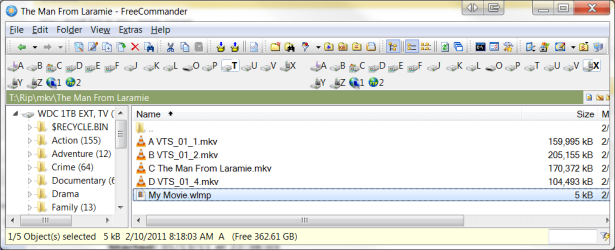
The output from a movie that I just encoded, came out atypically, in that instead of a single file, it had four, as seen in the screenshot. Of course, I can play the sections together as a batch, but for reasons that don't see any point in going into, I want to splice these sections into one file as they should be.

After a bit of Googling, it seemed that the common answer to this problem was to use Windows Movie Maker, but of course, in W7 that means Windows Live Movie Maker (don't know if there is a difference or not?).

When selecting that wlmp file, all that it does is to reopen the files in WLMM, where it will play the files in sequence, but is notin a fashion usable in VLC. How does one create a TRUE splice, useable in any player of choice?
 

Attachments
  • WLMP Splice.png
    WLMP Splice.png
    35.4 KB · Views: 17

My Computer

Computer Manufacturer/Model Number
DIY
OS
W7x64 Pro, SuSe 12.1/** W7 x64 Pro, XP MCE
CPU
Phenom II 1090T w/Noctua NH-D14 /**4400+ X2 w/CM Hyper TX 3
Motherboard
ASRock 890FX Deluxe 4/**A8N-SLI
Memory
2 x 2GB Patriot PGS34g1600LLKA/**4x1GB Corsair VS
Graphics Card(s)
EVGA GTX460 SC/**EVGA 8800GTS
Sound Card
Asus Xonar D2X/**Xonar D1
Monitor(s) Displays
Acer X233H, Dell E152FPc /**LG M237-WD
Screen Resolution
1920x1080 & 1024x768/**1980x1080
Hard Drives
WDC 2TB, 1.5TB, 1TB, 500GB,Seagate 500GB , Maxtor 80GB /**500GB Seagate & WDC 1TB Black
PSU
CM RS600 w/ APC BX1000G/**Antec 500 TP w/ APC BX1000
Case
HAF922/**Antec 1040IIB
Cooling
3x200mm, 1x140 and 1x120mm/**5x80mm fans
Keyboard
Logitech Media USB/**Saitek Eclipse
Mouse
Cordless Trackman Wheel/**Ditto
Internet Speed
3.3Mbps
Other Info
SB 560 5.1 w/ Sennheiser RS140/**Creative T20 speakers, Dvico FusionHDTV7 Gold RT, Cisco E3000, HP 5510V AIO, Linksys E3000, Belkin F5U237 hub and **F5D8055 adapter
(** = 2nd rig)
See if this helps:
http://www.sevenforums.com/tutorials/111442-mkv-mp4-files-merge-into-single-file.html?ltr=M

Recoding would be a lst resort IMO, as its times consuming, and you end up with more quality loss.
This just remuxes, and is rather quick.


As far as the encode coming out in Multiple files, is ther an option in the encoder you are using to "Split" ?
Perhaps disable it if so, or change it to a really high value, like 50GB.

Ive actually not had this happen before, so a bit confused as to why it would encoding it that way.
 

My Computer

Computer Manufacturer/Model Number
Custom (Self Build)
OS
Windows 7 Home Premium 64bit
CPU
Intel Core i7 2700k
Motherboard
eVGA P67 SLI
Memory
8GB Mushkin Redline Ridgebacks @1866
Graphics Card(s)
EVGA GTX570 SC
Sound Card
XiFi Titanium HD
Monitor(s) Displays
LG W2453V
Screen Resolution
1920x1080
Hard Drives
Intel 320 80GB -- Intel X25-V 40GB --WD Black 1TB x2 -- WD Blue 640GB
PSU
Seasonic x750
Case
Corsair 600T SE White
Cooling
eVGA Superclocked CPU Cooler
Keyboard
Saitek Cyborg
Antivirus
Kaspersky
Browser
IE
Other Info
LG BD/DVD
I shall reply by saying that I don't think that the problem was produced by any settings used in the encoder, because they are the same as I've always used, and this is a first for this problem. Actually, it failed altogether with WinX DVD Ripper Platinum, because it always terminated with a *success* window, after only running a couple of minutes. After going through their FAQ, it seemed that the only viable answer that there was something odd in the fashion that the DVD was written. I suppose that is possible, since the DVD was produced in Korea.

What I did show in the screenshot above, was made using DVDFab, and though it has failed in a variety of ways, never quite like this. I will now try the link that you provided and cross my fingers.
 

My Computer

Computer Manufacturer/Model Number
DIY
OS
W7x64 Pro, SuSe 12.1/** W7 x64 Pro, XP MCE
CPU
Phenom II 1090T w/Noctua NH-D14 /**4400+ X2 w/CM Hyper TX 3
Motherboard
ASRock 890FX Deluxe 4/**A8N-SLI
Memory
2 x 2GB Patriot PGS34g1600LLKA/**4x1GB Corsair VS
Graphics Card(s)
EVGA GTX460 SC/**EVGA 8800GTS
Sound Card
Asus Xonar D2X/**Xonar D1
Monitor(s) Displays
Acer X233H, Dell E152FPc /**LG M237-WD
Screen Resolution
1920x1080 & 1024x768/**1980x1080
Hard Drives
WDC 2TB, 1.5TB, 1TB, 500GB,Seagate 500GB , Maxtor 80GB /**500GB Seagate & WDC 1TB Black
PSU
CM RS600 w/ APC BX1000G/**Antec 500 TP w/ APC BX1000
Case
HAF922/**Antec 1040IIB
Cooling
3x200mm, 1x140 and 1x120mm/**5x80mm fans
Keyboard
Logitech Media USB/**Saitek Eclipse
Mouse
Cordless Trackman Wheel/**Ditto
Internet Speed
3.3Mbps
Other Info
SB 560 5.1 w/ Sennheiser RS140/**Creative T20 speakers, Dvico FusionHDTV7 Gold RT, Cisco E3000, HP 5510V AIO, Linksys E3000, Belkin F5U237 hub and **F5D8055 adapter
(** = 2nd rig)
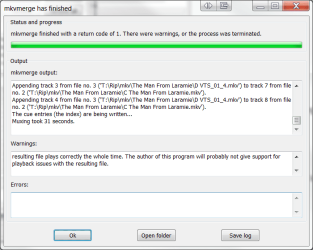
At first, it appeared that it worked properly, but after noting the warnings as seen in the screenshot, I ran the first few minutes of the movie to check. It started out as expected, but in short order, the voice audio disappeared, while the music played on. After maybe a minute, the voice audio continued, but where it had left off, not where it should have been. The gap between audio and video was so great, that not even calling it out of sync would be a good description.

The warning in the screenshot was so vague to me, that it is useless, unless you understand it better?
 

Attachments

  • MkvMerge.png
    MkvMerge.png
    20.2 KB · Views: 7

My Computer

Computer Manufacturer/Model Number
DIY
OS
W7x64 Pro, SuSe 12.1/** W7 x64 Pro, XP MCE
CPU
Phenom II 1090T w/Noctua NH-D14 /**4400+ X2 w/CM Hyper TX 3
Motherboard
ASRock 890FX Deluxe 4/**A8N-SLI
Memory
2 x 2GB Patriot PGS34g1600LLKA/**4x1GB Corsair VS
Graphics Card(s)
EVGA GTX460 SC/**EVGA 8800GTS
Sound Card
Asus Xonar D2X/**Xonar D1
Monitor(s) Displays
Acer X233H, Dell E152FPc /**LG M237-WD
Screen Resolution
1920x1080 & 1024x768/**1980x1080
Hard Drives
WDC 2TB, 1.5TB, 1TB, 500GB,Seagate 500GB , Maxtor 80GB /**500GB Seagate & WDC 1TB Black
PSU
CM RS600 w/ APC BX1000G/**Antec 500 TP w/ APC BX1000
Case
HAF922/**Antec 1040IIB
Cooling
3x200mm, 1x140 and 1x120mm/**5x80mm fans
Keyboard
Logitech Media USB/**Saitek Eclipse
Mouse
Cordless Trackman Wheel/**Ditto
Internet Speed
3.3Mbps
Other Info
SB 560 5.1 w/ Sennheiser RS140/**Creative T20 speakers, Dvico FusionHDTV7 Gold RT, Cisco E3000, HP 5510V AIO, Linksys E3000, Belkin F5U237 hub and **F5D8055 adapter
(** = 2nd rig)
See if this helps:
http://www.sevenforums.com/tutorials/111442-mkv-mp4-files-merge-into-single-file.html?ltr=M

Recoding would be a lst resort IMO, as its times consuming, and you end up with more quality loss.
This just remuxes, and is rather quick.


As far as the encode coming out in Multiple files, is ther an option in the encoder you are using to "Split" ?
Perhaps disable it if so, or change it to a really high value, like 50GB.

Ive actually not had this happen before, so a bit confused as to why it would encoding it that way.

Remux is the wrong word to use in this situation.
Remux is what you do when you combine different signals back together, like an Audio, Video, and Subtitle file into one file.

I've used this program to join some video clips in the past,
Video Joiner/Merger to join video, AVI Joiner, MPEG joiner, join AVI,join MPEG.
 

My Computer

Computer Manufacturer/Model Number
HAL-9000
OS
Windows 7 Ultimate 64bit
CPU
Intel i7 3770K
Motherboard
Asus Sabertooth Z77
Memory
16GB DDR3 1333 Corsair XMS3
Graphics Card(s)
XFX HD6950 2GB EyeFinity
Sound Card
Logitech G35 & Sennheiser PC135 & VIA HD
Monitor(s) Displays
23" HP 2310e, 23" Samsung B2230, 21.5" Viewsonic
Screen Resolution
5760x1080
Hard Drives
16TB of Storage
128GB & 256GB Crucial M4 SSD's, 2X 1TB WD Black, 3x 2TB WD, 3x 2TB Samsung F4, 1.5TB Seagate, WD 500GB,
PSU
Antec True Power New 650watt
Case
Cooler Master HAF-932
Cooling
Corsair H60 Hydro Cooler, 3x 230mm Fans, 2x120mm Fan
Keyboard
Logitech G15 and G13
Mouse
Logitech G700 Gaming Mouse
Internet Speed
50/10 Mbit
Other Info
Speakers : Alesis M1 Active Mk2 Studio Monitors , APC RS 1200 UPS, HP 4500DN Color Laser, HP P1006 mono Laser, Kodak 8500 Dye-Sub, Epson 1280 inkjet, Epson Worforce 610 MFC
Thanks, but the trial version will allow only 2 files to be merged, and I'm not inclined to buy it just to test it out.
 

My Computer

Computer Manufacturer/Model Number
DIY
OS
W7x64 Pro, SuSe 12.1/** W7 x64 Pro, XP MCE
CPU
Phenom II 1090T w/Noctua NH-D14 /**4400+ X2 w/CM Hyper TX 3
Motherboard
ASRock 890FX Deluxe 4/**A8N-SLI
Memory
2 x 2GB Patriot PGS34g1600LLKA/**4x1GB Corsair VS
Graphics Card(s)
EVGA GTX460 SC/**EVGA 8800GTS
Sound Card
Asus Xonar D2X/**Xonar D1
Monitor(s) Displays
Acer X233H, Dell E152FPc /**LG M237-WD
Screen Resolution
1920x1080 & 1024x768/**1980x1080
Hard Drives
WDC 2TB, 1.5TB, 1TB, 500GB,Seagate 500GB , Maxtor 80GB /**500GB Seagate & WDC 1TB Black
PSU
CM RS600 w/ APC BX1000G/**Antec 500 TP w/ APC BX1000
Case
HAF922/**Antec 1040IIB
Cooling
3x200mm, 1x140 and 1x120mm/**5x80mm fans
Keyboard
Logitech Media USB/**Saitek Eclipse
Mouse
Cordless Trackman Wheel/**Ditto
Internet Speed
3.3Mbps
Other Info
SB 560 5.1 w/ Sennheiser RS140/**Creative T20 speakers, Dvico FusionHDTV7 Gold RT, Cisco E3000, HP 5510V AIO, Linksys E3000, Belkin F5U237 hub and **F5D8055 adapter
(** = 2nd rig)
join 2, then join the joined one with one more and then do it one more time. :D
 

My Computer

Computer Manufacturer/Model Number
HAL-9000
OS
Windows 7 Ultimate 64bit
CPU
Intel i7 3770K
Motherboard
Asus Sabertooth Z77
Memory
16GB DDR3 1333 Corsair XMS3
Graphics Card(s)
XFX HD6950 2GB EyeFinity
Sound Card
Logitech G35 & Sennheiser PC135 & VIA HD
Monitor(s) Displays
23" HP 2310e, 23" Samsung B2230, 21.5" Viewsonic
Screen Resolution
5760x1080
Hard Drives
16TB of Storage
128GB & 256GB Crucial M4 SSD's, 2X 1TB WD Black, 3x 2TB WD, 3x 2TB Samsung F4, 1.5TB Seagate, WD 500GB,
PSU
Antec True Power New 650watt
Case
Cooler Master HAF-932
Cooling
Corsair H60 Hydro Cooler, 3x 230mm Fans, 2x120mm Fan
Keyboard
Logitech G15 and G13
Mouse
Logitech G700 Gaming Mouse
Internet Speed
50/10 Mbit
Other Info
Speakers : Alesis M1 Active Mk2 Studio Monitors , APC RS 1200 UPS, HP 4500DN Color Laser, HP P1006 mono Laser, Kodak 8500 Dye-Sub, Epson 1280 inkjet, Epson Worforce 610 MFC
Hmm, after thinking about it, I decided to give BoilSoft another shot, by doing multiple joinings of sequential files, two by two. However that produced an error, saying that merging wasn't possible, because the files were of a different frame rate. Rechecking the main window, the first file was at 29.97 FPS, as expected, but the second was only 23.976 FPS, even though all of these files were created at the same time, without changing any settings.

As too often is the case, the more that I dig, the deeper that I get, without finding the bottom.


EDIT: Didn't see your last post before posting this, but we seem to have been on the same frequency.


c
 
Last edited:

My Computer

Computer Manufacturer/Model Number
DIY
OS
W7x64 Pro, SuSe 12.1/** W7 x64 Pro, XP MCE
CPU
Phenom II 1090T w/Noctua NH-D14 /**4400+ X2 w/CM Hyper TX 3
Motherboard
ASRock 890FX Deluxe 4/**A8N-SLI
Memory
2 x 2GB Patriot PGS34g1600LLKA/**4x1GB Corsair VS
Graphics Card(s)
EVGA GTX460 SC/**EVGA 8800GTS
Sound Card
Asus Xonar D2X/**Xonar D1
Monitor(s) Displays
Acer X233H, Dell E152FPc /**LG M237-WD
Screen Resolution
1920x1080 & 1024x768/**1980x1080
Hard Drives
WDC 2TB, 1.5TB, 1TB, 500GB,Seagate 500GB , Maxtor 80GB /**500GB Seagate & WDC 1TB Black
PSU
CM RS600 w/ APC BX1000G/**Antec 500 TP w/ APC BX1000
Case
HAF922/**Antec 1040IIB
Cooling
3x200mm, 1x140 and 1x120mm/**5x80mm fans
Keyboard
Logitech Media USB/**Saitek Eclipse
Mouse
Cordless Trackman Wheel/**Ditto
Internet Speed
3.3Mbps
Other Info
SB 560 5.1 w/ Sennheiser RS140/**Creative T20 speakers, Dvico FusionHDTV7 Gold RT, Cisco E3000, HP 5510V AIO, Linksys E3000, Belkin F5U237 hub and **F5D8055 adapter
(** = 2nd rig)
can you choose the timeframe
 

My Computer

Computer Manufacturer/Model Number
Gateway/NV7923u & NV79C52u Laptops
OS
windows 7 professional & ultimate 64bit laptops
CPU
2.27 boost to 2.53 & 2.53 boost to 2.80
Motherboard
Mobile Intel® HM55 Express Chipset ???
Memory
4GB
Graphics Card(s)
Intel® Graphics Media Accelerator HD
Sound Card
realtek High-definition audio support
Monitor(s) Displays
17.3 " HD 1600 x 900
Hard Drives
hatachi Travelstar 5400 500GB & west digital 500GB
Internet Speed
35MB fios
If by time frame, you mean the FPS, then yes I can choose, but oddly enough, when I just reencoded the video from scratch, I found that the first section was 876 bps, while the trailing 3 sections were only 768 bps. If I understand correctly, those rates can be translated into FPS, such as 29.97FPS, so I sped up the later three sections to equal the speed of the first.

After completing the encode, I played each section for a few minutes, and while not noticing much, if any difference in the audio or video character in the last 3 sections, the first one was still messed up by there not being any voice audio, only music and sound effects. I hate to think it, but I'm beginning to feel that this video is a lost cause, and will only be able to play it directly from the DVD.
 

My Computer

Computer Manufacturer/Model Number
DIY
OS
W7x64 Pro, SuSe 12.1/** W7 x64 Pro, XP MCE
CPU
Phenom II 1090T w/Noctua NH-D14 /**4400+ X2 w/CM Hyper TX 3
Motherboard
ASRock 890FX Deluxe 4/**A8N-SLI
Memory
2 x 2GB Patriot PGS34g1600LLKA/**4x1GB Corsair VS
Graphics Card(s)
EVGA GTX460 SC/**EVGA 8800GTS
Sound Card
Asus Xonar D2X/**Xonar D1
Monitor(s) Displays
Acer X233H, Dell E152FPc /**LG M237-WD
Screen Resolution
1920x1080 & 1024x768/**1980x1080
Hard Drives
WDC 2TB, 1.5TB, 1TB, 500GB,Seagate 500GB , Maxtor 80GB /**500GB Seagate & WDC 1TB Black
PSU
CM RS600 w/ APC BX1000G/**Antec 500 TP w/ APC BX1000
Case
HAF922/**Antec 1040IIB
Cooling
3x200mm, 1x140 and 1x120mm/**5x80mm fans
Keyboard
Logitech Media USB/**Saitek Eclipse
Mouse
Cordless Trackman Wheel/**Ditto
Internet Speed
3.3Mbps
Other Info
SB 560 5.1 w/ Sennheiser RS140/**Creative T20 speakers, Dvico FusionHDTV7 Gold RT, Cisco E3000, HP 5510V AIO, Linksys E3000, Belkin F5U237 hub and **F5D8055 adapter
(** = 2nd rig)
I believe you've got a funky DVD there. The 30 fps rate is NTSC typical, and the 24 fps rate is PAL (you know this, I'm betting). You can use DVDFab to alter the frame rate. I am not sure what you are referring to with the 876 bps figure, unless it is the bit depth or encoding rate which is independent of the frame rate. My gut instinct is, along with you, to slow down the NTSC segments to the PAL rate. Once you have them all at the same framerate, you might be able to join them. Good luck. Let us know how this turns out -- very interesting problem.
 

My Computer

Computer Manufacturer/Model Number
Home Built
OS
Windows 7 Home Premium
CPU
Intel Core2 Quad Q9505
Motherboard
Intel DP45SG
Memory
8GB SDRAM DDR3
Graphics Card(s)
ATI Radeon HD 8500
Sound Card
onboard
Monitor(s) Displays
HDTV
Screen Resolution
1080p
Hard Drives
WD 500GB

2x Seagate 500GB 7200.11
Case
Thermaltake Spedo
Yes, that is probably what I deserved, since I saved a buck or two buying from overseas. You might be right about slowing the first section, but fast or slow, it's no good unless all of the audio is audible. What is confusing is that the video sounds and plays normally from the DVD, yet is so muddled when encoded. Maybe those Koreans have figured out a new kind of copy protection. I will solve my problem by never buying Korean again.
 

My Computer

Computer Manufacturer/Model Number
DIY
OS
W7x64 Pro, SuSe 12.1/** W7 x64 Pro, XP MCE
CPU
Phenom II 1090T w/Noctua NH-D14 /**4400+ X2 w/CM Hyper TX 3
Motherboard
ASRock 890FX Deluxe 4/**A8N-SLI
Memory
2 x 2GB Patriot PGS34g1600LLKA/**4x1GB Corsair VS
Graphics Card(s)
EVGA GTX460 SC/**EVGA 8800GTS
Sound Card
Asus Xonar D2X/**Xonar D1
Monitor(s) Displays
Acer X233H, Dell E152FPc /**LG M237-WD
Screen Resolution
1920x1080 & 1024x768/**1980x1080
Hard Drives
WDC 2TB, 1.5TB, 1TB, 500GB,Seagate 500GB , Maxtor 80GB /**500GB Seagate & WDC 1TB Black
PSU
CM RS600 w/ APC BX1000G/**Antec 500 TP w/ APC BX1000
Case
HAF922/**Antec 1040IIB
Cooling
3x200mm, 1x140 and 1x120mm/**5x80mm fans
Keyboard
Logitech Media USB/**Saitek Eclipse
Mouse
Cordless Trackman Wheel/**Ditto
Internet Speed
3.3Mbps
Other Info
SB 560 5.1 w/ Sennheiser RS140/**Creative T20 speakers, Dvico FusionHDTV7 Gold RT, Cisco E3000, HP 5510V AIO, Linksys E3000, Belkin F5U237 hub and **F5D8055 adapter
(** = 2nd rig)
May I join in here?
I assume you started with a commercial DVD. That being so if you open the DVD you will see two Folders AUDIO_TS and VIDEO_TS. The Audio one is empty but the video folder will contain IFO, BUP and VOB files. The VOB files are the ones you need. Transfer them to your hard drive. There may be a few smaller files but there should be a block of 3 or 4 files. 2 or 3 of them will be 1,048,404 Kb that being the maximum that a VOB file will take and one a smaller size making up the total for the video. The smaller files may be menu, trailers to other films, adverts etc.
The VOB extension is really not a format but a container for an MPEG file. If you rename the VOB's to .mpg then import them into a video editor in the order they are on the DVD, you will then be able to create an mpg file of the whole lot. This can be anything up to 4.7Gb in size. If you stick to mpg throughout and where possible tell the video editor to NOT re-render compliant mpg files you will keep rendering to an absolute minimum and thereby retain the best video quality.
If you can't transfer the files from the DVD then the disc is encrypted so it could be argued that you should not be copying it anyway.
 

My Computer

Computer type
PC/Desktop
OS
Microsoft Windows 7 Home Premium 64-bit 7601 Multiprocessor Free Service Pack 1
CPU
Intel(R) Core(TM) i7-3770 CPU @ 3.40GHz
Motherboard
ASUSTeK COMPUTER INC. P8H77-M
Memory
8.00 GB
Graphics Card(s)
Intel(R) HD Graphics 4000
Sound Card
On Board
Monitor(s) Displays
Dell 24"
Screen Resolution
1920 x 1080
Hard Drives
(1) INTEL SSDSC2CT180A3 ATA Device (2) ST500DM002-1BD142 ATA Device (3) WDC WD3200AAKS-75L9A0 ATA Device (4) Generic- Compact Flash USB Device (5) Generic- MS/MS-Pro USB Device (6) Generic- SD/MMC USB Device (7) Generic- SM/xD-Picture USB
PSU
500w Corsair
Case
Cooler Master
Cooling
3 Fans
Keyboard
Logitech MK300
Mouse
Logitech WOM
Internet Speed
75Mb
Antivirus
Norton 360
Browser
Firefox, Opera, IE
Are you encoding directly from the disc?

I agree your better off copying the disc to your HD, then encode it from there.
Ive never had a dvd encode into several pieces like this. Its a bit odd.


You may also wish to try ripping just the Main movie to the HD, and then choose the very first .VOB that .99 GB in size as the start point when you encode it, (in the Video TS folder)

It should, link the rest together automatically creating 1 single file.
 

My Computer

Computer Manufacturer/Model Number
Custom (Self Build)
OS
Windows 7 Home Premium 64bit
CPU
Intel Core i7 2700k
Motherboard
eVGA P67 SLI
Memory
8GB Mushkin Redline Ridgebacks @1866
Graphics Card(s)
EVGA GTX570 SC
Sound Card
XiFi Titanium HD
Monitor(s) Displays
LG W2453V
Screen Resolution
1920x1080
Hard Drives
Intel 320 80GB -- Intel X25-V 40GB --WD Black 1TB x2 -- WD Blue 640GB
PSU
Seasonic x750
Case
Corsair 600T SE White
Cooling
eVGA Superclocked CPU Cooler
Keyboard
Saitek Cyborg
Antivirus
Kaspersky
Browser
IE
Other Info
LG BD/DVD
The output from a movie that I just encoded, came out atypically, in that instead of a single file, it had four, as seen in the screenshot. Of course, I can play the sections together as a batch, but for reasons that don't see any point in going into, I want to splice these sections into one file as they should be.

After a bit of Googling, it seemed that the common answer to this problem was to use Windows Movie Maker, but of course, in W7 that means Windows Live Movie Maker (don't know if there is a difference or not?).

When selecting that wlmp file, all that it does is to reopen the files in WLMM, where it will play the files in sequence, but is notin a fashion usable in VLC. How does one create a TRUE splice, useable in any player of choice?


What you have done in WLM is to save your project as a wimp file which you can only open in WLM. What you need to do is save the movie as a wmf file. This can be done by pressing the save movie button near the top right corner. You can select different qualities of file in the dropdown (press the down arrow) or just accept the default(press the icon). Once selected a file save dialog will appear so that you can name your movie, then in will proceed to encode the movie as a wmf file. This can take some time so be patient. After completion you can play this file in any player that supports wmf files. Oh you don't actually have to save the project if you don't want to unless you want to make further changes to it later.
 

My Computer

Computer type
Laptop
Computer Manufacturer/Model Number
Hewlett-Packard/G62-107SA Notebook
OS
Microsoft Windows 7 Home Premium 64-bit Service Pack 1
CPU
Intel(R) Core(TM) i3 CPU M 330 @ 2.13GHz
Motherboard
Hewlett-Packard 1425
Memory
8 GB DDR3
Graphics Card(s)
Intel(R) HD Graphics
Sound Card
Realtek High Definition Audio
Monitor(s) Displays
Builtin
Screen Resolution
1366 x 768 x 32 bits (4294967296 colors) @ 60 Hz
Hard Drives
250 GB SATA Hard Disk Drive 7200 rpm
2TB Seagate GoFlex USB 2 Drive
1TB Iomega Prestige USB 2 Drive
1.5TB Iomega Prestige USB 2 Drive (Samsung)
2TB WD MyBook Live NAS.
Mouse
Logitech Anywhere MX
Internet Speed
152 Mbs download 10 Mbs upload
Antivirus
Norton 360
Browser
Chrome
I think I must be missing the point here. I thought seekermeister was trying to create a file just to play on his PC. The VOB are already MPEG files to why is it necessary to encode/render them to a different format? This always leads to a certain loss of quality. A mpg file will play on all the regular players that we use!
 

My Computer

Computer type
PC/Desktop
OS
Microsoft Windows 7 Home Premium 64-bit 7601 Multiprocessor Free Service Pack 1
CPU
Intel(R) Core(TM) i7-3770 CPU @ 3.40GHz
Motherboard
ASUSTeK COMPUTER INC. P8H77-M
Memory
8.00 GB
Graphics Card(s)
Intel(R) HD Graphics 4000
Sound Card
On Board
Monitor(s) Displays
Dell 24"
Screen Resolution
1920 x 1080
Hard Drives
(1) INTEL SSDSC2CT180A3 ATA Device (2) ST500DM002-1BD142 ATA Device (3) WDC WD3200AAKS-75L9A0 ATA Device (4) Generic- Compact Flash USB Device (5) Generic- MS/MS-Pro USB Device (6) Generic- SD/MMC USB Device (7) Generic- SM/xD-Picture USB
PSU
500w Corsair
Case
Cooler Master
Cooling
3 Fans
Keyboard
Logitech MK300
Mouse
Logitech WOM
Internet Speed
75Mb
Antivirus
Norton 360
Browser
Firefox, Opera, IE
I think I must be missing the point here. I thought seekermeister was trying to create a file just to play on his PC. The VOB are already MPEG files to why is it necessary to encode/render them to a different format? This always leads to a certain loss of quality. A mpg file will play on all the regular players that we use!

I do not understand all of this well enough to fully address your question, but there are 4 VOB files which contain this video, and I only want one file as the final product. Yes, a VOB file will play in it's current form, but my movie collection software is not setup to detect a file with a VOB extension. I want all of my video to be in either mpg, mka or flv. I'm limiting it in this fashion so as to decrease the possibility of some kind of incompatibility in any of the programs that I use.

I am unclear about the necessity of decrypting, because when I simply copy a VOB to the hard drive, it still plays okay in VLC, but then that would require adding all of them as a batch, rather than as a single file.

For simplicity in my personal dealings with the files, as well as the need for uniformity for inventorying videos, they do need to all consist of a single file.

Beyond this, a lot of other considerations have probably gone over my head.
 

My Computer

Computer Manufacturer/Model Number
DIY
OS
W7x64 Pro, SuSe 12.1/** W7 x64 Pro, XP MCE
CPU
Phenom II 1090T w/Noctua NH-D14 /**4400+ X2 w/CM Hyper TX 3
Motherboard
ASRock 890FX Deluxe 4/**A8N-SLI
Memory
2 x 2GB Patriot PGS34g1600LLKA/**4x1GB Corsair VS
Graphics Card(s)
EVGA GTX460 SC/**EVGA 8800GTS
Sound Card
Asus Xonar D2X/**Xonar D1
Monitor(s) Displays
Acer X233H, Dell E152FPc /**LG M237-WD
Screen Resolution
1920x1080 & 1024x768/**1980x1080
Hard Drives
WDC 2TB, 1.5TB, 1TB, 500GB,Seagate 500GB , Maxtor 80GB /**500GB Seagate & WDC 1TB Black
PSU
CM RS600 w/ APC BX1000G/**Antec 500 TP w/ APC BX1000
Case
HAF922/**Antec 1040IIB
Cooling
3x200mm, 1x140 and 1x120mm/**5x80mm fans
Keyboard
Logitech Media USB/**Saitek Eclipse
Mouse
Cordless Trackman Wheel/**Ditto
Internet Speed
3.3Mbps
Other Info
SB 560 5.1 w/ Sennheiser RS140/**Creative T20 speakers, Dvico FusionHDTV7 Gold RT, Cisco E3000, HP 5510V AIO, Linksys E3000, Belkin F5U237 hub and **F5D8055 adapter
(** = 2nd rig)
Then just rename the four VOB files to the .mpg extension. Import them into Windows movie maker and save that to one mpg file! Do you have a video editor installed? If so we can use that.
 

My Computer

Computer type
PC/Desktop
OS
Microsoft Windows 7 Home Premium 64-bit 7601 Multiprocessor Free Service Pack 1
CPU
Intel(R) Core(TM) i7-3770 CPU @ 3.40GHz
Motherboard
ASUSTeK COMPUTER INC. P8H77-M
Memory
8.00 GB
Graphics Card(s)
Intel(R) HD Graphics 4000
Sound Card
On Board
Monitor(s) Displays
Dell 24"
Screen Resolution
1920 x 1080
Hard Drives
(1) INTEL SSDSC2CT180A3 ATA Device (2) ST500DM002-1BD142 ATA Device (3) WDC WD3200AAKS-75L9A0 ATA Device (4) Generic- Compact Flash USB Device (5) Generic- MS/MS-Pro USB Device (6) Generic- SD/MMC USB Device (7) Generic- SM/xD-Picture USB
PSU
500w Corsair
Case
Cooler Master
Cooling
3 Fans
Keyboard
Logitech MK300
Mouse
Logitech WOM
Internet Speed
75Mb
Antivirus
Norton 360
Browser
Firefox, Opera, IE
If by video editor, you mean Windows Live Movie Maker, then yes. I copy/pasted the sections to the hard drive, renamed them to an mpg extension, loaded the sections into WLMM and then selected Save Movie. I do not yet know how well this will work, because it has already been saving for ~40 minutes, and still has 50% of the file to go. It sure seems like a lot of time just to save a file, since I assume that it is not doing anything else. I did notice that even though I renamed the sections to mpg, it changed them again to wmf, which I do not want. Can I simply return it to a mpg extension after it is complete?

Since I just copy/pasted the sections, I also assume that the encryption is still there, so it makes me wonder what the purpose of the encryption is...just to prevent copying to another blank DVD?
 

My Computer

Computer Manufacturer/Model Number
DIY
OS
W7x64 Pro, SuSe 12.1/** W7 x64 Pro, XP MCE
CPU
Phenom II 1090T w/Noctua NH-D14 /**4400+ X2 w/CM Hyper TX 3
Motherboard
ASRock 890FX Deluxe 4/**A8N-SLI
Memory
2 x 2GB Patriot PGS34g1600LLKA/**4x1GB Corsair VS
Graphics Card(s)
EVGA GTX460 SC/**EVGA 8800GTS
Sound Card
Asus Xonar D2X/**Xonar D1
Monitor(s) Displays
Acer X233H, Dell E152FPc /**LG M237-WD
Screen Resolution
1920x1080 & 1024x768/**1980x1080
Hard Drives
WDC 2TB, 1.5TB, 1TB, 500GB,Seagate 500GB , Maxtor 80GB /**500GB Seagate & WDC 1TB Black
PSU
CM RS600 w/ APC BX1000G/**Antec 500 TP w/ APC BX1000
Case
HAF922/**Antec 1040IIB
Cooling
3x200mm, 1x140 and 1x120mm/**5x80mm fans
Keyboard
Logitech Media USB/**Saitek Eclipse
Mouse
Cordless Trackman Wheel/**Ditto
Internet Speed
3.3Mbps
Other Info
SB 560 5.1 w/ Sennheiser RS140/**Creative T20 speakers, Dvico FusionHDTV7 Gold RT, Cisco E3000, HP 5510V AIO, Linksys E3000, Belkin F5U237 hub and **F5D8055 adapter
(** = 2nd rig)
If by video editor, you mean Windows Live Movie Maker, then yes. I copy/pasted the sections to the hard drive, renamed them to an mpg extension, loaded the sections into WLMM and then selected Save Movie. I do not yet know how well this will work, because it has already been saving for ~40 minutes, and still has 50% of the file to go. It sure seems like a lot of time just to save a file, since I assume that it is not doing anything else. I did notice that even though I renamed the sections to mpg, it changed them again to wmf, which I do not want. Can I simply return it to a mpg extension after it is complete?

Since I just copy/pasted the sections, I also assume that the encryption is still there, so it makes me wonder what the purpose of the encryption is...just to prevent copying to another blank DVD?

WLM always saves the movie as wmf. You have no choice here. Depending on how big the files are it can take several hours. If you want a choice of file format use Any Video Converter. You can use this directly from the VOB files. Free Video Converter - Any Video Converter Free Version - convert video to any formats, avi to MPEG, avi to MP4, flv to MPG
 

My Computer

Computer type
Laptop
Computer Manufacturer/Model Number
Hewlett-Packard/G62-107SA Notebook
OS
Microsoft Windows 7 Home Premium 64-bit Service Pack 1
CPU
Intel(R) Core(TM) i3 CPU M 330 @ 2.13GHz
Motherboard
Hewlett-Packard 1425
Memory
8 GB DDR3
Graphics Card(s)
Intel(R) HD Graphics
Sound Card
Realtek High Definition Audio
Monitor(s) Displays
Builtin
Screen Resolution
1366 x 768 x 32 bits (4294967296 colors) @ 60 Hz
Hard Drives
250 GB SATA Hard Disk Drive 7200 rpm
2TB Seagate GoFlex USB 2 Drive
1TB Iomega Prestige USB 2 Drive
1.5TB Iomega Prestige USB 2 Drive (Samsung)
2TB WD MyBook Live NAS.
Mouse
Logitech Anywhere MX
Internet Speed
152 Mbs download 10 Mbs upload
Antivirus
Norton 360
Browser
Chrome
Back
Top