SQL 2008 not loading

Neutronboy

New member
Local time
7:20 PM
Messages
3
Is SQL 2008 supported on Win7. I just downloaded it and tried to install, but it continues to get hung up on the reboot of system failure. I even installed the latest SP1 version update to no avail. Any advice on that? Or where else to go for help?:confused:
 

My Computer

Computer Manufacturer/Model Number
Dell Vostro 220
OS
Windows 7 professional
CPU
Intel Duo 2.66GHz
Motherboard
Dell
Memory
3 GB
Graphics Card(s)
Nvidia GForce Quadro
Sound Card
Realtek
Monitor(s) Displays
Dell / Hanns G
Hard Drives
WD ATA 3250, WD MyBook external 320GB
PSU
Dell
Case
Dell
Cooling
Dell
Is SQL 2008 supported on Win7. I just downloaded it and tried to install, but it continues to get hung up on the reboot of system failure. I even installed the latest SP1 version update to no avail. Any advice on that? Or where else to go for help?:confused:

Hello Welcome to SF,

SQL 2008 is supported in Windows 7. Can i know where exactly its stopping ?? Is it at the point where it install Prerequisites or at the point where it intalls the instance ?? If possible post a screenshot !!

Good Luck,
Captain
 

My Computer

Computer Manufacturer/Model Number
Samsung NP550P5C-S02IN
OS
Windows 7 Ultimate - 64-bit | Windows 8 Pro - 64-bit
CPU
Intel® Core™ i7 Processor 3,610QM (2.30Hz, 6MB L3 Cach
Memory
8 GB
Graphics Card(s)
NVIDIA® GeForce® GT 650M 2GB Graphics, Optimus™ techno
Sound Card
SoundAlive™ JBL 3 Speakers (With sub-Woofer)
Monitor(s) Displays
39.62cm (15.6) SuperBright 300nit HD+ LED Display
Screen Resolution
1,600 x 900, Anti-Reflective
Hard Drives
1TB S-ATA II Hard Drive (5,400RPM)
SQL 2008 fails to instal

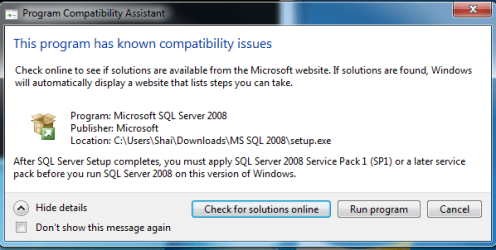
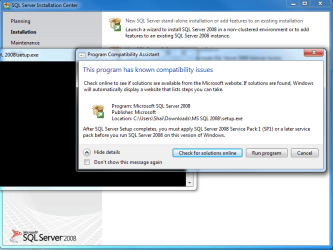
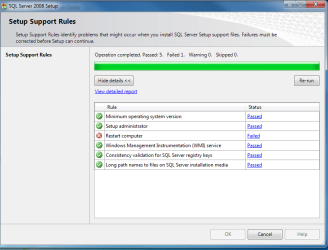
It hangs up right at the prerequisite install. Keeps giving an X on the system reboot. And, yes... I installed the SP1 for my system (WIN7 x64). Included the screen shots. Hope you can help me with this.

Obviously Billy boy doesn't believe in good support from the company's view point:mad:

Thanks
 

Attachments

  • SQL1.PNG
    SQL1.PNG
    15.6 KB · Views: 3
  • SQL2.PNG
    SQL2.PNG
    43.8 KB · Views: 2
  • SQL3.PNG
    SQL3.PNG
    31.1 KB · Views: 5
  • SQL4.PNG
    SQL4.PNG
    3 KB · Views: 2

My Computer

Computer Manufacturer/Model Number
Dell Vostro 220
OS
Windows 7 professional
CPU
Intel Duo 2.66GHz
Motherboard
Dell
Memory
3 GB
Graphics Card(s)
Nvidia GForce Quadro
Sound Card
Realtek
Monitor(s) Displays
Dell / Hanns G
Hard Drives
WD ATA 3250, WD MyBook external 320GB
PSU
Dell
Case
Dell
Cooling
Dell
It hangs up right at the prerequisite install. Keeps giving an X on the system reboot. And, yes... I installed the SP1 for my system (WIN7 x64). Included the screen shots. Hope you can help me with this.

Obviously Billy boy doesn't believe in good support from the company's view point:mad:

Thanks

Hello,

Lets try these steps !!
  1. Start regedit.exe
  2. Navigate to HKEY_LOCAL_MACHINE\SYSTEM\CurrentControlSet\Control\Session Manager
  3. Locate PendingFileRenameOperations
  4. Remove any data associated with the value
  5. Then try to install and see whether that works
  6. If that fails
  7. Navigate to HKEY_LOCAL_MACHINE\SYSTEM\ControlSet001\Session Manager
  8. Locate PendingFileRenameOperations
  9. Remove any data associated with the value
  10. Navigate to HKEY_LOCAL_MACHINE\SYSTEM\ControlSet002\Session Manager
  11. Locate PendingFileRenameOperations
  12. Remove any data associated with the value
  13. Without Rebooting Install it
Hope this helps,
Captain
 

My Computer

Computer Manufacturer/Model Number
Samsung NP550P5C-S02IN
OS
Windows 7 Ultimate - 64-bit | Windows 8 Pro - 64-bit
CPU
Intel® Core™ i7 Processor 3,610QM (2.30Hz, 6MB L3 Cach
Memory
8 GB
Graphics Card(s)
NVIDIA® GeForce® GT 650M 2GB Graphics, Optimus™ techno
Sound Card
SoundAlive™ JBL 3 Speakers (With sub-Woofer)
Monitor(s) Displays
39.62cm (15.6) SuperBright 300nit HD+ LED Display
Screen Resolution
1,600 x 900, Anti-Reflective
Hard Drives
1TB S-ATA II Hard Drive (5,400RPM)
That worked - thanks for the help - Jack !
 

My Computer

Computer Manufacturer/Model Number
Dell Vostro 220
OS
Windows 7 professional
CPU
Intel Duo 2.66GHz
Motherboard
Dell
Memory
3 GB
Graphics Card(s)
Nvidia GForce Quadro
Sound Card
Realtek
Monitor(s) Displays
Dell / Hanns G
Hard Drives
WD ATA 3250, WD MyBook external 320GB
PSU
Dell
Case
Dell
Cooling
Dell

My Computer

Computer Manufacturer/Model Number
Samsung NP550P5C-S02IN
OS
Windows 7 Ultimate - 64-bit | Windows 8 Pro - 64-bit
CPU
Intel® Core™ i7 Processor 3,610QM (2.30Hz, 6MB L3 Cach
Memory
8 GB
Graphics Card(s)
NVIDIA® GeForce® GT 650M 2GB Graphics, Optimus™ techno
Sound Card
SoundAlive™ JBL 3 Speakers (With sub-Woofer)
Monitor(s) Displays
39.62cm (15.6) SuperBright 300nit HD+ LED Display
Screen Resolution
1,600 x 900, Anti-Reflective
Hard Drives
1TB S-ATA II Hard Drive (5,400RPM)
Back
Top