SQL Server Express 2008 - Can't uninstall/repair

haven104

New member
Local time
2:34 AM
Messages
2
Hey
I installed SQL Server Express 2008. It gave some error messages during installation that I passed by (oops!)

I'm trying to uninstall but get the following error message:

TITLE: SQL Server Setup failure.
------------------------------
SQL Server Setup has encountered the following error:
Object reference not set to an instance of an object..
------------------------------
BUTTONS:
OK
------------------------------


I've tried searching google, microsoft help, etc and suspect some registry entries didn't get written.

Can anyone give me a hand to either repair or remove?

Thanks!
 

My Computer

Computer Manufacturer/Model Number
Dell/Precison 450
OS
Windows 7
CPU
Dual Xeon
Memory
2GB
Hard Drives
3 x 36GB SCSI Raid 0
Uninstall SQL 2008 Express

I have same problem on an XP (SP3) system having both SQL 2008 Developer installed (works OK) and SQL Express Installed. Can not start or connect to SQLEXPRESS instance. SQL Config Manager shows Express exists and allows config of protocols (I have all 4 enabled), but will time-out in trying to start SQLEXPRESS. SQL SMS allows me to locate SQLEXPRESS, but also will time-out trying to connect "network related or instance specific error.... error: 40 could not open a connection, Server, Error: 2"
Tried Control Panel... Add/Remove...repair but think this would work for Developer, but it will not work with now having EXPRESS installed. Seems like I need a specific Platform level repair (or uninstall), but can not find one. Using Platform it reports "Already Installed" but I can not find a repair or unistall option.
 

My Computer

Computer Manufacturer/Model Number
DELL
OS
Windows XP
CPU
AMD Athatlon 64 3700+
Motherboard
ACPI
Memory
3 GB
Graphics Card(s)
NVIDIA GeForce 6200 TurboCache
Sound Card
Realtek AC'97
Monitor(s) Displays
dual SyncMaster 2443BW
Hard Drives
Adaptec Array SCSI Raid 1
128 GB, NTFS format (two)
PSU
Standard
Case
Generic
Cooling
Two fans
Tips I've been offered from other forums

Frank,

Hopefully this will help. There is a response below from another forum I posted on.

My two cents worth - regarding uninstall/repair for SQLe, can you access the setup files under /program files/sql server/100/bootstrap setup (or similar - sorry Ica n't remembe teh exact address of the top of my head!)

(SQL Server SSMSe install problems on WIndows 7)

[)ia6l0 iii replied to Tom g at 19-Sep-09 01:34 Firstly, the Sql Server Service needs to be running. Only if this is running, you would be able to access your SQL Express instance.


Secondly, did you install the database engine? not sure which wizard has this during installation.


Thirdly, when you use SQL Server MS, can you use ComputerName\SQLExpress instance? instead of only the instance name?


And at last, can you check in the Sql Server Configuration Manager on the Named pipes configuration?
 

My Computer

Computer Manufacturer/Model Number
Dell/Precison 450
OS
Windows 7
CPU
Dual Xeon
Memory
2GB
Hard Drives
3 x 36GB SCSI Raid 0
Thanks for the tips,

In path you suggested found folder/file: Release>setup.exe. Ran setup.exe and under Maintenance, Repair it asked for location of "2008 Installation Media." Having used the platform installer, I had no idea where to find this media.

Under setup tools I ran the "discovery report" and it shows my MSSQLSERVER instance from the "Developer" edition, but nothing for the SQLEXPRESS instance. My MSSQLSERVER instance seems to be working OK. In SSMS I can <search for more> and under Local Servers>Database Engine> I can find entries for MAX and MAX\SQLEXPRESS (MAX is my computer name), and MAX will connect, but MAX\SQLEXPRESS will not connect due to a network related error... mentioning named pipes provider etc. etc. In SSCMgr I can find SQLEXPRESS protocols and I have all 4 protocols Enabled.

Ran MS Update, advised .net framework 3.5 SP1 should be installed. I tried, and it faiiled to install. So, I have another problem to look into as well as above. When it rains it pours....

Frank
 

My Computer

Computer Manufacturer/Model Number
DELL
OS
Windows XP
CPU
AMD Athatlon 64 3700+
Motherboard
ACPI
Memory
3 GB
Graphics Card(s)
NVIDIA GeForce 6200 TurboCache
Sound Card
Realtek AC'97
Monitor(s) Displays
dual SyncMaster 2443BW
Hard Drives
Adaptec Array SCSI Raid 1
128 GB, NTFS format (two)
PSU
Standard
Case
Generic
Cooling
Two fans
Hey, give full permissions to Microsoft Folder in Registry and it should do it
 

My Computer

Computer Manufacturer/Model Number
Microsoft
OS
Windows 7 and MAC
Graphics Card(s)
NVIDIA 9200 GT
Sound Card
NvIdiA
I had two Server 2003 R2 boxes that had to be reimaged due to that acursed sqle 2008 install. Use either sqle 2005 or 2008r2.
 

My Computer

Computer Manufacturer/Model Number
Black_Box (homebuilt)
OS
windows 7 RTM x64
CPU
Phenom II 965 Quad Core 3.4Ghz
Motherboard
Asus M4A79T Deluxe
Memory
Mushkin Blackline 8GB (4x2gb)
Graphics Card(s)
XFX Radeon 5970 Black Edition
Sound Card
onboard
Monitor(s) Displays
Dell 2408WPF-main Dell E248WFP-secondary
Screen Resolution
1920x1200-main 1920x1200-secondary
Hard Drives
OCZ Vertex Limited Edition 100GB (OS)
x1 WD Black Edition 500GB drive (Storage)
PSU
XFX 850w Black Edition (Modular)
Case
Mountian Mods H2go
Cooling
CoolITSystems ECO A.L.C.
Keyboard
Logitech MX 5500 wireless keyboard
Mouse
Razor Copperhead
Internet Speed
16Mb down/2Mb up Wowway Cable Internet
Uninstalling SQL Server 2008

Guys, I'm having a problem regarding uninstalling my SQL Server 2008 Express Edition.
I had some issues while using the program, so I decided to uninstall it fully then reinstall it. right now I can't uninstall it fully.

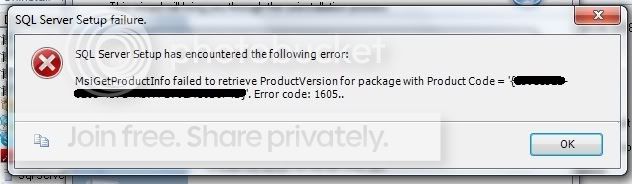
I used Perfect Uninstaller for uninstalling the program, then the first step gave me this error message.

SQLSerialKey-1.jpg


then...

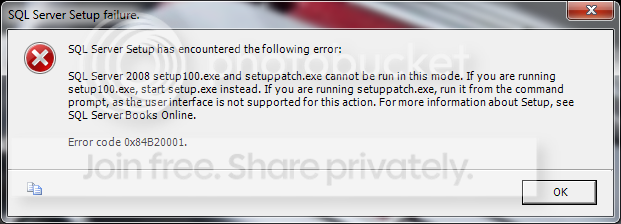
I tried re-running the setup.exe but after I clicked it nothing happens, then i tried running setup100.exe in the x86 folder (because im using a 32-bit), then I got an error message that states that I should run setup.exe instead of setup100.exe...

errormessage.png


Is there other ways to uninstall SQL Server 2008 Completely? I tried searching every possible ways but doesn't seem to work or not appropriate.

i'm using Windows 7 Professional. Thanks.
 
Last edited:

My Computer

Computer Manufacturer/Model Number
Microsoft
OS
Windows 7 Professional
CPU
Toshiba Satellite
Memory
Kingston 2GB
Graphics Card(s)
ATI Radeon Series 4700
Back
Top