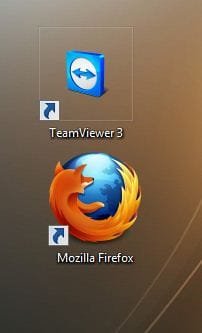
square lines

gigabyte

New member
Member
VIP
Local time
1:34 PM
Messages
150
why do i get theses sqare liens around my icons when i choose large icons???
 
Last edited by a moderator:

My Computer

Computer Manufacturer/Model Number
gigabyte
OS
windows 7 64bit
CPU
intel core 2 duo E8600 @3.33ghz
Motherboard
gigabyte ep45-ds5 (socket 775)
Memory
8.0gb dual-channel DDR2 @400mhz (6-6-6-18
Graphics Card(s)
2X ATI Radeon HD 4800 series (sapphire) crossfire
Sound Card
realtek high definition audio
Monitor(s) Displays
benq E2200w (digital)
Screen Resolution
1680 x 1050
Hard Drives
1 313GB Western digital WDC
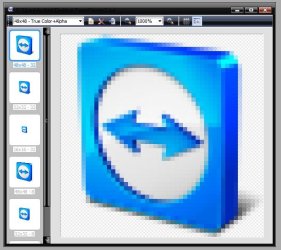
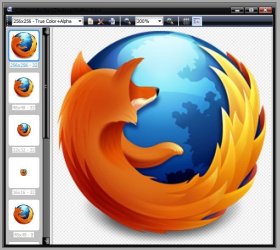
Coz none of those Icons are compatible with large icon view ..... they dont have the 256x256 pixels resolution layers . Probably the maximum size those icons support is 32x32 pixels .

Here lies the difference :
Capture.JPG

Edit ... it it what a quick icon view shows ... there is no 2566x256 in Teamviewer , but it is there in firefox .

Capture1.JPGCapture2.JPG

I think now it is clear to you ;)
 

My Computer

Computer type
PC/Desktop
Computer Manufacturer/Model Number
Self Assembled
OS
Microsoft Windows 10 Pro Insider Preview 64-bit
CPU
Intel(R) Core(TM) i3-4130 CPU @ 3.40GHz
Motherboard
Gigabyte Technology Co., Ltd. B85M-D3H
Memory
Corsair Vengence 4GB x2 (8.00GB Dual-Channel DDR3 @ 798MHz)
Graphics Card(s)
2047MB GeForce GTS 450 (ZOTAC International)
Sound Card
Onboard (Realtek High Definition Audio)
Monitor(s) Displays
LG Flatron E2040T
Screen Resolution
1600x900
Hard Drives
Western Digital 1 TB
Seagate 500 GB
PSU
Corsair VS550
Case
Cooler Master K380
Cooling
Cooler Master Seidon 120V Plus
Keyboard
Logitech MK260r
Mouse
Logitech MK260r
Internet Speed
PMPL Broadband
Antivirus
Windows Defender + MBAM
Browser
Firefox
Other Info
Dell Studio 15" Laptop
Back
Top