Square Windows Branding?

marcusj0015

Banned
Local time
3:32 AM
Messages
93
how can i make the windows flag part square instead of circular?

2q83v36.jpg


so that it holds the WHOLE picture instead of cutting parts off?
 

My Computer

Computer Manufacturer/Model Number
Gateway DX4831
OS
Windows 7 Ultimate x64
CPU
Intel i3 :(
Motherboard
OEM Intel H57
Memory
6GB DDR3 1333
Graphics Card(s)
NVIDIA GeForce GT 220 :(
Sound Card
Built IN
Monitor(s) Displays
Gateway HX2000 @ 1600x900 :(
Screen Resolution
1600x900
Hard Drives
1TB Western Digital
Internet Speed
Comcast 20MB down 5 MB up
does anyone know a registry hack for this or anyway of making it NOT circular?
 

My Computer

Computer Manufacturer/Model Number
Gateway DX4831
OS
Windows 7 Ultimate x64
CPU
Intel i3 :(
Motherboard
OEM Intel H57
Memory
6GB DDR3 1333
Graphics Card(s)
NVIDIA GeForce GT 220 :(
Sound Card
Built IN
Monitor(s) Displays
Gateway HX2000 @ 1600x900 :(
Screen Resolution
1600x900
Hard Drives
1TB Western Digital
Internet Speed
Comcast 20MB down 5 MB up
I'm sorry, but I've no help for you. I am curious, though, as to why you want to do this. :)

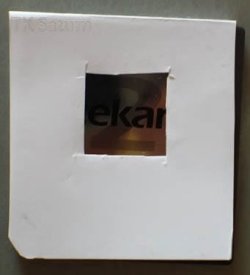
On second thought, here is an idea -

Print this out and tape it over your monitor:
 

Attachments

  • 06_ak_contact_repost_paper_over_acekard.jpg
    06_ak_contact_repost_paper_over_acekard.jpg
    24.7 KB · Views: 10

My Computer

Computer Manufacturer/Model Number
Self
OS
Main - Windows 7 Pro SP1 64-Bit; 2nd - Windows Server 2008 R2
CPU
Main - Core i7 2600K; 2nd - Core i7 920
Motherboard
Main - Asus P8Z68-V Pro/Gen3; 2nd - Gigabyte GA-EX58-UDR3
Memory
Main - 16GB Corsair Vengeance; 2nd - 12GB Corsair Vengeance
Graphics Card(s)
Main - XFX Radeon 6870 1GB; 2nd - XFX Radeon 4870 1GB
Sound Card
Both: Onboard Realtek Azalia
Monitor(s) Displays
Main - Hann 25" + I-INC 25" + Acer 23"; 2nd - Upgrading Soon
Screen Resolution
Main - 1920x1080 (All Three Monitors); 2nd - Upgrading Soon
Hard Drives
Main - (1) Crucial M4 128GB (Boot)
Main - (1) Seagate 2TB 64MB Cache (Data)
Main - (1) Seagate 2TB 64MB Cache (Data Backup)
2nd - (1) Intel X25-M SSD 80GB (Boot)
2nd - (3) Seagate 1TB 32MB Cache (Data Backup)
2nd - (1) Seagate 320GB (Because)
PSU
Main - OCZ 600W Modular; 2nd - OCZ 600W
Case
Main - Thermaltake Element G; 2nd - NZXT something or other
Cooling
Main - Corsair H80; 2nd - Prolimatech Megahalems
Keyboard
Main - Razer Reclusa; 2nd - Old MS Keyboard
Mouse
Main - Logitech MX Revolution; 2nd - Old MS Mouse
Internet Speed
20Mbps Time-Warner Cable
I'm sorry, but I've no help for you. I am curious, though, as to why you want to do this. :)

On second thought, here is an idea -

Print this out and tape it over your monitor:

Also if you double click the CD Rom icon a handy cup holder pops out ;)
 

My Computer

Computer Manufacturer/Model Number
Samsung Chronos 7
OS
windows 7 Pro 64Bit
CPU
2.2 GHz Intel Core i7-2675QM
Memory
8GB
Graphics Card(s)
Intel HD Graphics 3000/Radeon HD 6490M
Sound Card
Realtek High Definition Audio
Monitor(s) Displays
Built in LCD and external Dell 22 inch LCD
Screen Resolution
1600x900
Hard Drives
1 TB HDD
Internet Speed
20 MBPS Down 1500 KBPS Up
My advice would be to not mess with this unless you are fond of reinstalling Windows after screwing up your computer. ;)

If you are indeed determined to try, you'll need to find the right place to edit the logo and replace it with something like what I've attached, but no doubt re-sized and cropped. My guess would be is that it is a bitmap image buried deep in the part of Windows guts that you are better off leaving alone. :eek:
 

Attachments

  • Square Windows Logo.JPG
    Square Windows Logo.JPG
    13.6 KB · Views: 3

My Computer

Computer Manufacturer/Model Number
Self
OS
Main - Windows 7 Pro SP1 64-Bit; 2nd - Windows Server 2008 R2
CPU
Main - Core i7 2600K; 2nd - Core i7 920
Motherboard
Main - Asus P8Z68-V Pro/Gen3; 2nd - Gigabyte GA-EX58-UDR3
Memory
Main - 16GB Corsair Vengeance; 2nd - 12GB Corsair Vengeance
Graphics Card(s)
Main - XFX Radeon 6870 1GB; 2nd - XFX Radeon 4870 1GB
Sound Card
Both: Onboard Realtek Azalia
Monitor(s) Displays
Main - Hann 25" + I-INC 25" + Acer 23"; 2nd - Upgrading Soon
Screen Resolution
Main - 1920x1080 (All Three Monitors); 2nd - Upgrading Soon
Hard Drives
Main - (1) Crucial M4 128GB (Boot)
Main - (1) Seagate 2TB 64MB Cache (Data)
Main - (1) Seagate 2TB 64MB Cache (Data Backup)
2nd - (1) Intel X25-M SSD 80GB (Boot)
2nd - (3) Seagate 1TB 32MB Cache (Data Backup)
2nd - (1) Seagate 320GB (Because)
PSU
Main - OCZ 600W Modular; 2nd - OCZ 600W
Case
Main - Thermaltake Element G; 2nd - NZXT something or other
Cooling
Main - Corsair H80; 2nd - Prolimatech Megahalems
Keyboard
Main - Razer Reclusa; 2nd - Old MS Keyboard
Mouse
Main - Logitech MX Revolution; 2nd - Old MS Mouse
Internet Speed
20Mbps Time-Warner Cable
well thanks for treating me like i'm an idiot.

and the file is C:\Windows\Branding\shellbrd\shellbrd.dll

it's the windows logo in the control panel at

Control panel\system and security\system.

i don't want it to be circular, because my logo get's cut off when the frame is circular.

yeah i could resize it, but it looks like crap resized.


~EDIT~

i fixed it, here is the final version.

2lmpbwg.jpg
 
Last edited:

My Computer

Computer Manufacturer/Model Number
Gateway DX4831
OS
Windows 7 Ultimate x64
CPU
Intel i3 :(
Motherboard
OEM Intel H57
Memory
6GB DDR3 1333
Graphics Card(s)
NVIDIA GeForce GT 220 :(
Sound Card
Built IN
Monitor(s) Displays
Gateway HX2000 @ 1600x900 :(
Screen Resolution
1600x900
Hard Drives
1TB Western Digital
Internet Speed
Comcast 20MB down 5 MB up

My Computer

Computer Manufacturer/Model Number
Self
OS
Main - Windows 7 Pro SP1 64-Bit; 2nd - Windows Server 2008 R2
CPU
Main - Core i7 2600K; 2nd - Core i7 920
Motherboard
Main - Asus P8Z68-V Pro/Gen3; 2nd - Gigabyte GA-EX58-UDR3
Memory
Main - 16GB Corsair Vengeance; 2nd - 12GB Corsair Vengeance
Graphics Card(s)
Main - XFX Radeon 6870 1GB; 2nd - XFX Radeon 4870 1GB
Sound Card
Both: Onboard Realtek Azalia
Monitor(s) Displays
Main - Hann 25" + I-INC 25" + Acer 23"; 2nd - Upgrading Soon
Screen Resolution
Main - 1920x1080 (All Three Monitors); 2nd - Upgrading Soon
Hard Drives
Main - (1) Crucial M4 128GB (Boot)
Main - (1) Seagate 2TB 64MB Cache (Data)
Main - (1) Seagate 2TB 64MB Cache (Data Backup)
2nd - (1) Intel X25-M SSD 80GB (Boot)
2nd - (3) Seagate 1TB 32MB Cache (Data Backup)
2nd - (1) Seagate 320GB (Because)
PSU
Main - OCZ 600W Modular; 2nd - OCZ 600W
Case
Main - Thermaltake Element G; 2nd - NZXT something or other
Cooling
Main - Corsair H80; 2nd - Prolimatech Megahalems
Keyboard
Main - Razer Reclusa; 2nd - Old MS Keyboard
Mouse
Main - Logitech MX Revolution; 2nd - Old MS Mouse
Internet Speed
20Mbps Time-Warner Cable
oh i got it,

i had to resize it.

i thought it would look bad resized, but it looks damn awesome!
 

My Computer

Computer Manufacturer/Model Number
Gateway DX4831
OS
Windows 7 Ultimate x64
CPU
Intel i3 :(
Motherboard
OEM Intel H57
Memory
6GB DDR3 1333
Graphics Card(s)
NVIDIA GeForce GT 220 :(
Sound Card
Built IN
Monitor(s) Displays
Gateway HX2000 @ 1600x900 :(
Screen Resolution
1600x900
Hard Drives
1TB Western Digital
Internet Speed
Comcast 20MB down 5 MB up
Are you going to post a picture for us? :D

Whoops - just saw your edit. :)
 
Last edited:

My Computer

Computer Manufacturer/Model Number
Self
OS
Main - Windows 7 Pro SP1 64-Bit; 2nd - Windows Server 2008 R2
CPU
Main - Core i7 2600K; 2nd - Core i7 920
Motherboard
Main - Asus P8Z68-V Pro/Gen3; 2nd - Gigabyte GA-EX58-UDR3
Memory
Main - 16GB Corsair Vengeance; 2nd - 12GB Corsair Vengeance
Graphics Card(s)
Main - XFX Radeon 6870 1GB; 2nd - XFX Radeon 4870 1GB
Sound Card
Both: Onboard Realtek Azalia
Monitor(s) Displays
Main - Hann 25" + I-INC 25" + Acer 23"; 2nd - Upgrading Soon
Screen Resolution
Main - 1920x1080 (All Three Monitors); 2nd - Upgrading Soon
Hard Drives
Main - (1) Crucial M4 128GB (Boot)
Main - (1) Seagate 2TB 64MB Cache (Data)
Main - (1) Seagate 2TB 64MB Cache (Data Backup)
2nd - (1) Intel X25-M SSD 80GB (Boot)
2nd - (3) Seagate 1TB 32MB Cache (Data Backup)
2nd - (1) Seagate 320GB (Because)
PSU
Main - OCZ 600W Modular; 2nd - OCZ 600W
Case
Main - Thermaltake Element G; 2nd - NZXT something or other
Cooling
Main - Corsair H80; 2nd - Prolimatech Megahalems
Keyboard
Main - Razer Reclusa; 2nd - Old MS Keyboard
Mouse
Main - Logitech MX Revolution; 2nd - Old MS Mouse
Internet Speed
20Mbps Time-Warner Cable
Yeah, you like it?

i think it's awesome
 

My Computer

Computer Manufacturer/Model Number
Gateway DX4831
OS
Windows 7 Ultimate x64
CPU
Intel i3 :(
Motherboard
OEM Intel H57
Memory
6GB DDR3 1333
Graphics Card(s)
NVIDIA GeForce GT 220 :(
Sound Card
Built IN
Monitor(s) Displays
Gateway HX2000 @ 1600x900 :(
Screen Resolution
1600x900
Hard Drives
1TB Western Digital
Internet Speed
Comcast 20MB down 5 MB up
Looks good. :D :party:
 

My Computer

Computer Manufacturer/Model Number
Self
OS
Main - Windows 7 Pro SP1 64-Bit; 2nd - Windows Server 2008 R2
CPU
Main - Core i7 2600K; 2nd - Core i7 920
Motherboard
Main - Asus P8Z68-V Pro/Gen3; 2nd - Gigabyte GA-EX58-UDR3
Memory
Main - 16GB Corsair Vengeance; 2nd - 12GB Corsair Vengeance
Graphics Card(s)
Main - XFX Radeon 6870 1GB; 2nd - XFX Radeon 4870 1GB
Sound Card
Both: Onboard Realtek Azalia
Monitor(s) Displays
Main - Hann 25" + I-INC 25" + Acer 23"; 2nd - Upgrading Soon
Screen Resolution
Main - 1920x1080 (All Three Monitors); 2nd - Upgrading Soon
Hard Drives
Main - (1) Crucial M4 128GB (Boot)
Main - (1) Seagate 2TB 64MB Cache (Data)
Main - (1) Seagate 2TB 64MB Cache (Data Backup)
2nd - (1) Intel X25-M SSD 80GB (Boot)
2nd - (3) Seagate 1TB 32MB Cache (Data Backup)
2nd - (1) Seagate 320GB (Because)
PSU
Main - OCZ 600W Modular; 2nd - OCZ 600W
Case
Main - Thermaltake Element G; 2nd - NZXT something or other
Cooling
Main - Corsair H80; 2nd - Prolimatech Megahalems
Keyboard
Main - Razer Reclusa; 2nd - Old MS Keyboard
Mouse
Main - Logitech MX Revolution; 2nd - Old MS Mouse
Internet Speed
20Mbps Time-Warner Cable
Back
Top