
Solved SSD added to the homenet workgroup is not recognized

loninappleton

New member
Member
VIP
Local time
4:18 AM
Messages
892
Well this is embarrassing.

Something hangs with a boot drive SSD not recognized on my workgroup called homenet.

It gives the standard not accessible box after redoing it many times.

After I put Win7 on the SSD I ran the usual workgroup naming routine. On the SSD itself, the
Network connection opens to reveal folders.

It will show up on other workgroup nodes but not open up.

I have a previous SSD that I use all the time and id not encounter this.

I can screen print the error box but I'm sure there can't be that many. Is there something to check on the
SSD that runs with no problems?
 

Attachments
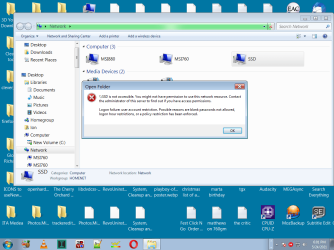
  • SSD not accessible.png
    SSD not accessible.png
    57.1 KB · Views: 1

My Computer My Computer

At a glance

Windows 7 x64 UltimateAMD Athlon II x3 4502 GB
Computer type
PC/Desktop
Computer Manufacturer/Model Number
custom
OS
Windows 7 x64 Ultimate
CPU
AMD Athlon II x3 450
Motherboard
MSI 880GM
Memory
2 GB
Hard Drives
various
Browser
Firefox, Opera
Just to clarify "SSD" is the name for the ssd.
 

My Computer My Computer

At a glance

Windows 7 x64 UltimateAMD Athlon II x3 4502 GB
Computer type
PC/Desktop
Computer Manufacturer/Model Number
custom
OS
Windows 7 x64 Ultimate
CPU
AMD Athlon II x3 450
Motherboard
MSI 880GM
Memory
2 GB
Hard Drives
various
Browser
Firefox, Opera
I reconnected the workgroup-friendly SSD and it booted up fine.

One thing I was doing on that scratch SSD was playing with backup and images. That never goes well for me.
If a wipe and reformat of the scratch ssd and reinstall of Win7 is needed that's an easy do.
 

My Computer My Computer

At a glance

Windows 7 x64 UltimateAMD Athlon II x3 4502 GB
Computer type
PC/Desktop
Computer Manufacturer/Model Number
custom
OS
Windows 7 x64 Ultimate
CPU
AMD Athlon II x3 450
Motherboard
MSI 880GM
Memory
2 GB
Hard Drives
various
Browser
Firefox, Opera
This stuff is old but that should not matter. I tried running Setup of the Biostar driver disk to get the ethernet files and that setup would not run. That's all I can think of.
 

My Computer My Computer

At a glance

Windows 7 x64 UltimateAMD Athlon II x3 4502 GB
Computer type
PC/Desktop
Computer Manufacturer/Model Number
custom
OS
Windows 7 x64 Ultimate
CPU
AMD Athlon II x3 450
Motherboard
MSI 880GM
Memory
2 GB
Hard Drives
various
Browser
Firefox, Opera
A further test on this. The SSD will write it's sample file to both the other two nodes on the work group called HOMENET.

The SSD shows up as a network device on both the other nodes.

But the SSD will not open to write files to it from the two nodes on the workgroup.

There is only one file to copy on this new install: a piece of wildlife media called Sample when Win7 installs.
 

My Computer My Computer

At a glance

Windows 7 x64 UltimateAMD Athlon II x3 4502 GB
Computer type
PC/Desktop
Computer Manufacturer/Model Number
custom
OS
Windows 7 x64 Ultimate
CPU
AMD Athlon II x3 450
Motherboard
MSI 880GM
Memory
2 GB
Hard Drives
various
Browser
Firefox, Opera
What are the NTFS permission on the SSD
 

My Computer My Computer

At a glance

win 8 32 bit
Computer type
PC/Desktop
OS
win 8 32 bit
What are the NTFS permission on the SSD

The Sevenforum website looks remade.

How do I check and or change permissions?

I was thinking I missed something in the install regarding one of those last dialogs on networks, but
I think I finished that by answering is this Win7 on a network.

The other thing that looks funny about this is Crucial's own SSD tools do not want to perform the tasks.
What would cause that? Does the SSD need special handling for remaking the NTFS partition?

Thanks for answering.
 

My Computer My Computer

At a glance

Windows 7 x64 UltimateAMD Athlon II x3 4502 GB
Computer type
PC/Desktop
Computer Manufacturer/Model Number
custom
OS
Windows 7 x64 Ultimate
CPU
AMD Athlon II x3 450
Motherboard
MSI 880GM
Memory
2 GB
Hard Drives
various
Browser
Firefox, Opera
I marked this solved for the problem Crucial SSD.

I redid the install carefully and that went through fine. But the workgroup error to write _to_ the Crucial
SSD perisisted. The message popped up and I reread where it mentioned blank passwords. I never
put passwords on my own equipment-- just tab through.

Normally that does not cause errors but I may have tabbed rather than just press enter
with no data. Again this has never given a problem.

On the Crucial SSD, once I created a password called foo my other MSI workstation would
write files to it after a dialog to enter the password.

I don't know why over many installs of HDD and SDD this became a problem in the Crucial
and one that persists after wipes.
 

My Computer My Computer

At a glance

Windows 7 x64 UltimateAMD Athlon II x3 4502 GB
Computer type
PC/Desktop
Computer Manufacturer/Model Number
custom
OS
Windows 7 x64 Ultimate
CPU
AMD Athlon II x3 450
Motherboard
MSI 880GM
Memory
2 GB
Hard Drives
various
Browser
Firefox, Opera
Back
Top