Three months ago after I first built the computer everything was lightening fast but now things are slowing down. I had done research on SSD optimization before I installed Windows 7 but I did not catch the alignment part so I am not sure if this is causing a problem.
I think that is the offset but the tutorial mentioned will tell you for sure. Also if you did a fresh nstall of windows 7 to a brand new SSD, then alignment would be done automatically by the install.
My Computer
Computer Manufacturer/Model Number
Custom build; parts from the Egg
OS
windows 7 Professional 64 Bit
CPU
I7-3930
Motherboard
Asus P9X79 PRO
Memory
G.Skill 4X 4 GB DR3 240 pin 16GB total
Graphics Card(s)
EVGA 670
Sound Card
Energy Take 5, Sennheiser HD 205 phones, X-FI
Monitor(s) Displays
Hanns G 21.5" HH221 and Samsung 19" 940BW and Hannspree
Three months ago after I first built the computer everything was lightening fast but now things are slowing down. I had done research on SSD optimization before I installed Windows 7 but I did not catch the alignment part so I am not sure if this is causing a problem.
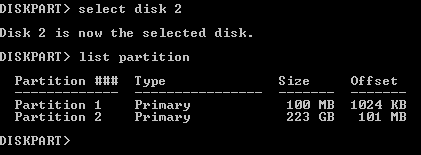
Hiyya greyclear and welcome also - I had a similar quandary in that I did not know what this meant and whs put me right by explaining that as long as the first partition ie Partition 1 as in your shot - the number = 100MB (is actually 1024 KB) is divisible by 4 ie 1024/4=256 then you are good to go - the rest of the drive is then "aligned" as the remainder is also divisible by 4!
Of course I stand to be corrected
My Computer
Computer type
PC/Desktop
Computer Manufacturer/Model Number
Own build (new) Desk1 / Asus ROG Win 7 / Desk2 1st build
OS
Desk1 7 Home Prem / Desk2 10 Pro / Main lap Asus ROG 10 Pro 2 laptop Toshiba 7 Pro Asus P2520 7 & 10
One other Desktop (tester) and spare Toshba laptop both with SSD's
Running Kaspersky 2016 ISS on all machines config'd identically
Logitec audio stereo systems on each machine (x3)
Canon MG5250MFC
Router/modem TP-Link running WPA2SK
Microsoft Security Essentials and Malwarebytes Premium
Browser
Pale Moon
Other Info
All fans PWM; speeds at idle: CPU circa 500 rpm; intake circa 600 rpm; exhaust circa 600 rpm; CPU temps 27 idle and 47 C load in a warm room (27 C/81 F) when running Intel Extreme Tuning Utility stress test.
Hum ignazatsonic I do have a Crucial 128GB and my boot and shut down have noticeably decreased since new even though I keep minimal stuff on it anything like music or pics I send through to my Seagate HDD. I am not sure what you mean by RAID model though.
MJF I think it runs TRIM as I was under the impression that it is automatic as an install feature and one just leaves for as long as possible after booting before signing in and using the thing.
My Computer
Computer type
PC/Desktop
Computer Manufacturer/Model Number
Own build (new) Desk1 / Asus ROG Win 7 / Desk2 1st build
OS
Desk1 7 Home Prem / Desk2 10 Pro / Main lap Asus ROG 10 Pro 2 laptop Toshiba 7 Pro Asus P2520 7 & 10
One other Desktop (tester) and spare Toshba laptop both with SSD's
Running Kaspersky 2016 ISS on all machines config'd identically
Logitec audio stereo systems on each machine (x3)
Canon MG5250MFC
Router/modem TP-Link running WPA2SK
Hum ignazatsonic I do have a Crucial 128GB and my boot and shut down have noticeably decreased since new even though I keep minimal stuff on it anything like music or pics I send through to my Seagate HDD. I am not sure what you mean by RAID model though.
Microsoft Security Essentials and Malwarebytes Premium
Browser
Pale Moon
Other Info
All fans PWM; speeds at idle: CPU circa 500 rpm; intake circa 600 rpm; exhaust circa 600 rpm; CPU temps 27 idle and 47 C load in a warm room (27 C/81 F) when running Intel Extreme Tuning Utility stress test.
Hum ignazatsonic I do have a Crucial 128GB and my boot and shut down have noticeably decreased since new even though I keep minimal stuff on it anything like music or pics I send through to my Seagate HDD. I am not sure what you mean by RAID model though.
One other Desktop (tester) and spare Toshba laptop both with SSD's
Running Kaspersky 2016 ISS on all machines config'd identically
Logitec audio stereo systems on each machine (x3)
Canon MG5250MFC
Router/modem TP-Link running WPA2SK
That is correct alignment. The 100MB partition is 1024, which as pointed out is divisible by 4. The 101 is ok because 1024X101=103424 which divided by 4 = 25856. That's the way I was told it is figured, but your alignment is typical of an aligned OS with the 100Mb partition.
I have the Crucial as well and have not done the firmware upgrade yet. Supposedly it is a must do at some point before or at 5000 or 50000 hours I think or the drive just "quits" until it is upgraded. I'm in no hurry to perform it as I understand this upgrade slightly degrades speed. So far I've only been using my new set up for a week or two and so far all I've noticed is the need to delete temp files on occasion.
My Computer
Computer Manufacturer/Model Number
Custom build; parts from the Egg
OS
windows 7 Professional 64 Bit
CPU
I7-3930
Motherboard
Asus P9X79 PRO
Memory
G.Skill 4X 4 GB DR3 240 pin 16GB total
Graphics Card(s)
EVGA 670
Sound Card
Energy Take 5, Sennheiser HD 205 phones, X-FI
Monitor(s) Displays
Hanns G 21.5" HH221 and Samsung 19" 940BW and Hannspree
I have the Crucial as well and have not done the firmware upgrade yet. Supposedly it is a must do at some point before or at 5000 or 50000 hours I think or the drive just "quits" until it is upgraded. I'm in no hurry to perform it as I understand this upgrade slightly degrades speed. So far I've only been using my new set up for a week or two and so far all I've noticed is the need to delete temp files on occasion.
Hum armyslowrdr maybe thats why my M4 is getting slower as I did the upgrade when I put the drive in as if I remember correctly it would not show up in Computer and I was then told to do it ASAP to get the most out of this drive performance and longevity wise.
I wouldn't leave it too long my friend be a shame to have it fall in a heap before it's time.
My Computer
Computer type
PC/Desktop
Computer Manufacturer/Model Number
Own build (new) Desk1 / Asus ROG Win 7 / Desk2 1st build
OS
Desk1 7 Home Prem / Desk2 10 Pro / Main lap Asus ROG 10 Pro 2 laptop Toshiba 7 Pro Asus P2520 7 & 10
One other Desktop (tester) and spare Toshba laptop both with SSD's
Running Kaspersky 2016 ISS on all machines config'd identically
Logitec audio stereo systems on each machine (x3)
Canon MG5250MFC
Router/modem TP-Link running WPA2SK
I figure if I leave the computer on 24/7 I ought to have 200+ days before I must do the upgrade. I understand that even if the drive just quits due the bug it has, it will come back once the upgrade is performed. But I do want to do it before that point. I'm thinking Cinco d Mayo may be a good day -- the 8th is my seniority day at work--I have 3 days of vacation still to burn by then...and the 5th is also the Tom Petty concert in Austin. Only reason I don't do it now is I've just been using this thing a week or two and want to see how it performs pre upgrade after a nice length of time, then how it does post upgrade. Maybe update is a better word than upgrade....
My Computer
Computer Manufacturer/Model Number
Custom build; parts from the Egg
OS
windows 7 Professional 64 Bit
CPU
I7-3930
Motherboard
Asus P9X79 PRO
Memory
G.Skill 4X 4 GB DR3 240 pin 16GB total
Graphics Card(s)
EVGA 670
Sound Card
Energy Take 5, Sennheiser HD 205 phones, X-FI
Monitor(s) Displays
Hanns G 21.5" HH221 and Samsung 19" 940BW and Hannspree
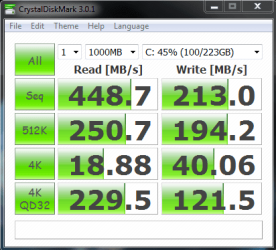
My computer specs are in my profile. Intel 320 series 120gb. Trim is active but I read an article somewhere that I lose some performance because it does garbage collection or something so trim enabled or disable doesn't matter. Its enabled anyways but I cant find the article I read on it at the moment. When I first setup I ran bench tests I was getting 600mb ranges almost peaking 700 read speeds. Writes were above 350.
I store everything on my raid 5 drives such as vmware/vbox, my games, chrome/firefox/ie temp/profiles are on another drive. Just windows and security essentials is running on the ssd drives but occasionally Ive transferred files from laptop to the ssd drives temporary so not much. I shouldnt complain lol far better than what I had before just wondering what happened to the speed..
My computer stays on all the time I dont turn it off except when I am going to be out for a few days