ssd boot time slow after adding hdd in optical drive

WindowsOP

New member
Local time
4:44 PM
Messages
60
Hi


I installed my SSD in the hdd bay (removed hdd and replaced ssd) and noticed fast boot time and then after adding a 2nd hdd using a caddy and replacing the optical dvd/cd drive ( I broke it :cry: ), I noticed a couple seconds slower on boot.


Computer specs : intel core i5 3230M 6gb ram windows 7 ultimate sony vaio sve 14

ssd sandisk ultra + 256gb paired with a 5200rpm 750gb in the optical drive
I set boot order as

internal Hard Drive
External Device
Network

the last option was optical drive which I didn't set as a boot order.
It doesn't let me set SSD as boot and HDD as secondary hdd on my BIOS. should I update my bios ?
 

Attachments
  • bootsetup.PNG
    bootsetup.PNG
    155 KB · Views: 0

My Computer My Computer

At a glance

Windows Ultimate x64Intel Core 2 Duo TP5500 1.6Ghz3GBIntel 945 Chipset
Computer type
Laptop
Computer Manufacturer/Model Number
Dell D620
OS
Windows Ultimate x64
CPU
Intel Core 2 Duo TP5500 1.6Ghz
Memory
3GB
Graphics Card(s)
Intel 945 Chipset
Sound Card
HD Audio Device
Screen Resolution
1440x900
Hard Drives
80GB HDD
Internet Speed
25 down 5 up
Antivirus
Avast, Malwarebytes
Browser
Chrome
Ok Windows OP mate does the BIOS let you set the SSD as first device with the other drives disconnected?
If so then I would reckon you need to update the BIOS but it is something you must be sure of first as you know updating the BIOS has it's hazards namely it can wreck the BIOS chip.

So whatever you do be careful in updating it. But first see what just having one drive in does (and in any case you should see in the BIOS all the drives that are hooked up anyway).

Have a read about the BIOS in this link AMI | American Megatrends Inc. : Glossary

PS Is this a different machine than the one in your system specs??
 

My Computer My Computer

At a glance

Desk1 7 Home Prem / Desk2 10 Pro / Main lap A...Desk1 i5 3750K / Laptop i7 GTX 860M / Desk2 i...Desk1 8GB (1866) / Desk2 16GB (1333) / Laptop...Desk 1& 2NVidia GTX 650 & Laptops on board Intel
Computer type
PC/Desktop
Computer Manufacturer/Model Number
Own build (new) Desk1 / Asus ROG Win 7 / Desk2 1st build
OS
Desk1 7 Home Prem / Desk2 10 Pro / Main lap Asus ROG 10 Pro 2 laptop Toshiba 7 Pro Asus P2520 7 & 10
CPU
Desk1 i5 3750K / Laptop i7 GTX 860M / Desk2 i5 2500
Motherboard
Desk1 Asus P877-V / Desk2 Gigabyte H67 UD3H / Laptop ?
Memory
Desk1 8GB (1866) / Desk2 16GB (1333) / Laptop 8Gb DDR3
Graphics Card(s)
Desk 1& 2NVidia GTX 650 & Laptops on board Intel
Sound Card
Desk 1 & 2 -XONAR DG Realtek High Def audio Laptop
Monitor(s) Displays
Desk 1 Benq HD 2450 / Desk2 Philips 24" / Laptop 17.5"
Screen Resolution
1920x1080 D1 & D2 & Laptop 1
Hard Drives
Desk1 Samsung 120GB 830 SSD
Asus ROG 256GB 850 Pro SSD
Desk2 Samsung 840 256 SSD
Toshiba 120GB EVO
PSU
Desk 1 Corsair HX 1050/ Laptop ? / Desk 2 Corsair HX 650
Case
Desk 1 Cooler HAF XM ? Toshiba laptop / Desk2 Coolermaster
Cooling
Fans on all Desk1 -2 Desk2 - all Coolermasters 5 Laptop ?
Keyboard
Desk 1 MS Sidewinder X6 Desk 2 MS Sidewinder X 4
Mouse
Desk 1&2 - Gigabyte MS 900 gamer - laptop - Logitec wireless
Internet Speed
ADSL2+
Other Info
One other Desktop (tester) and spare Toshba laptop both with SSD's
Running Kaspersky 2016 ISS on all machines config'd identically
Logitec audio stereo systems on each machine (x3)
Canon MG5250MFC
Router/modem TP-Link running WPA2SK
Ok Windows OP mate does the BIOS let you set the SSD as first device with the other drives disconnected?
If so then I would reckon you need to update the BIOS but it is something you must be sure of first as you know updating the BIOS has it's hazards namely it can wreck the BIOS chip.

So whatever you do be careful in updating it. But first see what just having one drive in does (and in any case you should see in the BIOS all the drives that are hooked up anyway).

Have a read about the BIOS in this link AMI | American Megatrends Inc. : Glossary

PS Is this a different machine than the one in your system specs??

Yes.

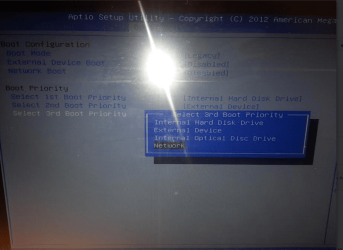
This machine is different than the one in my system specs. No, the BIOS doesn't let me set the SSD as an first device. I removed the 2nd hdd caddy from the optical drive and boot it in bios mode, and no SSD. What you see in the picture is what I can only select. HDD, Optical, Network, external device. As for updating the BIOS, I don't know how to do that. Do I get the bios update directly from the manufacturer website or the bios manufacturer website?

I checked the support page for my laptop and there is no update for my BIOS. It's a windows 8 pre installed laptop with Windows 7.
 

My Computer My Computer

At a glance

Windows Ultimate x64Intel Core 2 Duo TP5500 1.6Ghz3GBIntel 945 Chipset
Computer type
Laptop
Computer Manufacturer/Model Number
Dell D620
OS
Windows Ultimate x64
CPU
Intel Core 2 Duo TP5500 1.6Ghz
Memory
3GB
Graphics Card(s)
Intel 945 Chipset
Sound Card
HD Audio Device
Screen Resolution
1440x900
Hard Drives
80GB HDD
Internet Speed
25 down 5 up
Antivirus
Avast, Malwarebytes
Browser
Chrome
I assume you have just 2 hard drives: an SSD and an HDD mounted where your optical drive used to be.

Correct?

What's supposedly on the HDD?

What makes you think that "internal hard disk drive" isn't the SSD? I'm just asking. I'm not sure the SSD would be shown as "SSD" on a boot menu.

Does this machine boot OK if the HDD is disconnected?

This isn't likely to be something that a BIOS update would fix, so I'd forget about that for the time being.
 

My Computer My Computer

At a glance

Windows 7 Home Premium SP1, 64-bitIntel Skylake i5-6600K, not overclocked8 GB HyperX DDR4-2666 (2 x 4 GB)none; graphics are integrated on CPU
Computer type
PC/Desktop
Computer Manufacturer/Model Number
Ignatz Special; 4 speed manual gearbox; factory air conditioning; one of one
OS
Windows 7 Home Premium SP1, 64-bit
CPU
Intel Skylake i5-6600K, not overclocked
Motherboard
AsRock Z170M Extreme 4, micro ATX
Memory
8 GB HyperX DDR4-2666 (2 x 4 GB)
Graphics Card(s)
none; graphics are integrated on CPU
Sound Card
onboard: Realtek ALC1150; external: USB Behringer UF0-202
Monitor(s) Displays
Dell S2340M 23 inch IPS
Screen Resolution
1600 x 900
Hard Drives
System: Crucial MX100 series SSD, 128 GB;
Data: Samsung Spinpoint 103SJ, 1 TB;
Backup: WD Caviar Green WD30EZRX-00D8PB0, 3 TB
PSU
Rosewill SilentNight 500 watt fanless, semi-modular
Case
Antec Solo II
Cooling
Noctua NH-U12S; Noctua F12 intake, Noctua S12A exhaust
Keyboard
Microsoft 200 6JH-00001 USB
Mouse
Dell or Microsoft optical wired; USB
Antivirus
Microsoft Security Essentials and Malwarebytes Premium
Browser
Pale Moon
Other Info
All fans PWM; speeds at idle: CPU circa 500 rpm; intake circa 600 rpm; exhaust circa 600 rpm; CPU temps 27 idle and 47 C load in a warm room (27 C/81 F) when running Intel Extreme Tuning Utility stress test.
I assume you have just 2 hard drives: an SSD and an HDD mounted where your optical drive used to be.

Correct?

What's supposedly on the HDD?

What makes you think that "internal hard disk drive" isn't the SSD? I'm just asking. I'm not sure the SSD would be shown as "SSD" on a boot menu.

Does this machine boot OK if the HDD is disconnected?

This isn't likely to be something that a BIOS update would fix, so I'd forget about that for the time being.

machine boot ok if hdd is connected ( slightly faster)

nothing is on the hdd, my data (pics, downloads, documents, etc)

hdd is the optical so if i were to put the ssd in the optical, and change the boot order to optical first, it would boot.


theres just a slight delay with the hdd ( about 5 seconds delay ) upon boot
 

My Computer My Computer

At a glance

Windows Ultimate x64Intel Core 2 Duo TP5500 1.6Ghz3GBIntel 945 Chipset
Computer type
Laptop
Computer Manufacturer/Model Number
Dell D620
OS
Windows Ultimate x64
CPU
Intel Core 2 Duo TP5500 1.6Ghz
Memory
3GB
Graphics Card(s)
Intel 945 Chipset
Sound Card
HD Audio Device
Screen Resolution
1440x900
Hard Drives
80GB HDD
Internet Speed
25 down 5 up
Antivirus
Avast, Malwarebytes
Browser
Chrome
When Boot Order Priority chocies are that generic, it means the devices for that type are normally prioritized under another setting - for HD's usually under Advanced settings related to storage.

But I don't think that would slow it down unless the HD is set first and its pausing to call on it and check if its bootable.

The only Boot order priority device that really matters is the one that's first in order, unless you intend to have it skip it (like a DVD or flash drive) when not intending to boot that device. I like the HD set first to avoid any possible delay. There should be a way elsewhere to set which HD is being set first. .
 
I don't know what the others think but I cannot find any drivers for this laptop from Dell at least. It seems strange to me that the SSD is not recognised and was then thinking maybe it is a problem with the SATA ports?? hence looking for drivers.

Now am I right in assuming the spinner is recognised only in the optical port or is it recognised in both it and the hard drive bay?

If it is recognised in both spots then it points the finger at that SSD.
 

My Computer My Computer

At a glance

Desk1 7 Home Prem / Desk2 10 Pro / Main lap A...Desk1 i5 3750K / Laptop i7 GTX 860M / Desk2 i...Desk1 8GB (1866) / Desk2 16GB (1333) / Laptop...Desk 1& 2NVidia GTX 650 & Laptops on board Intel
Computer type
PC/Desktop
Computer Manufacturer/Model Number
Own build (new) Desk1 / Asus ROG Win 7 / Desk2 1st build
OS
Desk1 7 Home Prem / Desk2 10 Pro / Main lap Asus ROG 10 Pro 2 laptop Toshiba 7 Pro Asus P2520 7 & 10
CPU
Desk1 i5 3750K / Laptop i7 GTX 860M / Desk2 i5 2500
Motherboard
Desk1 Asus P877-V / Desk2 Gigabyte H67 UD3H / Laptop ?
Memory
Desk1 8GB (1866) / Desk2 16GB (1333) / Laptop 8Gb DDR3
Graphics Card(s)
Desk 1& 2NVidia GTX 650 & Laptops on board Intel
Sound Card
Desk 1 & 2 -XONAR DG Realtek High Def audio Laptop
Monitor(s) Displays
Desk 1 Benq HD 2450 / Desk2 Philips 24" / Laptop 17.5"
Screen Resolution
1920x1080 D1 & D2 & Laptop 1
Hard Drives
Desk1 Samsung 120GB 830 SSD
Asus ROG 256GB 850 Pro SSD
Desk2 Samsung 840 256 SSD
Toshiba 120GB EVO
PSU
Desk 1 Corsair HX 1050/ Laptop ? / Desk 2 Corsair HX 650
Case
Desk 1 Cooler HAF XM ? Toshiba laptop / Desk2 Coolermaster
Cooling
Fans on all Desk1 -2 Desk2 - all Coolermasters 5 Laptop ?
Keyboard
Desk 1 MS Sidewinder X6 Desk 2 MS Sidewinder X 4
Mouse
Desk 1&2 - Gigabyte MS 900 gamer - laptop - Logitec wireless
Internet Speed
ADSL2+
Other Info
One other Desktop (tester) and spare Toshba laptop both with SSD's
Running Kaspersky 2016 ISS on all machines config'd identically
Logitec audio stereo systems on each machine (x3)
Canon MG5250MFC
Router/modem TP-Link running WPA2SK
I don't know what the others think but I cannot find any drivers for this laptop from Dell at least. It seems strange to me that the SSD is not recognised and was then thinking maybe it is a problem with the SATA ports?? hence looking for drivers.

Now am I right in assuming the spinner is recognised only in the optical port or is it recognised in both it and the hard drive bay?

If it is recognised in both spots then it points the finger at that SSD.

It's not a Dell Laptop, its a Sony Vaio SVE14A35CXH.

Honestly, I assumed that the "Internal Hard Drive Disk " is for any hard drive bay whether its a SSD or HDD.

Maybe the SSD is only recognized in the optical drive and not the hard drive bay? o.o I know that most guides that involve ssd/hdd setups have you put the hdd in the hard drive bay and ssd in the optical. I did the opposite because it makes it easier to remove the hdd if I only use it for storage. I didn't know that the SSD is suppose to be recognized in the BIOS.

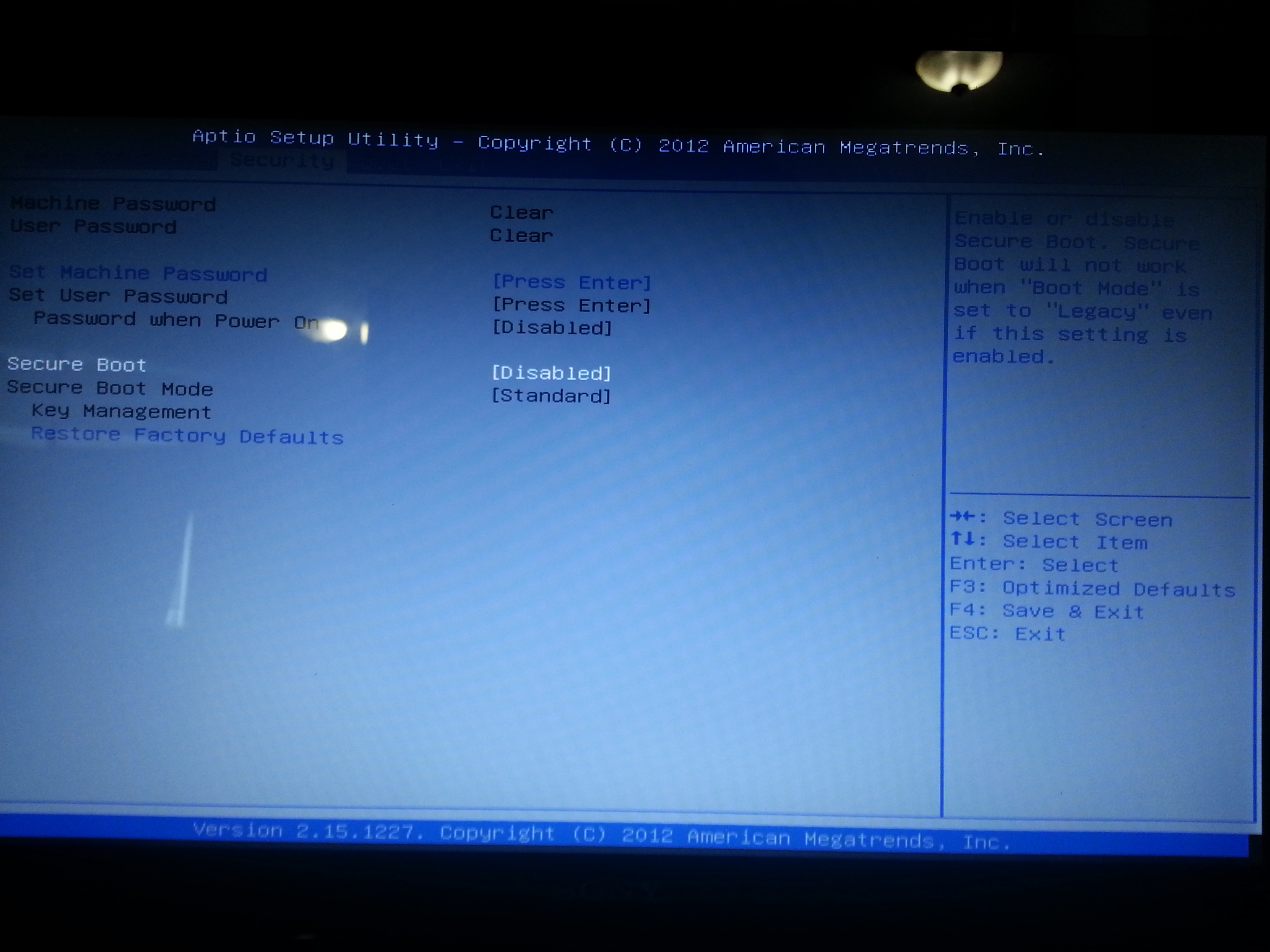
Aptio Setup Utility is the BIOS for my laptop.


Sony eSupport - SVE14A35CXH - Support
 

My Computer My Computer

At a glance

Windows Ultimate x64Intel Core 2 Duo TP5500 1.6Ghz3GBIntel 945 Chipset
Computer type
Laptop
Computer Manufacturer/Model Number
Dell D620
OS
Windows Ultimate x64
CPU
Intel Core 2 Duo TP5500 1.6Ghz
Memory
3GB
Graphics Card(s)
Intel 945 Chipset
Sound Card
HD Audio Device
Screen Resolution
1440x900
Hard Drives
80GB HDD
Internet Speed
25 down 5 up
Antivirus
Avast, Malwarebytes
Browser
Chrome
Did you read what I wrote ?

When a boot choice is that generic, there will be another place to set which Hard drive you want Primary - normally under Advanced BIOS options. I've never seen this not be the case.

Every connected drive is registered somewhere in the BIOS and near there should be the setting to choose which one is Primary. Look for where the SSD is registered.
 
Did you read what I wrote ?

When a boot choice is that generic, there will be another place to set which Hard drive you want Primary - normally under Advanced BIOS options. I've never seen this not be the case.

Every connected drive is registered somewhere in the BIOS and near there should be the setting to choose which one is Primary. Look for where the SSD is registered.

Yes I read your post Gregrocker,

Under the Advanced BIOS option, it says Intel (R) Visualization Technology Disabled.

This BIOS doesn't have much options compared to the D620 laptop that I use.

I'm not sure but what does it mean if you have the option to press F3:Optimized Defaults?

Under my BIOS, I set the internal Hard Disk Drive as first boot priority since that's where my SSD is located. After adding the HDD, there is a slight delay in boot but not much, by 1-5 seconds.
 

My Computer My Computer

At a glance

Windows Ultimate x64Intel Core 2 Duo TP5500 1.6Ghz3GBIntel 945 Chipset
Computer type
Laptop
Computer Manufacturer/Model Number
Dell D620
OS
Windows Ultimate x64
CPU
Intel Core 2 Duo TP5500 1.6Ghz
Memory
3GB
Graphics Card(s)
Intel 945 Chipset
Sound Card
HD Audio Device
Screen Resolution
1440x900
Hard Drives
80GB HDD
Internet Speed
25 down 5 up
Antivirus
Avast, Malwarebytes
Browser
Chrome
But there should be some other setting to tell the BIOS which hard drive to boot first, the SSD or HDD. Can you find that?

This is always the case if all HD's do not populate the Boot Priority list.
 
But there should be some other setting to tell the BIOS which hard drive to boot first, the SSD or HDD. Can you find that?

This is always the case if all HD's do not populate the Boot Priority list.

Unfortunately, there isn't a way to tell the BIOS which hard drive to boot first, SSD or HDD. In fact, it doesn't recognize the HDD in bios or the SSD. It just have the option to pick Internal Hard Disk Drive.


1.Internal Hard Disk Drive
2.External Device
3.Internal Optical Disc Drive
4.Network

(Please ignore the UEFI as boot mode, its set on Legacy)
6P05fJl.jpg

qXm2kis.jpg

3f6xomy.jpg

JpCE4JO.jpg
 

My Computer My Computer

At a glance

Windows Ultimate x64Intel Core 2 Duo TP5500 1.6Ghz3GBIntel 945 Chipset
Computer type
Laptop
Computer Manufacturer/Model Number
Dell D620
OS
Windows Ultimate x64
CPU
Intel Core 2 Duo TP5500 1.6Ghz
Memory
3GB
Graphics Card(s)
Intel 945 Chipset
Sound Card
HD Audio Device
Screen Resolution
1440x900
Hard Drives
80GB HDD
Internet Speed
25 down 5 up
Antivirus
Avast, Malwarebytes
Browser
Chrome
Are there other tabs to check? Which is Advanced tab?

Are both drives plugged in internally?

How is HD bay connected. Has it ever been recognized? Enable hardware auto-updating from Clean reinstall driver steps below. See if it loads a driver.

Try disconnecting rack and plugging both drives internally.
 
Are there other tabs to check? Which is Advanced tab?

Are both drives plugged in internally?

How is HD bay connected. Has it ever been recognized? Enable hardware auto-updating from Clean reinstall driver steps below. See if it loads a driver.

Try disconnecting rack and plugging both drives internally.

Here's the advance tab-

1L485zO.jpg


SSD is in the Hard Drive Bay , HDD is in the optical drive

Both drivers are recognized under the computer > Manage

not sure if clean reinstalling again since its a solid state drive so i have to do a ssd alignment?
 

My Computer My Computer

At a glance

Windows Ultimate x64Intel Core 2 Duo TP5500 1.6Ghz3GBIntel 945 Chipset
Computer type
Laptop
Computer Manufacturer/Model Number
Dell D620
OS
Windows Ultimate x64
CPU
Intel Core 2 Duo TP5500 1.6Ghz
Memory
3GB
Graphics Card(s)
Intel 945 Chipset
Sound Card
HD Audio Device
Screen Resolution
1440x900
Hard Drives
80GB HDD
Internet Speed
25 down 5 up
Antivirus
Avast, Malwarebytes
Browser
Chrome
Please answer all questions

Are there other tabs to check? Which is Advanced tab?

no other tabs to check. the advance tab is http://i.imgur.com/1L485zO.jpg

"MAIN" "ADVANCE" "SECURITY" "BOOT" "EXIT"

Are both drives plugged in internally?

yes ssd is in the hd bay and hdd in the optical drive using a caddy

How is HD bay connected. Has it ever been recognized? Enable hardware auto-updating from Clean reinstall driver steps below. See if it loads a driver.

I'm not sure what you mean by how the HD Bay is connected. SSD is in the HDD bay and the HDD is in the optical using a caddy. if ever recognized under bios, no but if recognized under computer management yes.
 

My Computer My Computer

At a glance

Windows Ultimate x64Intel Core 2 Duo TP5500 1.6Ghz3GBIntel 945 Chipset
Computer type
Laptop
Computer Manufacturer/Model Number
Dell D620
OS
Windows Ultimate x64
CPU
Intel Core 2 Duo TP5500 1.6Ghz
Memory
3GB
Graphics Card(s)
Intel 945 Chipset
Sound Card
HD Audio Device
Screen Resolution
1440x900
Hard Drives
80GB HDD
Internet Speed
25 down 5 up
Antivirus
Avast, Malwarebytes
Browser
Chrome
Go ahead and reset BIOS to defaults

reset bios to defaults just changed the boot mode from LEGACY to UEFI which I changed it back to LEGACY.
 

My Computer My Computer

At a glance

Windows Ultimate x64Intel Core 2 Duo TP5500 1.6Ghz3GBIntel 945 Chipset
Computer type
Laptop
Computer Manufacturer/Model Number
Dell D620
OS
Windows Ultimate x64
CPU
Intel Core 2 Duo TP5500 1.6Ghz
Memory
3GB
Graphics Card(s)
Intel 945 Chipset
Sound Card
HD Audio Device
Screen Resolution
1440x900
Hard Drives
80GB HDD
Internet Speed
25 down 5 up
Antivirus
Avast, Malwarebytes
Browser
Chrome
You could try UEFI install to see if pause goes away. Otherwise there may be a chip in caddy causing pause the DVD drive doesn't. I avoided this on my laptop upgrade using a larger SSD and external storage. You can achieve this easier with a very lean install, certainly without the OEM bloatware which no tech enthusiast would ruin an SSD install with. A perfect install is detailed in link below the picture below.
 
Back
Top