SSD controller?

Barso

New member
Local time
12:22 AM
Messages
27
I bought an OCZ vertex 3 and I have my OS installed to it.
My motherboard is an ASUS maximus IV P67.
I have my SSD connected to the intel sata port that uses the JMICRON controller as I read it was the better one.
But I know my SSD uses a sandforce controller also.
How do I know I am using the right controller for the SSD?
Thanks.
 

My Computer

Computer Manufacturer/Model Number
EVGA
OS
Windows 7 64bit
CPU
core i7 920
Motherboard
EVGA X58 classified
Memory
6GB G.SKILL
Graphics Card(s)
EVGA GTX295
Sound Card
Creative X-Fi soundblaster
Monitor(s) Displays
Samsung 240HD
Hard Drives
WD 1 TB Black caviar
PSU
Tagan 1100 piperock
Case
Coolermaster cosmos s
Cooling
wtaercooling
I bought an OCZ vertex 3 and I have my OS installed to it.
My motherboard is an ASUS maximus IV P67.
I have my SSD connected to the intel sata port that uses the JMICRON controller as I read it was the better one.
But I know my SSD uses a sandforce controller also.
How do I know I am using the right controller for the SSD?
Thanks.
Hello Barso
The controller built into the SSD is not the same as the SATA controller that you plug it into.
I have no manual available for your MB but the SATA controller that you plug into should be 6.0Gb/s capable.
You can find this info in your MB manual if you have one, otherwise you can download a manual for your MB from ASUSTeK Computer Inc. -Support-
I hope this helps you
 

My Computer

Computer Manufacturer/Model Number
Something I threw together
OS
Windows 7 Ultimate x64
CPU
Intel Core i7-2600K
Motherboard
Asus P8P67
Memory
16 GB G Skill F3-10666 CL9D-4GBRL
Graphics Card(s)
ATI Radeon HD 6870
Sound Card
ATI Radeon HDMI / Realtek ALC892
Monitor(s) Displays
2 x 22" standard monitors / LG32LC56v TV to watch films
Screen Resolution
1920 x1080
Hard Drives
2 x OCZ Vertex2 111.79GB
3 x Samsung103SJ
1 x Samsung103UJ
1 x WD3200BEVT
1 x Hitachi5K320-160
PSU
Thermaltake Toughpower Cable Management 750W
Case
Antec 300
Cooling
Noctua NH-U12P SE2 and 5 120mm Case fans
Keyboard
Microsoft Comfort Curve Keyboard 2000
Mouse
Hama M3110 / Logitech M305
Internet Speed
16000
Other Info
I have also used Fedora, Suse, Ubuntu Linux
And all other Windows from 95 to date except ME
The Jmicron controller is only 3Gb/s. It also may not support TRIM - which is important for your SSD to keep operating at top performance. Use one of the red SATA 6Gb/s ports and make sure you have them setup to use AHCI instead of IDE mode. If you don't already have them set to AHCI from when you installed Windows 7 , look for the tutorial here that tells you how to enable AHCi post-install.
 

My Computer

Computer type
PC/Desktop
Computer Manufacturer/Model Number
Home built (GeneO industries)/Model 4
OS
Windows 10 Pro. EFI boot partition, full EFI boot
CPU
i7 4770k 4.4GHz (44-44-43-43 turbo) @ 1.248V
Motherboard
ASUS Maximus VI Hero
Memory
16GB (8GBx2) @2200 MHz G.skill Sniper 10-11-10-30-1, 1.6V
Graphics Card(s)
MSI GTX 970 Gaming 4G
Sound Card
Onboard SupremeFX Audio
Monitor(s) Displays
NEC Spectraview 2490WUXi-SV
Screen Resolution
1920 x 1200
Hard Drives
Samsung 850 Pro 256GB (OS), Samsung 2x 128GB 840 Pro SSD in RAID0, 3x WD Blue 6Gb/s 1TB RAID0, WD 2TB Black external USB 3.0, 2TB WD20EARS Green external USB 3.0, 2x 500GB Seagate and 1 750 GB external USB, 1x 350GB external USB3
PSU
Seasonic X-850 (2012 KM3 model)
Case
Fractal Design Define R4
Cooling
NH-D14, NF-F12, NF-A15; NF-P14, NF-P12,NF-A14, S12A PWM
Keyboard
Cooler Master Storm Quickfire Rapid - Brown
Mouse
Logitech G602
Internet Speed
126.4 Mb/s down, 24.3 Mb/s up
Other Info
USB 3.0 x8 , SATA III x8, eSATA, USB 2.0 x6. Samsung DVD R/W drive.

WEI: CPU 7.8, Memory 7.9, Graphics 7.9, Disk 7.9
You need to use the 6GB port with the Marvell controller... no ifs ands or butts. JMicron is a 3GB port.
 

My Computer

OS
7 Ultimate x64
CPU
i5-2500k
Motherboard
Asus P8P67 Pro
Memory
8GB G.Skill Ripjaws X F3-12800CL7D-8GBXH 1866MHz 8-9-8-24
Graphics Card(s)
EVGA GTX 570 SC
Sound Card
X-Fi Titanium Fatality
Monitor(s) Displays
Samsung S27A550H 27" LED
Screen Resolution
1920x1080
Hard Drives
OCZ Vertex 3 120GB.
1TB Samsung F3.
2TB Samsung F4.
PSU
PC Power & Cooling Silencer 760
Case
Lian Li Lancool K62
Cooling
Thermalright Venomous X Black/Scythe S-Flex/Shin-Etsu X23
Keyboard
MS Natural Elite 4000 Ergonomic
Mouse
Logitech G500
Internet Speed
6MB/768
Other Info
Logitech Z-5500 505 watts.
D-Link DGL-4500.
Tripp-Lite Smart Pro 1500.
You need to use the 6GB port with the Marvell controller... no ifs ands or butts. JMicron is a 3GB port.

The Marvell may not support trim - last I hear was they don't. The board has both Intel and Marvell 6 Gb/s ports. Use one of the Intel 6 Gb/s ports. You will have to look in the manual to see which are Intel, which Marvell. Regardless, the Intel 6 Gb/s will be a better choice.

That is a nice board btw.

Here is the link for enabling AHCI mode if it isn't already enabled:

http://www.sevenforums.com/tutorials/61869-ahci-enable-windows-7-vista.html
 

My Computer

Computer type
PC/Desktop
Computer Manufacturer/Model Number
Home built (GeneO industries)/Model 4
OS
Windows 10 Pro. EFI boot partition, full EFI boot
CPU
i7 4770k 4.4GHz (44-44-43-43 turbo) @ 1.248V
Motherboard
ASUS Maximus VI Hero
Memory
16GB (8GBx2) @2200 MHz G.skill Sniper 10-11-10-30-1, 1.6V
Graphics Card(s)
MSI GTX 970 Gaming 4G
Sound Card
Onboard SupremeFX Audio
Monitor(s) Displays
NEC Spectraview 2490WUXi-SV
Screen Resolution
1920 x 1200
Hard Drives
Samsung 850 Pro 256GB (OS), Samsung 2x 128GB 840 Pro SSD in RAID0, 3x WD Blue 6Gb/s 1TB RAID0, WD 2TB Black external USB 3.0, 2TB WD20EARS Green external USB 3.0, 2x 500GB Seagate and 1 750 GB external USB, 1x 350GB external USB3
PSU
Seasonic X-850 (2012 KM3 model)
Case
Fractal Design Define R4
Cooling
NH-D14, NF-F12, NF-A15; NF-P14, NF-P12,NF-A14, S12A PWM
Keyboard
Cooler Master Storm Quickfire Rapid - Brown
Mouse
Logitech G602
Internet Speed
126.4 Mb/s down, 24.3 Mb/s up
Other Info
USB 3.0 x8 , SATA III x8, eSATA, USB 2.0 x6. Samsung DVD R/W drive.

WEI: CPU 7.8, Memory 7.9, Graphics 7.9, Disk 7.9
You need to use the 6GB port with the Marvell controller... no ifs ands or butts. JMicron is a 3GB port.

The Marvell may not support trim - last I hear was they don't. The board has both Intel and Marvell 6 Gb/s ports. Use one of the Intel 6 Gb/s ports. You will have to look in the manual to see which are Intel, which Marvell. Regardless, the Intel 6 Gb/s will be a better choice.

That is a nice board btw.

Here is the link for enabling AHCI mode if it isn't already enabled:

http://www.sevenforums.com/tutorials/61869-ahci-enable-windows-7-vista.html
True enough... :( Marvell doesn't support Trim. I just switched to the Intel controller (gray ports) and now it seems I'm stuck with the Microsoft driver as there doesn't seem to be a way to get the Intel driver to install without reinstalling the OS... but at least now I have Trim. The question is whether or not to reinstall to get the ~5% performance increase the Intel driver would provide?
 

My Computer

OS
7 Ultimate x64
CPU
i5-2500k
Motherboard
Asus P8P67 Pro
Memory
8GB G.Skill Ripjaws X F3-12800CL7D-8GBXH 1866MHz 8-9-8-24
Graphics Card(s)
EVGA GTX 570 SC
Sound Card
X-Fi Titanium Fatality
Monitor(s) Displays
Samsung S27A550H 27" LED
Screen Resolution
1920x1080
Hard Drives
OCZ Vertex 3 120GB.
1TB Samsung F3.
2TB Samsung F4.
PSU
PC Power & Cooling Silencer 760
Case
Lian Li Lancool K62
Cooling
Thermalright Venomous X Black/Scythe S-Flex/Shin-Etsu X23
Keyboard
MS Natural Elite 4000 Ergonomic
Mouse
Logitech G500
Internet Speed
6MB/768
Other Info
Logitech Z-5500 505 watts.
D-Link DGL-4500.
Tripp-Lite Smart Pro 1500.

My Computer

Computer type
PC/Desktop
Computer Manufacturer/Model Number
Custom Built
OS
Windows 10 Pro x64, Windows 8.1 Pro x64, Windows 7 Ultimate x64 SP1,
CPU
INTEL i9-7920X LGA 2066
Motherboard
Gigabyte X299-WU8 F3
Memory
64 GB (4 X 16 GB) G-Skill V Series DDR4 3200 Quad Channel
Graphics Card(s)
EVGA GTX 1060 SC 3 GB
Sound Card
Realtek Onboard ALC1220
Monitor(s) Displays
2 x Samsung S27E310
Screen Resolution
1920x1080
Hard Drives
Samsung 2 x 970 EVO Plus 500 GB NVMe
1 x 6TB WD 6003FZBX SATA
1 x 6TB WD 60EFRX SATA
12 x 3TB WD 30EFRX SATA
PSU
Seasonic X-1050
Case
Thermaltake Armor+
Cooling
Corsair H80i V2 Liquid AOI Cooler
Keyboard
Logitech G510s
Mouse
Logitech MX Master 2S
Internet Speed
200 Mb/s
Antivirus
ESET NOD32 13.1
Browser
EDGE (Dev, Canary, Beta), Chrome
Other Info
ASUS RT-AC68U router
Malwarebytes 4.0.4
You need to use the 6GB port with the Marvell controller... no ifs ands or butts. JMicron is a 3GB port.

The Marvell may not support trim - last I hear was they don't. The board has both Intel and Marvell 6 Gb/s ports. Use one of the Intel 6 Gb/s ports. You will have to look in the manual to see which are Intel, which Marvell. Regardless, the Intel 6 Gb/s will be a better choice.

That is a nice board btw.

Here is the link for enabling AHCI mode if it isn't already enabled:

http://www.sevenforums.com/tutorials/61869-ahci-enable-windows-7-vista.html
True enough... :( Marvell doesn't support Trim. I just switched to the Intel controller (gray ports) and now it seems I'm stuck with the Microsoft driver as there doesn't seem to be a way to get the Intel driver to install without reinstalling the OS... but at least now I have Trim. The question is whether or not to reinstall to get the ~5% performance increase the Intel driver would provide?

You should be able to do that. I know I did when experimenting around between the Microsoft and Intel drivers. Don't remember the details though - maybe it was installing from the device manager -> properties menu. I think the Microsoft are fine as long as you don't need RAID.
 

My Computer

Computer type
PC/Desktop
Computer Manufacturer/Model Number
Home built (GeneO industries)/Model 4
OS
Windows 10 Pro. EFI boot partition, full EFI boot
CPU
i7 4770k 4.4GHz (44-44-43-43 turbo) @ 1.248V
Motherboard
ASUS Maximus VI Hero
Memory
16GB (8GBx2) @2200 MHz G.skill Sniper 10-11-10-30-1, 1.6V
Graphics Card(s)
MSI GTX 970 Gaming 4G
Sound Card
Onboard SupremeFX Audio
Monitor(s) Displays
NEC Spectraview 2490WUXi-SV
Screen Resolution
1920 x 1200
Hard Drives
Samsung 850 Pro 256GB (OS), Samsung 2x 128GB 840 Pro SSD in RAID0, 3x WD Blue 6Gb/s 1TB RAID0, WD 2TB Black external USB 3.0, 2TB WD20EARS Green external USB 3.0, 2x 500GB Seagate and 1 750 GB external USB, 1x 350GB external USB3
PSU
Seasonic X-850 (2012 KM3 model)
Case
Fractal Design Define R4
Cooling
NH-D14, NF-F12, NF-A15; NF-P14, NF-P12,NF-A14, S12A PWM
Keyboard
Cooler Master Storm Quickfire Rapid - Brown
Mouse
Logitech G602
Internet Speed
126.4 Mb/s down, 24.3 Mb/s up
Other Info
USB 3.0 x8 , SATA III x8, eSATA, USB 2.0 x6. Samsung DVD R/W drive.

WEI: CPU 7.8, Memory 7.9, Graphics 7.9, Disk 7.9
Yes, you "should" be able to do that, but, I've been trying for several hours to find someone or somewhere that has accomplished this mythic feat. Going through the device manager doesn't work.
 

My Computer

OS
7 Ultimate x64
CPU
i5-2500k
Motherboard
Asus P8P67 Pro
Memory
8GB G.Skill Ripjaws X F3-12800CL7D-8GBXH 1866MHz 8-9-8-24
Graphics Card(s)
EVGA GTX 570 SC
Sound Card
X-Fi Titanium Fatality
Monitor(s) Displays
Samsung S27A550H 27" LED
Screen Resolution
1920x1080
Hard Drives
OCZ Vertex 3 120GB.
1TB Samsung F3.
2TB Samsung F4.
PSU
PC Power & Cooling Silencer 760
Case
Lian Li Lancool K62
Cooling
Thermalright Venomous X Black/Scythe S-Flex/Shin-Etsu X23
Keyboard
MS Natural Elite 4000 Ergonomic
Mouse
Logitech G500
Internet Speed
6MB/768
Other Info
Logitech Z-5500 505 watts.
D-Link DGL-4500.
Tripp-Lite Smart Pro 1500.
I think you have to install the intel rapid storage technology, which should be a download from Asus.
 

My Computers

System One System Two

  • Computer type
    PC/Desktop
    Computer Manufacturer/Model Number
    ALWAYS UNDER CONSTRUCTION
    OS
    Windows 11 Pro
    CPU
    Ryzen 9 5900X
    Motherboard
    Asus X570 Crosshair Viii Hero
    Memory
    32GB G Skill DDR4-3600
    Graphics Card(s)
    EVGA RTX 3080 FTW 3 Ultra
    Sound Card
    On Board/Sennheiser PC37X Headset
    Monitor(s) Displays
    3 X Asus 27"
    Screen Resolution
    2560x1440
    Hard Drives
    2 X 1 TB NVME drives
    PSU
    EVGA 850
    Case
    Phanteks Eclipse P400A
    Cooling
    EVGA 280 AIO
    Keyboard
    Logitech G510s/ Logitech G13
    Mouse
    Logitech G502
    Internet Speed
    24/1
    Antivirus
    ESET/MBAM Pro/SAS Pro
    Browser
    Chrome/ Firefox/ Edge
  • Computer type
    Laptop
    System Manufacturer/Model Number
    Dell 16 Plus
    OS
    Windows 11 Pro
    CPU
    Intel Ultra 9 288V
    Memory
    32 GB LPDDR5X 8533
    Monitor(s) Displays
    16" Mini-LED HDR600 Touch 90 Hz
    Screen Resolution
    2560X1600
    Hard Drives
    1 TB NVME
Intel RST has been installed and is working just fine. Missing drivers isn't the issue... the issue is that the device manager sees the MS driver as the latest, which it is, and even when I point it to the Intel drivers, it refuses to install them, only saying that I already have the latest drivers. At this point, the only option I have is "close"... there is no way I can find to force the install.

I've been googling this since I discovered Trim doesn't work with the Marvell driver and I switched to the Intel 6GB port. I'm not sure why this is the case, but so far it is.
 

My Computer

OS
7 Ultimate x64
CPU
i5-2500k
Motherboard
Asus P8P67 Pro
Memory
8GB G.Skill Ripjaws X F3-12800CL7D-8GBXH 1866MHz 8-9-8-24
Graphics Card(s)
EVGA GTX 570 SC
Sound Card
X-Fi Titanium Fatality
Monitor(s) Displays
Samsung S27A550H 27" LED
Screen Resolution
1920x1080
Hard Drives
OCZ Vertex 3 120GB.
1TB Samsung F3.
2TB Samsung F4.
PSU
PC Power & Cooling Silencer 760
Case
Lian Li Lancool K62
Cooling
Thermalright Venomous X Black/Scythe S-Flex/Shin-Etsu X23
Keyboard
MS Natural Elite 4000 Ergonomic
Mouse
Logitech G500
Internet Speed
6MB/768
Other Info
Logitech Z-5500 505 watts.
D-Link DGL-4500.
Tripp-Lite Smart Pro 1500.
Just as a suggestion uninstall the RST. reinstall it. I agree that you should be able to choose. That's the way my system works.
 

My Computers

System One System Two

  • Computer type
    PC/Desktop
    Computer Manufacturer/Model Number
    ALWAYS UNDER CONSTRUCTION
    OS
    Windows 11 Pro
    CPU
    Ryzen 9 5900X
    Motherboard
    Asus X570 Crosshair Viii Hero
    Memory
    32GB G Skill DDR4-3600
    Graphics Card(s)
    EVGA RTX 3080 FTW 3 Ultra
    Sound Card
    On Board/Sennheiser PC37X Headset
    Monitor(s) Displays
    3 X Asus 27"
    Screen Resolution
    2560x1440
    Hard Drives
    2 X 1 TB NVME drives
    PSU
    EVGA 850
    Case
    Phanteks Eclipse P400A
    Cooling
    EVGA 280 AIO
    Keyboard
    Logitech G510s/ Logitech G13
    Mouse
    Logitech G502
    Internet Speed
    24/1
    Antivirus
    ESET/MBAM Pro/SAS Pro
    Browser
    Chrome/ Firefox/ Edge
  • Computer type
    Laptop
    System Manufacturer/Model Number
    Dell 16 Plus
    OS
    Windows 11 Pro
    CPU
    Intel Ultra 9 288V
    Memory
    32 GB LPDDR5X 8533
    Monitor(s) Displays
    16" Mini-LED HDR600 Touch 90 Hz
    Screen Resolution
    2560X1600
    Hard Drives
    1 TB NVME
I would... if there were any hope that uninstalling the RST driver would also uninstall the MS achi driver, but it would not. I would still be left with the MS ahci driver. :(
 

My Computer

OS
7 Ultimate x64
CPU
i5-2500k
Motherboard
Asus P8P67 Pro
Memory
8GB G.Skill Ripjaws X F3-12800CL7D-8GBXH 1866MHz 8-9-8-24
Graphics Card(s)
EVGA GTX 570 SC
Sound Card
X-Fi Titanium Fatality
Monitor(s) Displays
Samsung S27A550H 27" LED
Screen Resolution
1920x1080
Hard Drives
OCZ Vertex 3 120GB.
1TB Samsung F3.
2TB Samsung F4.
PSU
PC Power & Cooling Silencer 760
Case
Lian Li Lancool K62
Cooling
Thermalright Venomous X Black/Scythe S-Flex/Shin-Etsu X23
Keyboard
MS Natural Elite 4000 Ergonomic
Mouse
Logitech G500
Internet Speed
6MB/768
Other Info
Logitech Z-5500 505 watts.
D-Link DGL-4500.
Tripp-Lite Smart Pro 1500.
When you tried to switch ahci drivers was iastor listed?
 

My Computers

System One System Two

  • Computer type
    PC/Desktop
    Computer Manufacturer/Model Number
    ALWAYS UNDER CONSTRUCTION
    OS
    Windows 11 Pro
    CPU
    Ryzen 9 5900X
    Motherboard
    Asus X570 Crosshair Viii Hero
    Memory
    32GB G Skill DDR4-3600
    Graphics Card(s)
    EVGA RTX 3080 FTW 3 Ultra
    Sound Card
    On Board/Sennheiser PC37X Headset
    Monitor(s) Displays
    3 X Asus 27"
    Screen Resolution
    2560x1440
    Hard Drives
    2 X 1 TB NVME drives
    PSU
    EVGA 850
    Case
    Phanteks Eclipse P400A
    Cooling
    EVGA 280 AIO
    Keyboard
    Logitech G510s/ Logitech G13
    Mouse
    Logitech G502
    Internet Speed
    24/1
    Antivirus
    ESET/MBAM Pro/SAS Pro
    Browser
    Chrome/ Firefox/ Edge
  • Computer type
    Laptop
    System Manufacturer/Model Number
    Dell 16 Plus
    OS
    Windows 11 Pro
    CPU
    Intel Ultra 9 288V
    Memory
    32 GB LPDDR5X 8533
    Monitor(s) Displays
    16" Mini-LED HDR600 Touch 90 Hz
    Screen Resolution
    2560X1600
    Hard Drives
    1 TB NVME
No, iastore isn't listed under the Vertex 3 because previously I was using the Marvell driver; however, it was installed prior to switching and it was showing up in the taskbar.

The iastoreUI always displayed my storage drive and my optical drive.. but not my ssd until I started using the Intel sata port... now it shows up.

What steps did you go through to switch drivers?

edit

I've tried a few times a few different ways of getting this driver in. Manually through the device manager and online with Intel update utility. I ran the update utility from Intel's site and from the local machine... I also heard that it wouldn't stick if you tried using an internal hdd or an optical drive (since they were connected to sata ports and this would apparently cause a problem) so I tried it the way they recommend... off a flash drive. No joy.

So far, what I've read is that the "only" way to get the Intel ahci driver installed is to do it while Windows is installing. If you know of some vodoo ... :D I'm all ears.
 

My Computer

OS
7 Ultimate x64
CPU
i5-2500k
Motherboard
Asus P8P67 Pro
Memory
8GB G.Skill Ripjaws X F3-12800CL7D-8GBXH 1866MHz 8-9-8-24
Graphics Card(s)
EVGA GTX 570 SC
Sound Card
X-Fi Titanium Fatality
Monitor(s) Displays
Samsung S27A550H 27" LED
Screen Resolution
1920x1080
Hard Drives
OCZ Vertex 3 120GB.
1TB Samsung F3.
2TB Samsung F4.
PSU
PC Power & Cooling Silencer 760
Case
Lian Li Lancool K62
Cooling
Thermalright Venomous X Black/Scythe S-Flex/Shin-Etsu X23
Keyboard
MS Natural Elite 4000 Ergonomic
Mouse
Logitech G500
Internet Speed
6MB/768
Other Info
Logitech Z-5500 505 watts.
D-Link DGL-4500.
Tripp-Lite Smart Pro 1500.
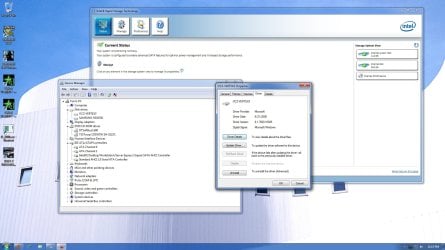
This is how it looks now.
 

Attachments

  • sata.jpg
    sata.jpg
    183.9 KB · Views: 67

My Computer

OS
7 Ultimate x64
CPU
i5-2500k
Motherboard
Asus P8P67 Pro
Memory
8GB G.Skill Ripjaws X F3-12800CL7D-8GBXH 1866MHz 8-9-8-24
Graphics Card(s)
EVGA GTX 570 SC
Sound Card
X-Fi Titanium Fatality
Monitor(s) Displays
Samsung S27A550H 27" LED
Screen Resolution
1920x1080
Hard Drives
OCZ Vertex 3 120GB.
1TB Samsung F3.
2TB Samsung F4.
PSU
PC Power & Cooling Silencer 760
Case
Lian Li Lancool K62
Cooling
Thermalright Venomous X Black/Scythe S-Flex/Shin-Etsu X23
Keyboard
MS Natural Elite 4000 Ergonomic
Mouse
Logitech G500
Internet Speed
6MB/768
Other Info
Logitech Z-5500 505 watts.
D-Link DGL-4500.
Tripp-Lite Smart Pro 1500.
Fumz, did you ever get the iastor driver installed?
 

My Computers

System One System Two

  • Computer type
    PC/Desktop
    Computer Manufacturer/Model Number
    ALWAYS UNDER CONSTRUCTION
    OS
    Windows 11 Pro
    CPU
    Ryzen 9 5900X
    Motherboard
    Asus X570 Crosshair Viii Hero
    Memory
    32GB G Skill DDR4-3600
    Graphics Card(s)
    EVGA RTX 3080 FTW 3 Ultra
    Sound Card
    On Board/Sennheiser PC37X Headset
    Monitor(s) Displays
    3 X Asus 27"
    Screen Resolution
    2560x1440
    Hard Drives
    2 X 1 TB NVME drives
    PSU
    EVGA 850
    Case
    Phanteks Eclipse P400A
    Cooling
    EVGA 280 AIO
    Keyboard
    Logitech G510s/ Logitech G13
    Mouse
    Logitech G502
    Internet Speed
    24/1
    Antivirus
    ESET/MBAM Pro/SAS Pro
    Browser
    Chrome/ Firefox/ Edge
  • Computer type
    Laptop
    System Manufacturer/Model Number
    Dell 16 Plus
    OS
    Windows 11 Pro
    CPU
    Intel Ultra 9 288V
    Memory
    32 GB LPDDR5X 8533
    Monitor(s) Displays
    16" Mini-LED HDR600 Touch 90 Hz
    Screen Resolution
    2560X1600
    Hard Drives
    1 TB NVME
Yeah, I ended up doing a clean install and loaded the Intel drivers during the install.

However, while all this was going on I got an Asus rep to say, in writing, that the Marvell controller supports Trim. I am currently pressing her on whether or not the Marvell driver passes along the signal. She's been a good sport, I can't wait for her reply. It's been a 5 mail back and forth getting what I thought was a really simple question answered.
 

My Computer

OS
7 Ultimate x64
CPU
i5-2500k
Motherboard
Asus P8P67 Pro
Memory
8GB G.Skill Ripjaws X F3-12800CL7D-8GBXH 1866MHz 8-9-8-24
Graphics Card(s)
EVGA GTX 570 SC
Sound Card
X-Fi Titanium Fatality
Monitor(s) Displays
Samsung S27A550H 27" LED
Screen Resolution
1920x1080
Hard Drives
OCZ Vertex 3 120GB.
1TB Samsung F3.
2TB Samsung F4.
PSU
PC Power & Cooling Silencer 760
Case
Lian Li Lancool K62
Cooling
Thermalright Venomous X Black/Scythe S-Flex/Shin-Etsu X23
Keyboard
MS Natural Elite 4000 Ergonomic
Mouse
Logitech G500
Internet Speed
6MB/768
Other Info
Logitech Z-5500 505 watts.
D-Link DGL-4500.
Tripp-Lite Smart Pro 1500.
Your drivers are setup correctly according to the screen you provided. Any SSD with Sandforce controllers should always be setup on the Intel P67 chipset that supports the M4E board.

Really nice board, just finishing up my review for this board for ASUS and it is worth the money for the features it brings.
 

My Computer

Computer Manufacturer/Model Number
My Build
OS
win7 Ult 64
CPU
i7 3930K & 3960X
Motherboard
ASUS P9X79 Deluxe
Memory
16GB G-Skill 2133MHz
Graphics Card(s)
Sapphire HD 7970
Sound Card
On-board
Monitor(s) Displays
ASUS 27 inch
Screen Resolution
1920X1080
Hard Drives
Crucial M4 256GB, 1.5TB WD Black for Data/Images
PSU
Corsair AX1200
Case
NZXT 810
Cooling
Custom Loop, Swiftech HDBlock
Keyboard
Mionix
Mouse
Mionix
Internet Speed
Cable
Your drivers are setup correctly according to the screen you provided. Any SSD with Sandforce controllers should always be setup on the Intel P67 chipset that supports the M4E board.

Really nice board, just finishing up my review for this board for ASUS and it is worth the money for the features it brings.

I think it is too. I looked real hard at it before I bought the Asrock extreme4. It has just about all the features you need. Asus did good on that board.
 

My Computers

System One System Two

  • Computer type
    PC/Desktop
    Computer Manufacturer/Model Number
    ALWAYS UNDER CONSTRUCTION
    OS
    Windows 11 Pro
    CPU
    Ryzen 9 5900X
    Motherboard
    Asus X570 Crosshair Viii Hero
    Memory
    32GB G Skill DDR4-3600
    Graphics Card(s)
    EVGA RTX 3080 FTW 3 Ultra
    Sound Card
    On Board/Sennheiser PC37X Headset
    Monitor(s) Displays
    3 X Asus 27"
    Screen Resolution
    2560x1440
    Hard Drives
    2 X 1 TB NVME drives
    PSU
    EVGA 850
    Case
    Phanteks Eclipse P400A
    Cooling
    EVGA 280 AIO
    Keyboard
    Logitech G510s/ Logitech G13
    Mouse
    Logitech G502
    Internet Speed
    24/1
    Antivirus
    ESET/MBAM Pro/SAS Pro
    Browser
    Chrome/ Firefox/ Edge
  • Computer type
    Laptop
    System Manufacturer/Model Number
    Dell 16 Plus
    OS
    Windows 11 Pro
    CPU
    Intel Ultra 9 288V
    Memory
    32 GB LPDDR5X 8533
    Monitor(s) Displays
    16" Mini-LED HDR600 Touch 90 Hz
    Screen Resolution
    2560X1600
    Hard Drives
    1 TB NVME
Back
Top