SSD crashed during conversion from MBR to GPT

gptokyo

New member
Local time
10:54 PM
Messages
7
[FONT=&quot]I am a PC novice using Windows 7. I had a problem with my old Lenovo x200 and asked a PC support firm to install the SSD into another Lenovo x200. That was successful, and the PC was working fine. Unfortunately when I asked them to make a copy of the SSD onto a hard drive, the system shut down, leaving a blue screen. This evidently happened when they tried to convert MBR to GPT. They tried making a clone and going back to MBR, and then tried applying a recovery system using GPT. Neither of those methods worked. The data itself is saved, so they tell me I can do a clean install and start over. But that would start me from square one (not to mention that I no longer have the recovery disk for Windows 7 OS or Office). It's frustrating since the PC was operating perfectly normally until they tried copying the SSD. It's possible that the PC firm here in Japan may not have access to all the needed info, so I would appreciate any suggestions here. Many thanks in advance. [/FONT]
 

My Computers My Computers

System One System Two

  • Computer type
    PC/Desktop
    OS
    Windows 10 pro 21H1 x64
  • Computer type
    PC/Desktop
What have you got?

Do you have a ssd gpt style that doesnt work?

Do you have a ssd mbr style that doesn't work ?

Do you have both?

Do you have the key for ms office saved? What version is it?

What is the data saved onto?
 

My Computers My Computers

System One System Two

  • Computer type
    PC/Desktop
    OS
    7 X64
    CPU
    i5 8400
    Motherboard
    gigabyte b365m ds3h
    Memory
    2x8gb 3200mhz
    Hard Drives
    various
    PSU
    pure power 11 400w cm
    Case
    Coolermaster
    Cooling
    cryorig m9i
  • Computer type
    PC/Desktop
    OS
    7x64
    CPU
    g5400
    Motherboard
    ga b365m ds3h
    Memory
    8gb ddr4 2400
    PSU
    xfx pro 450w
Thanks for the quick response.

(1) I'll need to ask the PC repair place, but the original SSD was MBR style. They tried to convert that to GPT in order to copy it onto an external drive. That caused the SSD to become inoperable; all that appears is a blue screen. The info on the screen says:

1: ATA HDD0 Model WDC WD5000LPCX-22VHAT0-(S --> No valid operating system

(2) I was using MS Office 2003. I do not have the key. I am using that version as well on a separate PC; I don't know if that is transferrable to another PC.

(3) The data is saved on an external HDD.

I appreciate the help.
 

My Computers My Computers

System One System Two

  • Computer type
    PC/Desktop
    OS
    Windows 10 pro 21H1 x64
  • Computer type
    PC/Desktop
Please edit your profile with ALL your hardware specs. It will help us to help you
System Info - See Your System Specs


UEFI-GPT requires a computer with UEFI BIOS. As it seems that you have a quite old that doesn't have UEFI BIOS.
It is quite easy to convert it back to MBR from GPT.

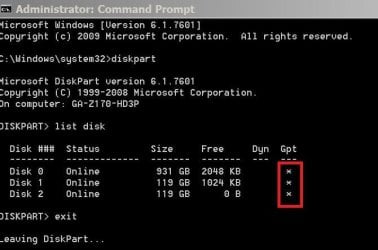
First of all you must find out if the SSD is GPT or MBR
Boot from a Win 7 or Win 10 installation disk.
At the Windows Setup screen, press Shift+F10 simultaneously to open a command line prompt and type
Diskpart
list disk (take note if the last column (GPT)) has a * indicating it is a GPT drive)
exit

List_Disk.JPG
 

My Computers My Computers

System One System Two

  • Computer type
    PC/Desktop
    Computer Manufacturer/Model Number
    custom build
    OS
    Windows 7 HP 64
    CPU
    i5 6600K - 800MHz to 4200MHz
    Motherboard
    GA-Z170-HD3P
    Memory
    4+4G GSkill DDR4 3000
    Graphics Card(s)
    IG - Intel 530
    Monitor(s) Displays
    Samsung 226BW
    Screen Resolution
    1680x1050
    Hard Drives
    (1) -1 SM951 – 128GB M.2 AHCI PCIe SSD drive for Windows 7 and Lubuntu
    (2) -1 WD SATA 3 - 1T for Data
    (3) -1 WD SATA 3 - 1T for backup
    PSU
    Thermaltake 450W TR2 gold
    Keyboard
    Old and good Chicony mechanical keyboard
    Mouse
    Logitech mX performance - 9 buttons (had to disable some)
    Internet Speed
    500Mb/s
    Browser
    Firefox 64
    Other Info
    TinyWall firewall
  • Computer type
    Laptop
    System Manufacturer/Model Number
    Asus Q550LF
    OS
    Windows 7 Pro
    CPU
    i7-4500U 800MHz to 3.0GHz
    Motherboard
    Asus Q550LF
    Memory
    (4+4)G DDR3 1600
    Graphics Card(s)
    IG intel 4400 + NVIDIA GeForce GT 745M
    Sound Card
    Realtek
    Monitor(s) Displays
    LG Display LP156WF4-SPH1
    Screen Resolution
    1920 x 1080
    Hard Drives
    BX500 120G SSD for Windows and programs +
    1T HDD for data
    Internet Speed
    500 Mb/s
    Browser
    Firefox
    Other Info
    TinyWall firewall
Thank you for the great suggestion. I will ask the PC repair shop for the information and list that later.

The SSD is MBR style. [FONT=&quot]They tried to convert that to GPT in order to copy it onto an external drive. That caused the SSD to become inoperable; all that appears is a blue screen.

I appreciate the help. [/FONT]
 

My Computers My Computers

System One System Two

  • Computer type
    PC/Desktop
    OS
    Windows 10 pro 21H1 x64
  • Computer type
    PC/Desktop
Did you run the instructed CMD?

First of all you must find out if the SSD is GPT or MBR
Boot from a Win 7 or Win 10 installation disk.
At the Windows Setup screen, press Shift+F10 simultaneously to open a command line prompt and type
Diskpart
list disk (take note if the last column (GPT)) has a * indicating it is a GPT drive)
exit
 

My Computers My Computers

System One System Two

  • Computer type
    PC/Desktop
    Computer Manufacturer/Model Number
    custom build
    OS
    Windows 7 HP 64
    CPU
    i5 6600K - 800MHz to 4200MHz
    Motherboard
    GA-Z170-HD3P
    Memory
    4+4G GSkill DDR4 3000
    Graphics Card(s)
    IG - Intel 530
    Monitor(s) Displays
    Samsung 226BW
    Screen Resolution
    1680x1050
    Hard Drives
    (1) -1 SM951 – 128GB M.2 AHCI PCIe SSD drive for Windows 7 and Lubuntu
    (2) -1 WD SATA 3 - 1T for Data
    (3) -1 WD SATA 3 - 1T for backup
    PSU
    Thermaltake 450W TR2 gold
    Keyboard
    Old and good Chicony mechanical keyboard
    Mouse
    Logitech mX performance - 9 buttons (had to disable some)
    Internet Speed
    500Mb/s
    Browser
    Firefox 64
    Other Info
    TinyWall firewall
  • Computer type
    Laptop
    System Manufacturer/Model Number
    Asus Q550LF
    OS
    Windows 7 Pro
    CPU
    i7-4500U 800MHz to 3.0GHz
    Motherboard
    Asus Q550LF
    Memory
    (4+4)G DDR3 1600
    Graphics Card(s)
    IG intel 4400 + NVIDIA GeForce GT 745M
    Sound Card
    Realtek
    Monitor(s) Displays
    LG Display LP156WF4-SPH1
    Screen Resolution
    1920 x 1080
    Hard Drives
    BX500 120G SSD for Windows and programs +
    1T HDD for data
    Internet Speed
    500 Mb/s
    Browser
    Firefox
    Other Info
    TinyWall firewall
Thank you for the suggestion. I will pass that on to the PC repair shop and give it a try.

I appreciate the help.
 

My Computers My Computers

System One System Two

  • Computer type
    PC/Desktop
    OS
    Windows 10 pro 21H1 x64
  • Computer type
    PC/Desktop
You should do it yourself or change the PC repair shop you're using. They don't know what they are doing and have already made your computer un boot able.
 

My Computers My Computers

System One System Two

  • Computer type
    PC/Desktop
    Computer Manufacturer/Model Number
    custom build
    OS
    Windows 7 HP 64
    CPU
    i5 6600K - 800MHz to 4200MHz
    Motherboard
    GA-Z170-HD3P
    Memory
    4+4G GSkill DDR4 3000
    Graphics Card(s)
    IG - Intel 530
    Monitor(s) Displays
    Samsung 226BW
    Screen Resolution
    1680x1050
    Hard Drives
    (1) -1 SM951 – 128GB M.2 AHCI PCIe SSD drive for Windows 7 and Lubuntu
    (2) -1 WD SATA 3 - 1T for Data
    (3) -1 WD SATA 3 - 1T for backup
    PSU
    Thermaltake 450W TR2 gold
    Keyboard
    Old and good Chicony mechanical keyboard
    Mouse
    Logitech mX performance - 9 buttons (had to disable some)
    Internet Speed
    500Mb/s
    Browser
    Firefox 64
    Other Info
    TinyWall firewall
  • Computer type
    Laptop
    System Manufacturer/Model Number
    Asus Q550LF
    OS
    Windows 7 Pro
    CPU
    i7-4500U 800MHz to 3.0GHz
    Motherboard
    Asus Q550LF
    Memory
    (4+4)G DDR3 1600
    Graphics Card(s)
    IG intel 4400 + NVIDIA GeForce GT 745M
    Sound Card
    Realtek
    Monitor(s) Displays
    LG Display LP156WF4-SPH1
    Screen Resolution
    1920 x 1080
    Hard Drives
    BX500 120G SSD for Windows and programs +
    1T HDD for data
    Internet Speed
    500 Mb/s
    Browser
    Firefox
    Other Info
    TinyWall firewall
I may not have explained myself well. Let me try again.

During conversion from MBR to GPT, a blue screen appeared and the PC experienced forced termination, making it impossible to boot the OS. Files such as user folders are still visible by connecting to another PC. Since the data is still there, the PC repair shop suspects that the file system was damaged. They then created a clone HDD. While cloning, the file system was converted by the cloning software. After converting from GPT to MBR, the clone was created, but the OS cannot be started.

The shop pointed out that while the file system can normally be converted using the standard Windows functions, that is premised on the SSD and HDD formats.

Respondents seem to be proposing a clean installation of the OS after converting and formatting the SSD to MBR. However, if the recovery media required for a clean OS installation is Windows 7, which is no longer available from the manufacturer, the OS can’t be booted even if the SSD file system is converted.

GPT has already been converted to MBR. The shop says it has no choice but to perform a clean OS installation, but recovery is impossible since there is no recovery media. Is there any way to accomplish this while leaving currently installed OS data bootable as is?

I would appreciate any help.
 

My Computers My Computers

System One System Two

  • Computer type
    PC/Desktop
    OS
    Windows 10 pro 21H1 x64
  • Computer type
    PC/Desktop
I wold say that the shop doesn't know what they are talking about.
I think you can make it boot able. Don't you want to try to fix it?
 

My Computers My Computers

System One System Two

  • Computer type
    PC/Desktop
    Computer Manufacturer/Model Number
    custom build
    OS
    Windows 7 HP 64
    CPU
    i5 6600K - 800MHz to 4200MHz
    Motherboard
    GA-Z170-HD3P
    Memory
    4+4G GSkill DDR4 3000
    Graphics Card(s)
    IG - Intel 530
    Monitor(s) Displays
    Samsung 226BW
    Screen Resolution
    1680x1050
    Hard Drives
    (1) -1 SM951 – 128GB M.2 AHCI PCIe SSD drive for Windows 7 and Lubuntu
    (2) -1 WD SATA 3 - 1T for Data
    (3) -1 WD SATA 3 - 1T for backup
    PSU
    Thermaltake 450W TR2 gold
    Keyboard
    Old and good Chicony mechanical keyboard
    Mouse
    Logitech mX performance - 9 buttons (had to disable some)
    Internet Speed
    500Mb/s
    Browser
    Firefox 64
    Other Info
    TinyWall firewall
  • Computer type
    Laptop
    System Manufacturer/Model Number
    Asus Q550LF
    OS
    Windows 7 Pro
    CPU
    i7-4500U 800MHz to 3.0GHz
    Motherboard
    Asus Q550LF
    Memory
    (4+4)G DDR3 1600
    Graphics Card(s)
    IG intel 4400 + NVIDIA GeForce GT 745M
    Sound Card
    Realtek
    Monitor(s) Displays
    LG Display LP156WF4-SPH1
    Screen Resolution
    1920 x 1080
    Hard Drives
    BX500 120G SSD for Windows and programs +
    1T HDD for data
    Internet Speed
    500 Mb/s
    Browser
    Firefox
    Other Info
    TinyWall firewall
I'm just sitting here, wondering what kind of Mickey Mouse cloning software that shop is using that would even try to change the basic format of the drive being cloned! Maybe not in Japan, but here in my world, Florida USA, that's unheard of!!!

I'm still using a Backup/Restore/Clone program that came out of New Zealand back in 1997, that I've used to clone hundreds of HD's of all brands and types, with NEVER a problem. That program is simply called "Ghost". It runs from a DOS boot disk and could not care less what is on the HD being copied or Cloned. It simply backs up ones and zeros, including the boot sector, MBR, etc.

I share what has already been said, that the guys at that shop apparently have no idea what they are doing. I'd get that PC to another shop as soon as you can.

Good Luck,
TM :cool:

- - - Updated - - -
 
Last edited:

My Computer My Computer

Computer type
PC/Desktop
Computer Manufacturer/Model Number
Various
OS
Win 7 Pro, SP1, x86, Win-11/Pro/64
CPU
AMD
Motherboard
Various
Memory
8GB Crucial
Graphics Card(s)
Various
Sound Card
OnBoard
Monitor(s) Displays
Acer 21.5"
Hard Drives
Crucial SSD, 500 GB
PSU
OEM
Case
SFF Slim Line Case
Cooling
OEM
Keyboard
eMachines
Mouse
Logitech Wireless
Internet Speed
varies
Antivirus
Windows Defender/Super Anti-Spyware
Browser
Firefox
2 different threads on the same issue is a bad idea. It's like 2 sets of cooks in separate kitchens preparing the same meals.
 

My Computers My Computers

System One System Two

Agree with others here that your PC repair shop is a joke and are a bunch of clowns that are only interested in taking your money. You should not be posting questions here to fix their screwup, they should. I've been doing this for a long time, when I return a PC that I worked on to someone it's in perfect working order. You know how I can tell? I thoroughly test everything and afterwards they don't call me back with anymore problems.

Get your PC back from those clowns before they cause more damage since they have no idea what they're doing.
 

My Computer My Computer

Computer type
PC/Desktop
OS
Windows 7 Pro x64
Back
Top