SSD Dead - "Not Initialised" - Data Recovery?

seeliokop

New member
Local time
7:30 PM
Messages
3
Good Day,

when I started my PC today it send me straight into the BIOS.
This had never happened before and after some searching I found out that my SSD wasn't being recognised any more (worked perfectly yesterday). The problem is that my OS & all my software is installed on my SSD. My data and any games installed are located on two other HDD's so there not effected.

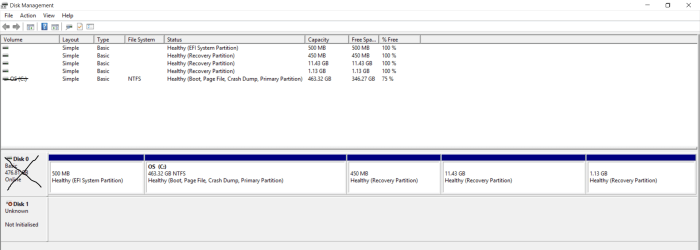
So I took the SSD out of my PC and hooked it up to my laptop (running win10) using an adapter. When I open Disk Management it tells me the drive is "Not Initialised" (screenshot attached). Ive already done some research online so im pretty sure its dead. However I sadly did not make any backups of my SSD (the HDD's yes just not the SSD :( )

I am aware that the SSD is probably not going to be usable again, and thats okay. However I would very much appreciate getting back the Data stored on it (as im not sure if everything is safely stored on my HDD's). Is there anyone that could help me with the recovery?

Thank you in advance!
 

Attachments
  • Capture.PNG
    Capture.PNG
    38.5 KB · Views: 3

My Computer

Computer type
PC/Desktop
OS
Windows 10

My Computers

System One System Two

  • Computer type
    PC/Desktop
    OS
    7 X64
    CPU
    i5 8400
    Motherboard
    gigabyte b365m ds3h
    Memory
    2x8gb 3200mhz
    Hard Drives
    various
    PSU
    pure power 11 400w cm
    Case
    Coolermaster
    Cooling
    cryorig m9i
  • Computer type
    PC/Desktop
    OS
    7x64
    CPU
    g5400
    Motherboard
    ga b365m ds3h
    Memory
    8gb ddr4 2400
    PSU
    xfx pro 450w
Hey, thanks for the quick reply
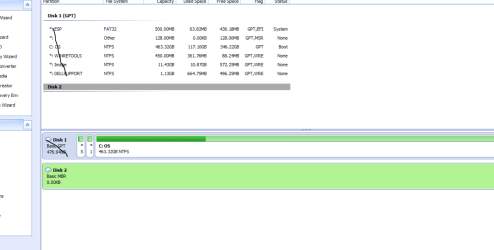
I downloaded it and it shows me pretty much the same result
What exactly did you have in mind?
 

My Computer

Computer type
PC/Desktop
OS
Windows 10
Does it show the drive as unallocated space, or not at all?
 

My Computers

System One System Two

  • Computer type
    PC/Desktop
    OS
    7 X64
    CPU
    i5 8400
    Motherboard
    gigabyte b365m ds3h
    Memory
    2x8gb 3200mhz
    Hard Drives
    various
    PSU
    pure power 11 400w cm
    Case
    Coolermaster
    Cooling
    cryorig m9i
  • Computer type
    PC/Desktop
    OS
    7x64
    CPU
    g5400
    Motherboard
    ga b365m ds3h
    Memory
    8gb ddr4 2400
    PSU
    xfx pro 450w
Its simply blank.
It does show up but thats it
Heres a screenshot:
 

Attachments

  • Capture2.PNG
    Capture2.PNG
    35.3 KB · Views: 3

My Computer

Computer type
PC/Desktop
OS
Windows 10
You could try System rescue cd, or parted magic, maybe Linux will see the drive. If so, you can try test disk for data recovery.
 

My Computers

System One System Two

  • Computer type
    PC/Desktop
    OS
    7 X64
    CPU
    i5 8400
    Motherboard
    gigabyte b365m ds3h
    Memory
    2x8gb 3200mhz
    Hard Drives
    various
    PSU
    pure power 11 400w cm
    Case
    Coolermaster
    Cooling
    cryorig m9i
  • Computer type
    PC/Desktop
    OS
    7x64
    CPU
    g5400
    Motherboard
    ga b365m ds3h
    Memory
    8gb ddr4 2400
    PSU
    xfx pro 450w
If the controller on the SSD has died, then there is likely no hope of rescuing the data. It would require a controller replacement, which most of us mere mortals cannot do, as it requires very specialized equipment.

If the data is very important, you could try sending the drive into the manufacturer for repair, but they will likely reinitialize the drive wiping your data. The other possibility is a data recovery service, but be prepared for a hefty bill if you do that.
 

My Computer

Computer type
PC/Desktop
Computer Manufacturer/Model Number
Mellon Labs (custom build)
OS
Win 7 Pro x64/Win 10 Pro x64 dual boot
CPU
AMD FX 8350 Vishera @ 4200
Motherboard
ASUS M5A97 R2.0
Memory
16 GB Mushkin Blackline DDR3-2400 @ 1866 (9-10-10-10-31)
Graphics Card(s)
XFX Radeon R9 280 Double D Black Edition
Sound Card
Realtek HD Audio on MB. Sounds great.
Monitor(s) Displays
Acer 24", Acer 22"
Screen Resolution
3840 x 1080
Hard Drives
1 x Mushkin Chronos 120 GB SSD (Win 10)
1 x Samsung 850 EVO 250 GB SSD (Win 7)
1 x WD 1TB SATA Blue
1 x WD 1TB SATA Green
PSU
Corsair TX-750
Case
CoolerMaster HAF 912+
Cooling
Coolermaster Seidon 240M Liquid AIO. 6 case fans
Keyboard
Logitech G710+
Mouse
Logitech G500s
Internet Speed
Much better since I got fiber, but still way overpriced.
Antivirus
MSE, Malware Bytes for scanning
Browser
Firefox
Other Info
Corsair VOID USB headphones.

A Mellon Labs X-1 - LCD Smartie driven system status display.

Brought to you by the letter E
Sadly, when SSDs die, any data on them will usually, if not always, be irrecoverably lost. This isn't a put down of SSDs, it's just the nature of the beasts (more on this in a moment). I wish I could give you better news.

This is too late to help you now but, if you are able to get the failed one working again (unlikely but possible) or you replace the SSD with a new one, you need to start backing up your data on a regular basis. Any drive, no matter the quality, can fail at any time without warning with no hope of recovery. The only way to ensure the safety of your data is to have it in at least three different places, typically your computer, an onsite backup drive, and an offsite backup drive. Onsite backups can be stored in a drawer or shelf away from the computer, Offsite drives can be stored in a locked drawer or locker at work or school, at a trusted friend's, neighbor's, or relative's home, or in a safe deposit box at a financial institution. If budget constraints won't allow two backup drives (we've all been there), even one backup drive will be much better than nothing until you can afford the second drive.

Backup drives must be kept disconnected from the computer except when updating a backup. I also recommend keeping the OS, programs, and games segregated from data to make backups more efficient and faster. This can be done with separate drives or separate partitions. For the System (OS, programs, and games), imaging is the best way to back those up. an image is essentially a snapshot of your system and, like a photo negative, can be used to restore the drive in the state it was in when you made the image. I, and many others here, recommend Macrium Reflect Free.

While imaging is required for backing up and restoring the System. It's too inefficient and much too slow for backing up data. For that, I recommend using a folder/file syncing program, such as FreeFileSync. When set to mirror, they work by comparing the data drive (or partition) to the backup drive, then copy in new or changed files on the data drive that aren't on the backup drive. Any files on the backup drive that aren't on the data drive get deleted from the backup drive. When finished, the backup drive will essentially be a clone of the data drive. FreeFileSync has a feature called versioning that can be used to send the deleted files to a versioning folder or drive. This helps to protect from loss due to accidental deletion, etc. I strongly recommend using Versioning.
 

My Computer

Computer type
PC/Desktop
Computer Manufacturer/Model Number
Custom Build
OS
Win 7 Ultimate 64 bit
CPU
Intel i7-3930K
Motherboard
ASUS P9X79 WS
Memory
Kingston HyperX Genesis 32GB Kit (8x4GB Modules) 1600MHz DDR
Graphics Card(s)
MSI R7850 Twin Frozr 2GD5/OC Radeon HD 7850 2GB 256-bit GDDR
Sound Card
Asus Xonar Essence STX
Monitor(s) Displays
3x Asus VG248QE 24", Vizio 32" TV
Screen Resolution
1920 x 1080, ?
Hard Drives
Samsung 128GB 840 Pro SSD (1),
Samsung 4TB 850 EVO SSDs (4)
Samsung 4TB 850 EVO SSDs (16) external backup drives used in 2.5" hot swap bays in the computer.
PSU
Corsair HX750w
Case
Antec Two Hundred v2 (modified)
Cooling
Cooler Master GeminII S524 120mm (fan replaced with a 140mm)
Keyboard
Logitech G510s
Mouse
Logitech M525 (two in use)
Internet Speed
=< 32Mbps down, 8Mbps up
Antivirus
AVAST!, MBAM, SAS, Spybot S&D (all but MBAM free) Glary Util
Browser
IE11
Other Info
LSI 9211-8i HBA card (8 SATA III ports), 2.5" & 3.5" Hot Swap Bays, HooToo HT-CR001 PCI-E to USB 3.0 Internal Hub + 6 Slot Card Reader, and LG Model CH12LS28 BD-ROM Optical Drive. Also, ScanSnap S1500 ADF duplexing scanner, Canon 9000F flat bed scanner, Corsair SP2500 2.1 speakers, Samsung CLP 415nw laser color printer, Cyberpower PP2200SW UPS
Back
Top