SSD Drives

Marinoprpic

New member
Local time
12:56 AM
Messages
96
Location
Europe
I am interested in these new drives as i have heard that they are much more better then the older drives.Does anyone has some experience and if someone does I hope you can share it
 

My Computer

Computer Manufacturer/Model Number
Super Power
OS
Windows 7 64 bit
CPU
Intel Core 2 quad Q6600 @ stock 2.4
Motherboard
Gigabyte GA-P35-DS3
Memory
4 GB DDR2-800
Graphics Card(s)
MSI GeForce GTX 460 Cyclone OC 768 MB
Monitor(s) Displays
Samsung SyncMaster 753DFX /NEW LG TV 107 cm via hdmi
Hard Drives
Seagate 160Gb
PSU
Chieftec 550W
Case
Super Power
Internet Speed
512 kb down,40kb up

My Computer

Computer Manufacturer/Model Number
DIY
OS
W7x64 Pro, SuSe 12.1/** W7 x64 Pro, XP MCE
CPU
Phenom II 1090T w/Noctua NH-D14 /**4400+ X2 w/CM Hyper TX 3
Motherboard
ASRock 890FX Deluxe 4/**A8N-SLI
Memory
2 x 2GB Patriot PGS34g1600LLKA/**4x1GB Corsair VS
Graphics Card(s)
EVGA GTX460 SC/**EVGA 8800GTS
Sound Card
Asus Xonar D2X/**Xonar D1
Monitor(s) Displays
Acer X233H, Dell E152FPc /**LG M237-WD
Screen Resolution
1920x1080 & 1024x768/**1980x1080
Hard Drives
WDC 2TB, 1.5TB, 1TB, 500GB,Seagate 500GB , Maxtor 80GB /**500GB Seagate & WDC 1TB Black
PSU
CM RS600 w/ APC BX1000G/**Antec 500 TP w/ APC BX1000
Case
HAF922/**Antec 1040IIB
Cooling
3x200mm, 1x140 and 1x120mm/**5x80mm fans
Keyboard
Logitech Media USB/**Saitek Eclipse
Mouse
Cordless Trackman Wheel/**Ditto
Internet Speed
3.3Mbps
Other Info
SB 560 5.1 w/ Sennheiser RS140/**Creative T20 speakers, Dvico FusionHDTV7 Gold RT, Cisco E3000, HP 5510V AIO, Linksys E3000, Belkin F5U237 hub and **F5D8055 adapter
(** = 2nd rig)

My Computer

Computer Manufacturer/Model Number
Keeps changing - (Custom)
OS
Windows 7 Professional x64
CPU
Intel Core i7 860
Motherboard
Gigabyte GA-P55-UD4P
Memory
4GB DDR3 Mushkin 1600Mhz @ 7-8-7-20
Graphics Card(s)
MSI GTS250 1GB DDR3 Twin Frozr
Sound Card
Onboard realtek
Monitor(s) Displays
Samsung SyncMaster 24" P2450 + Samsung 20" 2033
Screen Resolution
1920 X 1080 and 1600 X 900 (#2 system 1440 X 900)
Hard Drives
Patriot Inferno 120GB SSD + 3 WD Blue 640GB drives
PSU
Corsair 750 HX Modular
Case
Lancool PC-K62
Cooling
Cooler Master TX3 CPU cooler and 4-140mm and 1-120mm case
Keyboard
Gigabyte USB keyboard
Mouse
Microsoft wireless laser mouse 5000
Internet Speed
7 Mb down 1.5 up
Other Info
System #2: AMD Phenom II X6 1055T (Freezer 7 Pro cooler) - Gigabyte 880GMA-UD2H - WD 500GB Black - 9500GT (1GB) 500W OCZ modular PSU - Antec 200 case. System #3 (LapTop) Core 2 Duo T6670 - 320GB 7200RPM HD - 4GB DDR3 RAM.
I have one in another machine. Cold startup for windows 7 professional is about 3 1/2 seconds after POST.
 
With the prices that they bring, it looks as though it will be a while before I get one, but if I did, I would be certain to monitor drive activity to prevent an early demise. I think that the only thing that I would install on it would be the OS.
 

My Computer

Computer Manufacturer/Model Number
DIY
OS
W7x64 Pro, SuSe 12.1/** W7 x64 Pro, XP MCE
CPU
Phenom II 1090T w/Noctua NH-D14 /**4400+ X2 w/CM Hyper TX 3
Motherboard
ASRock 890FX Deluxe 4/**A8N-SLI
Memory
2 x 2GB Patriot PGS34g1600LLKA/**4x1GB Corsair VS
Graphics Card(s)
EVGA GTX460 SC/**EVGA 8800GTS
Sound Card
Asus Xonar D2X/**Xonar D1
Monitor(s) Displays
Acer X233H, Dell E152FPc /**LG M237-WD
Screen Resolution
1920x1080 & 1024x768/**1980x1080
Hard Drives
WDC 2TB, 1.5TB, 1TB, 500GB,Seagate 500GB , Maxtor 80GB /**500GB Seagate & WDC 1TB Black
PSU
CM RS600 w/ APC BX1000G/**Antec 500 TP w/ APC BX1000
Case
HAF922/**Antec 1040IIB
Cooling
3x200mm, 1x140 and 1x120mm/**5x80mm fans
Keyboard
Logitech Media USB/**Saitek Eclipse
Mouse
Cordless Trackman Wheel/**Ditto
Internet Speed
3.3Mbps
Other Info
SB 560 5.1 w/ Sennheiser RS140/**Creative T20 speakers, Dvico FusionHDTV7 Gold RT, Cisco E3000, HP 5510V AIO, Linksys E3000, Belkin F5U237 hub and **F5D8055 adapter
(** = 2nd rig)
I have 3 systems running SSDs. I have the OS and a few programs installed on them.

I have Patriot Torqx drives so they have a 10 year warranty. If they slow down or fail they will replace them. I know because I have had one bad one. They sent me a new one.

I used to turn off system restore, superfetch, prefetch, and other stuff, but now I am trying running them almost normally. They sure make you not ever want to go back to "normal" drives.
 

My Computer

Computer Manufacturer/Model Number
Keeps changing - (Custom)
OS
Windows 7 Professional x64
CPU
Intel Core i7 860
Motherboard
Gigabyte GA-P55-UD4P
Memory
4GB DDR3 Mushkin 1600Mhz @ 7-8-7-20
Graphics Card(s)
MSI GTS250 1GB DDR3 Twin Frozr
Sound Card
Onboard realtek
Monitor(s) Displays
Samsung SyncMaster 24" P2450 + Samsung 20" 2033
Screen Resolution
1920 X 1080 and 1600 X 900 (#2 system 1440 X 900)
Hard Drives
Patriot Inferno 120GB SSD + 3 WD Blue 640GB drives
PSU
Corsair 750 HX Modular
Case
Lancool PC-K62
Cooling
Cooler Master TX3 CPU cooler and 4-140mm and 1-120mm case
Keyboard
Gigabyte USB keyboard
Mouse
Microsoft wireless laser mouse 5000
Internet Speed
7 Mb down 1.5 up
Other Info
System #2: AMD Phenom II X6 1055T (Freezer 7 Pro cooler) - Gigabyte 880GMA-UD2H - WD 500GB Black - 9500GT (1GB) 500W OCZ modular PSU - Antec 200 case. System #3 (LapTop) Core 2 Duo T6670 - 320GB 7200RPM HD - 4GB DDR3 RAM.
As with any other new technology, the price of SSDs will probably drop as production and demand increases. Besides the speed, I like the fact that with an with an SSD, accidentally dropping your laptop while it's running no longer means instant dead HDD.
 
After running the Os on a SSD, like most of us, you would likely have the same conclusion.

No way id ever run the OS on a spinning drive again.

Some things are prfectly fine on a spinning drive and doesnt really matter IMO.
Such as movies, Pictures, Music etc most of these do not require alot of transfer speed anyway and are fine.

A couple entry level drives (Good basically for OS only):
Over at Newegg, theres the OCZ Vertex30GB drives:
http://www.newegg.com/Product/Product.aspx?Item=N82E16820227393
Excellent Drives!!!

And Intell has one (a 40GB):
http://www.newegg.com/Product/Product.aspx?Item=N82E16820167025

i cant say much about the Intels, perhaps others know more.

but I do know the Vertexs are just terrific SSDs
 

My Computer

Computer Manufacturer/Model Number
Custom (Self Build)
OS
Windows 7 Home Premium 64bit
CPU
Intel Core i7 2700k
Motherboard
eVGA P67 SLI
Memory
8GB Mushkin Redline Ridgebacks @1866
Graphics Card(s)
EVGA GTX570 SC
Sound Card
XiFi Titanium HD
Monitor(s) Displays
LG W2453V
Screen Resolution
1920x1080
Hard Drives
Intel 320 80GB -- Intel X25-V 40GB --WD Black 1TB x2 -- WD Blue 640GB
PSU
Seasonic x750
Case
Corsair 600T SE White
Cooling
eVGA Superclocked CPU Cooler
Keyboard
Saitek Cyborg
Antivirus
Kaspersky
Browser
IE
Other Info
LG BD/DVD
I have one in another machine. Cold startup for windows 7 professional is about 3 1/2 seconds after POST.

As an owner of an SSD drive myself, 3.5 seconds after POST would be absolutely incredible. I recall a thread on this board discussing the ability to get to an 11 second boot with SSD drive...so I don't quite think that 3.5 seconds is accurate...unless it's coming out of hibernation. I'd say after post, my bootup time is about 16 seconds with the Intel X25-M Gen 2 SSD drive.

For the original poster, here is what I really love about the SSD drive

1). It's silent
2). No need to defrag as it can randomly get to the file pieces just as fast
3). Virus scans and malware scans are extremely fast.
4). I shut off indexing and prefetch....as it's just not needed with these fast drives.

As for the negatives
1). Write performance degradation: Get a drive that supports TRIM today, you likely won't notice the slowdown
2). Shorter life span: These drives should last 10 years pretty easily. I don't anticipate still having my 80GB Intel 10 years from now.
3). Cost: It's the biggest bang for the buck upgrade you can get.
 

My Computer

Computer Manufacturer/Model Number
Self-Built in July 2009
OS
Windows 7 Ultimate x64
CPU
Intel Q9550 2.83Ghz OC'd to 3.40Ghz
Motherboard
Gigabyte GA-EP45-UD3R rev. 1.1, F12 BIOS
Memory
8GB G.Skill PI DDR2-800, 4-4-4-12 timings
Graphics Card(s)
EVGA 1280MB Nvidia GeForce GTX570
Sound Card
Realtek ALC899A 8 channel onboard audio
Monitor(s) Displays
23" Acer x233H
Screen Resolution
1920x1080
Hard Drives
Intel X25-M 80GB Gen 2 SSD
Western Digital 1TB Caviar Black, 32MB cache. WD1001FALS
PSU
Corsair 620HX modular
Case
Antec P182
Cooling
stock
Keyboard
ABS M1 Mechanical
Mouse
Logitech G9 Laser Mouse
Internet Speed
15/2 cable modem
Other Info
Windows and Linux enthusiast. Logitech G35 Headset.
Actually it takes longer to come out of hibernation than to start up cold. And why does 3 1/2 seconds sound so incredible? Total startup time including POST is about 15 seconds, but once the system decides it's ready to boot, it only needs to read about 300 MB to load the desktop, which probably takes less than 2 seconds.
 
Actually it takes longer to come out of hibernation than to start up cold. And why does 3 1/2 seconds sound so incredible? Total startup time including POST is about 15 seconds, but once the system decides it's ready to boot, it only needs to read about 300 MB to load the desktop, which probably takes less than 2 seconds.

It seems unreasonable because I have never seen a machine run this fast. I'm running an SSD drive and don't get this type of performance. Even the guys with SSD drives on this forum in the Reboot Time thread aren't showing startup times in under 15 seconds.

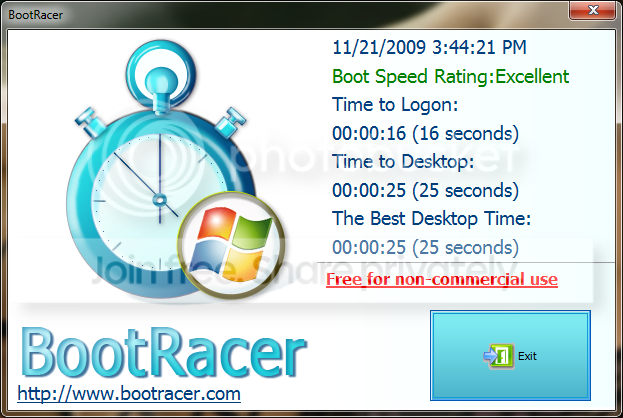
This is the result of my machine booting from an SSD drive (Intel X25-M Gen 2 80GB)
BootRacer2ndRun.png


So, After POST (which takes about 20 seconds on my machine), it's 16 seconds to the logon screen. My password is fairly complex...thus the additional time after logon to hit the actual desktop. That's running on a Gigabyte GA-EP45-UD3R mobo, with an Intel Quad Core Q9550 overclocked to 3.2Ghz, with 8GB of G.Skill DDR2 800 RAM with 4-4-4-12 timings and the Intel X25-M Gen 2 SSD drive. So, clearly I don't have a terrible box with a super fast drive.


Edit : Here was the story talking about the 11 second boot times....http://news.softpedia.com/news/The-...e-Computer-that-Made-It-Possible-122111.shtml

And another article from Technet forums where user describes getting to 14 seconds with an SSD Drive
http://social.technet.microsoft.com...f/thread/49412a6e-76ff-4910-a470-79e8c95ae965

Decent discussion on Intel SSD forum discussing boot times;
http://communities.intel.com/message/77836;jsessionid=62566F84959F38FD360AB080F4F594AA.node5COMS

So, as you can see, if you are getting boots in less than 4 seconds...you are 3x to 4x faster than any of these other people.
 

My Computer

Computer Manufacturer/Model Number
Self-Built in July 2009
OS
Windows 7 Ultimate x64
CPU
Intel Q9550 2.83Ghz OC'd to 3.40Ghz
Motherboard
Gigabyte GA-EP45-UD3R rev. 1.1, F12 BIOS
Memory
8GB G.Skill PI DDR2-800, 4-4-4-12 timings
Graphics Card(s)
EVGA 1280MB Nvidia GeForce GTX570
Sound Card
Realtek ALC899A 8 channel onboard audio
Monitor(s) Displays
23" Acer x233H
Screen Resolution
1920x1080
Hard Drives
Intel X25-M 80GB Gen 2 SSD
Western Digital 1TB Caviar Black, 32MB cache. WD1001FALS
PSU
Corsair 620HX modular
Case
Antec P182
Cooling
stock
Keyboard
ABS M1 Mechanical
Mouse
Logitech G9 Laser Mouse
Internet Speed
15/2 cable modem
Other Info
Windows and Linux enthusiast. Logitech G35 Headset.
Yeah, you have a pretty fast system, but the i7 systems with ddr3 memory and an ssd will run circles around it.
 
Yeah, you have a pretty fast system, but the i7 systems with ddr3 memory and an ssd will run circles around it.
But during the boot up process....those circles won't make that kind of difference. Like that link above showed, the 11 second bootup was on a Core i7 machine. And DDR3 memories have higher latencies...so there is not that much difference between my low timing DDR2 and the faster DDR3 ram.

I simply think there is something fishy with your 3.5 second number. That's just way too fast. Anyway you can post a video of this up to youtube or something?
 

My Computer

Computer Manufacturer/Model Number
Self-Built in July 2009
OS
Windows 7 Ultimate x64
CPU
Intel Q9550 2.83Ghz OC'd to 3.40Ghz
Motherboard
Gigabyte GA-EP45-UD3R rev. 1.1, F12 BIOS
Memory
8GB G.Skill PI DDR2-800, 4-4-4-12 timings
Graphics Card(s)
EVGA 1280MB Nvidia GeForce GTX570
Sound Card
Realtek ALC899A 8 channel onboard audio
Monitor(s) Displays
23" Acer x233H
Screen Resolution
1920x1080
Hard Drives
Intel X25-M 80GB Gen 2 SSD
Western Digital 1TB Caviar Black, 32MB cache. WD1001FALS
PSU
Corsair 620HX modular
Case
Antec P182
Cooling
stock
Keyboard
ABS M1 Mechanical
Mouse
Logitech G9 Laser Mouse
Internet Speed
15/2 cable modem
Other Info
Windows and Linux enthusiast. Logitech G35 Headset.
Just because your hardware can't do it, doesn't mean it can't be done. Stop answering my posts in a condescending tone that makes it sound as if you know everything there is to know and everyone else is full of shit. If you don't like what I have to say, ignore it.

I apologize for my tone and any offense that you took to my comments. Your boot times rank as the fastest that I have ever heard of...that was why I questioned it. I've also seen situations where the time to boot was measured from different points and to different points...so it's important to know how it was measured to be sure we are comparing apples to apples.

I posted simply to prevent somebody from purchasing an SSD drive expecting a sub 5 second boot up process and being disappointed if their boot times were in the 10-20 second range which I believe to be the norm for SSD drives on Windows 7 systems.

I will refrain from commenting anymore on your specific situation in this thread. Again, I apologize for my tone in previous threads.
 

My Computer

Computer Manufacturer/Model Number
Self-Built in July 2009
OS
Windows 7 Ultimate x64
CPU
Intel Q9550 2.83Ghz OC'd to 3.40Ghz
Motherboard
Gigabyte GA-EP45-UD3R rev. 1.1, F12 BIOS
Memory
8GB G.Skill PI DDR2-800, 4-4-4-12 timings
Graphics Card(s)
EVGA 1280MB Nvidia GeForce GTX570
Sound Card
Realtek ALC899A 8 channel onboard audio
Monitor(s) Displays
23" Acer x233H
Screen Resolution
1920x1080
Hard Drives
Intel X25-M 80GB Gen 2 SSD
Western Digital 1TB Caviar Black, 32MB cache. WD1001FALS
PSU
Corsair 620HX modular
Case
Antec P182
Cooling
stock
Keyboard
ABS M1 Mechanical
Mouse
Logitech G9 Laser Mouse
Internet Speed
15/2 cable modem
Other Info
Windows and Linux enthusiast. Logitech G35 Headset.
I was wondering how one could get a 3.5 second boot also. I have spent a lot of time and money on my system and I don't think it's possible without major hardware and thousands....possibly tens of thousands of dollars. I would like to see it (a 3.5 second boot) though.
 

My Computer

Computer Manufacturer/Model Number
Keeps changing - (Custom)
OS
Windows 7 Professional x64
CPU
Intel Core i7 860
Motherboard
Gigabyte GA-P55-UD4P
Memory
4GB DDR3 Mushkin 1600Mhz @ 7-8-7-20
Graphics Card(s)
MSI GTS250 1GB DDR3 Twin Frozr
Sound Card
Onboard realtek
Monitor(s) Displays
Samsung SyncMaster 24" P2450 + Samsung 20" 2033
Screen Resolution
1920 X 1080 and 1600 X 900 (#2 system 1440 X 900)
Hard Drives
Patriot Inferno 120GB SSD + 3 WD Blue 640GB drives
PSU
Corsair 750 HX Modular
Case
Lancool PC-K62
Cooling
Cooler Master TX3 CPU cooler and 4-140mm and 1-120mm case
Keyboard
Gigabyte USB keyboard
Mouse
Microsoft wireless laser mouse 5000
Internet Speed
7 Mb down 1.5 up
Other Info
System #2: AMD Phenom II X6 1055T (Freezer 7 Pro cooler) - Gigabyte 880GMA-UD2H - WD 500GB Black - 9500GT (1GB) 500W OCZ modular PSU - Antec 200 case. System #3 (LapTop) Core 2 Duo T6670 - 320GB 7200RPM HD - 4GB DDR3 RAM.
Just because your hardware can't do it, doesn't mean it can't be done. Stop answering my posts in a condescending tone that makes it sound as if you know everything there is to know and everyone else is full of shit. If you don't like what I have to say, ignore it.

I apologize for my tone and any offense that you took to my comments. Your boot times rank as the fastest that I have ever heard of...that was why I questioned it. I've also seen situations where the time to boot was measured from different points and to different points...so it's important to know how it was measured to be sure we are comparing apples to apples.

I posted simply to prevent somebody from purchasing an SSD drive expecting a sub 5 second boot up process and being disappointed if their boot times were in the 10-20 second range which I believe to be the norm for SSD drives on Windows 7 systems.

I will refrain from commenting anymore on your specific situation in this thread. Again, I apologize for my tone in previous threads.
I apologize for getting a bit angry too. Not sure how to post a video to youtube, and I should clarify. I tested the laptop I was talking about, a dell studio xps 16 using the restart time script available on another thread, with the login password removed, pagefile and prefetch disabled, and for a full restart this is what I got.
 
Yeah, laptops certainly do power up quickly and get through the POST in a hurry compared to a desktop. And I am willing to bet that quite a number of people use their SSD's with their laptops rather than with their desktop.

For example, I have time tested my work laptop (Dell Latitude E6400 with P8600 Core 2 Duo at 2.40Ghz, 4GB of RAM and Windows 7 Enterprise 32-bit running on a 7,200RPM laptop hard drive). Using a stopwatch, I've timed the following
--power on until POST complete and Starting Windows 7 appears : 7 seconds
--From Starting Windows 7 until CTRL-ALT-DEL screen appears: 24 seconds (31 seconds total)

Comparing this to my home desktop ( Core 2 Quad Q9550 at 3.2ghz, 8GB of RAM, Gigabyte GA-EP45-UD3R Rev 1.1 mobo, using Windows 7 64-bit, and an SSD drive)
--power on until monitor first turns on: 9 seconds
--delay between when monitor comes alive and POST appears: 2 seconds (11 seconds total)
--Time which POST starts and runs until it says Starting Windows: 11 seconds (22 seconds total)
--Time from Starting Windows until CTRL-ALT-DEL appears: 13 seconds (35 seconds total).


Overall, your restart time of 28 seconds is super fast. Very Impressive :D My restart time on my laptop comes in around 70 seconds...but that is on a domain, with a complex password which I must type in and a mechanical hard drive.

I'll have to run that VBS file on my home computer to see where it clocks in.

 

My Computer

Computer Manufacturer/Model Number
Self-Built in July 2009
OS
Windows 7 Ultimate x64
CPU
Intel Q9550 2.83Ghz OC'd to 3.40Ghz
Motherboard
Gigabyte GA-EP45-UD3R rev. 1.1, F12 BIOS
Memory
8GB G.Skill PI DDR2-800, 4-4-4-12 timings
Graphics Card(s)
EVGA 1280MB Nvidia GeForce GTX570
Sound Card
Realtek ALC899A 8 channel onboard audio
Monitor(s) Displays
23" Acer x233H
Screen Resolution
1920x1080
Hard Drives
Intel X25-M 80GB Gen 2 SSD
Western Digital 1TB Caviar Black, 32MB cache. WD1001FALS
PSU
Corsair 620HX modular
Case
Antec P182
Cooling
stock
Keyboard
ABS M1 Mechanical
Mouse
Logitech G9 Laser Mouse
Internet Speed
15/2 cable modem
Other Info
Windows and Linux enthusiast. Logitech G35 Headset.
After running the Os on a SSD, like most of us, you would likely have the same conclusion.

No way id ever run the OS on a spinning drive again.

Some things are prfectly fine on a spinning drive and doesnt really matter IMO.
Such as movies, Pictures, Music etc most of these do not require alot of transfer speed anyway and are fine.

A couple entry level drives (Good basically for OS only):
Over at Newegg, theres the OCZ Vertex30GB drives:
Newegg.com - OCZ Vertex Series OCZSSD2-1VTX30GXXX 2.5" 30GB SATA II MLC Internal Solid State Drive (SSD) - SSD
Excellent Drives!!!

And Intell has one (a 40GB):
Newegg.com - Intel X25-V SSDSA2MP040G2R5 2.5" 40GB SATA II MLC Internal Solid State Drive (SSD) - SSD

i cant say much about the Intels, perhaps others know more.

but I do know the Vertexs are just terrific SSDs

Those prices are lower than anything that I had seen before. Maybe I had been looking at the top end...I don't know. I could afford to buy one of them for my primary rig, but I would need to find it somewhere except Newegg...I never do business with them.

As for OCZ, I have a bad taste in my mouth for them, because they beat me out of a $20 rebate on a flash drive, just as Corsair did on another. Corsair has never even bothered to respond to my RMA request on their Flash Voyager, so this has me wondering just how reliably these companys support their SSDs, despite nate42nd account of his experience.
 

My Computer

Computer Manufacturer/Model Number
DIY
OS
W7x64 Pro, SuSe 12.1/** W7 x64 Pro, XP MCE
CPU
Phenom II 1090T w/Noctua NH-D14 /**4400+ X2 w/CM Hyper TX 3
Motherboard
ASRock 890FX Deluxe 4/**A8N-SLI
Memory
2 x 2GB Patriot PGS34g1600LLKA/**4x1GB Corsair VS
Graphics Card(s)
EVGA GTX460 SC/**EVGA 8800GTS
Sound Card
Asus Xonar D2X/**Xonar D1
Monitor(s) Displays
Acer X233H, Dell E152FPc /**LG M237-WD
Screen Resolution
1920x1080 & 1024x768/**1980x1080
Hard Drives
WDC 2TB, 1.5TB, 1TB, 500GB,Seagate 500GB , Maxtor 80GB /**500GB Seagate & WDC 1TB Black
PSU
CM RS600 w/ APC BX1000G/**Antec 500 TP w/ APC BX1000
Case
HAF922/**Antec 1040IIB
Cooling
3x200mm, 1x140 and 1x120mm/**5x80mm fans
Keyboard
Logitech Media USB/**Saitek Eclipse
Mouse
Cordless Trackman Wheel/**Ditto
Internet Speed
3.3Mbps
Other Info
SB 560 5.1 w/ Sennheiser RS140/**Creative T20 speakers, Dvico FusionHDTV7 Gold RT, Cisco E3000, HP 5510V AIO, Linksys E3000, Belkin F5U237 hub and **F5D8055 adapter
(** = 2nd rig)
Hmm...I've never had a bad experience with Corsair on a rebate or an RMA. I had a Flash Voyager that the USB connector broke right off. They exchanged in immediately. I've had rebates on a power supply and flash drive as well that have come right in.

Mwave has that same SSD for $124.99. They had a $20 MIR, but I believe it expired last week from the mfg;
http://www.mwave.com/mwave/skusearch_v3.asp?scriteria=BA32468#aShoppingCart

I bought my SSD from mwave and didn't have any problems.
 

My Computer

Computer Manufacturer/Model Number
Self-Built in July 2009
OS
Windows 7 Ultimate x64
CPU
Intel Q9550 2.83Ghz OC'd to 3.40Ghz
Motherboard
Gigabyte GA-EP45-UD3R rev. 1.1, F12 BIOS
Memory
8GB G.Skill PI DDR2-800, 4-4-4-12 timings
Graphics Card(s)
EVGA 1280MB Nvidia GeForce GTX570
Sound Card
Realtek ALC899A 8 channel onboard audio
Monitor(s) Displays
23" Acer x233H
Screen Resolution
1920x1080
Hard Drives
Intel X25-M 80GB Gen 2 SSD
Western Digital 1TB Caviar Black, 32MB cache. WD1001FALS
PSU
Corsair 620HX modular
Case
Antec P182
Cooling
stock
Keyboard
ABS M1 Mechanical
Mouse
Logitech G9 Laser Mouse
Internet Speed
15/2 cable modem
Other Info
Windows and Linux enthusiast. Logitech G35 Headset.
Hmm...I've never had a bad experience with Corsair on a rebate or an RMA. I had a Flash Voyager that the USB connector broke right off. They exchanged in immediately. I've had rebates on a power supply and flash drive as well that have come right in.

Mwave has that same SSD for $124.99. They had a $20 MIR, but I believe it expired last week from the mfg;
OCZ OCZSSD2-1AGT30G Agility Series 2.5" 30GB SATA II MLC Internal Solid state disk (SSD) - Retail ($20 Mail-In Manufacturer Rebate Available from 01/17/10 till 01/31/10) from mwave.com

I bought my SSD from mwave and didn't have any problems.

Right now, I'm particularly perturbed with Corsair, more for their lack of response to my RMA request. I placed it on 1/24/10, so they have had more than enough time to process it.
 

My Computer

Computer Manufacturer/Model Number
DIY
OS
W7x64 Pro, SuSe 12.1/** W7 x64 Pro, XP MCE
CPU
Phenom II 1090T w/Noctua NH-D14 /**4400+ X2 w/CM Hyper TX 3
Motherboard
ASRock 890FX Deluxe 4/**A8N-SLI
Memory
2 x 2GB Patriot PGS34g1600LLKA/**4x1GB Corsair VS
Graphics Card(s)
EVGA GTX460 SC/**EVGA 8800GTS
Sound Card
Asus Xonar D2X/**Xonar D1
Monitor(s) Displays
Acer X233H, Dell E152FPc /**LG M237-WD
Screen Resolution
1920x1080 & 1024x768/**1980x1080
Hard Drives
WDC 2TB, 1.5TB, 1TB, 500GB,Seagate 500GB , Maxtor 80GB /**500GB Seagate & WDC 1TB Black
PSU
CM RS600 w/ APC BX1000G/**Antec 500 TP w/ APC BX1000
Case
HAF922/**Antec 1040IIB
Cooling
3x200mm, 1x140 and 1x120mm/**5x80mm fans
Keyboard
Logitech Media USB/**Saitek Eclipse
Mouse
Cordless Trackman Wheel/**Ditto
Internet Speed
3.3Mbps
Other Info
SB 560 5.1 w/ Sennheiser RS140/**Creative T20 speakers, Dvico FusionHDTV7 Gold RT, Cisco E3000, HP 5510V AIO, Linksys E3000, Belkin F5U237 hub and **F5D8055 adapter
(** = 2nd rig)
Back
Top