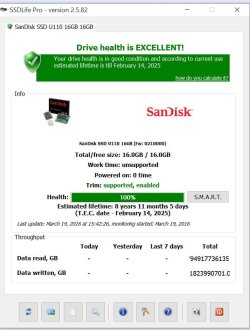
I tried several programs to check the health of my SSD and they say it's in perfect health which confuses me.
This is from SSD life pro which says my SSD is 100% health but noticed that why it says Powered on 0 times which means was never used?
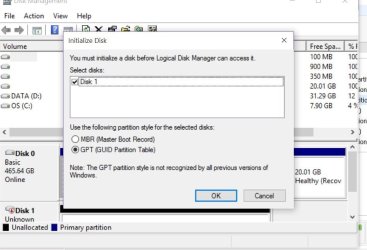
So I try to go to run and type diskmgmt.msc and I get this prompt that I need to initialize it. From previous thread my ssd is sandisk u110 16 GB is just for caching to load programs faster. I am new to this and would like your input. If I initialize it should I choose MBR or GPT?
Edit: My OS is loaded using HDD and the SSD was just for cache purposes.
As a direct answer to your question, use whatever is on the main drive. Read this https://en.wikipedia.org/wiki/GUID_Partition_Table for additional info to make a more informed decision. And, perhaps it's also important to learn about how is your SSD drive is communicating with the motherboard. IDE or AHCI and how that affects your plans.
My Computer
Computer type
PC/Desktop
Computer Manufacturer/Model Number
Custom built
OS
Microsoft Windows 10 Pro 64-bit
CPU
8th generation Intel(R) Pentium G5600 3.9GHz
Motherboard
ASRock B360 Pro 4 8th Generation
Memory
16 GB DDR4 Kingston HyperX
Graphics Card(s)
On board Intel UHD Graphics 1GB shared
Sound Card
On board Realtek HD ALC892
Monitor(s) Displays
LG 22 in LCD
Screen Resolution
1536 x 864 x 32 bits (4294967296 colors) @ 59 Hz
Hard Drives
(1) SanDisk SDSSDHII120G ATA Device
(2) ST1000DM003-1SB10C ATA Device
(3) ST500DM002-1BD142 ATA Device
Thanks for the advise and the link. First, I am going to restore to the SSD the Windows 7 OS mirror, I prepared earlier today. The I begin to analyze everything, and I mean everything.
My Computer
Computer type
PC/Desktop
Computer Manufacturer/Model Number
Custom built
OS
Microsoft Windows 10 Pro 64-bit
CPU
8th generation Intel(R) Pentium G5600 3.9GHz
Motherboard
ASRock B360 Pro 4 8th Generation
Memory
16 GB DDR4 Kingston HyperX
Graphics Card(s)
On board Intel UHD Graphics 1GB shared
Sound Card
On board Realtek HD ALC892
Monitor(s) Displays
LG 22 in LCD
Screen Resolution
1536 x 864 x 32 bits (4294967296 colors) @ 59 Hz
Hard Drives
(1) SanDisk SDSSDHII120G ATA Device
(2) ST1000DM003-1SB10C ATA Device
(3) ST500DM002-1BD142 ATA Device