SSD Install, Drivers needed?

ariespaan

New member
Member
Local time
6:50 PM
Messages
71
HI,
I am working with a Laptop and Win-7 using a 500 Gb Internal HD
I now want to install a 500 Gb SSD Unit (Samsung EVO 640)

I first clone mine 500 GB HD to the 500 GB SSD with Macrium Reflect free
Than i change the old HD with the new SSD.
My question is: Do i also need to install a driver for the new SSD i installed
And if so, where can i find a driver for the SSD or does it works fine without a new driver for gthe SSD?
Thanks
 

My Computer

Computer type
Laptop
Computer Manufacturer/Model Number
Sony
OS
Windows-7 64 Bits Home Premium
CPU
Intel I5
You don't need any drivers for an SSD. If your hard drive works in that computer, then the SSD will work.

Did you do a "clone" (sector-by-sector) backup or an "image" backup? I strongly suggest that you do an image backup of the hard drive, then an image restore to the SSD, if that's not what you have already done. The problem is, an SSD is not the same as a mechanical hard drive, so the clone won't match the SSD like it would another mechanical hard drive.

Make sure TRIM is active on the SSD.

I have heard that you need to "align" the SSD, but I don't know anything about aligning an SSD, so I can't comment on that.
 

My Computer

Computer type
PC/Desktop
Computer Manufacturer/Model Number
Dell
OS
Linux Mint 18.2 xfce 64-bit (VMWare host) / Windows 8.1 Pro 32-bit (VMWare guest)
CPU
Haswell
Memory
4 GB
Monitor(s) Displays
Acer 23"
Screen Resolution
1920 x 1080
Hard Drives
Two hard drives, 1TB each: One for Linux, one for my data.
Keyboard
IBM Model M
Antivirus
Sophos (Linux), Trend Micro (Windows)
Browser
Firefox, Opera
Other Info
I use Samba to share my data drive with the other computers at my house and with my guest session in VMWare Workstation Player.
I have not yet done the cloning at this moment.
In the past i had done a cloning of an old 500 GB HD to a new 500 GB HD, and i used Macrium Reflect free for that purpose
(I dont know what type of cloning Macrium reflect did at that time, and i intended to do the same procedure to clone my HD to a SSD-Drive now.

I see what you mean with your reply and when a do the cloning now i do that with the procedure you recommended.
Thanks for your advice.
By the way: I read some articles about trimming the SSD later on, and i will loom it up again when i needed it.
 

My Computer

Computer type
Laptop
Computer Manufacturer/Model Number
Sony
OS
Windows-7 64 Bits Home Premium
CPU
Intel I5
A driver is a bridge between software and hardware. But most common hardware, driven by widnows, doesn't require a separate installation. Such as the keyboard and mouse, as well as the hard drive.
Solid-state drives are usually installed automatically by the system. Once the AHCI option in the BIOS is turned on, the AHCI driver is automatically installed when the system is installed. If you install the system in IDE mode, you need to install the driver separately after the system is installed.
hope it's helpful.
 

My Computer

Computer type
PC/Desktop
OS
Windows 7 Ultimate x64
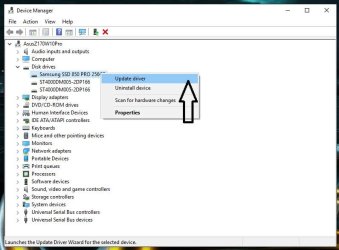
Windows will install any drivers for it after you have it up and running, just check in Device Manager for any issues.

I did not know Samsung made a 640 SSD.

Could you post a link :-)
 

Attachments

  • DM.JPG
    DM.JPG
    69.2 KB · Views: 1
Last edited:

My Computer

Computer type
PC/Desktop
Computer Manufacturer/Model Number
Skylake Special #666
OS
Windows 10 Pro x64
CPU
Intel Core i7 6700K
Motherboard
Asus Sabertooth Z170 Mark 1
Memory
GSkill TridentZ RGB 16GB 3600 16-16-16-36
Graphics Card(s)
EVGA GTX 980 Ti SC x2
Sound Card
Realtek High Definition
Monitor(s) Displays
AOC G2460PG
Screen Resolution
1920 x 1080 144Hz
Hard Drives
Samsung 860 Pro 256GB, Seagate Barracuda 4TB x2
PSU
EVGA 1000 P2, EVGA White Custom Braided Cables
Case
Corsair Vengeance C70 Gunmetal Black
Cooling
Corsair H100i v2, Corsair ML120 x2, Thermal Grizzly Kryonaut
Keyboard
Logitech G910 Orion Spectrum
Mouse
Logitech G700s
Internet Speed
Verizon Fios Quantum Gateway 75/75
Antivirus
Windows Defender, Malwarebytes Free 3.8.3
Browser
Chrome
Other Info
Corsair SP120 x4, LG Blu-ray Drive, Durabrand HT-395 100 Watt Dolby Digital Amp, Corsair H2100 Wireless 7.1 Headset
Back
Top