I recently got a corsair force 3 ssd so i did some reading and disconnected my 2 1TB WD HDDs and started to update bios. Bios updated flawlessly as normal so I began installing the SSD as corsair say only flash firmware if you have issues they dont recommend to do it for no reason. So i changed my bios to run in ACHI mode and installed fresh copy of windows 7 on the SSD. The system runs great but when i reconnect the first HDD the system doesnt make past the POST or black boot up screen.
Im not sure what to do to get my HDD working with my SSD. I want to have my SSD for windows7 and few games and the HDD for videos, documents etc. At this point I have no Idea what to do.
Many thanks for any help in advance.
My Computer
At a glance
64bit Windows 7Core I3 I-550 3.2Ghz8GB (2x4GB) Corsair XMS3 DDR3 1600XFX ATI 5770 1GB
not sure which firmware ididnt update it :/ but the SSD runs stable like a dream its only when i connect the WD 1tb HDDs then does the post screen freeze. I have SSD in sata2_0 and tried HDD in Sata2_1 and Sata2_2 aswell .
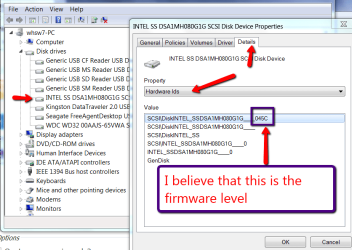
how i check which firmware i have?
My Computer
At a glance
64bit Windows 7Core I3 I-550 3.2Ghz8GB (2x4GB) Corsair XMS3 DDR3 1600XFX ATI 5770 1GB
I checked my Firmware and It says 1.33 so its up to date not sure what to do im thinking has something to do with some setting in bios that im not familiar with.
My Computer
At a glance
64bit Windows 7Core I3 I-550 3.2Ghz8GB (2x4GB) Corsair XMS3 DDR3 1600XFX ATI 5770 1GB
Yep. That should rule out any problem with the ssd drive. Just gotta figure out the other. How did you get the firmware? Mine is in raid so it might be different.
My Computer
At a glance
Windows 7 Pro x64 -- PCLinuxOS KDE4 FullMonty...i7-875k @ Turbo - 7,6,5,5 - 3.6ghzCorsair CMD8GX3M4A1600C8 8gbAsus EAH5850 DirectCU/2DIS/1GD5
Computer Manufacturer/Model Number
Custom
OS
Windows 7 Pro x64 -- PCLinuxOS KDE4 FullMonty 2011
CPU
i7-875k @ Turbo - 7,6,5,5 - 3.6ghz
Motherboard
Asus P7P55D-E Deluxe
Memory
Corsair CMD8GX3M4A1600C8 8gb
Graphics Card(s)
Asus EAH5850 DirectCU/2DIS/1GD5
Sound Card
On Board
Monitor(s) Displays
Samsung SyncMaster T220 - Panasonic VT30a 50"
Screen Resolution
1680x1050 -
Hard Drives
Corsair Force 3 SSD 120GB x 2 ::
WD VelociRaptor 150GB WD1500HLFS x 2
whats on the other drives, does it have a os on pne
My Computer
At a glance
Window pro 8 64bitAMD PHENON 1090T 6 core16.00 GB mushkin 1333mhzATI RADEON HD 6850 1GB DDR5
Computer type
PC/Desktop
Computer Manufacturer/Model Number
Home Built Media Center PC
OS
Window pro 8 64bit
CPU
AMD PHENON 1090T 6 core
Motherboard
Gigabyte GA-890GPA-UD3H
Memory
16.00 GB mushkin 1333mhz
Graphics Card(s)
ATI RADEON HD 6850 1GB DDR5
Sound Card
On Board Realtec ALC880
Monitor(s) Displays
Samsung 27Inch IPS LED & LG 42 Inch Plasma
Screen Resolution
1920 - 1080
Hard Drives
C:/Windows Drive = Corsair Force III Series Solid State Drive, 240GB
2 X Hitachi 1TB Deskstar 7K1000.C SATA II Internal Drive Kit w/ 32MB Cache
2 X Hitachi 2TB Deskstar 7K1000.C SATA II Internal Drive Kit w/ 64MB Cache
LG Super-Multi 22x DVD Wri
Does IDE in BIOS work. If it does, you may want to go with that. In many cases there is little difference running the SSD in IDE or AHCI - there are some cases though where it makes a difference. But as long as the access time does not change, you may not notice a difference in R/W speed in real life.
My Computer
At a glance
Vista, Windows7, Mint Mate, Zorin, Windows 8from 1.6GHz Duo to i7
Computer Manufacturer/Model Number
HP, Dell, Gateway, Toshiba - 4 laptops and 2 desktops
Britjoe the 60gb ssd has windows 7 on it and so does the HDD. Trying to erase HDD make movie/storage drive while ssd runs windows and few games.
My SSD came with the most up to date firmware out 1.3.3 for corsair force 3 60gb
well half solved the problem I reset the bios to IDE mode and hooked up the HDD to sata2_1 while the SSD is hooked to sata2_0 and it boots windows from SSD while HDD is hooked up which is awesome that its not freezing when HDD is hooked up.
not recognizing the HDD in windows but i see it in BIOS now
Last edited:
My Computer
At a glance
64bit Windows 7Core I3 I-550 3.2Ghz8GB (2x4GB) Corsair XMS3 DDR3 1600XFX ATI 5770 1GB
I see the drive in Bios ssd listed as channel 0 master and hdd listed as channel 1 master. Sata usually doesnt need master/slave setting but since i set to IDE do i need move HDD to channel 0 slave and if so how i do that.
Cannot thank you all enough for your input and help
Still not showing up in disk management tho
My Computer
At a glance
64bit Windows 7Core I3 I-550 3.2Ghz8GB (2x4GB) Corsair XMS3 DDR3 1600XFX ATI 5770 1GB
So im thinking mebe update some motherboard driver for sata controller or some options in bios just not sure how to get windows to recognize my 2nd drive :/
My Computer
At a glance
64bit Windows 7Core I3 I-550 3.2Ghz8GB (2x4GB) Corsair XMS3 DDR3 1600XFX ATI 5770 1GB
Problem solved by changing drive letters now the hdd shows up and is working everything working like it should. Though I do have ide mode in bios to make it work. It also appears many people have issue with drive not showing up in disk management in w7 but for me changing the drive letter is what worked
My Computer
At a glance
64bit Windows 7Core I3 I-550 3.2Ghz8GB (2x4GB) Corsair XMS3 DDR3 1600XFX ATI 5770 1GB


 .
.