SSD Migration Fails

fergiet

New member
Member
Local time
6:59 PM
Messages
71
I have a spare SSD and wanted to migrate current os (win 7 64bit) to it. So that I could use it as replacement should my current os get corrupted. The os is on a Samsung SSD.
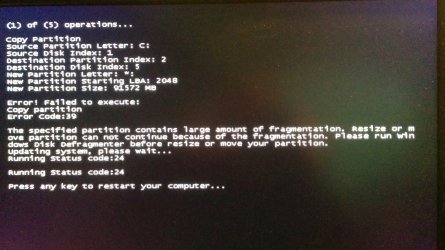
However EaseUS and MiniTool migration wizard both fail and report errors due to fragmented files on the partition. I always understood that SSD drives must not be defraged.

Any suggestions ?
 

My Computer

Computer type
PC/Desktop
Computer Manufacturer/Model Number
Self Build
OS
Windows 7 64 bit
CPU
Intel 2500K @4.3 GHz
Motherboard
ASUS P8Z68-V PRO
Memory
Corsair 16gb DDR3
Graphics Card(s)
ATI Radeon HD 5670
Monitor(s) Displays
19 inch Asus
Hard Drives
Samsung Evo 850 256gb
Toshiba 2TB
Toshiba 4TB
WD Green 2TB
PSU
Antec 650
Case
NZXT BETA EVO
Cooling
Arctic Freezer 13
Keyboard
Logitech Wireless
Mouse
Logitech Wireless
Internet Speed
120 to 160mbps Virgin Cable
Antivirus
MS Essentials
Browser
Firefox
I'd assume you are trying to "clone" from one SSD to another, so that the destination drive is an immediately bootable replica of the source drive.

That can work or can fail. It just seems to be a touchy process, prone to failure.

You might have success with another application?

Or you could give up on cloning and use imaging instead. That would NOT result in an immediately bootable replica, but might be more likely to succeed.

And it would have the advantage of not quickly going stale. If you clone today, the destination drive will forever be as it is on June 15, 2015. The Windows installation on it would be quite outdated if you put the SSD in a closet until June 15, 2016 and then installed it. Imaging, on the other hand, can be quickly redone weekly or monthly so that the latest image file would never be severely out of date. The disadvantage of imaging is that the image file would have to be restored.

Additionally, it seems to me to be a waste of an otherwise good SSD to put a clone on it and stick it in a closet, unused. I'd rather try to take advantage of its speed daily if I could--perhaps as a backup drive if nothing else.
 

My Computer

Computer type
PC/Desktop
Computer Manufacturer/Model Number
Ignatz Special; 4 speed manual gearbox; factory air conditioning; one of one
OS
Windows 7 Home Premium SP1, 64-bit
CPU
Intel Skylake i5-6600K, not overclocked
Motherboard
AsRock Z170M Extreme 4, micro ATX
Memory
8 GB HyperX DDR4-2666 (2 x 4 GB)
Graphics Card(s)
none; graphics are integrated on CPU
Sound Card
onboard: Realtek ALC1150; external: USB Behringer UF0-202
Monitor(s) Displays
Dell S2340M 23 inch IPS
Screen Resolution
1600 x 900
Hard Drives
System: Crucial MX100 series SSD, 128 GB;
Data: Samsung Spinpoint 103SJ, 1 TB;
Backup: WD Caviar Green WD30EZRX-00D8PB0, 3 TB
PSU
Rosewill SilentNight 500 watt fanless, semi-modular
Case
Antec Solo II
Cooling
Noctua NH-U12S; Noctua F12 intake, Noctua S12A exhaust
Keyboard
Microsoft 200 6JH-00001 USB
Mouse
Dell or Microsoft optical wired; USB
Antivirus
Microsoft Security Essentials and Malwarebytes Premium
Browser
Pale Moon
Other Info
All fans PWM; speeds at idle: CPU circa 500 rpm; intake circa 600 rpm; exhaust circa 600 rpm; CPU temps 27 idle and 47 C load in a warm room (27 C/81 F) when running Intel Extreme Tuning Utility stress test.
I've had cloning fail a few times over the years - just had one last week. To work around it I used Acronis to create a backup image of the old drive then restored the image to the new drive. Worked great.
 

My Computer

Computer type
PC/Desktop
OS
Windows 7 Pro 64-bit
Thanks guys. Just going to use ssd as a backup for os.

Trying to understand the problem as these issues annoy me !

Photo attached re error.
 

Attachments

  • IMG_20150615_193054.jpg
    IMG_20150615_193054.jpg
    470.6 KB · Views: 0

My Computer

Computer type
PC/Desktop
Computer Manufacturer/Model Number
Self Build
OS
Windows 7 64 bit
CPU
Intel 2500K @4.3 GHz
Motherboard
ASUS P8Z68-V PRO
Memory
Corsair 16gb DDR3
Graphics Card(s)
ATI Radeon HD 5670
Monitor(s) Displays
19 inch Asus
Hard Drives
Samsung Evo 850 256gb
Toshiba 2TB
Toshiba 4TB
WD Green 2TB
PSU
Antec 650
Case
NZXT BETA EVO
Cooling
Arctic Freezer 13
Keyboard
Logitech Wireless
Mouse
Logitech Wireless
Internet Speed
120 to 160mbps Virgin Cable
Antivirus
MS Essentials
Browser
Firefox
Looks like a software restriction or there may be something running that's changing the disk. You might try a Clean Boot using both the Services and Startup Tabs. Make sure the disk light is "calm" after booting. (A blip of the light about every second is normal.) There may be a lot going on at startup and the Register Backup will run after about 30 minutes of idle so you want to run your clone before the backup starts.
 
Last edited:

My Computer

Computer type
PC/Desktop
Computer Manufacturer/Model Number
Built 2/11/2011
OS
Windows 7 Pro-x64
CPU
i7-2600 3.4GHz - 3.8GHz Turbo
Motherboard
Intel DH67BL-B3
Memory
8Gb - 2x4GB, Muskin 991770 PC3-1333
Graphics Card(s)
Integrated Intel HD 2000
Sound Card
Integrated Intel 10.1 HD, RealTek ALC892
Monitor(s) Displays
Asus LCD VH222H, Haier HL24XSL2a
Screen Resolution
1920x1080, 1920x1080
Hard Drives
Crucial SSD C300-128Gb,
Western Digital WD5002AALX - 500Gb,
Western Digital WD7501AALS - 750Gb
PSU
Seasonic 650W 80+ Gold Modular
Case
Rosewill Defender
Cooling
Stock CPU, Four 120mm case fans, PCH fan added
Keyboard
Logitech EX100 Y-RBH94 Wireless
Mouse
Logitech EX100 M-RCE95 Wireless
Internet Speed
3.0/1.5 Mbs
Antivirus
Microsoft Security Essentials
Browser
Microsoft Internet Explorer 11
Other Info
Antec Veris Premier-Multimedia IR Station,
Cyber Accoustics-3602 Speakers,
AFT XM-5U Card Reader,
Hauppauge TV-HVR-2250,
Sony LX300 USB Turntable
Thanks guys, got it sorted now, more by accident than design. :D:party::D
 

My Computer

Computer type
PC/Desktop
Computer Manufacturer/Model Number
Self Build
OS
Windows 7 64 bit
CPU
Intel 2500K @4.3 GHz
Motherboard
ASUS P8Z68-V PRO
Memory
Corsair 16gb DDR3
Graphics Card(s)
ATI Radeon HD 5670
Monitor(s) Displays
19 inch Asus
Hard Drives
Samsung Evo 850 256gb
Toshiba 2TB
Toshiba 4TB
WD Green 2TB
PSU
Antec 650
Case
NZXT BETA EVO
Cooling
Arctic Freezer 13
Keyboard
Logitech Wireless
Mouse
Logitech Wireless
Internet Speed
120 to 160mbps Virgin Cable
Antivirus
MS Essentials
Browser
Firefox
Back
Top