
Hi everyone,
Today I have tried to migrate my HDD install of OEM windows 7 that was shipped with my Asus laptop to a new bought SSD in the same laptop, with a very strange result: The computer boots and starts up windows 7 on solely the SSD-drive, lets me type in my passwords, but then turns to a black desktop screen where I can move the mouse with only the text:
Windows 7
Build (...)
U gebruikt geen legitieme versie van Windows (You do not have a genuine version of Windows)
This is when my former HDD is detached, and the SSD is connected in the former DVD-slot. However when I reconnect my HDD, and still boot from my SSD, Windows DOES start up. Until the password screen this is very quick, after this it is slow as usual (laptop from 2009). Looking in Disk manager it shows the following:
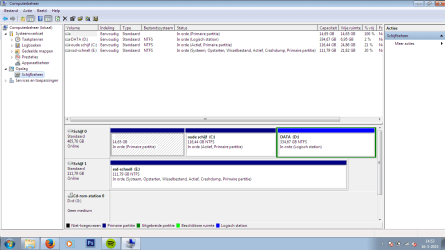
So it says that booting and windows are performed from my SSD, however all the other programs are clearly ran from my old HDD, regarding the time it takes and the noise that the old HDD makes.
Any ideas how to solve this problem? should I switch my SSD and HDD physically in the laptop? or is it because of the OEM version of windows?
some other information: I used EaseUS backup tool to clone the windows partition. Then ran EasyBCD to copy the boot sector to the SSD (or was this wrong?), switched the BIOS boot order, unplugged old HDD, started windows recovery usb drive and performed Startup repair three times, tried to startup with halt as described above, plugged HDD back in, could startup again.
Today I have tried to migrate my HDD install of OEM windows 7 that was shipped with my Asus laptop to a new bought SSD in the same laptop, with a very strange result: The computer boots and starts up windows 7 on solely the SSD-drive, lets me type in my passwords, but then turns to a black desktop screen where I can move the mouse with only the text:
Windows 7
Build (...)
U gebruikt geen legitieme versie van Windows (You do not have a genuine version of Windows)
This is when my former HDD is detached, and the SSD is connected in the former DVD-slot. However when I reconnect my HDD, and still boot from my SSD, Windows DOES start up. Until the password screen this is very quick, after this it is slow as usual (laptop from 2009). Looking in Disk manager it shows the following:
So it says that booting and windows are performed from my SSD, however all the other programs are clearly ran from my old HDD, regarding the time it takes and the noise that the old HDD makes.
Any ideas how to solve this problem? should I switch my SSD and HDD physically in the laptop? or is it because of the OEM version of windows?
some other information: I used EaseUS backup tool to clone the windows partition. Then ran EasyBCD to copy the boot sector to the SSD (or was this wrong?), switched the BIOS boot order, unplugged old HDD, started windows recovery usb drive and performed Startup repair three times, tried to startup with halt as described above, plugged HDD back in, could startup again.
Last edited by a moderator:
My Computer
- Computer type
- Laptop
- Computer Manufacturer/Model Number
- ASUS
- OS
- Windows 7 Home Premium OEM - NL 64 bit
- CPU
- i3
- Memory
- 4 GB
- Graphics Card(s)
- Nvidea Radeon 512mb
- Hard Drives
- 500 GB hdd
120 GB sdd
- Antivirus
- windows security
- Browser
- mozilla


