SSD mini-lockups?

ikjadoon

New member
Power User
VIP
Local time
7:27 PM
Messages
94
Hi! I have a Samsung 256GB SSD with TRIM on Windows 7 Ultimate 64-bit. I am using Microsoft's AHCI drivers (only ones that support TRIM so far) and have aligned my SSD partition.

However, my SSD as of late seems to be having some mini-lockups. You could almost call it stuttering, but it only happens once and then it's over.

It happens at two different places.

1. Firefox (and my add-on Download Statusbar) scan all downloaded files right after they are downloaded. I am using Microsoft's Security Essentials (updated and all) for my AV and MSE itself scans these files.

As soon as I download a file, say larger than 3MB, my laptop hangs for about 2 seconds. The larger the file, the longer the hang. I think it hung for 8 seconds on a 1GB file. It's not just Firefox that hangs, but all open applications. Say I'm typing a Word document and a large file finishes downloading and the scan begins. Word instantly locks up. I can move the mouse and click, but I get that annoying "fade out to white" and a cute 'Not responding' title if I try to do anything with any open programs. This all goes away after the scan finishes.

2. Accessing a folder with more than 50 files with different icons. I thought SSDs had good random access! What is this?! My Downloads folder has 56 items: about 25 folders and about 31 files. These 31 files have 8-10 different icons. Every time when I first try to hover over this folder in the Start Menu, it takes like 5-6 seconds for the icons to appear. In this lapse, all of Explorer.exe is dead: can't click anything in the start menu, the time, my taskbar, icons on the taskbar, etc.

After I do it the first time, though, it caches all the icons and no more hangs. But why does it happen the first time?

I have TRIM on (AHCI mode), aligned my partitions, emptied my Recycle Bin, am using MS' AHCI driver, and I've only used 51.1GB on my 256GB drive.

Any ideas?

Thanks,

~Ibrahim~

P.S. This drive *does* have hardware encryption/decryption, but on SSDs that was "supposed" to have a negligible impact....
 

My Computer

Computer Manufacturer/Model Number
Dell SXPS 1645
OS
Windows 7 Ultimate 64-bit
CPU
i7-720QM
Memory
6GB DDR3-1.333GHz
Graphics Card(s)
ATI 4670 1GB
Sound Card
IDT Integ.
Monitor(s) Displays
RGBLED
Screen Resolution
1920x1080
Hard Drives
Samsung PM800 256GB SSD
PSU
Dell 90W w/ 9-cell
Hi.

Have you run a benchmark to test the drive to see if its performing as it should?
Alex Intelligent Software - Downloads: AS SSD Benchmark
I would do this just to see if the drive itself is performing properly.

Second, have you scanned for malware etc. with something like Malwarebytes?


~~ On a side note, Intels new AHCI/RAID drivers pass TRIM to the SSD now :) But mixed results from them. My system,for example, likes the generic MS drivers better.
 

My Computer

Computer Manufacturer/Model Number
Custom (Self Build)
OS
Windows 7 Home Premium 64bit
CPU
Intel Core i7 2700k
Motherboard
eVGA P67 SLI
Memory
8GB Mushkin Redline Ridgebacks @1866
Graphics Card(s)
EVGA GTX570 SC
Sound Card
XiFi Titanium HD
Monitor(s) Displays
LG W2453V
Screen Resolution
1920x1080
Hard Drives
Intel 320 80GB -- Intel X25-V 40GB --WD Black 1TB x2 -- WD Blue 640GB
PSU
Seasonic x750
Case
Corsair 600T SE White
Cooling
eVGA Superclocked CPU Cooler
Keyboard
Saitek Cyborg
Antivirus
Kaspersky
Browser
IE
Other Info
LG BD/DVD
1. The problem with scanning of the downloads could be caused by MSE. Have Process Explorer or Task Manager running when you do this operation. Then you can see which processes monopolizes the system.
2. This first time access problem I encounter too. E.g. I have a toolbar with about 25 programs. Every time I access this toolbar for the first time, it takes a few seconds to display the icons and the text that goes with them. My SSD is an 80GB Intel.
 

My Computer

Computer Manufacturer/Model Number
HP, Dell, Gateway, Toshiba - 4 laptops and 2 desktops
OS
Vista, Windows7, Mint Mate, Zorin, Windows 8
CPU
from 1.6GHz Duo to i7
Monitor(s) Displays
2x HP w2207
Hard Drives
5x HDD, 7x SSD, 12x Externals
Keyboard
with trackball - no mices
Mouse
Trackball mice
Internet Speed
DSL 6000
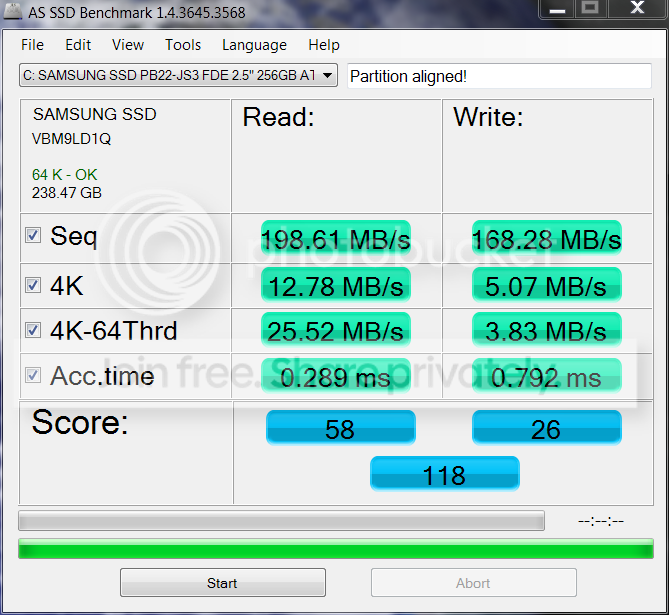
Oh, my gosh! Look at this:

as-ssd-benchSAMSUNGSSDPB22SundayApr.png


It used to be this:

ASSSDpartitionaligned.png


Definite performance degradation....so does that mean TRIM is not working, then?

Hmmm....the drive definitely has TRIM, or so says CrystalDiskInfo and fsutil behavior query disabledeletenotify gives me a 0, meaning enabled. Curious...maybe I'll try Intel's drivers.
 

My Computer

Computer Manufacturer/Model Number
Dell SXPS 1645
OS
Windows 7 Ultimate 64-bit
CPU
i7-720QM
Memory
6GB DDR3-1.333GHz
Graphics Card(s)
ATI 4670 1GB
Sound Card
IDT Integ.
Monitor(s) Displays
RGBLED
Screen Resolution
1920x1080
Hard Drives
Samsung PM800 256GB SSD
PSU
Dell 90W w/ 9-cell
Yeah, your writes have degraded indeed. But that should not cause the 2 problems you initially described. In those operations there should be hardly any writes involved.
 

My Computer

Computer Manufacturer/Model Number
HP, Dell, Gateway, Toshiba - 4 laptops and 2 desktops
OS
Vista, Windows7, Mint Mate, Zorin, Windows 8
CPU
from 1.6GHz Duo to i7
Monitor(s) Displays
2x HP w2207
Hard Drives
5x HDD, 7x SSD, 12x Externals
Keyboard
with trackball - no mices
Mouse
Trackball mice
Internet Speed
DSL 6000
Most of it is Seq. Write, which isnt that big of a deal, and as WHS pointed out will not cause the issue your having. Likely just normal degradation. Overall, not as bad as it looks :)


As already suggested, I would look into MSE as a possible culprit at this point.


If the Seq.Write bugs you, you can try copy a 700MB or so file to the drive, then delete it and empty the recycle bin. then reboot for safe measure.
It will force a TRIM.
 

My Computer

Computer Manufacturer/Model Number
Custom (Self Build)
OS
Windows 7 Home Premium 64bit
CPU
Intel Core i7 2700k
Motherboard
eVGA P67 SLI
Memory
8GB Mushkin Redline Ridgebacks @1866
Graphics Card(s)
EVGA GTX570 SC
Sound Card
XiFi Titanium HD
Monitor(s) Displays
LG W2453V
Screen Resolution
1920x1080
Hard Drives
Intel 320 80GB -- Intel X25-V 40GB --WD Black 1TB x2 -- WD Blue 640GB
PSU
Seasonic x750
Case
Corsair 600T SE White
Cooling
eVGA Superclocked CPU Cooler
Keyboard
Saitek Cyborg
Antivirus
Kaspersky
Browser
IE
Other Info
LG BD/DVD
Sorry to bump this uber-old thread, but I thought I'd update:

MSE: It automatically checks downloaded files, so I think the redundancy in Firefox was messing with it. But, since I have Download Statusbar (add-on), I had to do it through its own anti-viral scan upon download. There was nothing there, so I cleared out the arguments, and hit save. The delays are gone! :D :D

@TRIM

I tried forcing a TRIM, tried letting it idle for garbage collection, nothing. I ended up doing a Secure Erase and the 200MB/s writes are back!

Seems a bit snappier, too.

And, for those curious, Windows' Backup images do retain alignment, so whatever alignment you made the backup with, that's what the backup image will have. :)
 

My Computer

Computer Manufacturer/Model Number
Dell SXPS 1645
OS
Windows 7 Ultimate 64-bit
CPU
i7-720QM
Memory
6GB DDR3-1.333GHz
Graphics Card(s)
ATI 4670 1GB
Sound Card
IDT Integ.
Monitor(s) Displays
RGBLED
Screen Resolution
1920x1080
Hard Drives
Samsung PM800 256GB SSD
PSU
Dell 90W w/ 9-cell
And, for those curious, Windows' Backup images do retain alignment, so whatever alignment you made the backup with, that's what the backup image will have
I wonder whether it is the backup image that retains the alignment or the SSD that retains it. I always thought it would not be retained in the image - you could e.g. restore it to an HDD where the alignment makes no sense.
Maybe you explain some more how you found out that in fact the image retains the alignment.
 

My Computer

Computer Manufacturer/Model Number
HP, Dell, Gateway, Toshiba - 4 laptops and 2 desktops
OS
Vista, Windows7, Mint Mate, Zorin, Windows 8
CPU
from 1.6GHz Duo to i7
Monitor(s) Displays
2x HP w2207
Hard Drives
5x HDD, 7x SSD, 12x Externals
Keyboard
with trackball - no mices
Mouse
Trackball mice
Internet Speed
DSL 6000
And, for those curious, Windows' Backup images do retain alignment, so whatever alignment you made the backup with, that's what the backup image will have
I wonder whether it is the backup image that retains the alignment or the SSD that retains it. I always thought it would not be retained in the image - you could e.g. restore it to an HDD where the alignment makes no sense.
Maybe you explain some more how you found out that in fact the image retains the alignment.

Oh. Well, this is actually from previous experience, as well. If you recall that thread where I attempted to align my partitions without losing data and then the whole world collapsed with unbootable Windows, etc.?

ANYWAYS, I had aligned the drive, but Windows was acting up. I restored from an image when the hard drive was unaligned. When I restored, the hard drive was again unaligned.

I'm unable to be 100% sure because I think I formatted in the whole trouble of restoring the image, which may throw this out the window....

Not positive.
 

My Computer

Computer Manufacturer/Model Number
Dell SXPS 1645
OS
Windows 7 Ultimate 64-bit
CPU
i7-720QM
Memory
6GB DDR3-1.333GHz
Graphics Card(s)
ATI 4670 1GB
Sound Card
IDT Integ.
Monitor(s) Displays
RGBLED
Screen Resolution
1920x1080
Hard Drives
Samsung PM800 256GB SSD
PSU
Dell 90W w/ 9-cell
Hmm, looks like we are not certain one way or the other. Thanks for the further details.
 

My Computer

Computer Manufacturer/Model Number
HP, Dell, Gateway, Toshiba - 4 laptops and 2 desktops
OS
Vista, Windows7, Mint Mate, Zorin, Windows 8
CPU
from 1.6GHz Duo to i7
Monitor(s) Displays
2x HP w2207
Hard Drives
5x HDD, 7x SSD, 12x Externals
Keyboard
with trackball - no mices
Mouse
Trackball mice
Internet Speed
DSL 6000
Unfortunately so. :(

~Ibrahim~
 

My Computer

Computer Manufacturer/Model Number
Dell SXPS 1645
OS
Windows 7 Ultimate 64-bit
CPU
i7-720QM
Memory
6GB DDR3-1.333GHz
Graphics Card(s)
ATI 4670 1GB
Sound Card
IDT Integ.
Monitor(s) Displays
RGBLED
Screen Resolution
1920x1080
Hard Drives
Samsung PM800 256GB SSD
PSU
Dell 90W w/ 9-cell
Back
Top