SSD partition...behavior!

paulobao

New member
Member
VIP
Local time
3:36 PM
Messages
197
Hi,

Now that my first SSD (urrah) is installed and my laptop is running smoothly (after SSD hardawre install. I restore my Laptop to factory state! Thaen I removed all bloatware/apps I do not use...it is a Toshiba!). Checked and rechecked, and everyting is OK and better :).
Now I will pass to phase 2: PARTITION of my SSD (a Plextor M5P 512GB).

- I'm going to remove the System Recovery (because I have 2 copys of it in DVDs plus a copy in a 16 GB USB Flash drive. And it was with one of this copys that I restore the laptop to factory state).
-I'm going to create 2 partitions:

- one for data (32 GB): DATA
- one for the last stable image created with my Image software: SYSTEM RECOVERY

Of course I will copys of those in a portable external HDD!

My question is:

When I make partitions to the SSD, is there is an impact to the SSD?
Exemple: imagine I have a 512 GB ssd and I make a partition of 6 GB. Since SSD have a limited writes and those are proportional to the capacity of the disk, will the 6 GB partition have lesser writes that the main partition? Or, even is the ssd is partitioned, writes cycles will be not affected?

Thanks for your time and I will appreciate the comments,

cheers,
paulo
 

My Computer

Computer Manufacturer/Model Number
Toshiba Tecra R840
OS
Windows 7 Professional 64 bit
CPU
I7 2640M
Memory
8 GB
Graphics Card(s)
AMD Radeo HD 6450M
Monitor(s) Displays
HD+ 14 inch
Hard Drives
HDD 500GB 7200 rpm
write cycles is per flash cell, so yes, the partition that is written more will wear out more.

Still, I've seen modern SDD tested and they can last well beyond the computer they are in, for home use.

So, unless you are writing 5 GB of data per day for years, cells wearing out is a non-issue.

Btw, disable the page file (virtual memory). You have enough RAM to not really need it, and that degrades the drive faster (if used anyway).
 

My Computer

Computer type
PC/Desktop
Computer Manufacturer/Model Number
custom built
OS
Win 7 Pro 64-bit 7601
CPU
AMD Phenom 9650 QuadCore, revision DR-B3
Motherboard
ASUS M4A78
Memory
5 GB yes I run 2x 2GB and 1x 1GB, different brand, spank me.
Graphics Card(s)
NVIDIA GeForce 9800 GT 512 Mb, unknown manufacturer.
Sound Card
Crappy Realtek Integrated Audio
Monitor(s) Displays
Fujitsu Siemens P19-3P
Screen Resolution
1280 x 1024 x 32 bits @ 60 Hz Oh yeah, 4:3 rocks!
Hard Drives
(1) MAXTOR S TM3320613AS SATA Disk Device (2) STM35004 18AS SATA Disk Device (3) TOSHIBA USB 2.5"-HDD
PSU
whatever, around 450w
Case
Scavenged from old company PC, 10+ years old
Cooling
CPU fan, GPU fan, case fan, nothing fancy
Keyboard
Microsoft, PS/2, white.
Mouse
Optical, logitec.
Internet Speed
effective max speeds: 70-ish kB/s down 30-ish kB/s up
Antivirus
Avira, free edition.
Browser
Firefox with FXChrome to make it look like Google Chrome :P
Other Info
Was discarded by previous owner due to "horrible performance".
Was running Win Xp from a IDE drive. Yeah. Was a pain.
SATA II drive and Win7 and it zips away! Yay!
I would not disable the page file completely. If you do, you will not be able to get any memory dumps incase of problems.
 

My Computer

Computer type
PC/Desktop
Computer Manufacturer/Model Number
Custom Built
OS
Windows 10 Pro x64, Windows 8.1 Pro x64, Windows 7 Ultimate x64 SP1,
CPU
INTEL i9-7920X LGA 2066
Motherboard
Gigabyte X299-WU8 F3
Memory
64 GB (4 X 16 GB) G-Skill V Series DDR4 3200 Quad Channel
Graphics Card(s)
EVGA GTX 1060 SC 3 GB
Sound Card
Realtek Onboard ALC1220
Monitor(s) Displays
2 x Samsung S27E310
Screen Resolution
1920x1080
Hard Drives
Samsung 2 x 970 EVO Plus 500 GB NVMe
1 x 6TB WD 6003FZBX SATA
1 x 6TB WD 60EFRX SATA
12 x 3TB WD 30EFRX SATA
PSU
Seasonic X-1050
Case
Thermaltake Armor+
Cooling
Corsair H80i V2 Liquid AOI Cooler
Keyboard
Logitech G510s
Mouse
Logitech MX Master 2S
Internet Speed
200 Mb/s
Antivirus
ESET NOD32 13.1
Browser
EDGE (Dev, Canary, Beta), Chrome
Other Info
ASUS RT-AC68U router
Malwarebytes 4.0.4
Thanks for the tips!
 

My Computer

Computer Manufacturer/Model Number
Toshiba Tecra R840
OS
Windows 7 Professional 64 bit
CPU
I7 2640M
Memory
8 GB
Graphics Card(s)
AMD Radeo HD 6450M
Monitor(s) Displays
HD+ 14 inch
Hard Drives
HDD 500GB 7200 rpm
Hum bit late now paulo but I have a couple of Toshiba's and put an OEM on both with SSD's and you would probably been better off spending another $100 for an OEM as this negates any need for clearing of the bloat.

I suppose another way would have been to get an ISO of 7 booted from it and used your original activation code to activate.

Never mind next time :)
 

My Computer

Computer type
PC/Desktop
Computer Manufacturer/Model Number
Own build (new) Desk1 / Asus ROG Win 7 / Desk2 1st build
OS
Desk1 7 Home Prem / Desk2 10 Pro / Main lap Asus ROG 10 Pro 2 laptop Toshiba 7 Pro Asus P2520 7 & 10
CPU
Desk1 i5 3750K / Laptop i7 GTX 860M / Desk2 i5 2500
Motherboard
Desk1 Asus P877-V / Desk2 Gigabyte H67 UD3H / Laptop ?
Memory
Desk1 8GB (1866) / Desk2 16GB (1333) / Laptop 8Gb DDR3
Graphics Card(s)
Desk 1& 2NVidia GTX 650 & Laptops on board Intel
Sound Card
Desk 1 & 2 -XONAR DG Realtek High Def audio Laptop
Monitor(s) Displays
Desk 1 Benq HD 2450 / Desk2 Philips 24" / Laptop 17.5"
Screen Resolution
1920x1080 D1 & D2 & Laptop 1
Hard Drives
Desk1 Samsung 120GB 830 SSD
Asus ROG 256GB 850 Pro SSD
Desk2 Samsung 840 256 SSD
Toshiba 120GB EVO
PSU
Desk 1 Corsair HX 1050/ Laptop ? / Desk 2 Corsair HX 650
Case
Desk 1 Cooler HAF XM ? Toshiba laptop / Desk2 Coolermaster
Cooling
Fans on all Desk1 -2 Desk2 - all Coolermasters 5 Laptop ?
Keyboard
Desk 1 MS Sidewinder X6 Desk 2 MS Sidewinder X 4
Mouse
Desk 1&2 - Gigabyte MS 900 gamer - laptop - Logitec wireless
Internet Speed
ADSL2+
Other Info
One other Desktop (tester) and spare Toshba laptop both with SSD's
Running Kaspersky 2016 ISS on all machines config'd identically
Logitec audio stereo systems on each machine (x3)
Canon MG5250MFC
Router/modem TP-Link running WPA2SK
- one for the last stable image created with my Image software: SYSTEM RECOVERY

There's nothing inherently wrong with making a partition to hold images, but there's no particular reason to do it either.

It's just unnecessary, further subdivides your drive, and may complicate your backup strategy. It's not the most efficient use of the total space available on a drive.

I'd just treat the images like any other valuable data and keep them on my regular data partition in an "images" folder---and back them up along with everything else on the data partition.
 

My Computer

Computer type
PC/Desktop
Computer Manufacturer/Model Number
Ignatz Special; 4 speed manual gearbox; factory air conditioning; one of one
OS
Windows 7 Home Premium SP1, 64-bit
CPU
Intel Skylake i5-6600K, not overclocked
Motherboard
AsRock Z170M Extreme 4, micro ATX
Memory
8 GB HyperX DDR4-2666 (2 x 4 GB)
Graphics Card(s)
none; graphics are integrated on CPU
Sound Card
onboard: Realtek ALC1150; external: USB Behringer UF0-202
Monitor(s) Displays
Dell S2340M 23 inch IPS
Screen Resolution
1600 x 900
Hard Drives
System: Crucial MX100 series SSD, 128 GB;
Data: Samsung Spinpoint 103SJ, 1 TB;
Backup: WD Caviar Green WD30EZRX-00D8PB0, 3 TB
PSU
Rosewill SilentNight 500 watt fanless, semi-modular
Case
Antec Solo II
Cooling
Noctua NH-U12S; Noctua F12 intake, Noctua S12A exhaust
Keyboard
Microsoft 200 6JH-00001 USB
Mouse
Dell or Microsoft optical wired; USB
Antivirus
Microsoft Security Essentials and Malwarebytes Premium
Browser
Pale Moon
Other Info
All fans PWM; speeds at idle: CPU circa 500 rpm; intake circa 600 rpm; exhaust circa 600 rpm; CPU temps 27 idle and 47 C load in a warm room (27 C/81 F) when running Intel Extreme Tuning Utility stress test.
Thanks all :-)
Ignatz, could you tell me your partition scheme?

Cheers,
paulo
 

My Computer

Computer Manufacturer/Model Number
Toshiba Tecra R840
OS
Windows 7 Professional 64 bit
CPU
I7 2640M
Memory
8 GB
Graphics Card(s)
AMD Radeo HD 6450M
Monitor(s) Displays
HD+ 14 inch
Hard Drives
HDD 500GB 7200 rpm
I'd just treat the images like any other valuable data and keep them on my regular data partition in an "images" folder---and back them up along with everything else on the data partition.

Hi paulo. I think what he meant was that you only need two partitions, one for the OS and the other for the data. It makes system imaging neater that way, as any images you create of the "C" partition will only contain the OS and not all your other data.
 

My Computer

Computer Manufacturer/Model Number
Customized build from CyberPower
OS
Windows 7 Home Premium 64bit SP 1
CPU
Intel i5 2500k
Motherboard
Asus P8P67 Deluxe
Memory
8 gigabytes Corsair PC3-12800 DDR3
Graphics Card(s)
EVGA GeForce GTX 460 superclocked
Sound Card
Integrated
Monitor(s) Displays
ViewSonic 23" LCD
Screen Resolution
1980 x 1080
Hard Drives
120 Gb Samsung 840 Pro SSD
120 Gb Kingston Hyper X SSD
1 Tb WD Caviar Black HDD
PSU
Coolermaster 1000 watt modular
Case
Coolermaster HAF X full tower
Cooling
Coolermaster Hyper 212 plus
Keyboard
Logitech USB
Mouse
Microsoft 3 button
Internet Speed
download 1.5 Mb/sec upload 300Kb/sec
Nothing wrong with a data partition. Just make sure you backup your data frequently. Once that is lost, you cannot recover it.
 

My Computer

Computer Manufacturer/Model Number
HP, Dell, Gateway, Toshiba - 4 laptops and 2 desktops
OS
Vista, Windows7, Mint Mate, Zorin, Windows 8
CPU
from 1.6GHz Duo to i7
Monitor(s) Displays
2x HP w2207
Hard Drives
5x HDD, 7x SSD, 12x Externals
Keyboard
with trackball - no mices
Mouse
Trackball mice
Internet Speed
DSL 6000
Hi,

I've laptops (I only have desktops at work) from 1997 and never lost any bit of data! But I never used a backup software!!! I use my computers for the processing part (I do astronomy/astrophotography): controlling all my astronomy gear, processing all the data, etc! What I do is:
- when I download new data to my laptop, I just copy/paste it to at least 1 external HDD (usually 2 or even 3)
- when I process all the data and have the "results" I copy/paste it the same way
- when I download tutorials, pdfs, etc from the web, I copy/paste too..
- my favorites: copy/paste it to the external hdd

Well, I think you see what I do! And for that I think I do not need any special software (I want to keep it simple and I do not want anything working in the background...at least in this respect!)

So, I do not keep much data in my computer anyway! And the data I keep is already in a external hdd too!

Like this, I would ask you if you find that I would be better served with a data partition? (because I never had one just a unique partition!)

Of course my main concern now is about imaging! Because I restore my laptop 2 weeks ago to the factory state because I did not have any way to recover my lap to point in time where everything was fine!!! And I had dozens of GB of SW installed with the settings/preferences as I liked :-(. So I do not want to go this way again and I'm doing all to avoid this in the case a crash/major crash happens again!
Saying this, I never restorede/recovered a computer! Hope if/when I need it all will pass ok!

One question: when you make an image of your system this includes all you need to recover the system to the exact same state as when you made the image? I mean all sw installed will be reinstalled from the image including all the settings, preferences, etc?

Many thanks,
paulo
 

My Computer

Computer Manufacturer/Model Number
Toshiba Tecra R840
OS
Windows 7 Professional 64 bit
CPU
I7 2640M
Memory
8 GB
Graphics Card(s)
AMD Radeo HD 6450M
Monitor(s) Displays
HD+ 14 inch
Hard Drives
HDD 500GB 7200 rpm
Thanks all :-)
Ignatz, could you tell me your partition scheme?

Cheers,
paulo

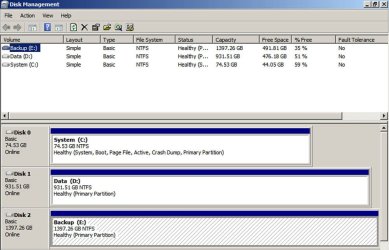
Here is a pic.

It's about as simple as you can get.

Three separate internal drives: System, Data, Backup. System is an SSD. The other 2 are HDD.

One partition on each: C, D, and E. All partitions are primary.

No system reserved.

C is imaged periodically. D is backed up to E without using an image.

My images of C are stored on D just like all other data. The images are backed up to E just like all other data.

I also back up D to an external drive via a dock every other month.. And I back up my most critical text file data (about 6 GB) to a USB stick 3 or 4 times a year.
 

Attachments

  • Untitled-1.jpg
    Untitled-1.jpg
    98.6 KB · Views: 11

My Computer

Computer type
PC/Desktop
Computer Manufacturer/Model Number
Ignatz Special; 4 speed manual gearbox; factory air conditioning; one of one
OS
Windows 7 Home Premium SP1, 64-bit
CPU
Intel Skylake i5-6600K, not overclocked
Motherboard
AsRock Z170M Extreme 4, micro ATX
Memory
8 GB HyperX DDR4-2666 (2 x 4 GB)
Graphics Card(s)
none; graphics are integrated on CPU
Sound Card
onboard: Realtek ALC1150; external: USB Behringer UF0-202
Monitor(s) Displays
Dell S2340M 23 inch IPS
Screen Resolution
1600 x 900
Hard Drives
System: Crucial MX100 series SSD, 128 GB;
Data: Samsung Spinpoint 103SJ, 1 TB;
Backup: WD Caviar Green WD30EZRX-00D8PB0, 3 TB
PSU
Rosewill SilentNight 500 watt fanless, semi-modular
Case
Antec Solo II
Cooling
Noctua NH-U12S; Noctua F12 intake, Noctua S12A exhaust
Keyboard
Microsoft 200 6JH-00001 USB
Mouse
Dell or Microsoft optical wired; USB
Antivirus
Microsoft Security Essentials and Malwarebytes Premium
Browser
Pale Moon
Other Info
All fans PWM; speeds at idle: CPU circa 500 rpm; intake circa 600 rpm; exhaust circa 600 rpm; CPU temps 27 idle and 47 C load in a warm room (27 C/81 F) when running Intel Extreme Tuning Utility stress test.
Thanks Ignatz!
So you have 3 separate discs :-) That is cool :-) Unfortunatelly my laptop only have one disc :-(.
Since I do not keep much data in my laptop (when I have new data I copy/paste it to external USB HDDs) maybe I can keep it simple and only have a plain, no partition disk! And I will image frequentely this disk to an external HDD (dedicated only to backup images)!

Cheers,
paulo
 

My Computer

Computer Manufacturer/Model Number
Toshiba Tecra R840
OS
Windows 7 Professional 64 bit
CPU
I7 2640M
Memory
8 GB
Graphics Card(s)
AMD Radeo HD 6450M
Monitor(s) Displays
HD+ 14 inch
Hard Drives
HDD 500GB 7200 rpm
One question: when you make an image of your system this includes all you need to recover the system to the exact same state as when you made the image? I mean all sw installed will be reinstalled from the image including all the settings, preferences, etc?

Yes. That's the premise.

The only fly in the ointment is that images do not always restore, so you need to have another plan in case they don't.

Keeping Windows in one partition and data in another means that your images of C will not contain data and will therefore be smaller.

A separate partition for data also helps in this scenario:

Suppose all your data is on C and you make an image of C on October 1.

On October 2, you produce a bunch of data and keep it on C with all other data.

Suppose your hard drive fails on October 3. You buy a new drive and restore the October 1 image.

In that scenario, the data produced October 2 is lost---unless you had it separately backed up.

If the data was not on C, it would not be over-written by the restoration of the October 1 image.
 

My Computer

Computer type
PC/Desktop
Computer Manufacturer/Model Number
Ignatz Special; 4 speed manual gearbox; factory air conditioning; one of one
OS
Windows 7 Home Premium SP1, 64-bit
CPU
Intel Skylake i5-6600K, not overclocked
Motherboard
AsRock Z170M Extreme 4, micro ATX
Memory
8 GB HyperX DDR4-2666 (2 x 4 GB)
Graphics Card(s)
none; graphics are integrated on CPU
Sound Card
onboard: Realtek ALC1150; external: USB Behringer UF0-202
Monitor(s) Displays
Dell S2340M 23 inch IPS
Screen Resolution
1600 x 900
Hard Drives
System: Crucial MX100 series SSD, 128 GB;
Data: Samsung Spinpoint 103SJ, 1 TB;
Backup: WD Caviar Green WD30EZRX-00D8PB0, 3 TB
PSU
Rosewill SilentNight 500 watt fanless, semi-modular
Case
Antec Solo II
Cooling
Noctua NH-U12S; Noctua F12 intake, Noctua S12A exhaust
Keyboard
Microsoft 200 6JH-00001 USB
Mouse
Dell or Microsoft optical wired; USB
Antivirus
Microsoft Security Essentials and Malwarebytes Premium
Browser
Pale Moon
Other Info
All fans PWM; speeds at idle: CPU circa 500 rpm; intake circa 600 rpm; exhaust circa 600 rpm; CPU temps 27 idle and 47 C load in a warm room (27 C/81 F) when running Intel Extreme Tuning Utility stress test.
One question: when you make an image of your system this includes all you need to recover the system to the exact same state as when you made the image? I mean all sw installed will be reinstalled from the image including all the settings, preferences, etc?
Answer is YES. Just make sure you also image the little system partition along with the C partition - else your system cannot boot when this is corrupted. This system partition has to be imaged only once because it never changes (unless you go to double boot). Put it into a seperate folder so that it does not get mixed up.
 

My Computer

Computer Manufacturer/Model Number
HP, Dell, Gateway, Toshiba - 4 laptops and 2 desktops
OS
Vista, Windows7, Mint Mate, Zorin, Windows 8
CPU
from 1.6GHz Duo to i7
Monitor(s) Displays
2x HP w2207
Hard Drives
5x HDD, 7x SSD, 12x Externals
Keyboard
with trackball - no mices
Mouse
Trackball mice
Internet Speed
DSL 6000
Yes I see that! But As I told you I usually copy/paste the data to an external HDD as soon (well, in the same day!) I get it!But yes, maybe a small data partition will not hurt! And data should I put in this data partition? My docs, favorites,...any thing, data wise speaking, more deep? Ex: app data? The "location transfer" from C to D do not will cause any problems? How should I correctly do this?paulo
 

My Computer

Computer Manufacturer/Model Number
Toshiba Tecra R840
OS
Windows 7 Professional 64 bit
CPU
I7 2640M
Memory
8 GB
Graphics Card(s)
AMD Radeo HD 6450M
Monitor(s) Displays
HD+ 14 inch
Hard Drives
HDD 500GB 7200 rpm
I would not disable the page file completely. If you do, you will not be able to get any memory dumps incase of problems.

Sound advice.

That page file does not hurt you.
The page file does help you.
Anyone who has any doubt should research the recent literature.
I've got links somewhere for this but I'll let the doubters do their homework.
 

My Computer

Computer Manufacturer/Model Number
Toshiba Satellite S875D-S7239 laptop
OS
MS Windows 7 Ultimate SP1 64-bit
CPU
AMD A10-4600M
Motherboard
AMD Pumori (Socket FT1)
Memory
6.00 GB Dual-Channel DDR3 @ 798MHz (11-11-12-28)
Graphics Card(s)
AMD Radeon HD 7660G
Sound Card
High Definition Audio Device
Monitor(s) Displays
Generic PnP Monitor (1600x900@60Hz)
Screen Resolution
1600x900@60Hz
Hard Drives
SSD 119GB Corsair CSSD-V128GB2 ATA Device
Keyboard
Standard PS/2 Keyboard
Mouse
HP Wireless Optical Mobile Mouse Model FHA-3410
Internet Speed
What the local pub, local coffee shop offers.
Other Info
Optical Drive:MATSHITA BD-CMB UJ160B ATA Device


Also have an Asus ha1002xp netbook with Win 7 Ultimate installed.
One question: when you make an image of your system this includes all you need to recover the system to the exact same state as when you made the image? I mean all sw installed will be reinstalled from the image including all the settings, preferences, etc?
Answer is YES. Just make sure you also image the little system partition along with the C partition - else your system cannot boot when this is corrupted. This system partition has to be imaged only once because it never changes (unless you go to double boot). Put it into a seperate folder so that it does not get mixed up.

Thanks! My laptop have a strange partition system!There is a 1.47 GB at left of C and a 14 GB recovery at right!
 

My Computer

Computer Manufacturer/Model Number
Toshiba Tecra R840
OS
Windows 7 Professional 64 bit
CPU
I7 2640M
Memory
8 GB
Graphics Card(s)
AMD Radeo HD 6450M
Monitor(s) Displays
HD+ 14 inch
Hard Drives
HDD 500GB 7200 rpm
paulobao,
don't worry about a 100 mb system recovery partition. Just leave it be as it is.
 

My Computer

Computer Manufacturer/Model Number
Toshiba Satellite S875D-S7239 laptop
OS
MS Windows 7 Ultimate SP1 64-bit
CPU
AMD A10-4600M
Motherboard
AMD Pumori (Socket FT1)
Memory
6.00 GB Dual-Channel DDR3 @ 798MHz (11-11-12-28)
Graphics Card(s)
AMD Radeon HD 7660G
Sound Card
High Definition Audio Device
Monitor(s) Displays
Generic PnP Monitor (1600x900@60Hz)
Screen Resolution
1600x900@60Hz
Hard Drives
SSD 119GB Corsair CSSD-V128GB2 ATA Device
Keyboard
Standard PS/2 Keyboard
Mouse
HP Wireless Optical Mobile Mouse Model FHA-3410
Internet Speed
What the local pub, local coffee shop offers.
Other Info
Optical Drive:MATSHITA BD-CMB UJ160B ATA Device


Also have an Asus ha1002xp netbook with Win 7 Ultimate installed.
Yes I see that! But As I told you I usually copy/paste the data to an external HDD as soon (well, in the same day!) I get it!But yes, maybe a small data partition will not hurt! And data should I put in this data partition? My docs, favorites,...any thing, data wise speaking, more deep? Ex: app data? The "location transfer" from C to D do not will cause any problems? How should I correctly do this?paulo

There's no particular reason to make a data partition on the SSD.

In fact, if the ORIGINAL versions of most of your data is on an external, I'd keep it all on the external and use the SSD only for Windows, with no data anywhere on the SSD.

It makes backup a lot simpler if ALL data is on ONE partition. Then you just back up that one partition to some other physically separate drive.

If on the other hand the original versions of most data is on the SSD, I would put all data on the SSD---but in a separate partition.

I'm just not sure where you keep your original data---but there's no reason to keep it on multiple partitions if it will fit on one partition.
 

My Computer

Computer type
PC/Desktop
Computer Manufacturer/Model Number
Ignatz Special; 4 speed manual gearbox; factory air conditioning; one of one
OS
Windows 7 Home Premium SP1, 64-bit
CPU
Intel Skylake i5-6600K, not overclocked
Motherboard
AsRock Z170M Extreme 4, micro ATX
Memory
8 GB HyperX DDR4-2666 (2 x 4 GB)
Graphics Card(s)
none; graphics are integrated on CPU
Sound Card
onboard: Realtek ALC1150; external: USB Behringer UF0-202
Monitor(s) Displays
Dell S2340M 23 inch IPS
Screen Resolution
1600 x 900
Hard Drives
System: Crucial MX100 series SSD, 128 GB;
Data: Samsung Spinpoint 103SJ, 1 TB;
Backup: WD Caviar Green WD30EZRX-00D8PB0, 3 TB
PSU
Rosewill SilentNight 500 watt fanless, semi-modular
Case
Antec Solo II
Cooling
Noctua NH-U12S; Noctua F12 intake, Noctua S12A exhaust
Keyboard
Microsoft 200 6JH-00001 USB
Mouse
Dell or Microsoft optical wired; USB
Antivirus
Microsoft Security Essentials and Malwarebytes Premium
Browser
Pale Moon
Other Info
All fans PWM; speeds at idle: CPU circa 500 rpm; intake circa 600 rpm; exhaust circa 600 rpm; CPU temps 27 idle and 47 C load in a warm room (27 C/81 F) when running Intel Extreme Tuning Utility stress test.
Yes I see that! But As I told you I usually copy/paste the data to an external HDD as soon (well, in the same day!) I get it!But yes, maybe a small data partition will not hurt! And data should I put in this data partition? My docs, favorites,...any thing, data wise speaking, more deep? Ex: app data? The "location transfer" from C to D do not will cause any problems? How should I correctly do this?paulo
Only your own data files - no system files like AppData.
For moving the folders, you can use this: http://www.sevenforums.com/tutorials/18629-user-folders-change-default-location.html
But you can also create new folders in the data partition and INCLUDE those into the library. Then move your data folders. I prefer that solution.
 

My Computer

Computer Manufacturer/Model Number
HP, Dell, Gateway, Toshiba - 4 laptops and 2 desktops
OS
Vista, Windows7, Mint Mate, Zorin, Windows 8
CPU
from 1.6GHz Duo to i7
Monitor(s) Displays
2x HP w2207
Hard Drives
5x HDD, 7x SSD, 12x Externals
Keyboard
with trackball - no mices
Mouse
Trackball mice
Internet Speed
DSL 6000
Back
Top