
Solved SSD power consumption when computer is off

paulobao

New member
Member
VIP
Local time
2:20 AM
Messages
197
Hi,

Could anyone tell me what the power consumption of a ssd when the computer is power off?

I've a Toshiba Tecra R840-16J laptop (bougth 6 months ago) with a fresh intalled Plextor M5Pro 512 GB ssd. Yestarday, after a 100% charge, I shutted down the laptop and today (after 16 hours) I turn it on! The battery was at 93% !!!! Is this normal?

Regards,
paulo
 

My Computer

Computer Manufacturer/Model Number
Toshiba Tecra R840
OS
Windows 7 Professional 64 bit
CPU
I7 2640M
Memory
8 GB
Graphics Card(s)
AMD Radeo HD 6450M
Monitor(s) Displays
HD+ 14 inch
Hard Drives
HDD 500GB 7200 rpm
Yes it's normal, and it has nothing to do with the SSD. All batteries lose power over time, even when not in use.
 

My Computer

OS
Windows 7 Ultimate x64 SP1
CPU
Intel Core i7-2600
Motherboard
Gigabyte GA-P67A-UD3P-B3
Memory
12 GB Patriot Extreme DDR3-1333
Graphics Card(s)
Nvidia GTX 470
Monitor(s) Displays
Dell UltraSharp 2209WA
Hard Drives
OCZ Agility3 240 GB, WD5001AALS, WD7501AALS
PSU
OCZ ModStream 700W
Case
CoolerMaster HAF 912 Advanced
Cooling
CoolerMaster Hyper 212 Plus
Well yes, but not that much! I leave my 8 year old Toshiba M30X laptop with a almost dead battery on hibernation for a month and when I restart the bat level is almost (!) the same as when I hibernate it!
At this rate (7% in 16 hours) the battery would be at 0% in less that 10 days!

I will try to disable the USB sleep and charge and see what happens ;-)

paulo
 

My Computer

Computer Manufacturer/Model Number
Toshiba Tecra R840
OS
Windows 7 Professional 64 bit
CPU
I7 2640M
Memory
8 GB
Graphics Card(s)
AMD Radeo HD 6450M
Monitor(s) Displays
HD+ 14 inch
Hard Drives
HDD 500GB 7200 rpm
Is there anything plugged in to the USB sleep and charge port?

There shouldn't be any power drain from the ssd, the memory in the ssd doesn't require power to be applied to preserve it's contents.
 

My Computer

Computer type
PC/Desktop
Computer Manufacturer/Model Number
Home Built desktop, Dell G15 5511 Gaming laptop,MS Surface Pro 7 tablet
OS
W10 Pro desktop, W11 laptop, W11 Pro tablet (all 64-bit)
CPU
3.7Ghz 8700K i7, i7-11800H, i7-1065G7
Motherboard
ASUS TUF Z370-Pro Gaming in desktop
Memory
16G desktop, 16G laptop, 4G tablet
Graphics Card(s)
AMD Radeon RX580, RTX 3060, Intel Iris Plus
Sound Card
High Definition Audio (Built-in to mobo)
Monitor(s) Displays
Samsung U32J59 32" (2x), 15.6", 12"
Screen Resolution
3840x2160, 3840x2160, 1920x1080, 2160x1440
Hard Drives
500G SSD for OS; 2T, 10T & 15T HDDs for Data on Desktop, 1TB SSD laptop, 128G SSD tablet.
PSU
Corsair CX 750M
Case
Antec 100
Cooling
CM 212+
Keyboard
IBM Model M - used continuously since 1986
Mouse
Microsoft Pro IntelliMouse
Internet Speed
400M down 8M up
Antivirus
Windows Defender
Browser
FireFox
Other Info
Built my first computer (8Mhz 8088cpu, 640K RAM, 20MB HDD, 2 360K floppy drives) in 1985 and have been building them for myself, relatives and friends ever since.
No, there's nothing there!
 

My Computer

Computer Manufacturer/Model Number
Toshiba Tecra R840
OS
Windows 7 Professional 64 bit
CPU
I7 2640M
Memory
8 GB
Graphics Card(s)
AMD Radeo HD 6450M
Monitor(s) Displays
HD+ 14 inch
Hard Drives
HDD 500GB 7200 rpm
What you could try:
Fully charge the battery, shutdown, and remove the battery.
After 16 hours, put the battery back in, restart, and check the battery level.

If it's near 100%, something in the laptop is draining it.
If it's ~7% less, the battery drains on it's own.

I'm guessing here, but i would try that test to determine if it's a battery or laptop issue...
 

My Computer

Computer type
PC/Desktop
Computer Manufacturer/Model Number
home built
OS
Multi-Boot W7_Pro_x64 W8.1_Pro_x64 W10_Pro_x64 +Linux_VMs +Chromium_VM
CPU
AMD Athlon II x4 620
Motherboard
Gigabyte GA-MA785G-UD3H
Memory
6GB GSkill DDR2 800
Graphics Card(s)
AMD 4670 GPU + AMD 4200 IGP
Sound Card
on board Realtek ALC889A
Monitor(s) Displays
RCA 40" LCD TV, Insignia 32" LCD TV, HP 15" LCD monitor
Screen Resolution
1680 x 1050
Hard Drives
OCZ Vertex 3 120GB,
Samsung F3 1TB (3),
Several others - WD, Seagate, Hitachi, ...
PSU
Corsair 500 W
Case
Rosewill mid tower
Cooling
CM 90mm rifle
Keyboard
Gyration wireless, Logitech wireless, Dell USB wired
Mouse
Gyration wireless, Logitech wireless, V7 USB wired
Internet Speed
Spectrum - 100Mbps D / 10Mbps U
Antivirus
Avast, MBAM3, EMET, WinPatrol
Browser
Pale Moon, Firefox, IE
Other Info
2 multi-boot PC's
Mainly HTPC/Office/Gen purpose (no gaming).
Trendnet USB KVM.
LG DVD burner/Blue Ray Player.
Tray system for removable SATA backup drives.

Not currently OCd, under-volted.
I use Hybrid sleep, rarely re-boot or shutdown.

Hauppauge HD-PVR, Avermedia PCIe TV Tuner, Hauppauge PCI TV Tuner.
I had a Toshiba that used the battery to charge up the CMOS battery. If I left it off overnight it would drain the battery! Whose bright idea was that?

Anyhow, when you turn off your computer is it set to go in sleep (aka suspend) mode or Hibernate? If sleep, sure it will drain a lot. If hibernate, it should save processor and memory state to disk, and drain very little, but will take longer to start up. I expect you have it in sleep mode. In that case some power is used to maintain the data in your RAM and your processor state.
 

My Computer

Computer type
PC/Desktop
Computer Manufacturer/Model Number
Home built (GeneO industries)/Model 4
OS
Windows 10 Pro. EFI boot partition, full EFI boot
CPU
i7 4770k 4.4GHz (44-44-43-43 turbo) @ 1.248V
Motherboard
ASUS Maximus VI Hero
Memory
16GB (8GBx2) @2200 MHz G.skill Sniper 10-11-10-30-1, 1.6V
Graphics Card(s)
MSI GTX 970 Gaming 4G
Sound Card
Onboard SupremeFX Audio
Monitor(s) Displays
NEC Spectraview 2490WUXi-SV
Screen Resolution
1920 x 1200
Hard Drives
Samsung 850 Pro 256GB (OS), Samsung 2x 128GB 840 Pro SSD in RAID0, 3x WD Blue 6Gb/s 1TB RAID0, WD 2TB Black external USB 3.0, 2TB WD20EARS Green external USB 3.0, 2x 500GB Seagate and 1 750 GB external USB, 1x 350GB external USB3
PSU
Seasonic X-850 (2012 KM3 model)
Case
Fractal Design Define R4
Cooling
NH-D14, NF-F12, NF-A15; NF-P14, NF-P12,NF-A14, S12A PWM
Keyboard
Cooler Master Storm Quickfire Rapid - Brown
Mouse
Logitech G602
Internet Speed
126.4 Mb/s down, 24.3 Mb/s up
Other Info
USB 3.0 x8 , SATA III x8, eSATA, USB 2.0 x6. Samsung DVD R/W drive.

WEI: CPU 7.8, Memory 7.9, Graphics 7.9, Disk 7.9
I had a Toshiba that used the battery to charge up the CMOS battery.
I never heard of a rechargeable CMOS battery.
That would be something new to me.
I can see where a battery pack could be used to supply power so the CMOS battery is not used and could last longer...

Anyhow, when you turn off your computer is it set to go in sleep (aka suspend) mode or Hibernate? If sleep, sure it will drain a lot.

My suggestion to remove the battery assumed the laptop is powered off / shut down and not sleeping based on the OP.
If the laptop is sleeping, removing the battery will lose the "Windows session" and not wake up as it should.
 

My Computer

Computer type
PC/Desktop
Computer Manufacturer/Model Number
home built
OS
Multi-Boot W7_Pro_x64 W8.1_Pro_x64 W10_Pro_x64 +Linux_VMs +Chromium_VM
CPU
AMD Athlon II x4 620
Motherboard
Gigabyte GA-MA785G-UD3H
Memory
6GB GSkill DDR2 800
Graphics Card(s)
AMD 4670 GPU + AMD 4200 IGP
Sound Card
on board Realtek ALC889A
Monitor(s) Displays
RCA 40" LCD TV, Insignia 32" LCD TV, HP 15" LCD monitor
Screen Resolution
1680 x 1050
Hard Drives
OCZ Vertex 3 120GB,
Samsung F3 1TB (3),
Several others - WD, Seagate, Hitachi, ...
PSU
Corsair 500 W
Case
Rosewill mid tower
Cooling
CM 90mm rifle
Keyboard
Gyration wireless, Logitech wireless, Dell USB wired
Mouse
Gyration wireless, Logitech wireless, V7 USB wired
Internet Speed
Spectrum - 100Mbps D / 10Mbps U
Antivirus
Avast, MBAM3, EMET, WinPatrol
Browser
Pale Moon, Firefox, IE
Other Info
2 multi-boot PC's
Mainly HTPC/Office/Gen purpose (no gaming).
Trendnet USB KVM.
LG DVD burner/Blue Ray Player.
Tray system for removable SATA backup drives.

Not currently OCd, under-volted.
I use Hybrid sleep, rarely re-boot or shutdown.

Hauppauge HD-PVR, Avermedia PCIe TV Tuner, Hauppauge PCI TV Tuner.
Hi,

good idea :-) I will do that and that will elucidate if it's a battery "issue" or a laptop internals batery drainage!
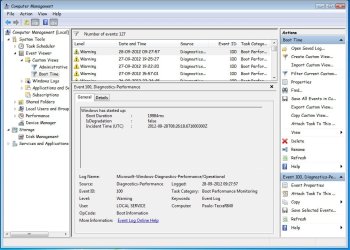
I do not use sleep! Just shut down or hibernate! (well I can suspend/sleep but only if I will resume work in a hour or less!)

paulo
 

My Computer

Computer Manufacturer/Model Number
Toshiba Tecra R840
OS
Windows 7 Professional 64 bit
CPU
I7 2640M
Memory
8 GB
Graphics Card(s)
AMD Radeo HD 6450M
Monitor(s) Displays
HD+ 14 inch
Hard Drives
HDD 500GB 7200 rpm
Hi,

good news :-) (last reply was from another computer!).

Yestarday at 19:25 before shut down battery power was at 46%. Today at 9:25 power was at 45% !
So 1% in 14 hours (and the shut down and power on may drain some W too) gives you 0.071% / hour which is 6.2 x less that the previous numbers (7% / 16 hours!).

Only think I did was to disable USB sleep and charge!!!! So we can say that even without any device plugged in, the USB sleep and charge drains a lot of energy from the battery! Nice :-)

Let's see what other stuff could drain power too! I will report it here if I find others!

And, maybe nothing to do with it...first time I drop the 20 sec for complete boot :-)


Cheers,
paulo
 

Attachments

  • Untitled.jpg
    Untitled.jpg
    98.7 KB · Views: 14

My Computer

Computer Manufacturer/Model Number
Toshiba Tecra R840
OS
Windows 7 Professional 64 bit
CPU
I7 2640M
Memory
8 GB
Graphics Card(s)
AMD Radeo HD 6450M
Monitor(s) Displays
HD+ 14 inch
Hard Drives
HDD 500GB 7200 rpm
I guarantee the SSD isn't putting a dent in your laptops charge.
 

My Computer

Computer type
PC/Desktop
Computer Manufacturer/Model Number
Custom Built
OS
Windows 7 Professional 64bit SP1
CPU
Intel Core i5-3570K @ 4.5GHz
Motherboard
Asus Sabertooth Z77
Memory
Corsair Vengeance 16GB (4x4) @1866MHz CL 9-9-9-24 1T
Graphics Card(s)
EVGA GTX 750 Ti FTW
Sound Card
Onboard Audio
Monitor(s) Displays
Dell S2309W
Screen Resolution
1920x1080
Hard Drives
Samsung 830 128GB SSD - OS
(4) Seagate 5TB HDD
(1) Seagate 2TB HDD
PSU
Seasonic X750 80+ Gold Full Modular
Case
Antec Eleven Hundred Super Mid Tower
Cooling
Intel Liquid Cooler
Keyboard
Max Nighthawk X8 Mechanical keyboard
Mouse
Mionix Naos 7000
Internet Speed
50 Mbps Down / 10 Mbps Up
Antivirus
Microsoft Security Essentials/Malwarebytes Anti-Malware
Browser
Chrome/Firefox
Other Info
Klipsch ProMedia 2.1's
Asus RT-N66R Wireless Router
Yes, now I see it :-). The culprit was USB sleep and charge!
And both WOL and WOK are disabeled by default!

Thanks,
paulo
 

My Computer

Computer Manufacturer/Model Number
Toshiba Tecra R840
OS
Windows 7 Professional 64 bit
CPU
I7 2640M
Memory
8 GB
Graphics Card(s)
AMD Radeo HD 6450M
Monitor(s) Displays
HD+ 14 inch
Hard Drives
HDD 500GB 7200 rpm
Back
Top