
SSD problems

simplecj

New member
Local time
1:10 AM
Messages
14
Well, I was going to try to post my benchmark, but now I think I've got some problems with my SSD.

I have a 64GB Kingston SSD-Now installed as my primary system disk. When I first installed the system, Windows ranked my disc at 7.1, then after rolling from Win7 RC to the final version Windows said that it could not complete the performance analysis because of some error (can't remember exactly what it said). Then a while later I ran it and it did complete, but now my disc rates at a 5.9.

I tried to run the first benchmark program, read speeds seem OK, tops off around 170 MB/s, but the write speed has me concerned. The first "Seq" sequence had write speeds at 26.9MB/s. The "4k" sequence was taking too long to complete, and was showing 0.19 MB/s with and hour and a half showing on the countdown timer! :shock:

Anyone have any ideas on what could cause this or any settings to check?
 

My Computer

Computer Manufacturer/Model Number
Custom Assembled and Configured by Myself
OS
Windows 7 Professional x64
CPU
Intel Core 2 Duo E8400 Wolfdale (OC stable 3.6GHz)
Motherboard
Asus P5Q-E
Memory
4GB (2x2) GSkillz DDR2 @ 1066MHz
Graphics Card(s)
Asus EN9600GT - upgrading soon
Sound Card
HTO Omega Striker 7.1 - Using optical out to Logitech DTS
Monitor(s) Displays
BenQ FP202W LCD & BenQ MP720 DLP Projector in Dualview
Hard Drives
64GB Kingston SSD-Now SSD - System Drive
500GB Seagate SATA - My Documents and Files
1TB Seagate SATA - Media and Archive Drive
500GB Seagate Freeagent External - Backup Drive
PSU
OCZ500MXSP - Modularized cable system, 120mm Exaust Fan
Case
Tsunami Dream Tower
Cooling
Zalman "Copper Flower" sinks on both CPU and GPU + 4x120mm
Well I'd go into the BIOS and make sure that ultraDAM mode is enabled for that drive. If it was stuck in PIO mode only then that might do it.

Seconsly, make sure the real storage drivers for your motherboard are installed, not just the microsoft ones.
 

My Computer

Computer Manufacturer/Model Number
Scratch built
OS
Windows 7 x64 Ultimate
CPU
i7 960
Motherboard
Asus P6X58D
Memory
12 Gig Corsair Dominator
Graphics Card(s)
Nvidia 480
Sound Card
Maudio Delta 44 + breakout box
Monitor(s) Displays
Dell UltraSharp U2410 24in and Samsung 21 dual monitors
Screen Resolution
1920x1200 and 1280x1024
Hard Drives
Primary: Intel X-25M G2 160G SSD
Secondary: Segate baracuda 1.0 TB
HDs in AHCI mode.
PSU
Corasair TX850
Case
Cooler Master HAF
Cooling
Corsair H50
Keyboard
Logitech G15 + N52 game pad
Mouse
Logitech MX518
Internet Speed
15kbs down 4.5kbps up
Other Info
WEI 7.6
CPU & RAM 7.6
Graphics 7.9
Hard disk 7.7
Checked Bios, Ultra DMA5 enabled, PIO is in Mode 4

Storage controller is latest from Asus - Marvell 6121 SATA Driver V1.2.0.69 for 32/64bit Windows7.

Any other ideas?
 

My Computer

Computer Manufacturer/Model Number
Custom Assembled and Configured by Myself
OS
Windows 7 Professional x64
CPU
Intel Core 2 Duo E8400 Wolfdale (OC stable 3.6GHz)
Motherboard
Asus P5Q-E
Memory
4GB (2x2) GSkillz DDR2 @ 1066MHz
Graphics Card(s)
Asus EN9600GT - upgrading soon
Sound Card
HTO Omega Striker 7.1 - Using optical out to Logitech DTS
Monitor(s) Displays
BenQ FP202W LCD & BenQ MP720 DLP Projector in Dualview
Hard Drives
64GB Kingston SSD-Now SSD - System Drive
500GB Seagate SATA - My Documents and Files
1TB Seagate SATA - Media and Archive Drive
500GB Seagate Freeagent External - Backup Drive
PSU
OCZ500MXSP - Modularized cable system, 120mm Exaust Fan
Case
Tsunami Dream Tower
Cooling
Zalman "Copper Flower" sinks on both CPU and GPU + 4x120mm
Does Kingston have any drive refresher/inspection tools available?

Not sure how old the dirve is or how suspetable it is but older SSDs did suffer from some trememdous performance slow downs after a lot of use. For years and years actually till the relatively recent crop of SSDs finally appeared.

If that is the case you may be able to get a tool to completely refresh the drive to like new performance, but it may or may not require reinstalling windows on it again, depends on how the tool works.

Dunno if I have any more ideas...
 

My Computer

Computer Manufacturer/Model Number
Scratch built
OS
Windows 7 x64 Ultimate
CPU
i7 960
Motherboard
Asus P6X58D
Memory
12 Gig Corsair Dominator
Graphics Card(s)
Nvidia 480
Sound Card
Maudio Delta 44 + breakout box
Monitor(s) Displays
Dell UltraSharp U2410 24in and Samsung 21 dual monitors
Screen Resolution
1920x1200 and 1280x1024
Hard Drives
Primary: Intel X-25M G2 160G SSD
Secondary: Segate baracuda 1.0 TB
HDs in AHCI mode.
PSU
Corasair TX850
Case
Cooler Master HAF
Cooling
Corsair H50
Keyboard
Logitech G15 + N52 game pad
Mouse
Logitech MX518
Internet Speed
15kbs down 4.5kbps up
Other Info
WEI 7.6
CPU & RAM 7.6
Graphics 7.9
Hard disk 7.7
...Storage controller is latest from Asus - Marvell 6121 SATA Driver V1.2.0.69 for 32/64bit Windows7...
Is there an Intel storage controller on the board along with the Marvel? My housemate's SSD performance increased a fair bit when I moved the drive to the Intel SATA controller.
 

My Computer

Computer Manufacturer/Model Number
Self
OS
Main - Windows 7 Pro SP1 64-Bit; 2nd - Windows Server 2008 R2
CPU
Main - Core i7 2600K; 2nd - Core i7 920
Motherboard
Main - Asus P8Z68-V Pro/Gen3; 2nd - Gigabyte GA-EX58-UDR3
Memory
Main - 16GB Corsair Vengeance; 2nd - 12GB Corsair Vengeance
Graphics Card(s)
Main - XFX Radeon 6870 1GB; 2nd - XFX Radeon 4870 1GB
Sound Card
Both: Onboard Realtek Azalia
Monitor(s) Displays
Main - Hann 25" + I-INC 25" + Acer 23"; 2nd - Upgrading Soon
Screen Resolution
Main - 1920x1080 (All Three Monitors); 2nd - Upgrading Soon
Hard Drives
Main - (1) Crucial M4 128GB (Boot)
Main - (1) Seagate 2TB 64MB Cache (Data)
Main - (1) Seagate 2TB 64MB Cache (Data Backup)
2nd - (1) Intel X25-M SSD 80GB (Boot)
2nd - (3) Seagate 1TB 32MB Cache (Data Backup)
2nd - (1) Seagate 320GB (Because)
PSU
Main - OCZ 600W Modular; 2nd - OCZ 600W
Case
Main - Thermaltake Element G; 2nd - NZXT something or other
Cooling
Main - Corsair H80; 2nd - Prolimatech Megahalems
Keyboard
Main - Razer Reclusa; 2nd - Old MS Keyboard
Mouse
Main - Logitech MX Revolution; 2nd - Old MS Mouse
Internet Speed
20Mbps Time-Warner Cable
...Storage controller is latest from Asus - Marvell 6121 SATA Driver V1.2.0.69 for 32/64bit Windows7...
Is there an Intel storage controller on the board along with the Marvel? My housemate's SSD performance increased a fair bit when I moved the drive to the Intel SATA controller.

Ah good catch, the Marvels are frequently a secondary controller set. I've got mine on port 0 of the Intel set, not using the Marvel one on my board at all.
 

My Computer

Computer Manufacturer/Model Number
Scratch built
OS
Windows 7 x64 Ultimate
CPU
i7 960
Motherboard
Asus P6X58D
Memory
12 Gig Corsair Dominator
Graphics Card(s)
Nvidia 480
Sound Card
Maudio Delta 44 + breakout box
Monitor(s) Displays
Dell UltraSharp U2410 24in and Samsung 21 dual monitors
Screen Resolution
1920x1200 and 1280x1024
Hard Drives
Primary: Intel X-25M G2 160G SSD
Secondary: Segate baracuda 1.0 TB
HDs in AHCI mode.
PSU
Corasair TX850
Case
Cooler Master HAF
Cooling
Corsair H50
Keyboard
Logitech G15 + N52 game pad
Mouse
Logitech MX518
Internet Speed
15kbs down 4.5kbps up
Other Info
WEI 7.6
CPU & RAM 7.6
Graphics 7.9
Hard disk 7.7

My Computer

Computer Manufacturer/Model Number
HP, Dell, Gateway, Toshiba - 4 laptops and 2 desktops
OS
Vista, Windows7, Mint Mate, Zorin, Windows 8
CPU
from 1.6GHz Duo to i7
Monitor(s) Displays
2x HP w2207
Hard Drives
5x HDD, 7x SSD, 12x Externals
Keyboard
with trackball - no mices
Mouse
Trackball mice
Internet Speed
DSL 6000
Well it's not much more than a year old. I got it while I was trying out Win7 RC 7100 last fall, then I reinstalled the full OS last spring. It ran great on the RC install, not so good now though. I have done a bunch of SSD tweaks that were recommended online. It's been a while though, can't remember everything I did other than I really didn't notice any difference in performance from the recommended tweaks. I think most of the tweaks I did were supposed to reduce read/write cycles performed by the OS.

Starting to think I might be better off getting a new OCZ drive and doing a new clean install of Win7.
 

My Computer

Computer Manufacturer/Model Number
Custom Assembled and Configured by Myself
OS
Windows 7 Professional x64
CPU
Intel Core 2 Duo E8400 Wolfdale (OC stable 3.6GHz)
Motherboard
Asus P5Q-E
Memory
4GB (2x2) GSkillz DDR2 @ 1066MHz
Graphics Card(s)
Asus EN9600GT - upgrading soon
Sound Card
HTO Omega Striker 7.1 - Using optical out to Logitech DTS
Monitor(s) Displays
BenQ FP202W LCD & BenQ MP720 DLP Projector in Dualview
Hard Drives
64GB Kingston SSD-Now SSD - System Drive
500GB Seagate SATA - My Documents and Files
1TB Seagate SATA - Media and Archive Drive
500GB Seagate Freeagent External - Backup Drive
PSU
OCZ500MXSP - Modularized cable system, 120mm Exaust Fan
Case
Tsunami Dream Tower
Cooling
Zalman "Copper Flower" sinks on both CPU and GPU + 4x120mm
...Storage controller is latest from Asus - Marvell 6121 SATA Driver V1.2.0.69 for 32/64bit Windows7...
Is there an Intel storage controller on the board along with the Marvel? My housemate's SSD performance increased a fair bit when I moved the drive to the Intel SATA controller.

There is an Intel Matrix driver available under my Mobo on Asus, but when I try to install it it tells me that my system does not meet the minimum requirements, which I assume means there isn't any compatible hardware.

Under "Storage Volumes" (hidden) in device manager, they all say "Generic Volume".
Under "Storage Controllers" the Marvel device is the only one showing and there are no unrecognized device.

About alignment, I have no idea, but I did do a clean install of Win7, so per the description, I should be aligned correctly.
 
Last edited:

My Computer

Computer Manufacturer/Model Number
Custom Assembled and Configured by Myself
OS
Windows 7 Professional x64
CPU
Intel Core 2 Duo E8400 Wolfdale (OC stable 3.6GHz)
Motherboard
Asus P5Q-E
Memory
4GB (2x2) GSkillz DDR2 @ 1066MHz
Graphics Card(s)
Asus EN9600GT - upgrading soon
Sound Card
HTO Omega Striker 7.1 - Using optical out to Logitech DTS
Monitor(s) Displays
BenQ FP202W LCD & BenQ MP720 DLP Projector in Dualview
Hard Drives
64GB Kingston SSD-Now SSD - System Drive
500GB Seagate SATA - My Documents and Files
1TB Seagate SATA - Media and Archive Drive
500GB Seagate Freeagent External - Backup Drive
PSU
OCZ500MXSP - Modularized cable system, 120mm Exaust Fan
Case
Tsunami Dream Tower
Cooling
Zalman "Copper Flower" sinks on both CPU and GPU + 4x120mm
...There is an Intel Matrix driver available under my Mobo on Asus, but when I try to install it it tells me that my system does not meet the minimum requirements, which I assume means there isn't any compatible hardware...
Did you get the one that's about 23MB in size?

What about the other chipset drivers from Asus? Did you install those? Some systems are picky about the order in which the drivers are installed.
 

My Computer

Computer Manufacturer/Model Number
Self
OS
Main - Windows 7 Pro SP1 64-Bit; 2nd - Windows Server 2008 R2
CPU
Main - Core i7 2600K; 2nd - Core i7 920
Motherboard
Main - Asus P8Z68-V Pro/Gen3; 2nd - Gigabyte GA-EX58-UDR3
Memory
Main - 16GB Corsair Vengeance; 2nd - 12GB Corsair Vengeance
Graphics Card(s)
Main - XFX Radeon 6870 1GB; 2nd - XFX Radeon 4870 1GB
Sound Card
Both: Onboard Realtek Azalia
Monitor(s) Displays
Main - Hann 25" + I-INC 25" + Acer 23"; 2nd - Upgrading Soon
Screen Resolution
Main - 1920x1080 (All Three Monitors); 2nd - Upgrading Soon
Hard Drives
Main - (1) Crucial M4 128GB (Boot)
Main - (1) Seagate 2TB 64MB Cache (Data)
Main - (1) Seagate 2TB 64MB Cache (Data Backup)
2nd - (1) Intel X25-M SSD 80GB (Boot)
2nd - (3) Seagate 1TB 32MB Cache (Data Backup)
2nd - (1) Seagate 320GB (Because)
PSU
Main - OCZ 600W Modular; 2nd - OCZ 600W
Case
Main - Thermaltake Element G; 2nd - NZXT something or other
Cooling
Main - Corsair H80; 2nd - Prolimatech Megahalems
Keyboard
Main - Razer Reclusa; 2nd - Old MS Keyboard
Mouse
Main - Logitech MX Revolution; 2nd - Old MS Mouse
Internet Speed
20Mbps Time-Warner Cable
Wow, thought my posts were deleted, thanks for starting a separate thread.

It is the one that's 23mb and I verified that my mobo has the correct hardware so something else is stopping it. I DLed the Chipset drivers when I did the install of Win7, so they should be installed correctly. Order should go Chipset > Storage Controllers or reverse of that???

I'm getting ready to do a new clean install. I found the SP1 RC and am going to make a slip-stream disc using nLite. I'm also having some frustrating Bluetooth issues and am hoping these will also be resolved by a clean install. I'm still trying to decide if I should shell out the money for a new SSD, prob a OCZ one since they seem to be getting good reviews and are considerably cheaper than the Intel SSDs.

FYI
ASUS Driver:
Intel(R) Matrix Storage Manager Driver V8.9.0.1023 for Windows XP/Vista/7 32/64bit
Hardware: Intel Southbridge ICH10R 6 Port SATA (3GB/s) AHCI Controller

Update.
.. screw it, I'm getting 2 OCZ Vertex 2 60GB SSDs and I'm going to utilize my mobos dedicated raid ports to setup raid on these bad boys. At least I know my Marvel Raid drivers will install correctly. $260 for the two drives on Newegg right now, this better be the last upgrade I do for a while. Just upgraded mobo and cpu about one and a half years ago. Maybe I'll throw this Kingston into my laptop.
 
Last edited:

My Computer

Computer Manufacturer/Model Number
Custom Assembled and Configured by Myself
OS
Windows 7 Professional x64
CPU
Intel Core 2 Duo E8400 Wolfdale (OC stable 3.6GHz)
Motherboard
Asus P5Q-E
Memory
4GB (2x2) GSkillz DDR2 @ 1066MHz
Graphics Card(s)
Asus EN9600GT - upgrading soon
Sound Card
HTO Omega Striker 7.1 - Using optical out to Logitech DTS
Monitor(s) Displays
BenQ FP202W LCD & BenQ MP720 DLP Projector in Dualview
Hard Drives
64GB Kingston SSD-Now SSD - System Drive
500GB Seagate SATA - My Documents and Files
1TB Seagate SATA - Media and Archive Drive
500GB Seagate Freeagent External - Backup Drive
PSU
OCZ500MXSP - Modularized cable system, 120mm Exaust Fan
Case
Tsunami Dream Tower
Cooling
Zalman "Copper Flower" sinks on both CPU and GPU + 4x120mm
Was messing around a bit more. Realized that my BIOS had storage configured as IDE, tried to switch to AHCI but got BSOD as Win tried to boot. Apparently you have to have the system in AHCI when installing the OS or you won't be able to activate/deactivate it later. THIS may be my problem with why the AHCI drivers won't install, what do you think?

Oh well, already purchased the OCZ drives for the clean install.. going to read up on how to install them in raid and which raid mode to use.
 

My Computer

Computer Manufacturer/Model Number
Custom Assembled and Configured by Myself
OS
Windows 7 Professional x64
CPU
Intel Core 2 Duo E8400 Wolfdale (OC stable 3.6GHz)
Motherboard
Asus P5Q-E
Memory
4GB (2x2) GSkillz DDR2 @ 1066MHz
Graphics Card(s)
Asus EN9600GT - upgrading soon
Sound Card
HTO Omega Striker 7.1 - Using optical out to Logitech DTS
Monitor(s) Displays
BenQ FP202W LCD & BenQ MP720 DLP Projector in Dualview
Hard Drives
64GB Kingston SSD-Now SSD - System Drive
500GB Seagate SATA - My Documents and Files
1TB Seagate SATA - Media and Archive Drive
500GB Seagate Freeagent External - Backup Drive
PSU
OCZ500MXSP - Modularized cable system, 120mm Exaust Fan
Case
Tsunami Dream Tower
Cooling
Zalman "Copper Flower" sinks on both CPU and GPU + 4x120mm
My Computer

Computer Manufacturer/Model Number
Self
OS
Main - Windows 7 Pro SP1 64-Bit; 2nd - Windows Server 2008 R2
CPU
Main - Core i7 2600K; 2nd - Core i7 920
Motherboard
Main - Asus P8Z68-V Pro/Gen3; 2nd - Gigabyte GA-EX58-UDR3
Memory
Main - 16GB Corsair Vengeance; 2nd - 12GB Corsair Vengeance
Graphics Card(s)
Main - XFX Radeon 6870 1GB; 2nd - XFX Radeon 4870 1GB
Sound Card
Both: Onboard Realtek Azalia
Monitor(s) Displays
Main - Hann 25" + I-INC 25" + Acer 23"; 2nd - Upgrading Soon
Screen Resolution
Main - 1920x1080 (All Three Monitors); 2nd - Upgrading Soon
Hard Drives
Main - (1) Crucial M4 128GB (Boot)
Main - (1) Seagate 2TB 64MB Cache (Data)
Main - (1) Seagate 2TB 64MB Cache (Data Backup)
2nd - (1) Intel X25-M SSD 80GB (Boot)
2nd - (3) Seagate 1TB 32MB Cache (Data Backup)
2nd - (1) Seagate 320GB (Because)
PSU
Main - OCZ 600W Modular; 2nd - OCZ 600W
Case
Main - Thermaltake Element G; 2nd - NZXT something or other
Cooling
Main - Corsair H80; 2nd - Prolimatech Megahalems
Keyboard
Main - Razer Reclusa; 2nd - Old MS Keyboard
Mouse
Main - Logitech MX Revolution; 2nd - Old MS Mouse
Internet Speed
20Mbps Time-Warner Cable
From your link: "The issue with AHCI is it needs to be enabled in the BIOS prior to OS installation; doing so after you have installed the OS will disable the PC."

I think I had it in IDE when I installed my OS... so I can't enable it. I tried to and Windows didn't make it past the splash screen before BSOD and restarting.

Note to self: Check storage mode before next install... :p
 

My Computer

Computer Manufacturer/Model Number
Custom Assembled and Configured by Myself
OS
Windows 7 Professional x64
CPU
Intel Core 2 Duo E8400 Wolfdale (OC stable 3.6GHz)
Motherboard
Asus P5Q-E
Memory
4GB (2x2) GSkillz DDR2 @ 1066MHz
Graphics Card(s)
Asus EN9600GT - upgrading soon
Sound Card
HTO Omega Striker 7.1 - Using optical out to Logitech DTS
Monitor(s) Displays
BenQ FP202W LCD & BenQ MP720 DLP Projector in Dualview
Hard Drives
64GB Kingston SSD-Now SSD - System Drive
500GB Seagate SATA - My Documents and Files
1TB Seagate SATA - Media and Archive Drive
500GB Seagate Freeagent External - Backup Drive
PSU
OCZ500MXSP - Modularized cable system, 120mm Exaust Fan
Case
Tsunami Dream Tower
Cooling
Zalman "Copper Flower" sinks on both CPU and GPU + 4x120mm
Yes but you CAN switch windows to AHCI mode afterwards with just a couple steps. In fact all I did was boot into safe mode, remove the ide drivers, then boot normally. The AHCI drivers were installed automatically and I never touched anything else.

However, IDE vs AHCI mode really only affects the 64k multi threaded test and it wouldn't by itself makde the drive insanely slow, Just not as fast as it could be. (Usually the 64k multithread test ends up being the same speed as the 64k single thread test)
 

My Computer

Computer Manufacturer/Model Number
Scratch built
OS
Windows 7 x64 Ultimate
CPU
i7 960
Motherboard
Asus P6X58D
Memory
12 Gig Corsair Dominator
Graphics Card(s)
Nvidia 480
Sound Card
Maudio Delta 44 + breakout box
Monitor(s) Displays
Dell UltraSharp U2410 24in and Samsung 21 dual monitors
Screen Resolution
1920x1200 and 1280x1024
Hard Drives
Primary: Intel X-25M G2 160G SSD
Secondary: Segate baracuda 1.0 TB
HDs in AHCI mode.
PSU
Corasair TX850
Case
Cooler Master HAF
Cooling
Corsair H50
Keyboard
Logitech G15 + N52 game pad
Mouse
Logitech MX518
Internet Speed
15kbs down 4.5kbps up
Other Info
WEI 7.6
CPU & RAM 7.6
Graphics 7.9
Hard disk 7.7
I tried what you said with the same result, splash screen hangs for a minute then BSOD and auto reboot. Tried Start-up Repair, but that didn't work either.

No matter, will be setting it up in RAID mode anyways. Do you know if the non-raid drives will run in AHCI mode? There is no setting for RAID+AHCI, manual doesn't say how the "non-raid" drives are handled in raid mode.

EDIT: Drives arrive on Wed, I'm doing my research now. Will update firmware before rebooting and setting both drives up with the ASUS Raid Utility. Once I confirm raid is working, I'll disconnect the Kingston, refresh the bios with the new drive config, then reboot into my newely slipstreamed Win7 Pro 64bit SPI RC boot disk. From what others have posted on Newegg, I should expect about 500MB/s read/write with these drives in RAID0. I will post a benchmark as soon as I get it all up and running.

QUESTION: From what I've read Win7 comes with the proper RAID drivers already built in and I'm assuming that the SP1 has updated most of the drivers. Should I still load the Chipset and Storage Controller drivers before install? I read thru a tutorial and it seems abit involved to get it all loaded for Win7 64bit. ASUS does like to tweak their stuff so I'm not sure if there's any difference in the ones from ASUS and the ones from Intel.
 
Last edited:

My Computer

Computer Manufacturer/Model Number
Custom Assembled and Configured by Myself
OS
Windows 7 Professional x64
CPU
Intel Core 2 Duo E8400 Wolfdale (OC stable 3.6GHz)
Motherboard
Asus P5Q-E
Memory
4GB (2x2) GSkillz DDR2 @ 1066MHz
Graphics Card(s)
Asus EN9600GT - upgrading soon
Sound Card
HTO Omega Striker 7.1 - Using optical out to Logitech DTS
Monitor(s) Displays
BenQ FP202W LCD & BenQ MP720 DLP Projector in Dualview
Hard Drives
64GB Kingston SSD-Now SSD - System Drive
500GB Seagate SATA - My Documents and Files
1TB Seagate SATA - Media and Archive Drive
500GB Seagate Freeagent External - Backup Drive
PSU
OCZ500MXSP - Modularized cable system, 120mm Exaust Fan
Case
Tsunami Dream Tower
Cooling
Zalman "Copper Flower" sinks on both CPU and GPU + 4x120mm
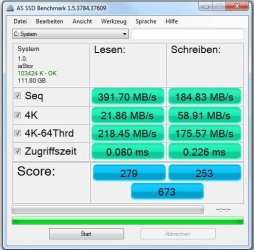
SOOO... I'm now running the 2 OCZ Vertex2 drives in RAID0 on a clean install... SOO much more responsive!

Still, seems to benchmark a bit slower than I thought it would... check the benchmark... Something doesn't seem right. Windows User Experience rated my Hard Drives a 7.9, everything else in my system is at a 6.8...

EDIT: I'm using the Intel Matrix drivers right now, but I've read that the Intel RTS drivers are better and still compatible with my hardware...
 

Attachments

  • AS SSD Benchmark OCZ Vert2 RAID0.jpg
    AS SSD Benchmark OCZ Vert2 RAID0.jpg
    43.7 KB · Views: 1

My Computer

Computer Manufacturer/Model Number
Custom Assembled and Configured by Myself
OS
Windows 7 Professional x64
CPU
Intel Core 2 Duo E8400 Wolfdale (OC stable 3.6GHz)
Motherboard
Asus P5Q-E
Memory
4GB (2x2) GSkillz DDR2 @ 1066MHz
Graphics Card(s)
Asus EN9600GT - upgrading soon
Sound Card
HTO Omega Striker 7.1 - Using optical out to Logitech DTS
Monitor(s) Displays
BenQ FP202W LCD & BenQ MP720 DLP Projector in Dualview
Hard Drives
64GB Kingston SSD-Now SSD - System Drive
500GB Seagate SATA - My Documents and Files
1TB Seagate SATA - Media and Archive Drive
500GB Seagate Freeagent External - Backup Drive
PSU
OCZ500MXSP - Modularized cable system, 120mm Exaust Fan
Case
Tsunami Dream Tower
Cooling
Zalman "Copper Flower" sinks on both CPU and GPU + 4x120mm
Back
Top