
Solved SSD Question

bigmck

Very Senior Member
Guru
Gold Member
VIP
Local time
8:54 AM
Messages
4,745
Location
Houston, Texas
I am thinking more and more about a SSD. The OCZ 120 GB is kind of in my price range. The screen shot below shows how my HDD is setup. I would expand the D partition to cover the whole HDD and make the SSD my C drive. Two questions == How do I expand the D to the left? I have Macrium Reflect V5. == If I unplug the C / D drive and put in the SSD, would Macrium restore to the SSD just like it does to the HDD or is it different?
 

Attachments
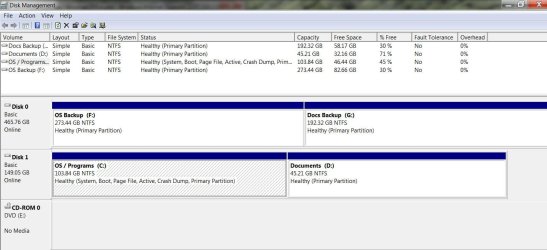
  • disk management.JPG
    disk management.JPG
    106.3 KB · Views: 11

My Computer

Computer type
PC/Desktop
Computer Manufacturer/Model Number
Custom Build
OS
Windows 7 Home Premium 32-Bit - Build 7600 SP1
CPU
Intel Core i3-2120 3.30Ghz
Motherboard
Asus P8Z68-V LX Intel Z68 Socket H2 ATX
Memory
Kingston 4 GB DDR3 1333 mhz
Graphics Card(s)
AMD Radeon HD6670
Sound Card
Sound Blaster Audigy SE 24-Bit
Monitor(s) Displays
Asus VE228
Screen Resolution
1440 X 900
Hard Drives
OCZ Vertex 3 120 GB Sata 3 SSD ==
Kingston SH103/S3 120 G Hyper X 120 GB SSD ==
Western Digital 500 GB Caviar Green 7200 RPM ==
PSU
Corsair CX600M == 600 Watt
Case
NZXT Apollo - Silver with Clear Side Panel
Cooling
Three 120 mm Fans
Keyboard
Microsoft Natural 4000
Mouse
Microsoft Custom Optical 3000
Internet Speed
AT&T Fiber Optic Wireless Network
Antivirus
Microsoft Security Essentials
Browser
Chrome
Other Info
120 mm Blue LED Fan -- Three Blue LED Lazer Light Sticks
1. If you have a 120GB SSD you can restore your C partition to that because your C is smaller.

2. If you want to do it with Macrium (or any other imaging program), you have to first align the SSD and create an active primary partitions. Instructions are here

3. Once you are all done, you can expand to the left with the bootable CD of Partition Wizard

PS: Although I own 3 OCZs myself (and those are OK), I warn you. There are some OCZ models that had a few problems. Better check that. You may be safer with a Crucial M4.
 

My Computer

Computer Manufacturer/Model Number
HP, Dell, Gateway, Toshiba - 4 laptops and 2 desktops
OS
Vista, Windows7, Mint Mate, Zorin, Windows 8
CPU
from 1.6GHz Duo to i7
Monitor(s) Displays
2x HP w2207
Hard Drives
5x HDD, 7x SSD, 12x Externals
Keyboard
with trackball - no mices
Mouse
Trackball mice
Internet Speed
DSL 6000
Jim, I nearly forgot - since you are transferring the OS with an image, you also have to turn the Defrag for the SSD off.

And if you do not use hibernate, get rid of the hiberfile. The command is powercfg -h off.

You also want to set the OS and the BIOS to AHCI. OS first, then BIOS, then reboot. http://www.sevenforums.com/tutorials/61869-ahci-enable-windows-7-vista.html

No other tweaks are required.
 

My Computer

Computer Manufacturer/Model Number
HP, Dell, Gateway, Toshiba - 4 laptops and 2 desktops
OS
Vista, Windows7, Mint Mate, Zorin, Windows 8
CPU
from 1.6GHz Duo to i7
Monitor(s) Displays
2x HP w2207
Hard Drives
5x HDD, 7x SSD, 12x Externals
Keyboard
with trackball - no mices
Mouse
Trackball mice
Internet Speed
DSL 6000
or the corsair force 3 :)

i own both a corsair and an OCZ and both have been very good.

Personally as its a new drive i would start a fresh and not run from a clone image. its a good time to get rid of some rubbish!
 

My Computer

Computer type
PC/Desktop
Computer Manufacturer/Model Number
Built by badgers!!!
OS
Windows 7 Ultimate x64, & Mac OS X 10.9.2
CPU
Intel Core i5 2500k
Motherboard
Asus P8z68 LE
Memory
Corsair Vengence 8gb 1866mhz
Graphics Card(s)
Nvidia GTX 770 OC
Monitor(s) Displays
2x ASUS LED 22" IPS
Screen Resolution
3840x1080
Hard Drives
240GB Crucial M500 SSD
120gb Corsair Force 3 SSD
1TB Western Digital
PSU
Corsair HX650w Modular
Case
Corsair Air 540
Cooling
Corsair H60 Push/Pull
Keyboard
Corsair K70/ Logitech G27 wheel
Mouse
Saitek R.A.T 9
Internet Speed
Too slow!
Other Info
AMD fusion E350N Home server-Windows Home Server 2011 (also made by badgers!)
2011 Macbook 2.4ghz Core2Duo, 4gb ddr3, 120gb Ocz Vertex SSD
Starting anew is not a bad idea if you take a MS .iso (e.g. from Digital River) that does not have all that OEM crap on it. But you are busy for 3 days with all the backlevel updates, program installations and settings.
 

My Computer

Computer Manufacturer/Model Number
HP, Dell, Gateway, Toshiba - 4 laptops and 2 desktops
OS
Vista, Windows7, Mint Mate, Zorin, Windows 8
CPU
from 1.6GHz Duo to i7
Monitor(s) Displays
2x HP w2207
Hard Drives
5x HDD, 7x SSD, 12x Externals
Keyboard
with trackball - no mices
Mouse
Trackball mice
Internet Speed
DSL 6000
1. If you have a 120GB SSD you can restore your C partition to that because your C is smaller.

2. If you want to do it with Macrium (or any other imaging program), you have to first align the SSD and create an active primary partitions. Instructions are here

3. Once you are all done, you can expand to the left with the bootable CD of Partition Wizard

PS: Although I own 3 OCZs myself (and those are OK), I warn you. There are some OCZ models that had a few problems. Better check that. You may be safer with a Crucial M4.


On the above #3, how do I go about getting rid of the info on C so I can expand D all the way to the left. My SSD would have all the C info on it and so would the HDD partition and both would be marked as C drive. What do I do to get rid of that conflict?
 

My Computer

Computer type
PC/Desktop
Computer Manufacturer/Model Number
Custom Build
OS
Windows 7 Home Premium 32-Bit - Build 7600 SP1
CPU
Intel Core i3-2120 3.30Ghz
Motherboard
Asus P8Z68-V LX Intel Z68 Socket H2 ATX
Memory
Kingston 4 GB DDR3 1333 mhz
Graphics Card(s)
AMD Radeon HD6670
Sound Card
Sound Blaster Audigy SE 24-Bit
Monitor(s) Displays
Asus VE228
Screen Resolution
1440 X 900
Hard Drives
OCZ Vertex 3 120 GB Sata 3 SSD ==
Kingston SH103/S3 120 G Hyper X 120 GB SSD ==
Western Digital 500 GB Caviar Green 7200 RPM ==
PSU
Corsair CX600M == 600 Watt
Case
NZXT Apollo - Silver with Clear Side Panel
Cooling
Three 120 mm Fans
Keyboard
Microsoft Natural 4000
Mouse
Microsoft Custom Optical 3000
Internet Speed
AT&T Fiber Optic Wireless Network
Antivirus
Microsoft Security Essentials
Browser
Chrome
Other Info
120 mm Blue LED Fan -- Three Blue LED Lazer Light Sticks
For #3, you have to delete the C volume and partition first. There must be Unallocated space (not freespace)From your SSD OS, you may be able to do that with Disk Management. Else use Partition Wizard bootable CD.

There will be no C conflict. The active OS will always be C - you'll see. The 'old' C will have another letter.
 

My Computer

Computer Manufacturer/Model Number
HP, Dell, Gateway, Toshiba - 4 laptops and 2 desktops
OS
Vista, Windows7, Mint Mate, Zorin, Windows 8
CPU
from 1.6GHz Duo to i7
Monitor(s) Displays
2x HP w2207
Hard Drives
5x HDD, 7x SSD, 12x Externals
Keyboard
with trackball - no mices
Mouse
Trackball mice
Internet Speed
DSL 6000
For #3, you have to delete the C volume and partition first. There must be Unallocated space (not freespace)From your SSD OS, you may be able to do that with Disk Management. Else use Partition Wizard bootable CD.

There will be no C conflict. The active OS will always be C - you'll see. The 'old' C will have another letter.

If I unplug the C / D drive, image the OS to the SSD and hookup the C / D drive again, then the old C will be a different letter. How do I make the old C unallocated? I would have thought I just format it, but evidently that won't work.
 

My Computer

Computer type
PC/Desktop
Computer Manufacturer/Model Number
Custom Build
OS
Windows 7 Home Premium 32-Bit - Build 7600 SP1
CPU
Intel Core i3-2120 3.30Ghz
Motherboard
Asus P8Z68-V LX Intel Z68 Socket H2 ATX
Memory
Kingston 4 GB DDR3 1333 mhz
Graphics Card(s)
AMD Radeon HD6670
Sound Card
Sound Blaster Audigy SE 24-Bit
Monitor(s) Displays
Asus VE228
Screen Resolution
1440 X 900
Hard Drives
OCZ Vertex 3 120 GB Sata 3 SSD ==
Kingston SH103/S3 120 G Hyper X 120 GB SSD ==
Western Digital 500 GB Caviar Green 7200 RPM ==
PSU
Corsair CX600M == 600 Watt
Case
NZXT Apollo - Silver with Clear Side Panel
Cooling
Three 120 mm Fans
Keyboard
Microsoft Natural 4000
Mouse
Microsoft Custom Optical 3000
Internet Speed
AT&T Fiber Optic Wireless Network
Antivirus
Microsoft Security Essentials
Browser
Chrome
Other Info
120 mm Blue LED Fan -- Three Blue LED Lazer Light Sticks
I would have thought I just format it, but evidently that won't work.
Why not ?? You can always delete it in Disk Management.
 

My Computer

Computer Manufacturer/Model Number
HP, Dell, Gateway, Toshiba - 4 laptops and 2 desktops
OS
Vista, Windows7, Mint Mate, Zorin, Windows 8
CPU
from 1.6GHz Duo to i7
Monitor(s) Displays
2x HP w2207
Hard Drives
5x HDD, 7x SSD, 12x Externals
Keyboard
with trackball - no mices
Mouse
Trackball mice
Internet Speed
DSL 6000
I would have thought I just format it, but evidently that won't work.
Why not ?? You can always delete it in Disk Management.

When you said "Unallocated" and not free space, that led me to believe I couldn't format it. Great, I think I am clear on this now. My birthday is next month. I have to go and drop a few hints. :D Thanks for your help.
 

My Computer

Computer type
PC/Desktop
Computer Manufacturer/Model Number
Custom Build
OS
Windows 7 Home Premium 32-Bit - Build 7600 SP1
CPU
Intel Core i3-2120 3.30Ghz
Motherboard
Asus P8Z68-V LX Intel Z68 Socket H2 ATX
Memory
Kingston 4 GB DDR3 1333 mhz
Graphics Card(s)
AMD Radeon HD6670
Sound Card
Sound Blaster Audigy SE 24-Bit
Monitor(s) Displays
Asus VE228
Screen Resolution
1440 X 900
Hard Drives
OCZ Vertex 3 120 GB Sata 3 SSD ==
Kingston SH103/S3 120 G Hyper X 120 GB SSD ==
Western Digital 500 GB Caviar Green 7200 RPM ==
PSU
Corsair CX600M == 600 Watt
Case
NZXT Apollo - Silver with Clear Side Panel
Cooling
Three 120 mm Fans
Keyboard
Microsoft Natural 4000
Mouse
Microsoft Custom Optical 3000
Internet Speed
AT&T Fiber Optic Wireless Network
Antivirus
Microsoft Security Essentials
Browser
Chrome
Other Info
120 mm Blue LED Fan -- Three Blue LED Lazer Light Sticks
Any time Jim. When you have the thing, we'll do a more detailed drill.
 

My Computer

Computer Manufacturer/Model Number
HP, Dell, Gateway, Toshiba - 4 laptops and 2 desktops
OS
Vista, Windows7, Mint Mate, Zorin, Windows 8
CPU
from 1.6GHz Duo to i7
Monitor(s) Displays
2x HP w2207
Hard Drives
5x HDD, 7x SSD, 12x Externals
Keyboard
with trackball - no mices
Mouse
Trackball mice
Internet Speed
DSL 6000
new SSD with win 7 will not detect new hard drive

Hello this is my first time posting hear so please go easy on me. Me and my fiance just finished putting together her first real gaming computer and we wanted to use a Patriot 64g SSD to put win 7 on and use a 1TB Seagate drive for all the rest of the storage. The installation of Win 7 onto the SSD went nice and smooth but when we get into windows it is not detecting the 1TB HD at all. Funny thing is that when I go in to the SSD properties, I can see the Seagate under the sharing options. The only info I have found is how to clone off an existing hard drive with Win 7 on it not how to do a fresh install on 2 new drives. Any help would be great.
 

My Computer

OS
windows 7 oem
CPU
intel I7 2700
Motherboard
Asus maximus 4
Memory
12gb g.skills
Graphics Card(s)
HIS 6970
Sound Card
onboard
Monitor(s) Displays
HP 2710
Hard Drives
Segate 1TB st31000524as

Patriot 64g SSD
PSU
roswell 800
Case
I Win dragon rider
Cooling
Corsair H80 Liquid cool
Hello this is my first time posting hear so please go easy on me. Me and my fiance just finished putting together her first real gaming computer and we wanted to use a Patriot 64g SSD to put win 7 on and use a 1TB Seagate drive for all the rest of the storage. The installation of Win 7 onto the SSD went nice and smooth but when we get into windows it is not detecting the 1TB HD at all. Funny thing is that when I go in to the SSD properties, I can see the Seagate under the sharing options. The only info I have found is how to clone off an existing hard drive with Win 7 on it not how to do a fresh install on 2 new drives. Any help would be great.
Suggest you start your own thread instead of highjacking this one which is solved. Then you will get a lot more answers.
 

My Computer

Computer Manufacturer/Model Number
HP, Dell, Gateway, Toshiba - 4 laptops and 2 desktops
OS
Vista, Windows7, Mint Mate, Zorin, Windows 8
CPU
from 1.6GHz Duo to i7
Monitor(s) Displays
2x HP w2207
Hard Drives
5x HDD, 7x SSD, 12x Externals
Keyboard
with trackball - no mices
Mouse
Trackball mice
Internet Speed
DSL 6000
Ya I saw that my bad will do that right away.
 

My Computer

OS
windows 7 oem
CPU
intel I7 2700
Motherboard
Asus maximus 4
Memory
12gb g.skills
Graphics Card(s)
HIS 6970
Sound Card
onboard
Monitor(s) Displays
HP 2710
Hard Drives
Segate 1TB st31000524as

Patriot 64g SSD
PSU
roswell 800
Case
I Win dragon rider
Cooling
Corsair H80 Liquid cool
Back
Top