ssd set up

BishBashBosh

New member
Local time
12:56 AM
Messages
18
Hi there

hope someone can point me in the right direction with this query

i have a SSD but not sure if i am running it at its optimal settings, so i am looking for some advice on what what settings would give me optimal performance, i currently have the O/S on ssd and then everything else on my raid 0 array and in BIOS the SATA configuration it is set to raid


many thanks in advance
 

My Computer

OS
windows 7 x64 ultimate
CPU
intel [email protected]
Motherboard
Asus P5Q Deluxe
Memory
8 Gig OCZ sli Ram@961MHz
Graphics Card(s)
ati xfx 4890 950/1125
Sound Card
xi-fi soundblaster
Monitor(s) Displays
aoc 24" and LG 42"
Hard Drives
128g kingston ssd
2xSamsung 1Tb F1's in Raid 0
PSU
corsair tx850
Case
nzxt
Cooling
zalman
Internet Speed
50Mb
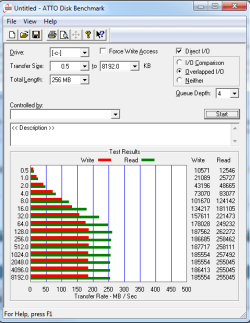
Download and run ATTO and post a snip of your results.
 

My Computer

Computer Manufacturer/Model Number
tw33k
OS
Windows 7 Ultimate (x64) SP1
CPU
Intel 3770k 4.6GHz
Motherboard
ASUS Maximus V Formula
Memory
8GB (2x 4GB) Crucial Ballistix
Graphics Card(s)
Sapphire 7950 (1060/1600)
Sound Card
On Board Realtek HD Audio
Monitor(s) Displays
27" Acer B273HU (via HDMI)
Screen Resolution
2048 x 1152
Hard Drives
Crucial M4 128GB
2TB WD Black
1TB Samsung F3 SATA
1TB WD Elite External
2TB WD USB 3.0
PSU
Corsair AX750 Gold
Case
Corsair Obsidian 800DW
Cooling
Corsair H100 (2x AP-121/2x UK-3000 push/pull)
Keyboard
Microsoft Wireless 5000
Mouse
Microsoft Wireless 5000
Internet Speed
5mb/s
Other Info
Logitech z-2300 2.1 speakers
Lamptron FC-5 v2
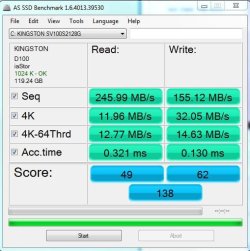
here's the results asssd bench.JPG

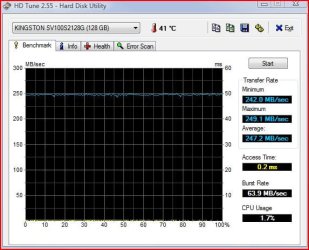
hdtune.ssd.JPG

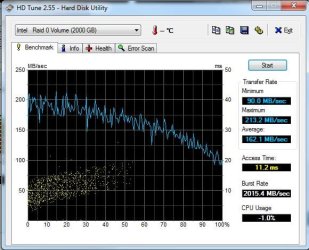
hdtune1.sammy.f1.s.in.raid0.JPG

atto1.PNG
 

My Computer

OS
windows 7 x64 ultimate
CPU
intel [email protected]
Motherboard
Asus P5Q Deluxe
Memory
8 Gig OCZ sli Ram@961MHz
Graphics Card(s)
ati xfx 4890 950/1125
Sound Card
xi-fi soundblaster
Monitor(s) Displays
aoc 24" and LG 42"
Hard Drives
128g kingston ssd
2xSamsung 1Tb F1's in Raid 0
PSU
corsair tx850
Case
nzxt
Cooling
zalman
Internet Speed
50Mb

My Computer

Computer Manufacturer/Model Number
Custom Build
OS
Windows 7 Ultimate x64
CPU
AMD Phenom II x6 1100T @ 4.0 GHZ
Motherboard
MSI 890FX-GD65
Memory
4GB Corsair XMS DDR3 1600MHz
Graphics Card(s)
MSI Twin Frozr GTX 560 Ti
Sound Card
Asus Xonar Essense STX
Monitor(s) Displays
23" 1080p LG LCD Flatscreen Panel
Screen Resolution
1920x1080 @ 60Hz
Hard Drives
1 x 120 GB OCZ Agility 2 SSD
1 x 500 GB WD Caviar Black 7200 RPM HDD
1 x 250 GB Maxtor OneTouch external USB Flash HDD
PSU
Corsair TX850W
Case
Antec 900
Cooling
4 case fans, 1xZalman 9500 CPU Heatsink
Keyboard
Logitech G110 Gaming Keyboard
Mouse
Razer Deathadder 3500DPI Infrared Gaming Mouse
Other Info
Sennheiser HD555 Headphones with Zalman Mic
I had a look at those tips and tweaks and already done all of them but how should my setup be for optimal performance ahci or raid?
 

My Computer

OS
windows 7 x64 ultimate
CPU
intel [email protected]
Motherboard
Asus P5Q Deluxe
Memory
8 Gig OCZ sli Ram@961MHz
Graphics Card(s)
ati xfx 4890 950/1125
Sound Card
xi-fi soundblaster
Monitor(s) Displays
aoc 24" and LG 42"
Hard Drives
128g kingston ssd
2xSamsung 1Tb F1's in Raid 0
PSU
corsair tx850
Case
nzxt
Cooling
zalman
Internet Speed
50Mb
I had a look at those tips and tweaks and already done all of them but how should my setup be for optimal performance ahci or raid?

you need multiple drives for RAID. Honestly a single SSD is good enough for most home consumer usage, if you did work that involved multiple large file transfers on a regular basis, then I'd say invest in extra drives and run them in RAID 0. If not, a single SSD with AHCI is fine.
 

My Computer

Computer Manufacturer/Model Number
Custom Build
OS
Windows 7 Ultimate x64
CPU
AMD Phenom II x6 1100T @ 4.0 GHZ
Motherboard
MSI 890FX-GD65
Memory
4GB Corsair XMS DDR3 1600MHz
Graphics Card(s)
MSI Twin Frozr GTX 560 Ti
Sound Card
Asus Xonar Essense STX
Monitor(s) Displays
23" 1080p LG LCD Flatscreen Panel
Screen Resolution
1920x1080 @ 60Hz
Hard Drives
1 x 120 GB OCZ Agility 2 SSD
1 x 500 GB WD Caviar Black 7200 RPM HDD
1 x 250 GB Maxtor OneTouch external USB Flash HDD
PSU
Corsair TX850W
Case
Antec 900
Cooling
4 case fans, 1xZalman 9500 CPU Heatsink
Keyboard
Logitech G110 Gaming Keyboard
Mouse
Razer Deathadder 3500DPI Infrared Gaming Mouse
Other Info
Sennheiser HD555 Headphones with Zalman Mic
Your numbers look pretty good to me. What do you want to improve. Some people say that AHCI is faster - I did not make that experience. I run none of my 4 SSDs in AHCI.

For the OS, all the "big" numbers are pretty meaningless anyhow. Most of the R/W is in 4K blocks. What really counts is the access time. That is what gives you the speed.

Btw: I never move any of the system files to the HDD - including the page file. I do, however, delete the hiberfile and move the user files. My SSDs are 80 and 90GBs.
 

My Computer

Computer Manufacturer/Model Number
HP, Dell, Gateway, Toshiba - 4 laptops and 2 desktops
OS
Vista, Windows7, Mint Mate, Zorin, Windows 8
CPU
from 1.6GHz Duo to i7
Monitor(s) Displays
2x HP w2207
Hard Drives
5x HDD, 7x SSD, 12x Externals
Keyboard
with trackball - no mices
Mouse
Trackball mice
Internet Speed
DSL 6000
Hi there
i currently have the O/S on ssd and then everything else on my raid 0 array and in BIOS the SATA configuration it is set to raid

Thats a close to perfect setup - my disks are configured in exactly the same way, and I have not had any trouble at all.
 

My Computer

Computer type
PC/Desktop
Computer Manufacturer/Model Number
Golden Mk. I.4
OS
Windows 10 Pro x64 ; Xubuntu x64
CPU
Intel i7 860 @ 2.80 GHz O/C'ed to 4.0GHz
Motherboard
Gigabyte P55A-UD3R Rev.1. Award BIOS F13
Memory
16GB Corsair Vengance DDR3 @ 661 MHz Dual Channel (9-9-9-24)
Graphics Card(s)
EVGA NVidia GTX 560 1024MB
Sound Card
Realtek Integrated
Monitor(s) Displays
Dual Samsung SyncMaster 2494HS
Screen Resolution
1920*1080 and 1920*1080
Hard Drives
1*Samsung 840 EVO 120GB SSD;
1*OCZ Vertex 2 60GB SSD;
2*Samsung F3 SpinPoint 1TB in RAID0;
1*Samsung F1 SpinPoint 1TB;
2*Western Digital 1TB External USB 3.0
1*Western Digital 500GB External USB 3.0
1*Seagate 500GB External USB 2.0
PSU
Thermaltake ToughPower QFan 750W
Case
Thermaltake Element S VK60001W2Z
Cooling
Corsair H60 Water Cooling, 2*230mm and 2*80mm case fans
Keyboard
Logitech G110
Mouse
Logitech MX518
the burst speeds and access times are really low compared to others, it seems that every time i run the benchmark tests they appear to get slower :confused:
 

My Computer

OS
windows 7 x64 ultimate
CPU
intel [email protected]
Motherboard
Asus P5Q Deluxe
Memory
8 Gig OCZ sli Ram@961MHz
Graphics Card(s)
ati xfx 4890 950/1125
Sound Card
xi-fi soundblaster
Monitor(s) Displays
aoc 24" and LG 42"
Hard Drives
128g kingston ssd
2xSamsung 1Tb F1's in Raid 0
PSU
corsair tx850
Case
nzxt
Cooling
zalman
Internet Speed
50Mb
Its tricky to compare different makes against each other - alos be careful of running too many tests. Testing a huge amount on an SSD shortens its life span, which will eventually affect the scores.

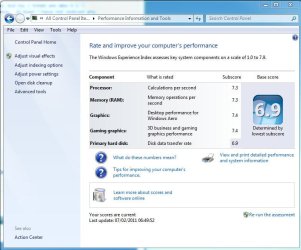
What is your disk WEI?
 

My Computer

Computer type
PC/Desktop
Computer Manufacturer/Model Number
Golden Mk. I.4
OS
Windows 10 Pro x64 ; Xubuntu x64
CPU
Intel i7 860 @ 2.80 GHz O/C'ed to 4.0GHz
Motherboard
Gigabyte P55A-UD3R Rev.1. Award BIOS F13
Memory
16GB Corsair Vengance DDR3 @ 661 MHz Dual Channel (9-9-9-24)
Graphics Card(s)
EVGA NVidia GTX 560 1024MB
Sound Card
Realtek Integrated
Monitor(s) Displays
Dual Samsung SyncMaster 2494HS
Screen Resolution
1920*1080 and 1920*1080
Hard Drives
1*Samsung 840 EVO 120GB SSD;
1*OCZ Vertex 2 60GB SSD;
2*Samsung F3 SpinPoint 1TB in RAID0;
1*Samsung F1 SpinPoint 1TB;
2*Western Digital 1TB External USB 3.0
1*Western Digital 500GB External USB 3.0
1*Seagate 500GB External USB 2.0
PSU
Thermaltake ToughPower QFan 750W
Case
Thermaltake Element S VK60001W2Z
Cooling
Corsair H60 Water Cooling, 2*230mm and 2*80mm case fans
Keyboard
Logitech G110
Mouse
Logitech MX518
Access time of 0.2ms is not unusual. Yes my OCZs have 0.1ms, but my 2 Intels are also 0.2. I would not worry about it. In real life it makes really no difference - at least I have not noticed any.

And Golden is right. Running too many tests is not good.
 

My Computer

Computer Manufacturer/Model Number
HP, Dell, Gateway, Toshiba - 4 laptops and 2 desktops
OS
Vista, Windows7, Mint Mate, Zorin, Windows 8
CPU
from 1.6GHz Duo to i7
Monitor(s) Displays
2x HP w2207
Hard Drives
5x HDD, 7x SSD, 12x Externals
Keyboard
with trackball - no mices
Mouse
Trackball mice
Internet Speed
DSL 6000
wei score.JPG
 

My Computer

OS
windows 7 x64 ultimate
CPU
intel [email protected]
Motherboard
Asus P5Q Deluxe
Memory
8 Gig OCZ sli Ram@961MHz
Graphics Card(s)
ati xfx 4890 950/1125
Sound Card
xi-fi soundblaster
Monitor(s) Displays
aoc 24" and LG 42"
Hard Drives
128g kingston ssd
2xSamsung 1Tb F1's in Raid 0
PSU
corsair tx850
Case
nzxt
Cooling
zalman
Internet Speed
50Mb

My Computer

Computer Manufacturer/Model Number
HP, Dell, Gateway, Toshiba - 4 laptops and 2 desktops
OS
Vista, Windows7, Mint Mate, Zorin, Windows 8
CPU
from 1.6GHz Duo to i7
Monitor(s) Displays
2x HP w2207
Hard Drives
5x HDD, 7x SSD, 12x Externals
Keyboard
with trackball - no mices
Mouse
Trackball mice
Internet Speed
DSL 6000
i checked the alignment and it was ok and it was a clean install of windows seven so i think it should of done that automatically
 

My Computer

OS
windows 7 x64 ultimate
CPU
intel [email protected]
Motherboard
Asus P5Q Deluxe
Memory
8 Gig OCZ sli Ram@961MHz
Graphics Card(s)
ati xfx 4890 950/1125
Sound Card
xi-fi soundblaster
Monitor(s) Displays
aoc 24" and LG 42"
Hard Drives
128g kingston ssd
2xSamsung 1Tb F1's in Raid 0
PSU
corsair tx850
Case
nzxt
Cooling
zalman
Internet Speed
50Mb
i checked the alignment and it was ok and it was a clean install of windows seven so i think it should of done that automatically
True, the installer does the alignment. But there were still cases where it was out of wack.
 

My Computer

Computer Manufacturer/Model Number
HP, Dell, Gateway, Toshiba - 4 laptops and 2 desktops
OS
Vista, Windows7, Mint Mate, Zorin, Windows 8
CPU
from 1.6GHz Duo to i7
Monitor(s) Displays
2x HP w2207
Hard Drives
5x HDD, 7x SSD, 12x Externals
Keyboard
with trackball - no mices
Mouse
Trackball mice
Internet Speed
DSL 6000
I agree with whs - I would have expected a WEI of +7.

Re-check the alignment. Have you implemented any tweaks before posting here?
 

My Computer

Computer type
PC/Desktop
Computer Manufacturer/Model Number
Golden Mk. I.4
OS
Windows 10 Pro x64 ; Xubuntu x64
CPU
Intel i7 860 @ 2.80 GHz O/C'ed to 4.0GHz
Motherboard
Gigabyte P55A-UD3R Rev.1. Award BIOS F13
Memory
16GB Corsair Vengance DDR3 @ 661 MHz Dual Channel (9-9-9-24)
Graphics Card(s)
EVGA NVidia GTX 560 1024MB
Sound Card
Realtek Integrated
Monitor(s) Displays
Dual Samsung SyncMaster 2494HS
Screen Resolution
1920*1080 and 1920*1080
Hard Drives
1*Samsung 840 EVO 120GB SSD;
1*OCZ Vertex 2 60GB SSD;
2*Samsung F3 SpinPoint 1TB in RAID0;
1*Samsung F1 SpinPoint 1TB;
2*Western Digital 1TB External USB 3.0
1*Western Digital 500GB External USB 3.0
1*Seagate 500GB External USB 2.0
PSU
Thermaltake ToughPower QFan 750W
Case
Thermaltake Element S VK60001W2Z
Cooling
Corsair H60 Water Cooling, 2*230mm and 2*80mm case fans
Keyboard
Logitech G110
Mouse
Logitech MX518

My Computer

OS
windows 7 x64 ultimate
CPU
intel [email protected]
Motherboard
Asus P5Q Deluxe
Memory
8 Gig OCZ sli Ram@961MHz
Graphics Card(s)
ati xfx 4890 950/1125
Sound Card
xi-fi soundblaster
Monitor(s) Displays
aoc 24" and LG 42"
Hard Drives
128g kingston ssd
2xSamsung 1Tb F1's in Raid 0
PSU
corsair tx850
Case
nzxt
Cooling
zalman
Internet Speed
50Mb
The majority of these tweaks were for early generation SSDs and no longer apply.


IMHO, run the WEI assesment.
Then restart your computer.

Win7 will automatically make all the tweaks that were needed.

Thats all you should do.


Optionally, you can delete and disable the Hiberfile if you do not use it. And possibly turn off Indexing on the SSD, (Not disable the service just uncheck the index option for the SSD)


You can also turn SuperFetch back On if you choose. Completely optional.


But, overall, run WEI and reboot is the only "tweak' you need to do to a modern SSD. It will take care of itself.

If you have been benchmarking it a lot, just leave it alone for a while. In a few days, performace will return to normal on its own.
 

My Computer

Computer Manufacturer/Model Number
Custom (Self Build)
OS
Windows 7 Home Premium 64bit
CPU
Intel Core i7 2700k
Motherboard
eVGA P67 SLI
Memory
8GB Mushkin Redline Ridgebacks @1866
Graphics Card(s)
EVGA GTX570 SC
Sound Card
XiFi Titanium HD
Monitor(s) Displays
LG W2453V
Screen Resolution
1920x1080
Hard Drives
Intel 320 80GB -- Intel X25-V 40GB --WD Black 1TB x2 -- WD Blue 640GB
PSU
Seasonic x750
Case
Corsair 600T SE White
Cooling
eVGA Superclocked CPU Cooler
Keyboard
Saitek Cyborg
Antivirus
Kaspersky
Browser
IE
Other Info
LG BD/DVD
The majority of these tweaks were for early generation SSDs and no longer apply.


IMHO, run the WEI assesment.
Then restart your computer.

Win7 will automatically make all the tweaks that were needed.

Thats all you should do.


Optionally, you can delete and disable the Hiberfile if you do not use it. And possibly turn off Indexing on the SSD, (Not disable the service just uncheck the index option for the SSD)


You can also turn SuperFetch back On if you choose. Completely optional.


But, overall, run WEI and reboot is the only "tweak' you need to do to a modern SSD. It will take care of itself.

If you have been benchmarking it a lot, just leave it alone for a while. In a few days, performace will return to normal on its own.
+1, that's the way I do it and never had problems. Many of those "recommended" tweaks are counterproductive - e.g. turning Superfetch off. The RAM is still a lot faster than even an SSD.
 

My Computer

Computer Manufacturer/Model Number
HP, Dell, Gateway, Toshiba - 4 laptops and 2 desktops
OS
Vista, Windows7, Mint Mate, Zorin, Windows 8
CPU
from 1.6GHz Duo to i7
Monitor(s) Displays
2x HP w2207
Hard Drives
5x HDD, 7x SSD, 12x Externals
Keyboard
with trackball - no mices
Mouse
Trackball mice
Internet Speed
DSL 6000
Back
Top