SSD slow boot times

allday165

New member
Local time
5:05 PM
Messages
16
I have a 128 gig Vertex 4 that recently started taking about a minute to boot up when it normally takes under 10 seconds. It was paired with a 1TB (half-filled) Spinpoint I was using for data. On black friday, I got a good deal on an OCZ Agility 4 and replaced it with my Spinpoint to see if it was the problem. It wasn't the problem; it still takes way longer than it should to boot up. Both SSD's are in AHCI mode. If you have any questions, just ask. Thanks for the help.
 

My Computer

OS
Windows 7 Home Premium 64bit
CPU
AMD Phenom x4 965 BE @ 3.5
Motherboard
Asus M4A77TD
Memory
4 GB G.Skill Ripjaws DDR3-1600
Graphics Card(s)
Asus ATI Radeon HD4870
Hard Drives
128 GB OCZ Vertex 4 (Boot)
128 GB OCZ Agility 4 (Data #1)
1 TB Samsung Spinpoint 7200 RPM (Data #2, not attached)
320 GB Seagate Barracuda 5400RPM (Back up, not attached)
PSU
OCZ 550Fifty
Case
Antec Three Hundred
Cooling
4x90mm, Cooler Master Hyper 212
Are you sure the problem is hardware and not software?
 

My Computer

Computer type
PC/Desktop
Computer Manufacturer/Model Number
Alienware Aurora ALX R4
OS
Windows 10 Pro (x64)
CPU
Intel Core i7-3930K (3.2GHz - 4.5GHz)
Motherboard
Alienware Aurora-R4 x79
Memory
4x Samsung 4GB PC3-12800 DDR3 (16GB 1600MHz)
Graphics Card(s)
Nvidia Geforce GTX 690
Sound Card
SteelSeries Siberia Elite
Monitor(s) Displays
Dell UltraSharp U3011
Screen Resolution
2560x1600
Hard Drives
Samsung 850 Pro 256 GB, Seagate 1TB Desktop Hybrid HDD, 2x Western Digital 4TB Green HDD
PSU
875W Some Dell PSU <.<
Case
Alienware Aurora ALX
Cooling
Custom Liquid Cooling (EK CPU & GPU blocks) dual EK 480RAD
Keyboard
Logitech G710+ Mechanical
Mouse
Logitech G700s
Internet Speed
Verizon Fios (50 mbps average)
Other Info
Server: Intel NUC D54250WYK: i5-4250U, 16GB, 256 GB mSATA, Windows Server 2012 R2
I actually thought that after I bought the Agility, but I still wanted to keep it anyway because my HDD would freeze for 7-8 seconds when I tried to load something from it. But if it's a software problem, I have no idea would the problem is. I only have 33 GB of data on my boot drive, if that matters.
 

My Computer

OS
Windows 7 Home Premium 64bit
CPU
AMD Phenom x4 965 BE @ 3.5
Motherboard
Asus M4A77TD
Memory
4 GB G.Skill Ripjaws DDR3-1600
Graphics Card(s)
Asus ATI Radeon HD4870
Hard Drives
128 GB OCZ Vertex 4 (Boot)
128 GB OCZ Agility 4 (Data #1)
1 TB Samsung Spinpoint 7200 RPM (Data #2, not attached)
320 GB Seagate Barracuda 5400RPM (Back up, not attached)
PSU
OCZ 550Fifty
Case
Antec Three Hundred
Cooling
4x90mm, Cooler Master Hyper 212
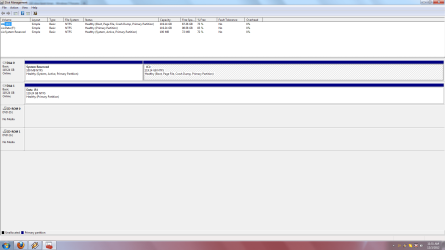
Post a picture of your Disk Management. Chances are your bootmgr landed on the HDD.
 

My Computer

Computer Manufacturer/Model Number
HP, Dell, Gateway, Toshiba - 4 laptops and 2 desktops
OS
Vista, Windows7, Mint Mate, Zorin, Windows 8
CPU
from 1.6GHz Duo to i7
Monitor(s) Displays
2x HP w2207
Hard Drives
5x HDD, 7x SSD, 12x Externals
Keyboard
with trackball - no mices
Mouse
Trackball mice
Internet Speed
DSL 6000
Here it is
 

Attachments

  • DM.png
    DM.png
    43.8 KB · Views: 46

My Computer

OS
Windows 7 Home Premium 64bit
CPU
AMD Phenom x4 965 BE @ 3.5
Motherboard
Asus M4A77TD
Memory
4 GB G.Skill Ripjaws DDR3-1600
Graphics Card(s)
Asus ATI Radeon HD4870
Hard Drives
128 GB OCZ Vertex 4 (Boot)
128 GB OCZ Agility 4 (Data #1)
1 TB Samsung Spinpoint 7200 RPM (Data #2, not attached)
320 GB Seagate Barracuda 5400RPM (Back up, not attached)
PSU
OCZ 550Fifty
Case
Antec Three Hundred
Cooling
4x90mm, Cooler Master Hyper 212

My Computer

Computer Manufacturer/Model Number
HP, Dell, Gateway, Toshiba - 4 laptops and 2 desktops
OS
Vista, Windows7, Mint Mate, Zorin, Windows 8
CPU
from 1.6GHz Duo to i7
Monitor(s) Displays
2x HP w2207
Hard Drives
5x HDD, 7x SSD, 12x Externals
Keyboard
with trackball - no mices
Mouse
Trackball mice
Internet Speed
DSL 6000
Yes, I did.
 

My Computer

OS
Windows 7 Home Premium 64bit
CPU
AMD Phenom x4 965 BE @ 3.5
Motherboard
Asus M4A77TD
Memory
4 GB G.Skill Ripjaws DDR3-1600
Graphics Card(s)
Asus ATI Radeon HD4870
Hard Drives
128 GB OCZ Vertex 4 (Boot)
128 GB OCZ Agility 4 (Data #1)
1 TB Samsung Spinpoint 7200 RPM (Data #2, not attached)
320 GB Seagate Barracuda 5400RPM (Back up, not attached)
PSU
OCZ 550Fifty
Case
Antec Three Hundred
Cooling
4x90mm, Cooler Master Hyper 212
Is the SSD properly aligned.

If you want to verify the alignment, you use the following commands.

Diskpart
List disk
Select disk n
List partition

Now you should see a result like this.

Partition ### Type Size Offset
------------- ---------------- ------- -------
Partition 1 Primary 59 GB 1024 KB - but 64KB or any number divisible by 4 is also good

The offset (in KBs) has to be divisible by 4.
 

My Computer

Computer Manufacturer/Model Number
HP, Dell, Gateway, Toshiba - 4 laptops and 2 desktops
OS
Vista, Windows7, Mint Mate, Zorin, Windows 8
CPU
from 1.6GHz Duo to i7
Monitor(s) Displays
2x HP w2207
Hard Drives
5x HDD, 7x SSD, 12x Externals
Keyboard
with trackball - no mices
Mouse
Trackball mice
Internet Speed
DSL 6000
Disk 0 Partition 1 100 MB 1024 KB
Disk 0 Partition 2 119 GB 101 MB
 

My Computer

OS
Windows 7 Home Premium 64bit
CPU
AMD Phenom x4 965 BE @ 3.5
Motherboard
Asus M4A77TD
Memory
4 GB G.Skill Ripjaws DDR3-1600
Graphics Card(s)
Asus ATI Radeon HD4870
Hard Drives
128 GB OCZ Vertex 4 (Boot)
128 GB OCZ Agility 4 (Data #1)
1 TB Samsung Spinpoint 7200 RPM (Data #2, not attached)
320 GB Seagate Barracuda 5400RPM (Back up, not attached)
PSU
OCZ 550Fifty
Case
Antec Three Hundred
Cooling
4x90mm, Cooler Master Hyper 212
That looks good. Now I am out of ideas regarding the SSD.

The only other thing you can do is to track your boot. First have a look into the event viewer and see what that says.

Then you can also use Soluto to get a detailed view. You should know that some people had problems with Soluto - but it worked fine for me. So it's at your own risk. But if Lifehacker sponsors it, it should be OK.
 

My Computer

Computer Manufacturer/Model Number
HP, Dell, Gateway, Toshiba - 4 laptops and 2 desktops
OS
Vista, Windows7, Mint Mate, Zorin, Windows 8
CPU
from 1.6GHz Duo to i7
Monitor(s) Displays
2x HP w2207
Hard Drives
5x HDD, 7x SSD, 12x Externals
Keyboard
with trackball - no mices
Mouse
Trackball mice
Internet Speed
DSL 6000
Alright, thanks for the help.
 

My Computer

OS
Windows 7 Home Premium 64bit
CPU
AMD Phenom x4 965 BE @ 3.5
Motherboard
Asus M4A77TD
Memory
4 GB G.Skill Ripjaws DDR3-1600
Graphics Card(s)
Asus ATI Radeon HD4870
Hard Drives
128 GB OCZ Vertex 4 (Boot)
128 GB OCZ Agility 4 (Data #1)
1 TB Samsung Spinpoint 7200 RPM (Data #2, not attached)
320 GB Seagate Barracuda 5400RPM (Back up, not attached)
PSU
OCZ 550Fifty
Case
Antec Three Hundred
Cooling
4x90mm, Cooler Master Hyper 212
By the way, you helped me answer the previous question I had when my Vertex 4 kept failing. You think it could be the SSD itself? I had to stop using Windows update because that is what was causing the SSD to fail. I would go to download something like a malicious software tool from Windows and it would BSOD instantly.
 

My Computer

OS
Windows 7 Home Premium 64bit
CPU
AMD Phenom x4 965 BE @ 3.5
Motherboard
Asus M4A77TD
Memory
4 GB G.Skill Ripjaws DDR3-1600
Graphics Card(s)
Asus ATI Radeon HD4870
Hard Drives
128 GB OCZ Vertex 4 (Boot)
128 GB OCZ Agility 4 (Data #1)
1 TB Samsung Spinpoint 7200 RPM (Data #2, not attached)
320 GB Seagate Barracuda 5400RPM (Back up, not attached)
PSU
OCZ 550Fifty
Case
Antec Three Hundred
Cooling
4x90mm, Cooler Master Hyper 212
From what you describe, there may be a problem with write operations. You can run the chkdsk to see whether there is a problem. I would also take a peek into the Event Viewer.
 

My Computer

Computer Manufacturer/Model Number
HP, Dell, Gateway, Toshiba - 4 laptops and 2 desktops
OS
Vista, Windows7, Mint Mate, Zorin, Windows 8
CPU
from 1.6GHz Duo to i7
Monitor(s) Displays
2x HP w2207
Hard Drives
5x HDD, 7x SSD, 12x Externals
Keyboard
with trackball - no mices
Mouse
Trackball mice
Internet Speed
DSL 6000
Since you have the Agility SSD, I would image the vertex 4 and restore it to the Agility.
Then remove the Vertex and check the boot, etc using the Agility.
That would eliminate the software.
 

My Computer

Computer type
PC/Desktop
Computer Manufacturer/Model Number
Custom Built
OS
Windows 10 Pro x64, Windows 8.1 Pro x64, Windows 7 Ultimate x64 SP1,
CPU
INTEL i9-7920X LGA 2066
Motherboard
Gigabyte X299-WU8 F3
Memory
64 GB (4 X 16 GB) G-Skill V Series DDR4 3200 Quad Channel
Graphics Card(s)
EVGA GTX 1060 SC 3 GB
Sound Card
Realtek Onboard ALC1220
Monitor(s) Displays
2 x Samsung S27E310
Screen Resolution
1920x1080
Hard Drives
Samsung 2 x 970 EVO Plus 500 GB NVMe
1 x 6TB WD 6003FZBX SATA
1 x 6TB WD 60EFRX SATA
12 x 3TB WD 30EFRX SATA
PSU
Seasonic X-1050
Case
Thermaltake Armor+
Cooling
Corsair H80i V2 Liquid AOI Cooler
Keyboard
Logitech G510s
Mouse
Logitech MX Master 2S
Internet Speed
200 Mb/s
Antivirus
ESET NOD32 13.1
Browser
EDGE (Dev, Canary, Beta), Chrome
Other Info
ASUS RT-AC68U router
Malwarebytes 4.0.4
Back
Top