SSD Space Issue - WIN 7 Pro 64bit

Nasho23

New member
Local time
10:18 AM
Messages
16
I have Win 7 Pro 64bit installed on a SSD 250GB along with my Programs and Data on a second SATA Hard Drive.
Recently when I looked at my C: SSD from My Computer, I noticed the Used Space Bar was Red and I only had a small value of Free Space left (13GB). I used CCleaner to clean up Temporary Files Etc, Emptied the Recycle Bin. This action did not have much affect on increasing Free Space.
I left the issue for a few days as I had a lot of other work to do.
Yesterday, I thought I would have another look at this issue, as I was thinking I might have to upgrade to a 500GB SSD.
Low and Behold, when I checked the Drives in MY Computer, my C: SSD was now Blue and showing 108GB Free Space.
I am struggling to understand how this could have happened as I had done nothing to contribute to this change to Free Space.

Has WIN 7 Pro got some built in Archiving Feature I am not aware of that could have compressed the Files on C: SSD.

Can someone please throw some light on this issue.
 

My Computer

Computer Manufacturer/Model Number
PC Clone
OS
WIn 7 Utlimate x64
CPU
Intel Quad Q94oo 2.6Ghz
Motherboard
GigaByte EP45-DS3P
Memory
Kingston DDR2 8GB
Graphics Card(s)
GeForce 9500
Sound Card
OnBoard
Monitor(s) Displays
ViewSonic 22.5
Hard Drives
C: WD 1.5TB 3 Partitions - G: WD 1.0TB - H: Seagate 250GB- I: Seagate 1.0TB
PSU
550W
Case
AOpen
Cooling
CPU + System
Rebooting, after all the cleaning, probably is why it changed.

I would also do a complete malware/spyware scan and antivirus scan.
 

My Computer

Computer type
PC/Desktop
Computer Manufacturer/Model Number
My Own Build
OS
Windows 10 64 bit
CPU
Intel i7 6700K
Motherboard
ASUS ROG Maximus VIII Hero
Memory
16GB Corsair Dominator
Graphics Card(s)
Intel CPU Graphics
Sound Card
RealTek
Monitor(s) Displays
27" Dell S2719dgf
Screen Resolution
2560X1440
Hard Drives
1 TB Samsung 850 EVO SSD for Win 10 Pro
500GB Samsung 850 EVO SSD for Win 10 Insider
2 TB drive for backup
PSU
EVGA Supernova 750G2
Case
BeQuiet Silent Base 600
Cooling
Deepcool Captain 120EX
Keyboard
Microsoft Wireless 2000
Mouse
Microsoft wireless
Internet Speed
100 MB/sec (Cable)
Antivirus
Microsoft Defender and Malwarebytes
Browser
Edge/Firefox
Other Info
Cakewalk (Sonar) by BandLab and Studio One 4.1 Pro recording studio software. MOTU 896Mk3 Hybrid recording interface, Frontier Tranzport wireless control unit, Behringer X-Touch Control Surface.
Five USB connected optical drives for CD Audio production using Nero BurningROM
Thank you for reply fireberd; The pc has been booted a number of times after Disk Clean, etc, with no affect. Malware Scan is automatic each day and has not reported anything unusual. Having a look at the Folders last night, I do notice that something has changed since I last worked on Clean up for Free Space - a New Folder has appeared on the Drive ( $Windows-BT ). From what I read this is to do with WIN 10 Upgrade, so there must have been an Update from Windows, although no recent Updates show up when I view Installed Updates. Weird. No happy when Microsoft do things like this without me knowing about it.
 

My Computer

Computer Manufacturer/Model Number
PC Clone
OS
WIn 7 Utlimate x64
CPU
Intel Quad Q94oo 2.6Ghz
Motherboard
GigaByte EP45-DS3P
Memory
Kingston DDR2 8GB
Graphics Card(s)
GeForce 9500
Sound Card
OnBoard
Monitor(s) Displays
ViewSonic 22.5
Hard Drives
C: WD 1.5TB 3 Partitions - G: WD 1.0TB - H: Seagate 250GB- I: Seagate 1.0TB
PSU
550W
Case
AOpen
Cooling
CPU + System
Uninstall KB3035583 and KB2952664

As far as your space issue, I have no idea, you`ll have to keep looking.

But there are 3 things you can do to gain space.

1 Disable hibernation if you don`t use it

http://www.sevenforums.com/tutorials/819-hibernate-enable-disable.html

2 Turn off system restore, or lower the amopunt of space it uses, if it`s at a low amount then leave it alone.

3 Make sure your page file is at a low amount, windows sometimes makes it the same size as the amount of ram you have installed. In your case it might be 8 GB

Also 1 other thing, your programs should be installed on the ssd with windows, not on another drive, you`ll never be able to make proper Disk Images.
 

My Computer

Computer type
PC/Desktop
Computer Manufacturer/Model Number
Skylake Special #666
OS
Windows 10 Pro x64
CPU
Intel Core i7 6700K
Motherboard
Asus Sabertooth Z170 Mark 1
Memory
GSkill TridentZ RGB 16GB 3600 16-16-16-36
Graphics Card(s)
EVGA GTX 980 Ti SC x2
Sound Card
Realtek High Definition
Monitor(s) Displays
AOC G2460PG
Screen Resolution
1920 x 1080 144Hz
Hard Drives
Samsung 860 Pro 256GB, Seagate Barracuda 4TB x2
PSU
EVGA 1000 P2, EVGA White Custom Braided Cables
Case
Corsair Vengeance C70 Gunmetal Black
Cooling
Corsair H100i v2, Corsair ML120 x2, Thermal Grizzly Kryonaut
Keyboard
Logitech G910 Orion Spectrum
Mouse
Logitech G700s
Internet Speed
Verizon Fios Quantum Gateway 75/75
Antivirus
Windows Defender, Malwarebytes Free 3.8.3
Browser
Chrome
Other Info
Corsair SP120 x4, LG Blu-ray Drive, Durabrand HT-395 100 Watt Dolby Digital Amp, Corsair H2100 Wireless 7.1 Headset
Thank you AddRam: Those Tre items have already been attended to, I forgot to mention them.
I will look at those two KB Updates though. Now that Free Space has improved, I will be moving those Program Folder back to C:.
 

My Computer

Computer Manufacturer/Model Number
PC Clone
OS
WIn 7 Utlimate x64
CPU
Intel Quad Q94oo 2.6Ghz
Motherboard
GigaByte EP45-DS3P
Memory
Kingston DDR2 8GB
Graphics Card(s)
GeForce 9500
Sound Card
OnBoard
Monitor(s) Displays
ViewSonic 22.5
Hard Drives
C: WD 1.5TB 3 Partitions - G: WD 1.0TB - H: Seagate 250GB- I: Seagate 1.0TB
PSU
550W
Case
AOpen
Cooling
CPU + System
I have had windows installed on this ssd for 6 months along with all my programs, a lot of pictures, music, and a few downloads I haven`t moved yet, I install my games from C onto another drive.

And C still only has 46 GB used.

And I turn off all 3 of those items I mentioned, I have no use for them.


I can`t believe I`ve had it 6 months already :what: And by that I mean the board and ssd.
 

My Computer

Computer type
PC/Desktop
Computer Manufacturer/Model Number
Skylake Special #666
OS
Windows 10 Pro x64
CPU
Intel Core i7 6700K
Motherboard
Asus Sabertooth Z170 Mark 1
Memory
GSkill TridentZ RGB 16GB 3600 16-16-16-36
Graphics Card(s)
EVGA GTX 980 Ti SC x2
Sound Card
Realtek High Definition
Monitor(s) Displays
AOC G2460PG
Screen Resolution
1920 x 1080 144Hz
Hard Drives
Samsung 860 Pro 256GB, Seagate Barracuda 4TB x2
PSU
EVGA 1000 P2, EVGA White Custom Braided Cables
Case
Corsair Vengeance C70 Gunmetal Black
Cooling
Corsair H100i v2, Corsair ML120 x2, Thermal Grizzly Kryonaut
Keyboard
Logitech G910 Orion Spectrum
Mouse
Logitech G700s
Internet Speed
Verizon Fios Quantum Gateway 75/75
Antivirus
Windows Defender, Malwarebytes Free 3.8.3
Browser
Chrome
Other Info
Corsair SP120 x4, LG Blu-ray Drive, Durabrand HT-395 100 Watt Dolby Digital Amp, Corsair H2100 Wireless 7.1 Headset
What anti Virus are you using?
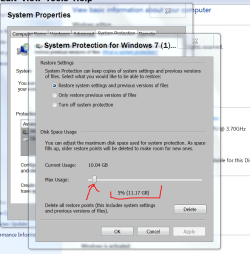
Windows 7 does have a kind of Archiving Featur, it's called Restore Points.

Avast at one time caused problems, with setting Restore point disk usage to 50% instead of where Windows or the owner operator set it at.


Example:

System protection Today.PNG
 

My Computer

Computer type
PC/Desktop
Computer Manufacturer/Model Number
Home made Desktop
OS
Windows 10 Pro. 64/ version 1709 Windows 7 Pro/64
CPU
Intel i7-6800K @ 4.3
Motherboard
ASUS X-99 Deluxe II
Memory
Corsair Platinum 16 gig @2400
Graphics Card(s)
EVGA GTX 1070 OC
Monitor(s) Displays
Asus 27" LED LCD/VE278Q
Screen Resolution
1920-1080 or 1280-720 HDMI
Hard Drives
INTEL SSD 730-240 Gb Sata 3.0/
PSU
EVGA Platium 1200W
Case
Phanteks Luxe Tempered Glass 8 fans/ one radiator
Cooling
XSPC/ Water Cooled CPU
Keyboard
Das 4 Professional
Mouse
Logitech M705/MX Anywhere 2-S
Internet Speed
100 mbits
Antivirus
Microsoft Security Essentials/ Malwarebytes Premium 3.0/ SAS
Browser
I.E. 11 default/Firefox/ ISP Time Warner Cable/Spectrum
Other Info
LG BluRay Burner/
Sound system-KLipsch-THX/
Icy Dock ssd Hot Swap bays.
Layback Bear::::::: I use Microsoft Security Essentials (MSE) which is Free to owners of Genuine Windows OS and MalwareBytes Premuim for protection from Malware. In addition to my owm machines, I have set up many Customer machines with these two Programs, with never an issue. These do everything the Expensive and Overbloated Security Programs can do. I recommend them to everyone. In WIN 10 MSE is replaced by Windows Defender, which is the same Program.
 

My Computer

Computer Manufacturer/Model Number
PC Clone
OS
WIn 7 Utlimate x64
CPU
Intel Quad Q94oo 2.6Ghz
Motherboard
GigaByte EP45-DS3P
Memory
Kingston DDR2 8GB
Graphics Card(s)
GeForce 9500
Sound Card
OnBoard
Monitor(s) Displays
ViewSonic 22.5
Hard Drives
C: WD 1.5TB 3 Partitions - G: WD 1.0TB - H: Seagate 250GB- I: Seagate 1.0TB
PSU
550W
Case
AOpen
Cooling
CPU + System
I know exactly what MSE and Malwarebyts are. I used them both and have for years.

Please put your security programs in your System Specs.
 

My Computer

Computer type
PC/Desktop
Computer Manufacturer/Model Number
Home made Desktop
OS
Windows 10 Pro. 64/ version 1709 Windows 7 Pro/64
CPU
Intel i7-6800K @ 4.3
Motherboard
ASUS X-99 Deluxe II
Memory
Corsair Platinum 16 gig @2400
Graphics Card(s)
EVGA GTX 1070 OC
Monitor(s) Displays
Asus 27" LED LCD/VE278Q
Screen Resolution
1920-1080 or 1280-720 HDMI
Hard Drives
INTEL SSD 730-240 Gb Sata 3.0/
PSU
EVGA Platium 1200W
Case
Phanteks Luxe Tempered Glass 8 fans/ one radiator
Cooling
XSPC/ Water Cooled CPU
Keyboard
Das 4 Professional
Mouse
Logitech M705/MX Anywhere 2-S
Internet Speed
100 mbits
Antivirus
Microsoft Security Essentials/ Malwarebytes Premium 3.0/ SAS
Browser
I.E. 11 default/Firefox/ ISP Time Warner Cable/Spectrum
Other Info
LG BluRay Burner/
Sound system-KLipsch-THX/
Icy Dock ssd Hot Swap bays.
Back
Top