

hi, now this is a shocker to me since everything was fine untill i turn off my computer, then installed a new Fan to the side case.
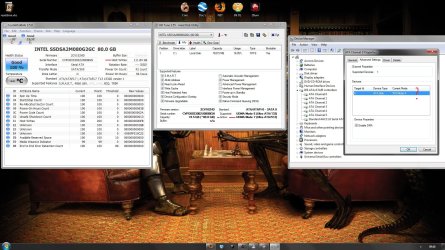
now since i rebooted im stuck in PIO mode 4?
SSD is 0 installed SATA ACHI enabled in bios.
SSD Channel 0 - Reads as - PIO Mode 4?
1TB SATA HDD is on Channle 1 Reads as - Mulity World DMA Mode 2?
DVDRW on Channle 2 - Reads as - UDMA 4 - Normal..
now this is bugging me since i can not switch back to UDMA 5 even if i uninstall all the drivers on them channles..
reboot and bang, still pio.
other thing i did was switch to IDE mode, boot and then uninstall as it was still pio.
switch back to ACHI and thought that would cure it.
ive took out everything & even unpluged the DVD to boot as i thought it might be that.
since ive install the pagefile onto the 1TB (save room on the SSD) if i dont have it pluged in on boot when windows loads you get that error about pagefile ect..
so guys, help!! i have no idea why this is not running in UDMA 5 like it was.. after a fan change and power down of the system for like 20 mins?
any information will be great.
now since i rebooted im stuck in PIO mode 4?
SSD is 0 installed SATA ACHI enabled in bios.
SSD Channel 0 - Reads as - PIO Mode 4?
1TB SATA HDD is on Channle 1 Reads as - Mulity World DMA Mode 2?
DVDRW on Channle 2 - Reads as - UDMA 4 - Normal..
now this is bugging me since i can not switch back to UDMA 5 even if i uninstall all the drivers on them channles..
reboot and bang, still pio.
other thing i did was switch to IDE mode, boot and then uninstall as it was still pio.
switch back to ACHI and thought that would cure it.
ive took out everything & even unpluged the DVD to boot as i thought it might be that.
since ive install the pagefile onto the 1TB (save room on the SSD) if i dont have it pluged in on boot when windows loads you get that error about pagefile ect..
so guys, help!! i have no idea why this is not running in UDMA 5 like it was.. after a fan change and power down of the system for like 20 mins?
any information will be great.
Attachments

My Computer
At a glance
Windows 7 64bit Ultimate SP1, VMware Windows ...Intel Core i7 920 @ 3.8 or 4.2 when i need itCorsair XMS3 12GB DDR3 1600 1.5vMSI GeForce GTX 560Ti OC Twin FrozR II
- Computer Manufacturer/Model Number
- Goonie Build 8 2010
- OS
- Windows 7 64bit Ultimate SP1, VMware Windows 7 64bit Ultimate SP1
- CPU
- Intel Core i7 920 @ 3.8 or 4.2 when i need it
- Motherboard
- Gigabyte GA-X58-UD5
- Memory
- Corsair XMS3 12GB DDR3 1600 1.5v
- Graphics Card(s)
- MSI GeForce GTX 560Ti OC Twin FrozR II
- Sound Card
- 7.1 HD
- Monitor(s) Displays
- 2x BenQ 24 LED 1080p + LG 50PK590 1080p
- Screen Resolution
- 3840 x 1080p
- Hard Drives
- Intel X25-M 80GB OS/
Intel X25-M 160GB
Data Robotics Drobo V2 8TB
- PSU
- Corsair AX 750W ATX Modular
- Case
- Antec Fusion Remote Max
- Cooling
- Noctua NH D14
- Keyboard
- Logitech
- Mouse
- Logitech
- Internet Speed
- 15Mbs Down 1.3Mbs Up
- Other Info
- Hauppauge HD PVR/
Pioneer 1017-k - 7.1 THX/
Xbox 360 250 Slim
SkyHD/LG 50PK590 TV


