

Now I was in another thread and discussing SSD machinations with someone whose thread was beginning to look like a mad cat's breakfast so thought I might try to perhaps discuss in here.
Now this came about because in the other thread a program called HD Tune came up and I ran it only to find some strange spikes in the readings so off I went to find the reasons behind those spikes because the machine was at idle while the test was running. Not that I am worried about my SSD because it runs really good -Samsung 256GB 850 Pro.
It came back that spikes can be due to heat and the effect on the materials used in transistor technology. Now I have tinkered in electronics over the years from vacuum tubes to the IC age but have only ever used up to the trusty 555 timer chip. I am no great mind and I won't bore anyone with the basic things about the elements used in these devices but like anything else the elements used in transistors does get affected by heat in one way or another ie to the point of the said element melting. This also of course has an effect on the conductivity both thermally and electrically on those materials used in transistors.
We have discussed in this forum more times than I can poke a stick at the effects of heat on especially CPU's and GPU's both which of course use transistors of one form or another based on silicon and thought maybe some would like to add to what I have put here because I am not going to pretend I am any great expert on the issue.
Now to get back to the SSD I did find some interesting reading although some of it is over my head but fascinating stuff all the same as in these two links.
https://nanoheat.stanford.edu/sites/default/files/publications/A90.pdf
Non-volatile memory - Wikipedia, the free encyclopedia
Personally I am one for knowing how something should work properly first then go on to track down why there is an anomaly.
So anyone who is interested your input would be appreciated because I think we take an awful lot for granted when wesue our machines and it is for me more interesting to find out how things work before delving into fixing them - either physically or electronically.
One thing that did come up when I was reading about volatile and non volatile memory for example is that while we can change the BIOS chip to a new version (therefore the internal components are "active") yet wreck by not doing it right. The strange to me is that one changes the "memory" in SSD's to suit our needs and even though it is basically the same technology - as far as I know - as the BIOS chip is not that workable. After all it is supposed to be ROM and yet can be changed it doesn't make a lot of sense to me at least.
So is this a manufacturers choice or just the very nature of the device?
Now this came about because in the other thread a program called HD Tune came up and I ran it only to find some strange spikes in the readings so off I went to find the reasons behind those spikes because the machine was at idle while the test was running. Not that I am worried about my SSD because it runs really good -Samsung 256GB 850 Pro.
It came back that spikes can be due to heat and the effect on the materials used in transistor technology. Now I have tinkered in electronics over the years from vacuum tubes to the IC age but have only ever used up to the trusty 555 timer chip. I am no great mind and I won't bore anyone with the basic things about the elements used in these devices but like anything else the elements used in transistors does get affected by heat in one way or another ie to the point of the said element melting. This also of course has an effect on the conductivity both thermally and electrically on those materials used in transistors.
We have discussed in this forum more times than I can poke a stick at the effects of heat on especially CPU's and GPU's both which of course use transistors of one form or another based on silicon and thought maybe some would like to add to what I have put here because I am not going to pretend I am any great expert on the issue.
Now to get back to the SSD I did find some interesting reading although some of it is over my head but fascinating stuff all the same as in these two links.
https://nanoheat.stanford.edu/sites/default/files/publications/A90.pdf
Non-volatile memory - Wikipedia, the free encyclopedia
Personally I am one for knowing how something should work properly first then go on to track down why there is an anomaly.
So anyone who is interested your input would be appreciated because I think we take an awful lot for granted when wesue our machines and it is for me more interesting to find out how things work before delving into fixing them - either physically or electronically.
One thing that did come up when I was reading about volatile and non volatile memory for example is that while we can change the BIOS chip to a new version (therefore the internal components are "active") yet wreck by not doing it right. The strange to me is that one changes the "memory" in SSD's to suit our needs and even though it is basically the same technology - as far as I know - as the BIOS chip is not that workable. After all it is supposed to be ROM and yet can be changed it doesn't make a lot of sense to me at least.
So is this a manufacturers choice or just the very nature of the device?
My Computer
- Computer type
- PC/Desktop
- Computer Manufacturer/Model Number
- Own build (new) Desk1 / Asus ROG Win 7 / Desk2 1st build
- OS
- Desk1 7 Home Prem / Desk2 10 Pro / Main lap Asus ROG 10 Pro 2 laptop Toshiba 7 Pro Asus P2520 7 & 10
- CPU
- Desk1 i5 3750K / Laptop i7 GTX 860M / Desk2 i5 2500
- Motherboard
- Desk1 Asus P877-V / Desk2 Gigabyte H67 UD3H / Laptop ?
- Memory
- Desk1 8GB (1866) / Desk2 16GB (1333) / Laptop 8Gb DDR3
- Graphics Card(s)
- Desk 1& 2NVidia GTX 650 & Laptops on board Intel
- Sound Card
- Desk 1 & 2 -XONAR DG Realtek High Def audio Laptop
- Monitor(s) Displays
- Desk 1 Benq HD 2450 / Desk2 Philips 24" / Laptop 17.5"
- Screen Resolution
- 1920x1080 D1 & D2 & Laptop 1
- Hard Drives
- Desk1 Samsung 120GB 830 SSD
Asus ROG 256GB 850 Pro SSD
Desk2 Samsung 840 256 SSD
Toshiba 120GB EVO
- PSU
- Desk 1 Corsair HX 1050/ Laptop ? / Desk 2 Corsair HX 650
- Case
- Desk 1 Cooler HAF XM ? Toshiba laptop / Desk2 Coolermaster
- Cooling
- Fans on all Desk1 -2 Desk2 - all Coolermasters 5 Laptop ?
- Keyboard
- Desk 1 MS Sidewinder X6 Desk 2 MS Sidewinder X 4
- Mouse
- Desk 1&2 - Gigabyte MS 900 gamer - laptop - Logitec wireless
- Internet Speed
- ADSL2+
- Other Info
- One other Desktop (tester) and spare Toshba laptop both with SSD's
Running Kaspersky 2016 ISS on all machines config'd identically
Logitec audio stereo systems on each machine (x3)
Canon MG5250MFC
Router/modem TP-Link running WPA2SK


 She now runs a business off what she learnt and me well I wouldn't mind doing that and I seem to remember from way back that those chips came with tight fitting pins and were removable with a bit of prising and teasing out of sockets so why not now??
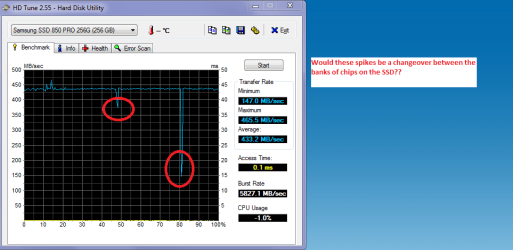
 ) and the other runs I have done with that HD the dips come in very different spots. It was just a curiosity that sent me off chasing answers because in some cases the dips were really significant those in the pic are really quite small compared to some.