
sagarnikam123
New member
i am on windows-64 bit hp machne.
i installed first latest cygwin(from local directory) to run hadoop on windows,but forgot to install tcp_wrappers pacakge.
so i deleted everything in C drive related to cygwin,also .ssh folder & .bashrc.profile
& installed again cygwin freshly.
i follow this tutorial:-http://v-lad.org/Tutorials/Hadoop/00%20-%20Intro.html
& run below command (u can see this commands in snapshot)
====================================================
trendwise@trendwise-HP ~
$ ssh-host-config
*** Info: Generating /etc/ssh_host_key
*** Info: Generating /etc/ssh_host_rsa_key
*** Info: Generating /etc/ssh_host_dsa_key
*** Info: Generating /etc/ssh_host_ecdsa_key
*** Info: Creating default /etc/ssh_config file
*** Info: Creating default /etc/sshd_config file
*** Info: Privilege separation is set to yes by default since OpenSSH 3.3.
*** Info: However, this requires a non-privileged account called 'sshd'.
*** Info: For more info on privilege separation read /usr/share/doc/openssh/READ ME.privsep.
*** Query: Should privilege separation be used? (yes/no) no
*** Info: Updating /etc/sshd_config file
*** Info: Sshd service is already installed.
*** Info: Host configuration finished. Have fun!
trendwise@trendwise-HP ~
$ ssh-keygen
Generating public/private rsa key pair.
Enter file in which to save the key (/home/trendwise/.ssh/id_rsa):
Created directory '/home/trendwise/.ssh'.
Enter passphrase (empty for no passphrase):
Enter same passphrase again:
Your identification has been saved in /home/trendwise/.ssh/id_rsa.
Your public key has been saved in /home/trendwise/.ssh/id_rsa.pub.
The key fingerprint is:
93:50:59:ac:c2:3a:ff:db:33:7e:ab:a9:bb:34:a5:cf trendwise@trendwise-HP
The key's randomart image is:
+--[ RSA 2048]----+
| .+. |
| .. . |
| .. . |
| o... |
| . .S . |
| o + |
| o + |
| .. =o.. |
| .**E=.. |
+-----------------+
trendwise@trendwise-HP ~
$ cd ~/.ssh
trendwise@trendwise-HP ~/.ssh
$ ls -l
total 5
-rw------- 1 trendwise None 1679 Oct 16 20:22 id_rsa
-rw-r--r-- 1 trendwise None 404 Oct 16 20:22 id_rsa.pub
trendwise@trendwise-HP ~/.ssh
$ cat id_rsa.pub >> authorized_keys
trendwise@trendwise-HP ~/.ssh
$ ssh localhost
ssh: connect to host localhost port 22: Connection refused
====================================================
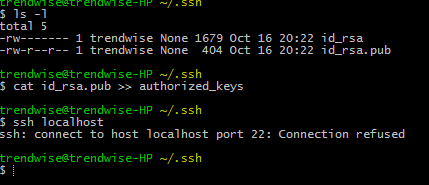
when i am going to start ssh localhost it says that
"ssh: connect to host localhost port 22: Connection refused "(see snapshot)
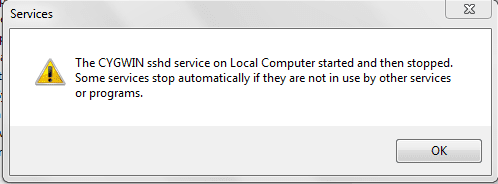
In Services, "Cygwinsshd" as service is already present there,but not started,
i don't know how to remove it from services(see snapshot)

Any how i want to start sshd server to run hadoop on windows,what should i do with port,or any other option,,plz i am installing it from last 2 days
i installed first latest cygwin(from local directory) to run hadoop on windows,but forgot to install tcp_wrappers pacakge.
so i deleted everything in C drive related to cygwin,also .ssh folder & .bashrc.profile
& installed again cygwin freshly.
i follow this tutorial:-http://v-lad.org/Tutorials/Hadoop/00%20-%20Intro.html
& run below command (u can see this commands in snapshot)
====================================================
trendwise@trendwise-HP ~
$ ssh-host-config
*** Info: Generating /etc/ssh_host_key
*** Info: Generating /etc/ssh_host_rsa_key
*** Info: Generating /etc/ssh_host_dsa_key
*** Info: Generating /etc/ssh_host_ecdsa_key
*** Info: Creating default /etc/ssh_config file
*** Info: Creating default /etc/sshd_config file
*** Info: Privilege separation is set to yes by default since OpenSSH 3.3.
*** Info: However, this requires a non-privileged account called 'sshd'.
*** Info: For more info on privilege separation read /usr/share/doc/openssh/READ ME.privsep.
*** Query: Should privilege separation be used? (yes/no) no
*** Info: Updating /etc/sshd_config file
*** Info: Sshd service is already installed.
*** Info: Host configuration finished. Have fun!
trendwise@trendwise-HP ~
$ ssh-keygen
Generating public/private rsa key pair.
Enter file in which to save the key (/home/trendwise/.ssh/id_rsa):
Created directory '/home/trendwise/.ssh'.
Enter passphrase (empty for no passphrase):
Enter same passphrase again:
Your identification has been saved in /home/trendwise/.ssh/id_rsa.
Your public key has been saved in /home/trendwise/.ssh/id_rsa.pub.
The key fingerprint is:
93:50:59:ac:c2:3a:ff:db:33:7e:ab:a9:bb:34:a5:cf trendwise@trendwise-HP
The key's randomart image is:
+--[ RSA 2048]----+
| .+. |
| .. . |
| .. . |
| o... |
| . .S . |
| o + |
| o + |
| .. =o.. |
| .**E=.. |
+-----------------+
trendwise@trendwise-HP ~
$ cd ~/.ssh
trendwise@trendwise-HP ~/.ssh
$ ls -l
total 5
-rw------- 1 trendwise None 1679 Oct 16 20:22 id_rsa
-rw-r--r-- 1 trendwise None 404 Oct 16 20:22 id_rsa.pub
trendwise@trendwise-HP ~/.ssh
$ cat id_rsa.pub >> authorized_keys
trendwise@trendwise-HP ~/.ssh
$ ssh localhost
ssh: connect to host localhost port 22: Connection refused
====================================================
when i am going to start ssh localhost it says that
"ssh: connect to host localhost port 22: Connection refused "(see snapshot)
In Services, "Cygwinsshd" as service is already present there,but not started,
i don't know how to remove it from services(see snapshot)
Any how i want to start sshd server to run hadoop on windows,what should i do with port,or any other option,,plz i am installing it from last 2 days
My Computer
At a glance
64 bit
- OS
- 64 bit

