Solved SSL VPN : error message : To log on to this computer, you must be gran

bandjgrimm

New member
Local time
4:32 PM
Messages
13
We are a church school and have server 2003 and XP environment in the past.
We use Sonicalwall SSL vpn to allow remote access.
Everything is cool when using XP.

I replaced a few workstations with new Windows 7 pro 64 bit machines. They are named identical and same IP addresses as the machines I replaced.

Using a remote machine to login through SSL VPN, I get this message on the machines I am using. I only get it trying to login to the Windows 7 machines. I can use the same remote machine and login to other XP machines fine.

I have no idea what to change and on which machine: server, local windows 7 machine I am trying to access, or the remote machine.

Any help would be greatly appreciated.

To log on to this remote computer, you must be granted the Allow log on Through Terminal Services right. By default, members of the remote desktop Users Group have this right. If you are not a member of the Remote Desktop Group or another group that has this right, or if the remote desktop users group does not have this right, you must be granted this right manually.
 

My Computer My Computer

At a glance

7 Pro 64bit
OS
7 Pro 64bit
is this an AD domain or a workgroup ?
 

My Computer My Computer

At a glance

windows 7 enterprise 32bit
OS
windows 7 enterprise 32bit
The network is a server 2003 domain with active directory.
The Windows 7 machine I cannot access is a member of that domain and listed on active directory.

The remote machines are XP stand alone machines trying to access network with SSL.
 

My Computer My Computer

At a glance

7 Pro 64bit
OS
7 Pro 64bit
when you say "I replaced a few workstations with new Windows 7 pro 64 bit machines. They are named identical and same IP addresses as the machines I replaced."

did you remove them from ad then recreate them ?

also can you remote into these win7 machines from within your network, ie no vpn..
 

My Computer My Computer

At a glance

windows 7 enterprise 32bit
OS
windows 7 enterprise 32bit
To Connect to the Windows Server 2003 you have to edit each user profile in AD to give them permissions. However this should have been done so that the XP machines can connect. So this is most likely not your problem.

If you are trying to connect to Windows 7 with to another Workstation (XP or 7) then you will need to setup the permission on those workstations. I can give you instructions but need to know which way this is NOT working. -WS
 

My Computer My Computer

At a glance

Windows 7 Enterprise (x64); Windows Server 20...16GB
Computer type
PC/Desktop
Computer Manufacturer/Model Number
Dell OP7010
OS
Windows 7 Enterprise (x64); Windows Server 2008 R2 (x64)
Memory
16GB
Monitor(s) Displays
4 Dell 24" LCD
Screen Resolution
1280x1024
Keyboard
Dell
Mouse
Dell Optical
Internet Speed
40meg
I do not believe I deleted them first. I have never had to do that in the past when I had drives fail, etc so I did not do this.

I cannot connect within the netowrk using remote desktop

I can ping them internally but not connect

I am trying to use an xp remote machine through the internet and SSL VPN to connect to Windows 7 machine on domain. Connecting to the Windows 7 machine is what provides the error. If connecting to another workstation that is XP it works fine.
 

My Computer My Computer

At a glance

7 Pro 64bit
OS
7 Pro 64bit
when replacing a machine which is within an AD, you can of course keep the name and ip but you need to refresh the GUID (machine specific Identification within AD) the best method of doing this is by removing the old name within AD users and computers, find computer, right click, delete.

there maybe something (Group Policy setting) within the domain which is stopping you logging on...

the other test was within the same network, ie plugged into the same router/switch can you connect using RDP. so try from one of the other xp machines to RDP to it.

In most technical issues, like a sherlock holmes detective story, what you want to do is try to remove potential suspects by using a process of elimination.`

my bad, I reread your reply and you've done that.
 

My Computer My Computer

At a glance

windows 7 enterprise 32bit
OS
windows 7 enterprise 32bit
where is the logon failing ?
are you getting prompted for the logon?

if you are getting a logon prompt then I would try to logon with the local user account ?
 

My Computer My Computer

At a glance

windows 7 enterprise 32bit
OS
windows 7 enterprise 32bit
....
 
Last edited:

My Computer My Computer

At a glance

windows 7 enterprise 32bit
OS
windows 7 enterprise 32bit
The machines work fine on the domain. However, I will delete the machines and rejoin them to the domain. I will do that during the week when I am up there.

I can login to SSL VPN and enter my credentials. I then select the machine I want to connect to and that is when it kicks out.

The SSL VPN points to the machine name so maybe resetting AD will help this also.

If I select an XP machine it connects fine. If I connect to the Windows 7 machine that is when I get the error.
 

My Computer My Computer

At a glance

7 Pro 64bit
OS
7 Pro 64bit
one more question if I may,
the SSL VPN connection, I presume you just type an URL and logon.. are you using a citrix type configuration to present you with a landing page when you connect where you can select services/programmes?
 

My Computer My Computer

At a glance

windows 7 enterprise 32bit
OS
windows 7 enterprise 32bit
All I supply is username and password to connect to SSL. Then I select a couputer which routes to a machine name.

Then it is just a remote session on the computer I believe.
 

My Computer My Computer

At a glance

7 Pro 64bit
OS
7 Pro 64bit
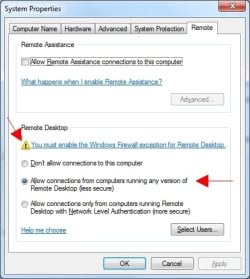
Have you configure Windows 7 to accept RDP connections?
 

Attachments

  • RemoteDesktopSettings2.jpg
    RemoteDesktopSettings2.jpg
    32.7 KB · Views: 5

My Computer My Computer

At a glance

Windows 7 Enterprise (x64); Windows Server 20...16GB
Computer type
PC/Desktop
Computer Manufacturer/Model Number
Dell OP7010
OS
Windows 7 Enterprise (x64); Windows Server 2008 R2 (x64)
Memory
16GB
Monitor(s) Displays
4 Dell 24" LCD
Screen Resolution
1280x1024
Keyboard
Dell
Mouse
Dell Optical
Internet Speed
40meg
Windows firewall is disabled in GP.

Remote connections were enabled as your pictures shows. THis was about the only thing I had done to the windows 7 machine. I did not do anything in windows firewall to allow an exception as it is supposed to be disabled through group policy.
 

My Computer My Computer

At a glance

7 Pro 64bit
OS
7 Pro 64bit
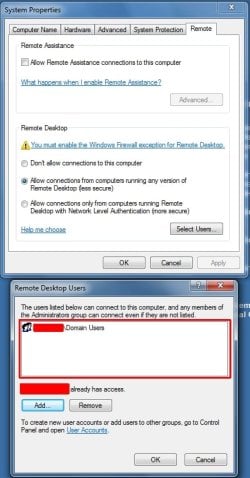
You have added your User Groups for access?
 

Attachments

  • UserGroupsRDP2.jpg
    UserGroupsRDP2.jpg
    50.5 KB · Views: 27

My Computer My Computer

At a glance

Windows 7 Enterprise (x64); Windows Server 20...16GB
Computer type
PC/Desktop
Computer Manufacturer/Model Number
Dell OP7010
OS
Windows 7 Enterprise (x64); Windows Server 2008 R2 (x64)
Memory
16GB
Monitor(s) Displays
4 Dell 24" LCD
Screen Resolution
1280x1024
Keyboard
Dell
Mouse
Dell Optical
Internet Speed
40meg
I did not add anything with the /domain users.

Maybe that is the issue. I can't check until late tomorrow though.
 

My Computer My Computer

At a glance

7 Pro 64bit
OS
7 Pro 64bit
I added things like
domain/domain users
domain/administrators

and I now see where I am at a login screen for that machine - but it doesn't pass through the password. You get a wrong password message. When I type in the password it doesn't accept it either.

I think it is a local windows 7 machine issue and not an SSL issues?

When I use my old password .... it gives me the original error message. So it appears it like my old password that is saved as a local password for a local user on the machine.

It doesn't appear to accept the domain credentials or login from the remote session.
 

My Computer My Computer

At a glance

7 Pro 64bit
OS
7 Pro 64bit
Are you able to logon the machine directly on the network. Try using a Windows XP machine to a Windows 7 machine without using the VPN. This way you can eliminate the VPN and the Windows Server 2003.
 

My Computer My Computer

At a glance

Windows 7 Enterprise (x64); Windows Server 20...16GB
Computer type
PC/Desktop
Computer Manufacturer/Model Number
Dell OP7010
OS
Windows 7 Enterprise (x64); Windows Server 2008 R2 (x64)
Memory
16GB
Monitor(s) Displays
4 Dell 24" LCD
Screen Resolution
1280x1024
Keyboard
Dell
Mouse
Dell Optical
Internet Speed
40meg
from work here I can remote nto the server.

I remote desktop connection to the windows 7 machine

I was able to login.

Any ideas on what to check with ssl?
 

My Computer My Computer

At a glance

7 Pro 64bit
OS
7 Pro 64bit
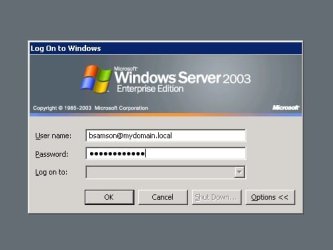
I know that in some cases when I VPN into a network that I have to REMOVE the domain information in the VPN Connection. If I don't then I would connect as say [email protected]. The double domain information would make it impossible for me to navigate the network, because I was really [email protected]. This could be causing the issue with RDP. Or it could be just the opposite. Where you are not getting any domain information so you are trying to log into the machine as just bsamson. You may need to use [email protected] and then the password to log in when using the RDP Client.
 

Attachments

  • RDPLogin.jpg
    RDPLogin.jpg
    15.6 KB · Views: 6

My Computer My Computer

At a glance

Windows 7 Enterprise (x64); Windows Server 20...16GB
Computer type
PC/Desktop
Computer Manufacturer/Model Number
Dell OP7010
OS
Windows 7 Enterprise (x64); Windows Server 2008 R2 (x64)
Memory
16GB
Monitor(s) Displays
4 Dell 24" LCD
Screen Resolution
1280x1024
Keyboard
Dell
Mouse
Dell Optical
Internet Speed
40meg
Back
Top