Hello,
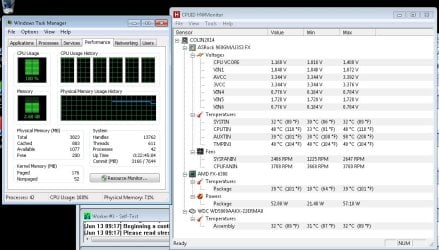
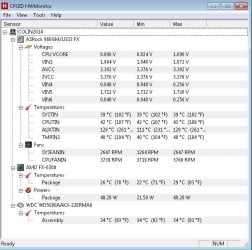
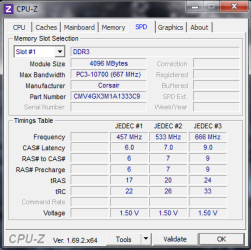
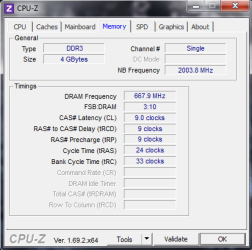
I've got a machine that I think the only issue preventing stability are the BIOS settings. The machine will not run Prime95 without errors, and as soon as I bumped the voltage to the CPU it seemed to be more stable. I haven't really had BSOD's to analyze. I've got several logs from running Prime95 at various settings. The most stable I've gotten it (fewer errors, longest run time) is to run Prime95 for 24+ hours by dropping the RAM bus clock speed to like 400MHz (from 667)
Has anybody else had issues with machines not running at stock/default settings?
Attached are the reports from the Log Collector and a few Prime95 logs (named after the BIOS settings or cpu voltage).
Any help/suggestions would be appreciated! I've been spending the past few weeks running tests and pulling out my hair.
Below are the hardware specs:
OS: Windows 7 Pro 64-bit
Case + PSU: RAIDMAX Super Hurricane ATX-248BP Black Steel / Plastic ATX Mid Tower Computer Case 450W Power Supply
Motherboard: ASRock 960GM/U3S3 FX AM3+ AMD 760G + SB710 SATA 6Gb/s USB 3.0 Micro ATX AMD Motherboard
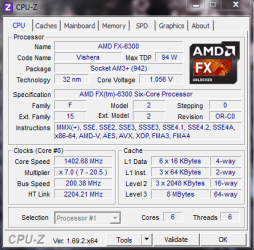
CPU: AMD FX-6300 Vishera 3.5GHz (4.1GHz Turbo) Socket AM3+ 95W Desktop Processor FD6300WMHKBOX
RAM: CORSAIR 4GB 240-Pin DDR3 SDRAM DDR3 1333 Desktop Memory Model CMV4GX3M1A1333C9
Hard Drive: Western Digital WD Blue WD5000AAKX 500GB 7200 RPM 16MB Cache SATA 6.0Gb/s 3.5" Internal Hard Drive Bare Drive - OEM
Disk Drive: LG Internal Super Multi Drive SATA Model GH24NSB0 - OEM
I've got a machine that I think the only issue preventing stability are the BIOS settings. The machine will not run Prime95 without errors, and as soon as I bumped the voltage to the CPU it seemed to be more stable. I haven't really had BSOD's to analyze. I've got several logs from running Prime95 at various settings. The most stable I've gotten it (fewer errors, longest run time) is to run Prime95 for 24+ hours by dropping the RAM bus clock speed to like 400MHz (from 667)
Has anybody else had issues with machines not running at stock/default settings?
Attached are the reports from the Log Collector and a few Prime95 logs (named after the BIOS settings or cpu voltage).
Any help/suggestions would be appreciated! I've been spending the past few weeks running tests and pulling out my hair.
Below are the hardware specs:
OS: Windows 7 Pro 64-bit
Case + PSU: RAIDMAX Super Hurricane ATX-248BP Black Steel / Plastic ATX Mid Tower Computer Case 450W Power Supply
Motherboard: ASRock 960GM/U3S3 FX AM3+ AMD 760G + SB710 SATA 6Gb/s USB 3.0 Micro ATX AMD Motherboard
CPU: AMD FX-6300 Vishera 3.5GHz (4.1GHz Turbo) Socket AM3+ 95W Desktop Processor FD6300WMHKBOX
RAM: CORSAIR 4GB 240-Pin DDR3 SDRAM DDR3 1333 Desktop Memory Model CMV4GX3M1A1333C9
Hard Drive: Western Digital WD Blue WD5000AAKX 500GB 7200 RPM 16MB Cache SATA 6.0Gb/s 3.5" Internal Hard Drive Bare Drive - OEM
Disk Drive: LG Internal Super Multi Drive SATA Model GH24NSB0 - OEM
Attachments
-
COLIN1182014-Sun_06_01_2014_203414_57.zip1,008.9 KB · Views: 4
-
Default settings.txt3.7 KB · Views: 4
-
default no turbo.txt3.3 KB · Views: 1
-
Default but 1215 volts.txt6.6 KB · Views: 1
-
135 volts.txt1.7 KB · Views: 3
-
 cpu4.PNG15.6 KB · Views: 31
 -
 cpu3.PNG14.3 KB · Views: 31
 -
 cpu2.PNG13.2 KB · Views: 31
 -
 cpu1.PNG21 KB · Views: 31
 -
136 volts.txt1.1 KB · Views: 1
My Computer
At a glance
Microsoft Windows 7 Professional 64-bit 7601 ...AMD Phenom(tm) II X4 840 Processor4.00 GBATI Radeon 3000 Graphics
- Computer type
- PC/Desktop
- OS
- Microsoft Windows 7 Professional 64-bit 7601 Multiprocessor Free Service Pack 1
- CPU
- AMD Phenom(tm) II X4 840 Processor
- Motherboard
- ASUSTeK Computer INC. M4A78LT-M-LE
- Memory
- 4.00 GB
- Graphics Card(s)
- ATI Radeon 3000 Graphics
- Sound Card
- High Definition Audio Device
- Hard Drives
- (1) Maxtor 6Y160P0 ATA Device (2) ST3250824A ATA Device (3) EPSON Stylus Storage USB Device