StandaloneStack 2 "unknown stack" problem

Sope

New member
Member
Local time
12:38 AM
Messages
46
Location
Wales, UK
Hi,

I'm trying to get StandaloneStack 2 to work under Win7 x64 without success.

I extracted the downloaded files to C:\Program Files (x86), and manually created a start menu shortcut to standalonestack2.exe

The program runs as expected and I'm able to successfully create a stack pointing to a folder containing mainly game shortcuts. When I try to launch it, however, I just get an error message saying "unknown stack" :confused:

Am I missing something obvious....is anyone using it that can point me in the right direction....any suggestions appreciated?
 

My Computer

Computer Manufacturer/Model Number
Self-Built Jan 2010
OS
Windows 7 64-bit
CPU
Intel Core i5 750 2.66Ghz
Motherboard
Asus P7P55D Pro
Memory
Crucial 8GB (4x2GB) DDR3 1333MHz
Graphics Card(s)
Sapphire HD 5850 1GB GDDR5
Monitor(s) Displays
Benq G2420HDBL LED LCD 24" DVI-D 1920x1080
Screen Resolution
1680 x 1050
Hard Drives
Samsung SpinPoint F3 1TB SATAII 7200rpm 32MB Cache (x2)
PSU
Corsair HX 750W
Case
Antec 300
Cooling
Arctic Cooling Freezer 7 Pro rev 2
Keyboard
Microsoft Reclusa
Mouse
Microsoft IntelliMouse Explorer 3.0
Internet Speed
10 Mb/sec (cable modem)
Other Info
Sony AD7241S 24x DVD±RW SATA Dual Layer & RAM Burner + LightScribe
Do you want to have stack docklet on your dock ? If so , I have a better option for you . I hope you have already understood that applying standalone stack successfully in nothing but Greco-Roman wrestling :(

Just use Stack Docklet For ObjectDock by ~arshi2009 on deviantART . It works with all the docks (I dont know about nexus, but all the others).

But if you want it to be just standalone, proceed through trial and method . It is a harder nut to crack :confused:
 

My Computer

Computer type
PC/Desktop
Computer Manufacturer/Model Number
Self Assembled
OS
Microsoft Windows 10 Pro Insider Preview 64-bit
CPU
Intel(R) Core(TM) i3-4130 CPU @ 3.40GHz
Motherboard
Gigabyte Technology Co., Ltd. B85M-D3H
Memory
Corsair Vengence 4GB x2 (8.00GB Dual-Channel DDR3 @ 798MHz)
Graphics Card(s)
2047MB GeForce GTS 450 (ZOTAC International)
Sound Card
Onboard (Realtek High Definition Audio)
Monitor(s) Displays
LG Flatron E2040T
Screen Resolution
1600x900
Hard Drives
Western Digital 1 TB
Seagate 500 GB
PSU
Corsair VS550
Case
Cooler Master K380
Cooling
Cooler Master Seidon 120V Plus
Keyboard
Logitech MK260r
Mouse
Logitech MK260r
Internet Speed
PMPL Broadband
Antivirus
Windows Defender + MBAM
Browser
Firefox
Other Info
Dell Studio 15" Laptop
Thanks for the suggestion but I didn't really want to use a dock. I would prefer to just have a simple stack pinned to the taskbar.

I've already tried 7stacks which does basically the same job and is ok, but it feels a little sluggish in use. From what I've read, StandaloneStack 2 is said to function more smoothly and offers more customization.....when it's working that is!
 

My Computer

Computer Manufacturer/Model Number
Self-Built Jan 2010
OS
Windows 7 64-bit
CPU
Intel Core i5 750 2.66Ghz
Motherboard
Asus P7P55D Pro
Memory
Crucial 8GB (4x2GB) DDR3 1333MHz
Graphics Card(s)
Sapphire HD 5850 1GB GDDR5
Monitor(s) Displays
Benq G2420HDBL LED LCD 24" DVI-D 1920x1080
Screen Resolution
1680 x 1050
Hard Drives
Samsung SpinPoint F3 1TB SATAII 7200rpm 32MB Cache (x2)
PSU
Corsair HX 750W
Case
Antec 300
Cooling
Arctic Cooling Freezer 7 Pro rev 2
Keyboard
Microsoft Reclusa
Mouse
Microsoft IntelliMouse Explorer 3.0
Internet Speed
10 Mb/sec (cable modem)
Other Info
Sony AD7241S 24x DVD±RW SATA Dual Layer & RAM Burner + LightScribe
Thanks for the suggestion but I didn't really want to use a dock. I would prefer to just have a simple stack pinned to the taskbar.

I've already tried 7stacks which does basically the same job and is ok, but it feels a little sluggish in use. From what I've read, StandaloneStack 2 is said to function more smoothly and offers more customization.....when it's working that is!
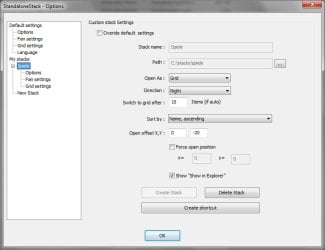
Hi ! It is easy. I was familiar with its earlier versions , that was a lot hard ! I just used this settings to have a stack :D
 

Attachments

  • Capture.JPG
    Capture.JPG
    35.9 KB · Views: 257

My Computer

Computer type
PC/Desktop
Computer Manufacturer/Model Number
Self Assembled
OS
Microsoft Windows 10 Pro Insider Preview 64-bit
CPU
Intel(R) Core(TM) i3-4130 CPU @ 3.40GHz
Motherboard
Gigabyte Technology Co., Ltd. B85M-D3H
Memory
Corsair Vengence 4GB x2 (8.00GB Dual-Channel DDR3 @ 798MHz)
Graphics Card(s)
2047MB GeForce GTS 450 (ZOTAC International)
Sound Card
Onboard (Realtek High Definition Audio)
Monitor(s) Displays
LG Flatron E2040T
Screen Resolution
1600x900
Hard Drives
Western Digital 1 TB
Seagate 500 GB
PSU
Corsair VS550
Case
Cooler Master K380
Cooling
Cooler Master Seidon 120V Plus
Keyboard
Logitech MK260r
Mouse
Logitech MK260r
Internet Speed
PMPL Broadband
Antivirus
Windows Defender + MBAM
Browser
Firefox
Other Info
Dell Studio 15" Laptop
Aaahh! :doh:

Yet again I fell into the "run as administrator" trap. I should know better by now! :o
Strangely StandaloneStack 2 needs to be run as administrator whereas 7stacks doesn't.

(Thanks for the replies Arc)
 

My Computer

Computer Manufacturer/Model Number
Self-Built Jan 2010
OS
Windows 7 64-bit
CPU
Intel Core i5 750 2.66Ghz
Motherboard
Asus P7P55D Pro
Memory
Crucial 8GB (4x2GB) DDR3 1333MHz
Graphics Card(s)
Sapphire HD 5850 1GB GDDR5
Monitor(s) Displays
Benq G2420HDBL LED LCD 24" DVI-D 1920x1080
Screen Resolution
1680 x 1050
Hard Drives
Samsung SpinPoint F3 1TB SATAII 7200rpm 32MB Cache (x2)
PSU
Corsair HX 750W
Case
Antec 300
Cooling
Arctic Cooling Freezer 7 Pro rev 2
Keyboard
Microsoft Reclusa
Mouse
Microsoft IntelliMouse Explorer 3.0
Internet Speed
10 Mb/sec (cable modem)
Other Info
Sony AD7241S 24x DVD±RW SATA Dual Layer & RAM Burner + LightScribe
Aaahh! :doh:

Yet again I fell into the "run as administrator" trap. I should know better by now! :o
Strangely StandaloneStack 2 needs to be run as administrator whereas 7stacks doesn't.

(Thanks for the replies Arc)
I didnt feel it coz I usually turn off UAC ! But I will not suggest you to do so ;)
 

My Computer

Computer type
PC/Desktop
Computer Manufacturer/Model Number
Self Assembled
OS
Microsoft Windows 10 Pro Insider Preview 64-bit
CPU
Intel(R) Core(TM) i3-4130 CPU @ 3.40GHz
Motherboard
Gigabyte Technology Co., Ltd. B85M-D3H
Memory
Corsair Vengence 4GB x2 (8.00GB Dual-Channel DDR3 @ 798MHz)
Graphics Card(s)
2047MB GeForce GTS 450 (ZOTAC International)
Sound Card
Onboard (Realtek High Definition Audio)
Monitor(s) Displays
LG Flatron E2040T
Screen Resolution
1600x900
Hard Drives
Western Digital 1 TB
Seagate 500 GB
PSU
Corsair VS550
Case
Cooler Master K380
Cooling
Cooler Master Seidon 120V Plus
Keyboard
Logitech MK260r
Mouse
Logitech MK260r
Internet Speed
PMPL Broadband
Antivirus
Windows Defender + MBAM
Browser
Firefox
Other Info
Dell Studio 15" Laptop
Hi guys!

This is my first visit in this forum and I'm from germany.
So please don't be too hard on me...

I know this thread is a bit old, but I have a pretty similiar issue with Standalone Stack 2, so I thought it's better to write an answer.

My problem is: It don't work like it should :party: :confused:.

I do anything like "Sope" describes in his thread. In my case, it dont says something like "unknown stack", but it shows only the shortcuts from my desktop, not from the folder I've selected. The programm seems to be pretty simple, there are just a few options to select (except the customization things). So I tried everything, without any success. Then, I tried to delete it (I guess it wasn't installed, just extracted) but I can't, a file is always used by another programm even if I close anything else. :confused:

So, I thought I try it again with a little help...
Maybe anyone else had this problem too and found a solution?
Or you look at my picture below and say "oh my god, THERE it is!" or something like that...

Or do you know a better programm?
I dont like these dock things, I just want something like this standalone stack does. A shortcut which is a group of many other shortcuts. But the "quick and dirty"-solution with normal folders, is not really satisfying to me.

Anyway, I would be very pleased for your help. :)

Thank you very much.

Best regards,
pyretta
 

Attachments

  • standalonestack_screen.jpg
    standalonestack_screen.jpg
    49.7 KB · Views: 24

My Computer

OS
Win 7 32 bit
Or do you know a better programm?
I dont like these dock things, I just want something like this standalone stack does. A shortcut which is a group of many other shortcuts. But the "quick and dirty"-solution with normal folders, is not really satisfying to me.

Hi pyretta,

I'm presuming you tried starting StandaloneStack 2 with "run as administrator".
As I remember, that did solve my initial problem, however I continued to find the program buggy so I stopped using it.

I was running StandaloneStack 2 alongside 7Stacks for a short while to compare the two. In the end I felt 7Stacks was better and I'm still using it now (sadly though, it hasn't been updated for a long time despite the website saying "more features coming soon").

Sorry I can't be of any more help.
 

My Computer

Computer Manufacturer/Model Number
Self-Built Jan 2010
OS
Windows 7 64-bit
CPU
Intel Core i5 750 2.66Ghz
Motherboard
Asus P7P55D Pro
Memory
Crucial 8GB (4x2GB) DDR3 1333MHz
Graphics Card(s)
Sapphire HD 5850 1GB GDDR5
Monitor(s) Displays
Benq G2420HDBL LED LCD 24" DVI-D 1920x1080
Screen Resolution
1680 x 1050
Hard Drives
Samsung SpinPoint F3 1TB SATAII 7200rpm 32MB Cache (x2)
PSU
Corsair HX 750W
Case
Antec 300
Cooling
Arctic Cooling Freezer 7 Pro rev 2
Keyboard
Microsoft Reclusa
Mouse
Microsoft IntelliMouse Explorer 3.0
Internet Speed
10 Mb/sec (cable modem)
Other Info
Sony AD7241S 24x DVD±RW SATA Dual Layer & RAM Burner + LightScribe
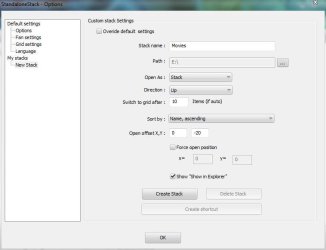
I use Standalone Stacks 2 on Windows 7 32 bit and Vista64. I have a folder full of shortcuts for each stack and just go through the procedure. The only "bug" I've found is on W7 sometimes I get the "plain paper icon" and have to store a custom icon to use via Standalone Stack customization. But that's a W7 bug not SS2 bug. It seems to happen on maybe one shortcut out of 10. In Vista64 everything works as it should. Like Arc though, I have UAC disabled.

edit: I've been running SS2 on both machines long enough that I can't remember anything special about setting it up. I know once you use a shortcut if you move it then things get messed up. I also use RocketDock. So what I do is make a folder inside my RocketDock folders with a subset of programs that I will use as a stack. Then I just create a stack from that folder of shortcuts.
 

My Computer

Computer Manufacturer/Model Number
HP Media Center
OS
Windows 7 32 bit
CPU
AMD 5200+ dual core
Memory
2 GB
Graphics Card(s)
NVidia GeForce 6150SE 128 MB
Monitor(s) Displays
CRT
Screen Resolution
1280x1024
Hard Drives
500 GB Sata internal :

SIIG USB 3.0 docking stations w/WD Caviar Black 6 Gb/s drives
Keyboard
PS/2
Mouse
PS/2 Wheel Mouse
Other Info
SIIG USB 3.0 PCIexpress card.
StandaloneStacks2 problem

I use StandaloneStacks2 with Rocketdock. SS2 seem to refuse to create a working stack for 'Desktop' and 'Computer'. I create the stacks but when I click on the icon it simply does the bouncing thing and nothing happens or i get the error "The parameter is incorrect" ... I wish it would tell me 'what' parameter.
Does anybody know what the problem could be ?
Below are the dialogs for 'Computer' of Standalonestacks2 and Rocketdock:
https://dl.dropboxusercontent.com/u/80779383/1.png
https://dl.dropboxusercontent.com/u/80779383/2.png
 

My Computer

Computer type
PC/Desktop
Computer Manufacturer/Model Number
Custom
OS
Windows 8.1 N 64bit
CPU
I7
Memory
32GB
Graphics Card(s)
4Gb
Back
Top