Standar VGA graphics card help

windows7dude

New member
Local time
2:46 AM
Messages
9
I recently installed Windows 7 and the resolution is stuck at 640 times 480. I don't know how to find/update my video driver. Please help.

I tried the Device manager method and it says it's up to date.
 

My Computer

OS
Windows 7 Ultimate 32 bit
I recently installed Windows 7 and the resolution is stuck at 640 times 480. I don't know how to find/update my video driver. Please help.

I tried the Device manager method and it says it's up to date.
Hi windows7dude , Welcome to the forums , If you would be so kind and tell us the manf/make/model of your PC we may be able to assist you further ;)
 

My Computer

Computer type
PC/Desktop
Computer Manufacturer/Model Number
self build
OS
win 7 ultimate32bit, Win8.1pro wmc 32bit
CPU
amd phenom x4 9600
Motherboard
asus m2n32-sli deluxe
Memory
corsair twinxs 2x2gb
Graphics Card(s)
2x nvidia 1gb 8500gt
Sound Card
onboard
Monitor(s) Displays
23" PB Viseo 233d
Screen Resolution
1920x1080
Hard Drives
maxtor sata 500gb
maxtor sata 320gb
fujitsu sata200gb
PSU
oryxx tornado 750w
Case
thermaltake xaser lll
Cooling
artic freezer64 pro + 7 case fans
I recently installed Windows 7 and the resolution is stuck at 640 times 480. I don't know how to find/update my video driver. Please help.

I tried the Device manager method and it says it's up to date.
Hi windows7dude , Welcome to the forums , If you would be so kind and tell us the manf/make/model of your PC we may be able to assist you further ;)

Dell dimension 4600.
 

My Computer

OS
Windows 7 Ultimate 32 bit
I recently installed Windows 7 and the resolution is stuck at 640 times 480. I don't know how to find/update my video driver. Please help.

I tried the Device manager method and it says it's up to date.
Hi windows7dude , Welcome to the forums , If you would be so kind and tell us the manf/make/model of your PC we may be able to assist you further ;)

Dell dimension 4600.

OK follow this link Drivers & Downloads and select the video card you have and download the driver which will have to be installed in compatability mode for windows XP http://www.sevenforums.com/tutorials/316-compatibility-mode.html :)
 

My Computer

Computer type
PC/Desktop
Computer Manufacturer/Model Number
self build
OS
win 7 ultimate32bit, Win8.1pro wmc 32bit
CPU
amd phenom x4 9600
Motherboard
asus m2n32-sli deluxe
Memory
corsair twinxs 2x2gb
Graphics Card(s)
2x nvidia 1gb 8500gt
Sound Card
onboard
Monitor(s) Displays
23" PB Viseo 233d
Screen Resolution
1920x1080
Hard Drives
maxtor sata 500gb
maxtor sata 320gb
fujitsu sata200gb
PSU
oryxx tornado 750w
Case
thermaltake xaser lll
Cooling
artic freezer64 pro + 7 case fans
How do I find my video card? Can you do it for me? I used all those programs on google and couldn't find it even after multiple scans.

Also there's 13 different ones. How do I know whcih one to download. :(
 

My Computer

OS
Windows 7 Ultimate 32 bit
How do I find my video card? Can you do it for me? I used all those programs on google and couldn't find it even after multiple scans.

do you have a service tag # on the pc ,if so input the # on the website link I gave you ,That will tell you the graphic card you have in the PC or download this app Speccy - System Information - Free Download and tell us which video card you have :)
 

My Computer

Computer type
PC/Desktop
Computer Manufacturer/Model Number
self build
OS
win 7 ultimate32bit, Win8.1pro wmc 32bit
CPU
amd phenom x4 9600
Motherboard
asus m2n32-sli deluxe
Memory
corsair twinxs 2x2gb
Graphics Card(s)
2x nvidia 1gb 8500gt
Sound Card
onboard
Monitor(s) Displays
23" PB Viseo 233d
Screen Resolution
1920x1080
Hard Drives
maxtor sata 500gb
maxtor sata 320gb
fujitsu sata200gb
PSU
oryxx tornado 750w
Case
thermaltake xaser lll
Cooling
artic freezer64 pro + 7 case fans
Service Tag: 676T851

i dont see what graphic card it is.
 

My Computer

OS
Windows 7 Ultimate 32 bit
Just go to Dell's support page and click support & drivers then insert your service tag in the appropriate search field.

Dell will then offer all the drivers for your system.

Download them and save them in a location of your choice then install them as you need them.
 

My Computer

Computer Manufacturer/Model Number
HP Pavilion Elite 495UK
OS
Windows 7 Ultimate SP1 64-Bit
CPU
Intel Core i7 870 @ 2.93GHz
Motherboard
MSI 2A9C (CPU1)
Memory
8Gb Dual-Channel DDR3 @ 664MHz
Graphics Card(s)
nVidia GeForce GTX 460 1024MB dedicated RAM
Sound Card
Realtek HD Audio
Monitor(s) Displays
HP2310i
Screen Resolution
1920 x 1080
Hard Drives
1x1954GB Hitachi HDS22020ALA 330 (RAID), 1x1954GB Hitachi External for backup and storage
PSU
460W
Case
HP Elite
Cooling
Air cooled
Keyboard
Logitech K750 solar-powered keyboard
Mouse
Logitech Wireless M180 mouse
Internet Speed
2Mb
Other Info
Pure Avanti Flow Internet Radio with iPod Dock, 64Gb iPod, HP USB Speakers, Sony MDR-V500 Headphones, Sony Vaio F-Series Laptop
All I need is the video one.

Do I just download the urgent/reccomended ones?
 

My Computer

OS
Windows 7 Ultimate 32 bit
Entering the service tag did not bring up any result for a graphic card , there are 13 versions of graphic card for that model the only thing I can now suggest is 1. open the case and look at the graphic card noting the model /manf and dl the appropriate driver 2. dl each driver until one works ! :(
 

My Computer

Computer type
PC/Desktop
Computer Manufacturer/Model Number
self build
OS
win 7 ultimate32bit, Win8.1pro wmc 32bit
CPU
amd phenom x4 9600
Motherboard
asus m2n32-sli deluxe
Memory
corsair twinxs 2x2gb
Graphics Card(s)
2x nvidia 1gb 8500gt
Sound Card
onboard
Monitor(s) Displays
23" PB Viseo 233d
Screen Resolution
1920x1080
Hard Drives
maxtor sata 500gb
maxtor sata 320gb
fujitsu sata200gb
PSU
oryxx tornado 750w
Case
thermaltake xaser lll
Cooling
artic freezer64 pro + 7 case fans
Just download the one you need for now and install it.

I suggested downloading and saving all of them (preferebly to an external source) so that if your computer crashes and you have to reinstall your OS, you'll have all the drivers you need without downloading them again.

Once you've installed Dell's graphics driver (or any other driver for that matter), Windows Updates does a pretty good job of keeping it up-to-date.
 

My Computer

Computer Manufacturer/Model Number
HP Pavilion Elite 495UK
OS
Windows 7 Ultimate SP1 64-Bit
CPU
Intel Core i7 870 @ 2.93GHz
Motherboard
MSI 2A9C (CPU1)
Memory
8Gb Dual-Channel DDR3 @ 664MHz
Graphics Card(s)
nVidia GeForce GTX 460 1024MB dedicated RAM
Sound Card
Realtek HD Audio
Monitor(s) Displays
HP2310i
Screen Resolution
1920 x 1080
Hard Drives
1x1954GB Hitachi HDS22020ALA 330 (RAID), 1x1954GB Hitachi External for backup and storage
PSU
460W
Case
HP Elite
Cooling
Air cooled
Keyboard
Logitech K750 solar-powered keyboard
Mouse
Logitech Wireless M180 mouse
Internet Speed
2Mb
Other Info
Pure Avanti Flow Internet Radio with iPod Dock, 64Gb iPod, HP USB Speakers, Sony MDR-V500 Headphones, Sony Vaio F-Series Laptop
Is the computer registered with Dell? If not it won't recognise the service tag until you do and that's why it's offerering all the graphics drivers.

Either that or the service tag is not correct.
 

My Computer

Computer Manufacturer/Model Number
HP Pavilion Elite 495UK
OS
Windows 7 Ultimate SP1 64-Bit
CPU
Intel Core i7 870 @ 2.93GHz
Motherboard
MSI 2A9C (CPU1)
Memory
8Gb Dual-Channel DDR3 @ 664MHz
Graphics Card(s)
nVidia GeForce GTX 460 1024MB dedicated RAM
Sound Card
Realtek HD Audio
Monitor(s) Displays
HP2310i
Screen Resolution
1920 x 1080
Hard Drives
1x1954GB Hitachi HDS22020ALA 330 (RAID), 1x1954GB Hitachi External for backup and storage
PSU
460W
Case
HP Elite
Cooling
Air cooled
Keyboard
Logitech K750 solar-powered keyboard
Mouse
Logitech Wireless M180 mouse
Internet Speed
2Mb
Other Info
Pure Avanti Flow Internet Radio with iPod Dock, 64Gb iPod, HP USB Speakers, Sony MDR-V500 Headphones, Sony Vaio F-Series Laptop
Is the computer registered with Dell? If not it won't recognise the service tag until you do and that's why it's offerering all the graphics drivers.

Either that or the service tag is not correct.


There was an option where I could let dell serach for my service tag. I used that one.

How do I know if it's registered or not?
 

My Computer

OS
Windows 7 Ultimate 32 bit
Is the computer registered with Dell? If not it won't recognise the service tag until you do and that's why it's offerering all the graphics drivers.

Either that or the service tag is not correct.


There was an option where I could let dell serach for my service tag. I used that one.

How do I know if it's registered or not?

As far as I can remember from when I had a Dell you just open an account with them, and then register any Dell computers you have with them.

The service tag (s) then ensures you get offered the correct application and driver updates.
 

My Computer

Computer Manufacturer/Model Number
HP Pavilion Elite 495UK
OS
Windows 7 Ultimate SP1 64-Bit
CPU
Intel Core i7 870 @ 2.93GHz
Motherboard
MSI 2A9C (CPU1)
Memory
8Gb Dual-Channel DDR3 @ 664MHz
Graphics Card(s)
nVidia GeForce GTX 460 1024MB dedicated RAM
Sound Card
Realtek HD Audio
Monitor(s) Displays
HP2310i
Screen Resolution
1920 x 1080
Hard Drives
1x1954GB Hitachi HDS22020ALA 330 (RAID), 1x1954GB Hitachi External for backup and storage
PSU
460W
Case
HP Elite
Cooling
Air cooled
Keyboard
Logitech K750 solar-powered keyboard
Mouse
Logitech Wireless M180 mouse
Internet Speed
2Mb
Other Info
Pure Avanti Flow Internet Radio with iPod Dock, 64Gb iPod, HP USB Speakers, Sony MDR-V500 Headphones, Sony Vaio F-Series Laptop
It's possible that there are no Windows 7 drivers for the graphics in windows7dude's Dimension 4600.

If it uses the onboard (Intel 865G) graphics, Intel has made no Win7 (or Vista) drivers.

Graphics — Older Intel® graphics controllers and Microsoft Windows 7* operating system

Things aren't a lot better with some of the discrete graphics cards listed. The Radeon 9800 cards have Win7 drivers, but I think that none of the others do.

Did you run the Upgrade Advisor? That might have flagged hardware issues.
 

My Computer

Computer Manufacturer/Model Number
homegrown
OS
Windows 7 Pro X64 SP1
CPU
Intel Core I7-3930k
Motherboard
Asus P9X79 Pro
Memory
16 GB Gskill DDR3-2133
Graphics Card(s)
eVGA GTX680
Sound Card
Creative X-Fi Titanium
Monitor(s) Displays
As PA246Q
Screen Resolution
1920 X 1200
Hard Drives
Corsair Force GT, 120 GB
WDC 1.5TB Caviar Black
PSU
PCP&C Silencer 750 Crossfire
Case
Silverstone FT02
Cooling
Noctua NH-D14
Keyboard
cheap Logitech USB
Mouse
Microsoft Intellimouse Explorer (old optical) USB
Internet Speed
6Mb cable
Other Info
Pioneer BDR-205
Samsung SH-203B
Monsoon 5.1 speakers
It's possible that there are no Windows 7 drivers for the graphics in windows7dude's Dimension 4600.

If it uses the onboard (Intel 865G) graphics, Intel has made no Win7 (or Vista) drivers.

Graphics — Older Intel® graphics controllers and Microsoft Windows 7* operating system

Things aren't a lot better with some of the discrete graphics cards listed. The Radeon 9800 cards have Win7 drivers, but I think that none of the others do.

Did you run the Upgrade Advisor? That might have flagged hardware issues.

I'm pretty sure it does because I was able to adjust resolution before I reformatted. I reformatted because my computer wouldn't boot correctly.

Yes, I did. The only option is add anti-virus, which isn't needed right now because I just reformatted everything.
 

My Computer

OS
Windows 7 Ultimate 32 bit
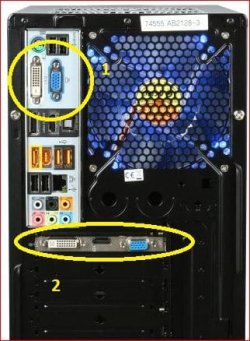
This is just an example,

H55.JPG

#1 is onboard video, and #2 would be for a video card. Which is your monitor connected too? If it is #1 as mentioned there is not now and never will be a Windows 7 or Vista driver for it and the best you're going to get is the last XP driver,

http://downloadcenter.intel.com/Detail_Desc.aspx?agr=Y&DwnldID=9498&ProdId=1049&lang=eng&OSVersion=Windows%20XP%20Professional*&DownloadType=

If it is #2 you have a couple of ways of finding out what card it is,

1. Follow this, http://www.sevenforums.com/tutorials/96442-device-manager-finding-unknown-devices.html , and you should be able to find it that way.

2. If that doesn't work then the only other way to find out what it is is to pull the card from the computer and look up any model numbers found on the card.
 

My Computer

Computer type
PC/Desktop
Computer Manufacturer/Model Number
Me
OS
Win 7 Ultimate x64
CPU
FX-8350 @ 4.6 GHz so far
Motherboard
Asus M5A97 EVO
Memory
ADATA XPG V1 Series Black 8GB DDR3 1600
Graphics Card(s)
Sapphire R9 270x Dual-X
Sound Card
Xonar DGX w/ Corsair Vengence 1300
Monitor(s) Displays
Acer S232HL Abid
Screen Resolution
1920x1080
Hard Drives
120 GB OCZ Vertex 3
500 GB Seagate 7200.12
PSU
Antec Earthwatts 650W Green
Case
Antec Three Hundred
Cooling
Cooler Master 212 EVO
Keyboard
Logitech G510
Mouse
Logitech G500s
Internet Speed
35000/3000
This is just an example,

View attachment 165503

#1 is onboard video, and #2 would be for a video card. Which is your monitor connected too? If it is #1 as mentioned there is not now and never will be a Windows 7 or Vista driver for it and the best you're going to get is the last XP driver,

http://downloadcenter.intel.com/Detail_Desc.aspx?agr=Y&DwnldID=9498&ProdId=1049&lang=eng&OSVersion=Windows%20XP%20Professional*&DownloadType=

If it is #2 you have a couple of ways of finding out what card it is,

1. Follow this, http://www.sevenforums.com/tutorials/96442-device-manager-finding-unknown-devices.html , and you should be able to find it that way.

2. If that doesn't work then the only other way to find out what it is is to pull the card from the computer and look up any model numbers found on the card.

Bro. YOU'RE THE SHIT MAN. THANK YOU! :D
 

My Computer

OS
Windows 7 Ultimate 32 bit
So is it the Intel onboard or an actual card? And if a card, which one?
 

My Computer

Computer type
PC/Desktop
Computer Manufacturer/Model Number
Me
OS
Win 7 Ultimate x64
CPU
FX-8350 @ 4.6 GHz so far
Motherboard
Asus M5A97 EVO
Memory
ADATA XPG V1 Series Black 8GB DDR3 1600
Graphics Card(s)
Sapphire R9 270x Dual-X
Sound Card
Xonar DGX w/ Corsair Vengence 1300
Monitor(s) Displays
Acer S232HL Abid
Screen Resolution
1920x1080
Hard Drives
120 GB OCZ Vertex 3
500 GB Seagate 7200.12
PSU
Antec Earthwatts 650W Green
Case
Antec Three Hundred
Cooling
Cooler Master 212 EVO
Keyboard
Logitech G510
Mouse
Logitech G500s
Internet Speed
35000/3000
Back
Top