Standard Windows batch script not working

Vuldimort

New member
Local time
11:17 AM
Messages
1
I am trying to run a simple shutdown script..easy no big deal
shutdown -r -t 00
And I created a desktop shortcut and assigned a hot key to it to speed up the process.

Problem is I try to launch the batch script and instead I get a command prompt window that goes to the script directory, types / activates CMD then does nothing? Prior doing this in XP worked like a charm, why does it not work in Windows 7? I also tried to run the script as administrator AND checked permissions and took ownership and also tried running it in compatability mode, still no luck.

Please help.
 

My Computer

OS
Windows 7 Ultimate
Hi and welcome to Seven Forums!

Have you tried to run shutdown at a command prompt?
 

My Computer

Computer Manufacturer/Model Number
Custom Build
OS
Windows 7 Ultimate x64 SP1 clean install
CPU
AMD Athlon 64 X2 6400+
Motherboard
Asus M2N-E SLI
Memory
4 GB
Graphics Card(s)
2 x NVidia Geforce 8600 GTS
Sound Card
Trust 5.1 Surround USB
Monitor(s) Displays
Benq FP931 19"
Screen Resolution
1280x1024@32bit@75MHz
Hard Drives
1 x Western Digital 500GB SATA (OS installation), 2 x Seagate 320GB SATA, 1 x Seagate 250GB IDE (in external USB box), 1 x TrekStor 750GB USB
PSU
650W
Keyboard
Logitech Cordless Desktop EX 100
Mouse
Logitech Cordless Optical
Internet Speed
8192 kbps / 640 kbps
Just pressing the power button once on the pc does the same thing, wouldn't this be just as quick ? .... just a thought ;)
 

My Computer

Computer type
PC/Desktop
Computer Manufacturer/Model Number
Self Built
OS
Windows 7 Ultimate 64bit
CPU
AMD Phenom Quad core 9950 black edition
Motherboard
Gigabyte
Memory
16Gb
Graphics Card(s)
2x XFX Radeon 5850
Sound Card
PCI Express X-Fi Titanium / Logitech G35
Monitor(s) Displays
2x HP 2410i
Screen Resolution
1920x1080
Hard Drives
2x 500Gb Seagate
1x 300Gb Seagate
1x 1Tb Seagate
2x 1Tb Hitatchi
PSU
Jean Tech Storm 700W
Case
Cooler Master COSMOS S
Cooling
Akasa Evo Blue Pro
Keyboard
Logitech G15
Mouse
Mad Catz M.M.O. 7
Internet Speed
12mb
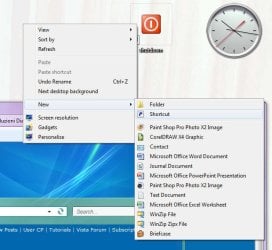
Try creating a shortcut on the desktop that does not use a batch file:

1) Right-Click an unused part of the desktop, click "New", Click "Shortcut":
Image2.jpg

2) Use "C:\Windows\System32\shutdown.exe /p" (without quotes) as the location of the item, then click "Next". You will obviously use your own desired parameters for the SHUTDOWN command instead of /p:
Image3.jpg

3) Type a name for the shortcut, then click "Finish":
Image4.jpg

4) Open the properties of the newly created shortcut, and change the shortcut key and/or icon according to your own desire:
Image1.jpg

I use this to force an emmidiate shutdown of Windows if I don't want to install updates first...
 

My Computer

Computer type
PC/Desktop
Computer Manufacturer/Model Number
Virtual Machine
OS
Windows 7 Professional 32-bit SP1
CPU
AMD A4/A6
Motherboard
Intel Corporation 440BX Desktop Reference Platform
Memory
3.00GB EDO
Graphics Card(s)
VMware SVGA 3D
Sound Card
High Definition Audio Device
Monitor(s) Displays
Generic Non-PnP Monitor on VMware SVGA 3D
Screen Resolution
1440x900
Hard Drives
1 x 60GB VMware Virtual SATA Hard Drive ATA Device
Antivirus
Kaspersky Total Security
Not really helpful in your case but the shutdown command would be
shutdown.exe –s –t 00
-r is reboot.
-DG
 

My Computer

Computer Manufacturer/Model Number
HP m8000n
OS
Windows 7 Ultimate x86
CPU
DualCore AMD Athlon 64 X2, 2600 MHz 5200+
Motherboard
Asus M2N68-LA (Narra)
Memory
Samsung 2GB DDR2
Graphics Card(s)
Onboard NVIDIA GeForce 6150SE nForce 430
Sound Card
Onboard nVIDIA nForce 6100-430 (MCP61P)
Monitor(s) Displays
Westinghouse 19" LED
Screen Resolution
1280x1024
Hard Drives
SATA II Seagate Barracuda 500GB
USB II WD Elements 500GB
USB II WD My Book 1TB
USB II WD My Book 2TB
PSU
Stock (HP)
Case
Stock (HP)
Cooling
Stock
Keyboard
Logitech Classic KB 200
Mouse
Standard HP opticle USB mouse
Your command worked fine in my system (i.e. re-booted it) - I simply typed it into the command prompt. Thus it should work, except it's possible that in your system execution of batch files is somehow restricted - by analogy with PowerShell scripts which are restricted by default. Check your Group Policy settings.
 

My Computer

Computer Manufacturer/Model Number
Dell Inspiron 530
OS
Windows 7 Ultimate (x64)
CPU
Q6600
Memory
8 GB
Graphics Card(s)
ATI Radeon HD 2600 XT
Monitor(s) Displays
Samsung Syncmaster P2450
Screen Resolution
1920x1080
Hard Drives
Samsung HD103UJ
Samsung HD501LJ
Internet Speed
25 Mb/s
Back
Top