Stange Problem - user account disappeared

Matt08642

New member
Local time
3:53 PM
Messages
9
Location
London, Ontario, Canada
I have Windows 7 Home Premium x64, and I used to have two accounts set up - One was my account (Admin) and one was a normal account for my mother. I forget what prompted HER account to disappear from the login screen, but something did. I do know for sure that it wasn't some sort of virus or seedy software.

I can still see all of her files and access them in C:\Users\Maria, but I cannot create a new account with that name, nor can I log in to it.

Any idea what is wrong, and if so, how to restore her account??

Thanks!
 

My Computer

OS
Windows 7 Home Premium x64
CPU
AMD Athlon 64 X2 6000+
Motherboard
Asus M2N32 SLI Deluxe Wireless Edition
Memory
4GB Kingston DDR2 800
Graphics Card(s)
EVGA GeForce 8600GT
Sound Card
Chaintech AV-710
Screen Resolution
1280*1024
Hard Drives
WD Caviar Black 1TB (WD1001FALS)
Maxtor 200GB SATA 1.5
PSU
Antec Truepower Quattro 850
Internet Speed
10/1
Hi, Matt08642. Could you please run the following in Command Prompt and then upload the file called Users.txt that it creates on your desktop?

Code:
net user > Desktop\Users.txt
 

My Computer

Computer Manufacturer/Model Number
Lenovo ThinkPad W520 (4270CT)
OS
Windows 7 Professional x64
CPU
Intel Core i7-2720QM
Memory
4GB (2 x 2GB)
Graphics Card(s)
NVIDIA Quadro 2000M (with Optimus)
Hard Drives
500 GB @ 7200 RPM
Hi, Matt08642. Could you please run the following in Command Prompt and then upload the file called Users.txt that it creates on your desktop?

Code:
net user > Desktop\Users.txt

here you go
 

Attachments

My Computer

OS
Windows 7 Home Premium x64
CPU
AMD Athlon 64 X2 6000+
Motherboard
Asus M2N32 SLI Deluxe Wireless Edition
Memory
4GB Kingston DDR2 800
Graphics Card(s)
EVGA GeForce 8600GT
Sound Card
Chaintech AV-710
Screen Resolution
1280*1024
Hard Drives
WD Caviar Black 1TB (WD1001FALS)
Maxtor 200GB SATA 1.5
PSU
Antec Truepower Quattro 850
Internet Speed
10/1

My Computer

Computer Manufacturer/Model Number
Lenovo ThinkPad W520 (4270CT)
OS
Windows 7 Professional x64
CPU
Intel Core i7-2720QM
Memory
4GB (2 x 2GB)
Graphics Card(s)
NVIDIA Quadro 2000M (with Optimus)
Hard Drives
500 GB @ 7200 RPM

Attachments

  • Capture.PNG
    Capture.PNG
    17.4 KB · Views: 105

My Computer

OS
Windows 7 Home Premium x64
CPU
AMD Athlon 64 X2 6000+
Motherboard
Asus M2N32 SLI Deluxe Wireless Edition
Memory
4GB Kingston DDR2 800
Graphics Card(s)
EVGA GeForce 8600GT
Sound Card
Chaintech AV-710
Screen Resolution
1280*1024
Hard Drives
WD Caviar Black 1TB (WD1001FALS)
Maxtor 200GB SATA 1.5
PSU
Antec Truepower Quattro 850
Internet Speed
10/1
In that case, take a look at Method Two. This method does it through the registry, which you should be able to edit on any edition of Windows.
 

My Computer

Computer Manufacturer/Model Number
Lenovo ThinkPad W520 (4270CT)
OS
Windows 7 Professional x64
CPU
Intel Core i7-2720QM
Memory
4GB (2 x 2GB)
Graphics Card(s)
NVIDIA Quadro 2000M (with Optimus)
Hard Drives
500 GB @ 7200 RPM
In that case, take a look at Method Two. This method does it through the registry, which you should be able to edit on any edition of Windows.

Thanks, I did that and while I was not able to see the "Maria" account at the login screen, I was able to copy the files from the account, delete it in control panel, and remake it.

Thanks for the link! :D
 

My Computer

OS
Windows 7 Home Premium x64
CPU
AMD Athlon 64 X2 6000+
Motherboard
Asus M2N32 SLI Deluxe Wireless Edition
Memory
4GB Kingston DDR2 800
Graphics Card(s)
EVGA GeForce 8600GT
Sound Card
Chaintech AV-710
Screen Resolution
1280*1024
Hard Drives
WD Caviar Black 1TB (WD1001FALS)
Maxtor 200GB SATA 1.5
PSU
Antec Truepower Quattro 850
Internet Speed
10/1
No problem. I'm glad that you were able to get this working.

Admins, you may mark this thread as solved.
 

My Computer

Computer Manufacturer/Model Number
Lenovo ThinkPad W520 (4270CT)
OS
Windows 7 Professional x64
CPU
Intel Core i7-2720QM
Memory
4GB (2 x 2GB)
Graphics Card(s)
NVIDIA Quadro 2000M (with Optimus)
Hard Drives
500 GB @ 7200 RPM
Can she now access her files?
 

My Computer

Computer type
PC/Desktop
Computer Manufacturer/Model Number
Dwarf Dwf/11/2012 r09/2013
OS
Windows 8.1 Pro RTM x64
CPU
Intel Core-i5-3570K 4-core @ 3.4GHz (Ivy Bridge) (OC 4.4GHz)
Motherboard
ASRock Z77 Extreme4-M
Memory
4 x 4GB DDR3-1600 Corsair Vengeance CMZ8GX3M2A1600C9B (16GB)
Graphics Card(s)
MSI GeForce GTX770 Gaming OC 2GB
Sound Card
Realtek High Definition on board solution (ALC 898)
Monitor(s) Displays
ViewSonic VA1912w Widescreen (VGA)
Screen Resolution
1440x900
Hard Drives
OCZ Agility 3 SSD 120GB SATA III x2 (RAID 0)
Samsung HD501LJ 500GB SATA II x2
Hitachi HDS721010CLA332 1TB SATA II
Iomega 1.5TB Ext USB 2.0
WD 2.0TB Ext USB 3.0
PSU
XFX Pro Series 850W Semi-Modular
Case
Gigabyte IF233
Cooling
1 x 120mm Front Inlet 1 x 120mm Rear Exhaust
Keyboard
Microsoft Comfort Curve Keyboard 3000 (USB)
Mouse
Microsoft Comfort Mouse 3000 for Business (USB)
Internet Speed
NetGear DG834Gv3 ADSL Modem/Router (Ethernet) ~4.0 Mb/s (O2)
Antivirus
Avast! 8.0.1497
Browser
IE 11
Other Info
Optical Drive: HL-DT-ST BD-RE BH10LS30 SATA Bluray
Lexmark S305 Printer/Scanner/Copier (USB)
WEI Score: 8.1/8.1/8.5/8.5/8.25
Asus Eee PC 1011PX Netbook (Windows 7 x86 Starter)
Can she now access her files?

Oh we could always access the files in C:\Users\Maria\Desktop, we just couldn't log in.
 

My Computer

OS
Windows 7 Home Premium x64
CPU
AMD Athlon 64 X2 6000+
Motherboard
Asus M2N32 SLI Deluxe Wireless Edition
Memory
4GB Kingston DDR2 800
Graphics Card(s)
EVGA GeForce 8600GT
Sound Card
Chaintech AV-710
Screen Resolution
1280*1024
Hard Drives
WD Caviar Black 1TB (WD1001FALS)
Maxtor 200GB SATA 1.5
PSU
Antec Truepower Quattro 850
Internet Speed
10/1
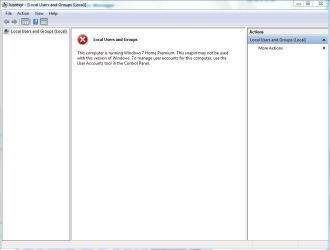
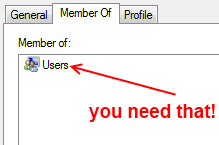
A similar thing happened to me recently. I think I figured out a less destructive way to fix it. What I eventually realized was that somehow (probably a permissions reset that I did) the account (let's call it "Bob") lost its membership to the "Users" security group.

The way to fix this is to open local users manager via lusrmgr.msc and then double click Bob's account, click the "Member Of" tab and then click "Add". Type "Users" and then click ok, and save it.
XR3Vb.png

Now log off and hopefully you will see Bob's account back on the welcome screen ;)
 

My Computer

OS
Windows 7 x64
CPU
E8600 @4.2GHz
Motherboard
Asus P5Q PRO
Memory
8GB G.SKILL
Graphics Card(s)
HD4850
Back
Top