
Star Wars Empire At War suddenly crashing at startup (Details inside)

WHib96

New member
Local time
1:55 PM
Messages
2
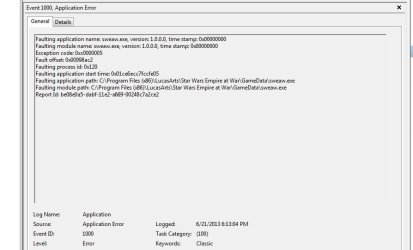
Long story short, my empire at war game just suddenly stopped working. I click "start game", the .exe file starts up, and then just crashes. No error or anything. I will say this though - it doesn't seem to even try to read the disc anymore like it used to. What I mean by that is when I'd hit start game, my cursor would turn into a little spinning disc and you could hear the actual disc starting to spin and stuff. I've reinstalled the game and it worked at first startup...However, thinking it was all good and working, I installed the latest patch, and suddenly it wouldn't work anymore (please note that before, I had that patch and it was working fine. Just one day it stopped working).

See my attached image for more details.

I would really appreciate some help. I hate how one of my favorite games just suddenly pooped out on me.
 

Attachments
  • error.jpg
    error.jpg
    37.2 KB · Views: 3

My Computer My Computer

At a glance

Windows 7 Ultiamte x64AMD Athlon II X4 6204GB DDR2ATI 4630
Computer type
PC/Desktop
Computer Manufacturer/Model Number
Asus
OS
Windows 7 Ultiamte x64
CPU
AMD Athlon II X4 620
Memory
4GB DDR2
Graphics Card(s)
ATI 4630
I would start by doing the easy parts...

1.- Download the latest Audio and Video drivers for your rig and saved them to a Temp Folder

2.- Manually download the patches for the game, save them on the same Temp folder. Uninstall Game again

3.- Download a free copy of CCleaner and immediately install it.

4.- Go to Device Manager and Uninstall both Audio and Video drivers.

5.- Restart computer and go to Safe Mode.

6.- Run CCleaner and Run Cleaner & Registry

7.- Restart again and let Windows install generic drivers... it may take a while and usually you will get a notification so wait for it.

8.- Go to Temp folder and Right Click on audio .exe and Run as Administrator... do the same with Video .exe. Do not restart until both drivers have been installed.

9.- Install the Game and Do Not auto update. Test the game now, if it works, follow through with first patch and test again, so on and so forth with the rest of the patches (if it has more than one.)

Sorry, that is all I got and it may or may not get you to play again
 

My Computer My Computer

At a glance

Windows 7 x64 (Ultimate)Intel i5-4670K8GBs Ripjaws 2133MhzAsus GTX660 (2GBs)
Computer type
PC/Desktop
Computer Manufacturer/Model Number
Custom Built... Intel/Nvidia/ASRock
OS
Windows 7 x64 (Ultimate)
CPU
Intel i5-4670K
Motherboard
ASRock Z87 Extreme 6
Memory
8GBs Ripjaws 2133Mhz
Graphics Card(s)
Asus GTX660 (2GBs)
Sound Card
Onboard Realtek HD
Monitor(s) Displays
Acer AL2216W
Screen Resolution
1680 x 1050
Hard Drives
Samsung 840 SSD 120GBs
Samsung 750GB 32MB cache
1.5 TB
PSU
PC Cooling 750w Silencer
Case
Thermaltake Spedo Advance
Cooling
Std Cooler
Keyboard
Logitech G15
Mouse
Logitech G9
Internet Speed
Comcast 20Mbit
Antivirus
Avast
Browser
Firefox
I would start by doing the easy parts...

1.- Download the latest Audio and Video drivers for your rig and saved them to a Temp Folder

2.- Manually download the patches for the game, save them on the same Temp folder. Uninstall Game again

3.- Download a free copy of CCleaner and immediately install it.

4.- Go to Device Manager and Uninstall both Audio and Video drivers.

5.- Restart computer and go to Safe Mode.

6.- Run CCleaner and Run Cleaner & Registry

7.- Restart again and let Windows install generic drivers... it may take a while and usually you will get a notification so wait for it.

8.- Go to Temp folder and Right Click on audio .exe and Run as Administrator... do the same with Video .exe. Do not restart until both drivers have been installed.

9.- Install the Game and Do Not auto update. Test the game now, if it works, follow through with first patch and test again, so on and so forth with the rest of the patches (if it has more than one.)

Sorry, that is all I got and it may or may not get you to play again

Tried your steps. They didn't work :( Even after reinstalling again, the game won't work even before installing the patch. Is there like some place online I can download the game, since I legally have a CD key? I'm thinking it could be the CD or something...So if I could just get a digital copy (preferably without paying...) that'd be fantastic.

Any suggestions?

PS. Tried running the game in safe mode, and it began to start up, but then said "Could not reset the Direct3D device." and crashed. Not sure if that's of any importance to you or anyone else who sees this.
 

My Computer My Computer

At a glance

Windows 7 Ultiamte x64AMD Athlon II X4 6204GB DDR2ATI 4630
Computer type
PC/Desktop
Computer Manufacturer/Model Number
Asus
OS
Windows 7 Ultiamte x64
CPU
AMD Athlon II X4 620
Memory
4GB DDR2
Graphics Card(s)
ATI 4630
Back
Top