Stardock - ObjectDock Customization

PooMan UK

Just call me Nick
Guru
VIP
Local time
4:41 PM
Messages
2,724
Location
St Clears, Wales
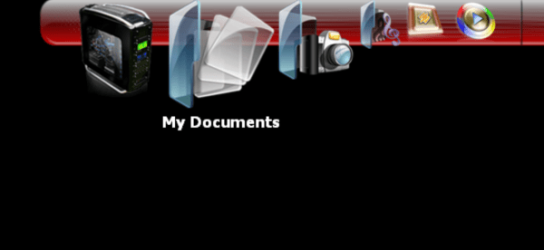
Just been messing about with customizing Objectdock backgrounds, you can get some wicked effects. They are actually fairly easy to edit.
Basically you edit the images the way you want them (try keeping within the image size) wack them in a new folder under the stardock directory ) edit the ini file (supplied below) just change the name inside the ini file to reflect the new name of your folder eg. in this case cell red mesh and away you go.

Don't worry about the cache.png files I think they get created automatically

I've only tested it with the new version of objectdock 2.0 Object Dock 2.0 download

Has anyone else played around with them ?
 

Attachments

  • background_Standalone_Cache.png
    background_Standalone_Cache.png
    3.7 KB · Views: 1,990
  • Vector Cell-Red mesh.zip
    Vector Cell-Red mesh.zip
    208.8 KB · Views: 117
  • sample.png
    sample.png
    22 KB · Views: 52
  • background_SkinOnly_Cache.png
    background_SkinOnly_Cache.png
    5.1 KB · Views: 1,992
  • background top.png
    background top.png
    6.3 KB · Views: 32
  • background right.png
    background right.png
    7.6 KB · Views: 25
  • background left.png
    background left.png
    7.6 KB · Views: 24
  • background bottom.png
    background bottom.png
    6.3 KB · Views: 30

My Computer

Computer type
PC/Desktop
Computer Manufacturer/Model Number
Self Built
OS
Windows 7 Ultimate 64bit
CPU
AMD Phenom Quad core 9950 black edition
Motherboard
Gigabyte
Memory
16Gb
Graphics Card(s)
2x XFX Radeon 5850
Sound Card
PCI Express X-Fi Titanium / Logitech G35
Monitor(s) Displays
2x HP 2410i
Screen Resolution
1920x1080
Hard Drives
2x 500Gb Seagate
1x 300Gb Seagate
1x 1Tb Seagate
2x 1Tb Hitatchi
PSU
Jean Tech Storm 700W
Case
Cooler Master COSMOS S
Cooling
Akasa Evo Blue Pro
Keyboard
Logitech G15
Mouse
Mad Catz M.M.O. 7
Internet Speed
12mb
Just been messing about with customizing Objectdock backgrounds, you can get some wicked effects. They are actually fairly easy to edit.
Basically you edit the images the way you want them (try keeping within the image size) wack them in a new folder under the stardock directory ) edit the ini file (supplied below) just change the name inside the ini file to reflect the new name of your folder eg. in this case cell red mesh and away you go.

Don't worry about the cache.png files I think they get created automatically

I've only tested it with the new version of objectdock 2.0 Object Dock 2.0 download

Has anyone else played around with them ?
that look's just awsome!
i never did try Object Dock.
 

My Computer

Computer type
PC/Desktop
Computer Manufacturer/Model Number
HP
OS
Windows 7 64Bit
CPU
Intel (R) Core (TM) 2 Duo CPU 2.80GHz
Memory
4,00 GB
Graphics Card(s)
NVIDIA Geforce GT 220
Monitor(s) Displays
Samsung
Screen Resolution
1280x1024
Hard Drives
1t
Here's another one I just made ... (with the swing effect option) :)
 

Attachments

  • blue gloss tray.zip
    blue gloss tray.zip
    79.7 KB · Views: 80
  • blue gloss screeny.png
    blue gloss screeny.png
    24.3 KB · Views: 57
  • background_Standalone_Cache.png
    background_Standalone_Cache.png
    4.9 KB · Views: 2,005
  • indicator.png
    indicator.png
    492 bytes · Views: 1,987
  • bg.png
    bg.png
    3.9 KB · Views: 13

My Computer

Computer type
PC/Desktop
Computer Manufacturer/Model Number
Self Built
OS
Windows 7 Ultimate 64bit
CPU
AMD Phenom Quad core 9950 black edition
Motherboard
Gigabyte
Memory
16Gb
Graphics Card(s)
2x XFX Radeon 5850
Sound Card
PCI Express X-Fi Titanium / Logitech G35
Monitor(s) Displays
2x HP 2410i
Screen Resolution
1920x1080
Hard Drives
2x 500Gb Seagate
1x 300Gb Seagate
1x 1Tb Seagate
2x 1Tb Hitatchi
PSU
Jean Tech Storm 700W
Case
Cooler Master COSMOS S
Cooling
Akasa Evo Blue Pro
Keyboard
Logitech G15
Mouse
Mad Catz M.M.O. 7
Internet Speed
12mb
Good stuff Nick :thumbsup:

A Guy
 

My Computer

Computer type
PC/Desktop
OS
Windows 10 Home x64
CPU
INTEL Core i5-750 Quad-Core 3.37GHz
Motherboard
ASUS P7P55D
Memory
HyperX Fury Black Series 8GB (2 x 4GB) 1866Mhz
Graphics Card(s)
EVGA GeForce GTX 750 Superclocked 1GB 128-Bit GDDR5
Monitor(s) Displays
LG 32MA68HY 32" IPS
Screen Resolution
1920 x 1080
Hard Drives
Samsung 840 Evo 120GB, SEAGATE 500GB Barracuda® 7200.12, SATA 3 Gb/s, 7200 RPM, 16MB cache
PSU
ANTEC TruePower New TP-550, 80 PLUS, 550W
Case
ANTEC Three Hundred Illusion
Cooling
COOLER MASTER Hyper 212 Plus, 4 x 120mm 1 x 140mm Noctua's
Internet Speed
85 + Mbps
Antivirus
Avast
Browser
Vivaldi
Thanks just installed red mesh look great, now I will give it a try
Jerry
 

Attachments

  • v.jpg
    v.jpg
    92.2 KB · Views: 131

My Computer

Computer type
Laptop
Computer Manufacturer/Model Number
Sager NP9170
OS
Win 7 Pro x64 / Win 10 Pro
CPU
Intel(R) Core(TM) i7-3630QM CPU @ 2.40GHz
Motherboard
CLEVO P170EM
Memory
12 GB
Graphics Card(s)
(1) Intel(R) HD Graphics 4000 (2) NVIDIA GeForce GTX 675M
Sound Card
(1) Realtek High Definition Audio (2) Intel(R) Display Aud
Monitor(s) Displays
17.3
Screen Resolution
1920x1080
Hard Drives
(1) Samsung 860 EVO 500GB(OS) (1) Samsung 860 EVO 500GB(Data)
Keyboard
Backlite
Antivirus
MSE, Malwarebytes Pro
Browser
Firefox
Other Info
DESKTOP: Custom-built.
OS: Win 10 Pro x64.
CASE: Rosewill R5.
CPU: Intel I5 4670K CPU @ 3.40GHz.
CPU COOLER: Cool Master Hyper 212 EVO.
MOTHERBOARD: Asus Z87-A.
MEMORY: Kingston HyperX 2x4 GB.
GPU: Nvidia Geforce 650 TI.
PSU: Corsair TX750.
DRIVES: (1) Samsung 840 120 GB SSD (2) Western Digital blue 500 GB 7200 RPM.
Years ago, I started making my own OD backgrounds, and found it easiest to just put them in the 'Shiny Black' folder. When I want to change, I just rename the dock.png and then rename the new image dock.png. Just the lazy way of doing it...;)
 

My Computer

Computer type
Laptop
Computer Manufacturer/Model Number
HP 17-ak0xx, dv7 3173nr
OS
Win7 Home Premium x64 W10Pro&Home
CPU
A12 9720p 4+8 TurionII M520
Motherboard
HP 3839
Memory
6GB 8GB
Graphics Card(s)
R7
Monitor(s) Displays
24" sa550
Screen Resolution
1600x900 1920x1080
Mouse
Logitechx2
Internet Speed
120Mb/s down 12up
Great work Nick ! I am getting inspired :thumbsup:
 

My Computer

Computer type
PC/Desktop
Computer Manufacturer/Model Number
Self Assembled
OS
Microsoft Windows 10 Pro Insider Preview 64-bit
CPU
Intel(R) Core(TM) i3-4130 CPU @ 3.40GHz
Motherboard
Gigabyte Technology Co., Ltd. B85M-D3H
Memory
Corsair Vengence 4GB x2 (8.00GB Dual-Channel DDR3 @ 798MHz)
Graphics Card(s)
2047MB GeForce GTS 450 (ZOTAC International)
Sound Card
Onboard (Realtek High Definition Audio)
Monitor(s) Displays
LG Flatron E2040T
Screen Resolution
1600x900
Hard Drives
Western Digital 1 TB
Seagate 500 GB
PSU
Corsair VS550
Case
Cooler Master K380
Cooling
Cooler Master Seidon 120V Plus
Keyboard
Logitech MK260r
Mouse
Logitech MK260r
Internet Speed
PMPL Broadband
Antivirus
Windows Defender + MBAM
Browser
Firefox
Other Info
Dell Studio 15" Laptop
Great stuff Nick :D & Arc i hope you do become inspired.

This has the makings of becoming yet another great thread :)
 

My Computer

Computer Manufacturer/Model Number
Hewlett Packard Compaq Presario CQ60-305au
OS
Windows Seven Home Premium 32bit SP1
CPU
AMD Athlon QI46 2.1Ghz
Motherboard
Wistron 303c
Memory
2048 Mb DDR2 SD RAM
Graphics Card(s)
NVidea GE GoForce 8200M G/256mb dedicated graphics memory
Sound Card
MCP78S NVidea high definition
Monitor(s) Displays
15.6" High definition Brightview Widescreen
Screen Resolution
1336x768
Hard Drives
Toshiba MK2555GSX ATA
Here's a couple more :)

If any one has a request, feel free to post them up I'm sure we can come up with something be it colour schemes, maybe something to match your current theme/wallpaper or even something that resembles your taskbar. ;)
 

Attachments

  • rgb_sample.png
    rgb_sample.png
    354.1 KB · Views: 100
  • blue ends_sample.png
    blue ends_sample.png
    827.5 KB · Views: 138
  • blue ends.zip
    blue ends.zip
    66.2 KB · Views: 60
  • rgb tubes.rar
    rgb tubes.rar
    227.2 KB · Views: 50
Last edited:

My Computer

Computer type
PC/Desktop
Computer Manufacturer/Model Number
Self Built
OS
Windows 7 Ultimate 64bit
CPU
AMD Phenom Quad core 9950 black edition
Motherboard
Gigabyte
Memory
16Gb
Graphics Card(s)
2x XFX Radeon 5850
Sound Card
PCI Express X-Fi Titanium / Logitech G35
Monitor(s) Displays
2x HP 2410i
Screen Resolution
1920x1080
Hard Drives
2x 500Gb Seagate
1x 300Gb Seagate
1x 1Tb Seagate
2x 1Tb Hitatchi
PSU
Jean Tech Storm 700W
Case
Cooler Master COSMOS S
Cooling
Akasa Evo Blue Pro
Keyboard
Logitech G15
Mouse
Mad Catz M.M.O. 7
Internet Speed
12mb
Those look great! The last time I tried to use objectdock, though, it said the start menu wasn't supported in 64 bit. Anyone know if that has been remedied?
 

My Computer

Computer Manufacturer/Model Number
Pugh Technologies
OS
W7 Professional x64
CPU
AMD Athlon II X3 445 Rana 3.10 GHz
Motherboard
MSI 870A-G54
Memory
PNY XLR DDR3 1600 4x2GB
Graphics Card(s)
NVIDIA GeForce GTS 450 (fermi) 1GB GDDR5
Sound Card
Realtek ALC892 onboard
Monitor(s) Displays
ASUS VE205t, Viewsonic VX2035WM
Screen Resolution
1600x900, 1600x1050
Hard Drives
977GB Hitachi Hitachi HDS721010CLA332
244GB Western Digital WDC WD2500AAJS-65B4A0
488GB Western Digital WDC WD5000AAJS-00A8B0
488GB Western Digital WDC WD5000AAKS-00UU3A0
PSU
Antec EarthWatts EA650 650W
Case
ThermalTake Armor A90 Mid Tower
Cooling
3x 120mm in, 1x 120mm & 200mm out, self built hydro-cooler
Keyboard
Logitec 55
Mouse
Razer Deathadder
Internet Speed
20 Mbps D/L, 9 Mbps U/L
First one by me :o
 

Attachments

  • Capture.JPG
    Capture.JPG
    39.8 KB · Views: 65
  • My First.zip
    My First.zip
    10.1 KB · Views: 24

My Computer

Computer type
PC/Desktop
Computer Manufacturer/Model Number
Self Assembled
OS
Microsoft Windows 10 Pro Insider Preview 64-bit
CPU
Intel(R) Core(TM) i3-4130 CPU @ 3.40GHz
Motherboard
Gigabyte Technology Co., Ltd. B85M-D3H
Memory
Corsair Vengence 4GB x2 (8.00GB Dual-Channel DDR3 @ 798MHz)
Graphics Card(s)
2047MB GeForce GTS 450 (ZOTAC International)
Sound Card
Onboard (Realtek High Definition Audio)
Monitor(s) Displays
LG Flatron E2040T
Screen Resolution
1600x900
Hard Drives
Western Digital 1 TB
Seagate 500 GB
PSU
Corsair VS550
Case
Cooler Master K380
Cooling
Cooler Master Seidon 120V Plus
Keyboard
Logitech MK260r
Mouse
Logitech MK260r
Internet Speed
PMPL Broadband
Antivirus
Windows Defender + MBAM
Browser
Firefox
Other Info
Dell Studio 15" Laptop
Looks good Arc pal - nice 1 :thumbsup:
 

My Computer

Computer type
PC/Desktop
Computer Manufacturer/Model Number
Self Built
OS
Windows 7 Ultimate 64bit
CPU
AMD Phenom Quad core 9950 black edition
Motherboard
Gigabyte
Memory
16Gb
Graphics Card(s)
2x XFX Radeon 5850
Sound Card
PCI Express X-Fi Titanium / Logitech G35
Monitor(s) Displays
2x HP 2410i
Screen Resolution
1920x1080
Hard Drives
2x 500Gb Seagate
1x 300Gb Seagate
1x 1Tb Seagate
2x 1Tb Hitatchi
PSU
Jean Tech Storm 700W
Case
Cooler Master COSMOS S
Cooling
Akasa Evo Blue Pro
Keyboard
Logitech G15
Mouse
Mad Catz M.M.O. 7
Internet Speed
12mb
Thanks a lot Nick . This is something That I miss ... so tried to make one for me :D
 

Attachments

  • my second.zip
    my second.zip
    19.2 KB · Views: 26
  • Capture2.JPG
    Capture2.JPG
    30.7 KB · Views: 21
  • Capture.JPG
    Capture.JPG
    38.1 KB · Views: 26

My Computer

Computer type
PC/Desktop
Computer Manufacturer/Model Number
Self Assembled
OS
Microsoft Windows 10 Pro Insider Preview 64-bit
CPU
Intel(R) Core(TM) i3-4130 CPU @ 3.40GHz
Motherboard
Gigabyte Technology Co., Ltd. B85M-D3H
Memory
Corsair Vengence 4GB x2 (8.00GB Dual-Channel DDR3 @ 798MHz)
Graphics Card(s)
2047MB GeForce GTS 450 (ZOTAC International)
Sound Card
Onboard (Realtek High Definition Audio)
Monitor(s) Displays
LG Flatron E2040T
Screen Resolution
1600x900
Hard Drives
Western Digital 1 TB
Seagate 500 GB
PSU
Corsair VS550
Case
Cooler Master K380
Cooling
Cooler Master Seidon 120V Plus
Keyboard
Logitech MK260r
Mouse
Logitech MK260r
Internet Speed
PMPL Broadband
Antivirus
Windows Defender + MBAM
Browser
Firefox
Other Info
Dell Studio 15" Laptop
Wooden :p
 

Attachments

  • Capture.JPG
    Capture.JPG
    45.9 KB · Views: 24
  • Capture2.JPG
    Capture2.JPG
    48.6 KB · Views: 16
  • Wooden.zip
    Wooden.zip
    59.9 KB · Views: 14

My Computer

Computer type
PC/Desktop
Computer Manufacturer/Model Number
Self Assembled
OS
Microsoft Windows 10 Pro Insider Preview 64-bit
CPU
Intel(R) Core(TM) i3-4130 CPU @ 3.40GHz
Motherboard
Gigabyte Technology Co., Ltd. B85M-D3H
Memory
Corsair Vengence 4GB x2 (8.00GB Dual-Channel DDR3 @ 798MHz)
Graphics Card(s)
2047MB GeForce GTS 450 (ZOTAC International)
Sound Card
Onboard (Realtek High Definition Audio)
Monitor(s) Displays
LG Flatron E2040T
Screen Resolution
1600x900
Hard Drives
Western Digital 1 TB
Seagate 500 GB
PSU
Corsair VS550
Case
Cooler Master K380
Cooling
Cooler Master Seidon 120V Plus
Keyboard
Logitech MK260r
Mouse
Logitech MK260r
Internet Speed
PMPL Broadband
Antivirus
Windows Defender + MBAM
Browser
Firefox
Other Info
Dell Studio 15" Laptop
Awesome stuff Nick...grabbed all & getting the new OD as well, last used on XP...;)
Thnx for the wake up call though have been using RD for quiet sometime on Windows7 & got it off hook for a change...:party:
Nick where do i copy the new styles???in which folder is it similar to RD copying in "skins" folder???:geek:
 

My Computer

Computer Manufacturer/Model Number
Acer Aspire 4530
OS
windows 7 Ultimate x86
CPU
AMD Athlon x2 QL60 1900Mhz 1 MB L2 cache
Motherboard
Acer Grasmoor
Memory
2GB DDR2
Graphics Card(s)
nVidia GeForce 9100M G
Sound Card
Onboard
Monitor(s) Displays
14.1"
Screen Resolution
1280*800
Hard Drives
160 GB
PSU
Onboard
Case
Onboard
Cooling
Onboard
Keyboard
Standard laptop keyboard
Mouse
Touchpad & external iball usb mouse
Internet Speed
its slower then SNAIL
Nick btw i also wanted to know how to get all the programs in the center of taskbar..?:confused:?..i did it couple of months ago but since I'm a lazy bum completely forgot about it till i saw your wally today & had a memory flash back...jusr let me know the steps...Thnx :geek:

Archan awesome skins for OD grabbed all of them my friend...Thnx for sharing & love your creation same goes for you too Nick...:geek:
 

My Computer

Computer Manufacturer/Model Number
Acer Aspire 4530
OS
windows 7 Ultimate x86
CPU
AMD Athlon x2 QL60 1900Mhz 1 MB L2 cache
Motherboard
Acer Grasmoor
Memory
2GB DDR2
Graphics Card(s)
nVidia GeForce 9100M G
Sound Card
Onboard
Monitor(s) Displays
14.1"
Screen Resolution
1280*800
Hard Drives
160 GB
PSU
Onboard
Case
Onboard
Cooling
Onboard
Keyboard
Standard laptop keyboard
Mouse
Touchpad & external iball usb mouse
Internet Speed
its slower then SNAIL
Thanks a lot Nick . This is something That I miss ... so tried to make one for me :D
that looks awsome!

how did you do it ?
 

My Computer

Computer type
PC/Desktop
Computer Manufacturer/Model Number
HP
OS
Windows 7 64Bit
CPU
Intel (R) Core (TM) 2 Duo CPU 2.80GHz
Memory
4,00 GB
Graphics Card(s)
NVIDIA Geforce GT 220
Monitor(s) Displays
Samsung
Screen Resolution
1280x1024
Hard Drives
1t
Awesome stuff Nick...grabbed all & getting the new OD as well, last used on XP...;)
Thnx for the wake up call though have been using RD for quiet sometime on Windows7 & got it off hook for a change...:party:
Nick where do i copy the new styles???in which folder is it similar to RD copying in "skins" folder???:geek:

Copy them to your Objectdock Backgrounds folder. ;)

Nick btw i also wanted to know how to get all the programs in the center of taskbar..?:confused:?..i did it couple of months ago but since I'm a lazy bum completely forgot about it till i saw your wally today & had a memory flash back...jusr let me know the steps...Thnx :geek:

Archan awesome skins for OD grabbed all of them my friend...Thnx for sharing & love your creation same goes for you too Nick...:geek:

* This is compliments of Mr Grim *

To have your taskbar centered

All you need to do is unlock the taskbar and right click on it go to toolbars/add new, and them make a new folder somewhere and call it blank for example, then select that folder for your new toolbar.

You then need to right click on the new toolbar and select view text/title and deselect those 2 options now repeat all those steps(you can use the same blank folder again) and place the blank toolbars on either side of your main Taskbar group and slide the taskbar to a central position.

Once you have it where you want lock the taskbar again (note that it move a little when you lock the taskbar so some fine tuning may be needed), and now you have a centered Taskbar.

If you like you can also make the blank folder hidden to remove it from view.

Taskbar will not display middle bar if you have your options set to never combine.

Always combine, hide labels should be selected
.

Thanks a lot Nick . This is something That I miss ... so tried to make one for me :D
that looks awsome!

how did you do it ?

2 ways.

1. Duplicate one of the folders from the Objectdock backgrounds folder rename the folder and just edit the png images as you like. (you don't have to do the cache files)
then edit the background.ini file (just change the 2nd line in the ini file to show the new name of the file) Then your good to go

2. Do the same thing as above but you can design the images from scratch. Try not to go outside the image size though ;)
 

My Computer

Computer type
PC/Desktop
Computer Manufacturer/Model Number
Self Built
OS
Windows 7 Ultimate 64bit
CPU
AMD Phenom Quad core 9950 black edition
Motherboard
Gigabyte
Memory
16Gb
Graphics Card(s)
2x XFX Radeon 5850
Sound Card
PCI Express X-Fi Titanium / Logitech G35
Monitor(s) Displays
2x HP 2410i
Screen Resolution
1920x1080
Hard Drives
2x 500Gb Seagate
1x 300Gb Seagate
1x 1Tb Seagate
2x 1Tb Hitatchi
PSU
Jean Tech Storm 700W
Case
Cooler Master COSMOS S
Cooling
Akasa Evo Blue Pro
Keyboard
Logitech G15
Mouse
Mad Catz M.M.O. 7
Internet Speed
12mb

My Computer

Computer type
PC/Desktop
Computer Manufacturer/Model Number
Self Assembled
OS
Microsoft Windows 10 Pro Insider Preview 64-bit
CPU
Intel(R) Core(TM) i3-4130 CPU @ 3.40GHz
Motherboard
Gigabyte Technology Co., Ltd. B85M-D3H
Memory
Corsair Vengence 4GB x2 (8.00GB Dual-Channel DDR3 @ 798MHz)
Graphics Card(s)
2047MB GeForce GTS 450 (ZOTAC International)
Sound Card
Onboard (Realtek High Definition Audio)
Monitor(s) Displays
LG Flatron E2040T
Screen Resolution
1600x900
Hard Drives
Western Digital 1 TB
Seagate 500 GB
PSU
Corsair VS550
Case
Cooler Master K380
Cooling
Cooler Master Seidon 120V Plus
Keyboard
Logitech MK260r
Mouse
Logitech MK260r
Internet Speed
PMPL Broadband
Antivirus
Windows Defender + MBAM
Browser
Firefox
Other Info
Dell Studio 15" Laptop
New one --- Starcraft II style ;)
 

Attachments

  • StarcraftII.zip
    StarcraftII.zip
    296 KB · Views: 37
  • starcraftII_stardock.png
    starcraftII_stardock.png
    37.3 KB · Views: 29
  • starcraft.PNG
    starcraft.PNG
    37 KB · Views: 53

My Computer

Computer type
PC/Desktop
Computer Manufacturer/Model Number
Self Built
OS
Windows 7 Ultimate 64bit
CPU
AMD Phenom Quad core 9950 black edition
Motherboard
Gigabyte
Memory
16Gb
Graphics Card(s)
2x XFX Radeon 5850
Sound Card
PCI Express X-Fi Titanium / Logitech G35
Monitor(s) Displays
2x HP 2410i
Screen Resolution
1920x1080
Hard Drives
2x 500Gb Seagate
1x 300Gb Seagate
1x 1Tb Seagate
2x 1Tb Hitatchi
PSU
Jean Tech Storm 700W
Case
Cooler Master COSMOS S
Cooling
Akasa Evo Blue Pro
Keyboard
Logitech G15
Mouse
Mad Catz M.M.O. 7
Internet Speed
12mb
Back
Top