Starforce protection update kills system

Orbital Shark

New member
Guru
Gold Member
VIP
Local time
4:59 AM
Messages
6,298
Location
Milton Keynes, United Kingdom
I recieved an email from the Starforce support team after contacting them with regards trying to get The Moment of Silence working on Windows 7.

Starforce support said:
Most probably this application is protected with too old protection system version and, generally speaking, won't run on Windows 7 in its original state. You can read about it here: Software Protection. Windows 7 support

First of all, please, try to do the following:

1) Right-click on the aplication's shortcut, select "Run as administrator";
2) Run the application, install the drivers and do not reboot the PC;
3) Run drivers updater, you can download it here:
http://www.star-force.com/support/sfdrvup.zip ;
4) Reboot the computer and try to launch the application.

If this doesn't help, then you should contact your product customer support service and ask them to make a patch, which will either update protection system version or remove protection at all.

Unfortunately, we can't build such a patch on our side since we neither have legal authority to produce any patches nor original application files required for that.
Sorry for the inconveniences.

In order to solve compatibility issue on your PC you can uninstall the drivers but note that if the protected application requires a StarForce driver, this driver will be re-installed as soon as you launch the application again.

The following procedure will ensure that all StarForce related components are completely removed from your system.

1. Download the SFREMOVE tool as a ZIP archive: http://www.star-force.com/support/sfdrvrem.zip
2. Extract and store sfdrvrem.exe anywhere on your hard disk.
3. Run sfdrvrem.exe.

Thank you for contacting our support group!

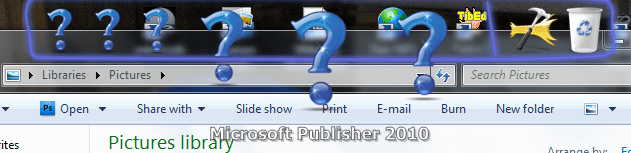
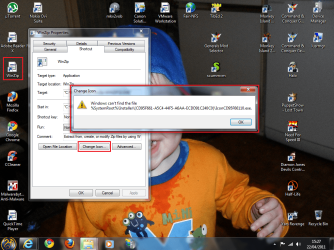
After doing what was suggested I have now lost Icon functionality on a multitude of my applications...as you can see from the pics...

Icon Properties
Error.PNG

Microsoft Office & Rocketdock
No Office Icons.PNGRocketdock.PNG

What's happened is my %systemroot%\Installer folder is now almost completely empty but I can still run the apps and the uninstallers.

I'm now going to have to do 1 of 2 things...

1, completely uninstall then re-install the apps, wasting hours of my time
2, completely re-install Windows 7 to a clean state in order for ALL remnants of the Starforce driver to be completely eradicated

Needless to say, I'm not *insert obscenities here* happy at all and they have recieved a polite email expressing this...

So my advice to all when it comes to Starforce protection drivers is...

DO NOT INSTALL THE DRIVERS OR THE UPDATES
at least untill they can 100% offer support for Windows 7 which they claim they have...
 

My Computer

Computer Manufacturer/Model Number
Compaq Desktop
OS
Windows 7 Ultimate x64
CPU
AMD Sempron Dual Core
Memory
3GB
Graphics Card(s)
NVIDIA GeForce 6150SE nForce 430
Screen Resolution
1024x768
Hard Drives
150GB Sata
I presume you have no disk images? The more I read and post in this forum, the more I want to make more images.

Sorry to hear what happened to you mate.
 

My Computer

Computer type
PC/Desktop
Computer Manufacturer/Model Number
Custom Build
OS
Windows 7 Ultimate x64 Service Pack 1
CPU
AMD Athlon II x4 Propus 2.9 GHz
Motherboard
ASRock N68C-GS FX
Memory
2 x 4GB Corsair XMS 3 DDR3 -1600 CL9
Graphics Card(s)
AMD Radeon HD 5850 1GB GDDR5
Sound Card
On-board 6-Channel HD Audio
Monitor(s) Displays
18' LG Flatron E1942TC-BN on DVI, 18' Chimei 95ND on HDMI
Screen Resolution
1366 x 768 x 2
Hard Drives
1 x 500 GB Seagate
1 x 1 TB Western Digital Caviar Green
1 x 1 TB Hitachi Touro Mobile USB 3
PSU
Seasonic S12II 520W
Case
Generic with Cable Management
Cooling
Deep Cool Gammaxx 200
Keyboard
Dragonwar Desert Eagle
Mouse
Logitech B85
Internet Speed
5Mb/s DL, 0.9Mb/s UL
Antivirus
ESET Nod32
Browser
Google Chrome 64 Bit
Other Info
LG G4 H818P - Rooted with Xposed Framework
Sorry to say- but stuff like that is nothing new for starforce even in xp. It has been a many of reformats and os install and pissed off folks over starforce junk.

I am glad I have no games that use it and will not buy or install any that do. In fact I think the american market stopped using starforce all together- we get other versions of rom. Thank the gods.
 

My Computer

OS
w7
Is the Moment of Silence a game?

Also, I tend to listen with a grain of salt anytime a company eases the blame of their software issue to another company. Game companies are notorious for this.

I had a tech support person from Bethesda tell me Fallout New Vegas wasn't compatible with Windows 7..... even though Windows 7 is listed under system specs.

At and the one I'll never forget is when an HP tech support person told me that their LCD monitors wasn't supported by ATI's video cards. Hmmm..... guess she had stock in Nvidia

Anyway you could try a Repair Install first and see if that helps. Then simply stay away from the game using the starforce protection.

Hmmm.... on the flipside a repair install may not fix all those icons.... but it's worth a try first.

My two cents.
 

My Computer

Computer type
PC/Desktop
Computer Manufacturer/Model Number
Custom built by me.
OS
Windows 10 Pro
CPU
Intel Core i7-4770K (3.5Ghz)
Motherboard
Gigabyte G1 Sniper 5 (F10 Bios)
Memory
32 gig Corsair Dominator Platinum (4x8Gig)
Graphics Card(s)
Sapphire Tri-X R9 Fury
Sound Card
Soundblaster ZXR
Monitor(s) Displays
NEC PA242W 24" LCD Monitor
Screen Resolution
1920 x 1200
Hard Drives
Primary - Samsung 850 Pro (512gig), Samsung 840 Pro (256gig), 2TB WD Caviar Black.
PSU
EVGA Supernova 1000 G2
Case
Cooler Master HAF X
Cooling
Corsair H100i with Corsair Air Series SP120 Quiet Fans
Keyboard
Logitech Wireless Wave
Mouse
Logitech Performance MX
Internet Speed
High Speed Cable
Antivirus
Norton Security
Browser
IE11
Other Info
Memory Timings - 1866MHz @ 9-9-9-27-1T @ 1.5 volts
Well, I'm now running my x64 Windows 7.

The Moment of Silence is an awesome point 'n' click adventure game ;)

Had no issues with Fallout: New Vegas even on my low (ish) spec machine lol
 

My Computer

Computer Manufacturer/Model Number
Compaq Desktop
OS
Windows 7 Ultimate x64
CPU
AMD Sempron Dual Core
Memory
3GB
Graphics Card(s)
NVIDIA GeForce 6150SE nForce 430
Screen Resolution
1024x768
Hard Drives
150GB Sata
Well, I'm now running my x64 Windows 7.

The Moment of Silence is an awesome point 'n' click adventure game ;)

Had no issues with Fallout: New Vegas even on my low (ish) spec machine lol

Point I was making (trying to make) is that sometimes tech support will pass the buck by blaming others. Not saying what they told you isn't true, but sometimes…..

BTW what are you going to do/have done to resolve the issue starforce has left?
 

My Computer

Computer type
PC/Desktop
Computer Manufacturer/Model Number
Custom built by me.
OS
Windows 10 Pro
CPU
Intel Core i7-4770K (3.5Ghz)
Motherboard
Gigabyte G1 Sniper 5 (F10 Bios)
Memory
32 gig Corsair Dominator Platinum (4x8Gig)
Graphics Card(s)
Sapphire Tri-X R9 Fury
Sound Card
Soundblaster ZXR
Monitor(s) Displays
NEC PA242W 24" LCD Monitor
Screen Resolution
1920 x 1200
Hard Drives
Primary - Samsung 850 Pro (512gig), Samsung 840 Pro (256gig), 2TB WD Caviar Black.
PSU
EVGA Supernova 1000 G2
Case
Cooler Master HAF X
Cooling
Corsair H100i with Corsair Air Series SP120 Quiet Fans
Keyboard
Logitech Wireless Wave
Mouse
Logitech Performance MX
Internet Speed
High Speed Cable
Antivirus
Norton Security
Browser
IE11
Other Info
Memory Timings - 1866MHz @ 9-9-9-27-1T @ 1.5 volts
I've taken the chicken **** option and reinstalled my x64 Windows 7.

Thing is, the game works fine in XP but for some reason will not work in XP using VMware :confused:
 

My Computer

Computer Manufacturer/Model Number
Compaq Desktop
OS
Windows 7 Ultimate x64
CPU
AMD Sempron Dual Core
Memory
3GB
Graphics Card(s)
NVIDIA GeForce 6150SE nForce 430
Screen Resolution
1024x768
Hard Drives
150GB Sata
LOL. Trust me, I've done the samething a few times ;)

Sorry I don't have an answer to the starforce issue. I know it was said to cause all sorts of problems when it was released though.

I'd tell you to look through my guide but it doesn't have a workaround for starforce :(

Good luck.
 

My Computer

Computer type
PC/Desktop
Computer Manufacturer/Model Number
Custom built by me.
OS
Windows 10 Pro
CPU
Intel Core i7-4770K (3.5Ghz)
Motherboard
Gigabyte G1 Sniper 5 (F10 Bios)
Memory
32 gig Corsair Dominator Platinum (4x8Gig)
Graphics Card(s)
Sapphire Tri-X R9 Fury
Sound Card
Soundblaster ZXR
Monitor(s) Displays
NEC PA242W 24" LCD Monitor
Screen Resolution
1920 x 1200
Hard Drives
Primary - Samsung 850 Pro (512gig), Samsung 840 Pro (256gig), 2TB WD Caviar Black.
PSU
EVGA Supernova 1000 G2
Case
Cooler Master HAF X
Cooling
Corsair H100i with Corsair Air Series SP120 Quiet Fans
Keyboard
Logitech Wireless Wave
Mouse
Logitech Performance MX
Internet Speed
High Speed Cable
Antivirus
Norton Security
Browser
IE11
Other Info
Memory Timings - 1866MHz @ 9-9-9-27-1T @ 1.5 volts
Back
Top