Start button missing icon, menu appears behind programs

rock99rock

New member
Local time
6:45 PM
Messages
7
Greetings!

I shot a quick video of the issue:


When we switch themes, the orb reappears but functionality does not return to normal, then the orb will disappear again and be replaced with "Start" written in text. No odd group policies are enabled (not that I am aware of), the default theme is aero, the machine is completely up to date. Rebooting temporarily fixes the issue, but returns shortly thereafter to no rhyme or reason. I am grateful for any suggestions.

Thanks!
Rock
 

My Computer

OS
7
Which theme is that? Any problems with the default theme? What of a system restore, esp. if this is a recent problem.
 

My Computer

OS
Windows XP - Now Windows 7 Home Premium (64-bit).
Thank you for your response. Aero (glass) is the default theme in Windows 7 if I'm not mistaken (for computers that can support it). I thought about system restore, but apparently this has been going on for about a month, and the user just told me about it. Restore, is not entirely out of the question, but needs to be avoided if possible.
 

My Computer

OS
7

My Computer

Computer type
PC/Desktop
Computer Manufacturer/Model Number
Self Built
OS
Win 10 Pro x64
CPU
Intel I5-2500K @3.3GHz
Motherboard
Asrock P67 Extreme4
Memory
16GB G.Skill Ripjaws X (4x4GB)
Graphics Card(s)
EVGA GeForce 750 Ti SC 2GB
Sound Card
ASUS Xonar DG 5.1 Channels 24-bit 96KHz PCI Interface Sound
Monitor(s) Displays
auria eq2367
Screen Resolution
1920 x 1080
Hard Drives
250GB Samsung 850 EVO SSD
1TB WD Blue
1TB Hitachi
PSU
SeaSonic X 650W 80 Plus Gold
Case
Corsair Obsidian 750D
Cooling
Corsair H60, Three 140mm case fans
Keyboard
Logitech Wireless Keyboard K520
Mouse
Logitech Wireless Mouse M310
Internet Speed
Wave Broadband ~ 100 dn 5 up
Antivirus
Windows Defender, Malwarebytes Premium
Browser
Edge, IE11, Chrome
Other Info
Laptop specs: HP g7-1365dx /
CPU: AMD A6-3420M APU with Radeon(tm) HD Graphics /
RAM: Crucial 8Gb (2x4Gb) /
SSD: Crucial M4-CT128M4SSD2 ATA Device/ FW 000F /
GFX: AMD Radeon HD 6520G /
OS: Windows 10 Pro x64
Your start button looks different from mine -- and mine is the default.


images
 

My Computer

OS
Windows XP - Now Windows 7 Home Premium (64-bit).
I'd be inclined first to remove any add-ons, switch to the default Windows theme and click on Use Default Settings under the Start Menu tab (Taskbar Properties).
 

My Computer

OS
Windows XP - Now Windows 7 Home Premium (64-bit).
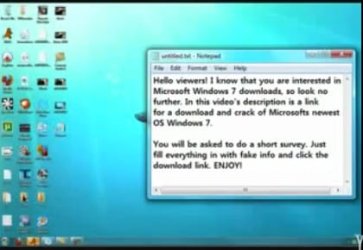
Your video is causing an error ... why do I see Windows Key Keygen crack listed? :confused:
 

Attachments

  • keygen.jpg
    keygen.jpg
    18.1 KB · Views: 77

My Computer

Computer type
PC/Desktop
Computer Manufacturer/Model Number
Bruce ... somewhere in his 40's
OS
Windows 7 Ultimate 32bit SP1
CPU
Intel(R) Core(TM)2 Quad CPU @ 2.40GHz, 2400 MHz
Motherboard
INTEL/D975XBX2
Memory
4 GB
Graphics Card(s)
ATI Radeon HD 2600 Pro
Monitor(s) Displays
Samsung SyncMaster 914v
Screen Resolution
1280 x 1024
Hard Drives
2/500GB each ... ST3500630AS ATA Device.
One is not connected
PSU
Rocketfish 700 W
Case
G.Skill Gigabyte Chassis
Keyboard
Standard PS/2 Keyboard
Mouse
Microsoft PS/2 Mouse
Internet Speed
DSL
Antivirus
Avira Internet Security
Browser
IE 11
Other Info
ATI HDMI Audio
Your start button looks different from mine -- and mine is the default.


images


Correct, that is why the title of this thread states "Start button missing icon" ;) Mine looks the way it does WITH the default theme loaded.
 

My Computer

OS
7
Your video is causing an error ... why do I see Windows Key Keygen crack listed? :confused:


That is bizarre, all i see is my youtube video. You might need to check the legitimacy of your OS...
 

My Computer

OS
7

My Computer

Computer type
PC/Desktop
Computer Manufacturer/Model Number
Self Built
OS
Win 10 Pro x64
CPU
Intel I5-2500K @3.3GHz
Motherboard
Asrock P67 Extreme4
Memory
16GB G.Skill Ripjaws X (4x4GB)
Graphics Card(s)
EVGA GeForce 750 Ti SC 2GB
Sound Card
ASUS Xonar DG 5.1 Channels 24-bit 96KHz PCI Interface Sound
Monitor(s) Displays
auria eq2367
Screen Resolution
1920 x 1080
Hard Drives
250GB Samsung 850 EVO SSD
1TB WD Blue
1TB Hitachi
PSU
SeaSonic X 650W 80 Plus Gold
Case
Corsair Obsidian 750D
Cooling
Corsair H60, Three 140mm case fans
Keyboard
Logitech Wireless Keyboard K520
Mouse
Logitech Wireless Mouse M310
Internet Speed
Wave Broadband ~ 100 dn 5 up
Antivirus
Windows Defender, Malwarebytes Premium
Browser
Edge, IE11, Chrome
Other Info
Laptop specs: HP g7-1365dx /
CPU: AMD A6-3420M APU with Radeon(tm) HD Graphics /
RAM: Crucial 8Gb (2x4Gb) /
SSD: Crucial M4-CT128M4SSD2 ATA Device/ FW 000F /
GFX: AMD Radeon HD 6520G /
OS: Windows 10 Pro x64
Your video is causing an error ... why do I see Windows Key Keygen crack listed? :confused:
I'm not seeing that Jacee, Weird though.:confused:

Your start button looks different from mine -- and mine is the default.


images


Correct, that is why the title of this thread states "Start button missing icon" ;) Mine looks the way it does WITH the default theme loaded.

Have you tried the sfc /scannow I posted above?


Just completed. There were some files that were moved around, and I am rebooting now. I will see if the issue returns, thanks for the suggestion.
 

My Computer

OS
7

Attachments

  • 005.JPG
    005.JPG
    248.1 KB · Views: 8

My Computer

Computer type
PC/Desktop
Computer Manufacturer/Model Number
Bruce ... somewhere in his 40's
OS
Windows 7 Ultimate 32bit SP1
CPU
Intel(R) Core(TM)2 Quad CPU @ 2.40GHz, 2400 MHz
Motherboard
INTEL/D975XBX2
Memory
4 GB
Graphics Card(s)
ATI Radeon HD 2600 Pro
Monitor(s) Displays
Samsung SyncMaster 914v
Screen Resolution
1280 x 1024
Hard Drives
2/500GB each ... ST3500630AS ATA Device.
One is not connected
PSU
Rocketfish 700 W
Case
G.Skill Gigabyte Chassis
Keyboard
Standard PS/2 Keyboard
Mouse
Microsoft PS/2 Mouse
Internet Speed
DSL
Antivirus
Avira Internet Security
Browser
IE 11
Other Info
ATI HDMI Audio

My Computer

OS
7
Mine are all okay ... I'm using IE 8 and it just looked wierd to see a line up of other videos on yours :p
 

My Computer

Computer type
PC/Desktop
Computer Manufacturer/Model Number
Bruce ... somewhere in his 40's
OS
Windows 7 Ultimate 32bit SP1
CPU
Intel(R) Core(TM)2 Quad CPU @ 2.40GHz, 2400 MHz
Motherboard
INTEL/D975XBX2
Memory
4 GB
Graphics Card(s)
ATI Radeon HD 2600 Pro
Monitor(s) Displays
Samsung SyncMaster 914v
Screen Resolution
1280 x 1024
Hard Drives
2/500GB each ... ST3500630AS ATA Device.
One is not connected
PSU
Rocketfish 700 W
Case
G.Skill Gigabyte Chassis
Keyboard
Standard PS/2 Keyboard
Mouse
Microsoft PS/2 Mouse
Internet Speed
DSL
Antivirus
Avira Internet Security
Browser
IE 11
Other Info
ATI HDMI Audio
Your video is causing an error ... why do I see Windows Key Keygen crack listed? :confused:
I'm not seeing that Jacee, Weird though.:confused:

Your start button looks different from mine -- and mine is the default.


images


Correct, that is why the title of this thread states "Start button missing icon" ;) Mine looks the way it does WITH the default theme loaded.

Have you tried the sfc /scannow I posted above?


sfc /scannow did not fix the issue, it returned somewhat. The icon is still missing, but the menu is appearing on top now.
 

My Computer

OS
7
You may have to run it more than once if there are too many to fix at once.

If you've done this already and the scan results come back with "did not find any integrity violations", then you may want to try a http://www.sevenforums.com/tutorials/3413-repair-install.html?ltr=R ,

you wont lose anything but as with any repair task, you should back up all your data should something go awry.
 

My Computer

Computer type
PC/Desktop
Computer Manufacturer/Model Number
Self Built
OS
Win 10 Pro x64
CPU
Intel I5-2500K @3.3GHz
Motherboard
Asrock P67 Extreme4
Memory
16GB G.Skill Ripjaws X (4x4GB)
Graphics Card(s)
EVGA GeForce 750 Ti SC 2GB
Sound Card
ASUS Xonar DG 5.1 Channels 24-bit 96KHz PCI Interface Sound
Monitor(s) Displays
auria eq2367
Screen Resolution
1920 x 1080
Hard Drives
250GB Samsung 850 EVO SSD
1TB WD Blue
1TB Hitachi
PSU
SeaSonic X 650W 80 Plus Gold
Case
Corsair Obsidian 750D
Cooling
Corsair H60, Three 140mm case fans
Keyboard
Logitech Wireless Keyboard K520
Mouse
Logitech Wireless Mouse M310
Internet Speed
Wave Broadband ~ 100 dn 5 up
Antivirus
Windows Defender, Malwarebytes Premium
Browser
Edge, IE11, Chrome
Other Info
Laptop specs: HP g7-1365dx /
CPU: AMD A6-3420M APU with Radeon(tm) HD Graphics /
RAM: Crucial 8Gb (2x4Gb) /
SSD: Crucial M4-CT128M4SSD2 ATA Device/ FW 000F /
GFX: AMD Radeon HD 6520G /
OS: Windows 10 Pro x64
Back
Top