Start button problem

gohardsupreme

New member
Local time
6:35 AM
Messages
133
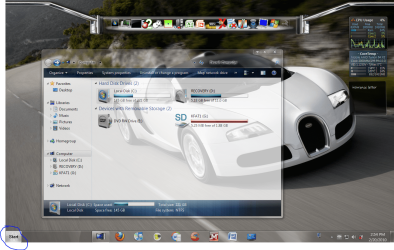
Can someone please take a look at the picture i have attached and explain to me what has happened to my start button and how to fix it. I can see my correct button there but as you can see it is underneath the strange square which i never saw until i turned my computer on today. Thanks in advance.
 

Attachments

  • Capture.PNG
    Capture.PNG
    383.8 KB · Views: 114

My Computer

Computer Manufacturer/Model Number
Gateway T-1628
OS
windows 7 home premium sp1 x86
CPU
AMD Turion 64 x2 Mobile Technology 2.0 GHz
Motherboard
GATEWAY (Socket M2/S1G1) ATI RS690/RS690M Chipset
Memory
3gb DDR2 RAM
Graphics Card(s)
ATI Radeon x1200 series
Sound Card
SigmaTel High Def audio
Monitor(s) Displays
Generic PnP Monitor
Screen Resolution
1280x800
Hard Drives
250gb Western Digital

My Computer

Computer type
PC/Desktop
Computer Manufacturer/Model Number
Self Build
OS
MS Windows 7 Professional 64-bit SP1
CPU
AMD FX(tm)-6100 Six-Core Processor Socket AM3+ (942)
Motherboard
ASUSTeK COMPUTER INC. SABERTOOTH 990FX (AM3r2)
Memory
8.00 GB Dual-Channel DDR3 @ 802MHz (11-11-11-36) 1.5Volts
Graphics Card(s)
NVIDIA GeForce GTX 560 Ti
Sound Card
Onboard Realtek HD
Monitor(s) Displays
shimian (1920x1080@60Hz)
Screen Resolution
1920*1080
Hard Drives
OCZ-AGIL ITY3 SATA Disk Device 120GB
PSU
Corsair TX 750
Case
Corsair
Cooling
WaterCooled
Keyboard
Microsoft Wired
Mouse
Logitech USB Optical TiltWheel Mouse
Internet Speed
Realtek PCIe GBE Family Controller 20MB*1MB
Antivirus
Avast
Browser
Firefox
Other Info
150GB Internal Hard Drive for Backing Up Important Files -
Hauppauge Nova-DT Dual DVB-T Tuner Device (+IR) -
USB PC Camera with Mic (SN9C105)

nice idea but sadly i already tried it. do you think restorator would work?
nevermind i tried restorator and it didnt work. unless there is some other process i can do with it
 
Last edited:

My Computer

Computer Manufacturer/Model Number
Gateway T-1628
OS
windows 7 home premium sp1 x86
CPU
AMD Turion 64 x2 Mobile Technology 2.0 GHz
Motherboard
GATEWAY (Socket M2/S1G1) ATI RS690/RS690M Chipset
Memory
3gb DDR2 RAM
Graphics Card(s)
ATI Radeon x1200 series
Sound Card
SigmaTel High Def audio
Monitor(s) Displays
Generic PnP Monitor
Screen Resolution
1280x800
Hard Drives
250gb Western Digital

nice idea but sadly i already tried it. do you think restorator would work?
nevermind i tried restorator and it didnt work. unless there is some other process i can do with it
Yea they both wouldn't work for me eather blahhh :cry:

error
See the end of this message for details on invoking
just-in-time (JIT) debugging instead of this dialog box.
************** Exception Text **************
System.IO.IOException: The process cannot access the file 'r.bmp' because it is being used by another process.
at Microsoft.VisualBasic.FileSystem.FileCopy(String Source, String Destination)
at Windows_7_Start_Button_Changer.Main.OpenOrbDialog_FileOk(Object sender, CancelEventArgs e)
at System.Windows.Forms.FileDialog.OnFileOk(CancelEventArgs e)
at System.Windows.Forms.FileDialog.HandleVistaFileOk(IFileDialog dialog)

************** Loaded Assemblies **************
mscorlib
Assembly Version: 2.0.0.0
Win32 Version: 2.0.50727.4927 (NetFXspW7.050727-4900)
CodeBase: file:///C:/Windows/Microsoft.NET/Framework/v2.0.50727/mscorlib.dll
----------------------------------------
Windows 7 Start Button Changer
Assembly Version: 1.0.0.0
Win32 Version:
CodeBase: file:///C:/Users/Tyler/Downloads/Pr...aria/W7SBC/Windows 7 Start Button Changer.exe
----------------------------------------
Microsoft.VisualBasic
Assembly Version: 8.0.0.0
Win32 Version: 8.0.50727.4927 (NetFXspW7.050727-4900)
CodeBase: file:///C:/Windows/assembly/GAC_MSI...0__b03f5f7f11d50a3a/Microsoft.VisualBasic.dll
----------------------------------------
System
Assembly Version: 2.0.0.0
Win32 Version: 2.0.50727.4927 (NetFXspW7.050727-4900)
CodeBase: file:///C:/Windows/assembly/GAC_MSIL/System/2.0.0.0__b77a5c561934e089/System.dll
----------------------------------------
System.Windows.Forms
Assembly Version: 2.0.0.0
Win32 Version: 2.0.50727.4927 (NetFXspW7.050727-4900)
CodeBase: file:///C:/Windows/assembly/GAC_MSI....0__b77a5c561934e089/System.Windows.Forms.dll
----------------------------------------
System.Drawing
Assembly Version: 2.0.0.0
Win32 Version: 2.0.50727.4927 (NetFXspW7.050727-4900)
CodeBase: file:///C:/Windows/assembly/GAC_MSIL/System.Drawing/2.0.0.0__b03f5f7f11d50a3a/System.Drawing.dll
----------------------------------------
System.Runtime.Remoting
Assembly Version: 2.0.0.0
Win32 Version: 2.0.50727.4927 (NetFXspW7.050727-4900)
CodeBase: file:///C:/Windows/assembly/GAC_MSI..._b77a5c561934e089/System.Runtime.Remoting.dll
----------------------------------------
************** JIT Debugging **************
To enable just-in-time (JIT) debugging, the .config file for this
application or computer (machine.config) must have the
jitDebugging value set in the system.windows.forms section.
The application must also be compiled with debugging
enabled.
For example:
<configuration>
<system.windows.forms jitDebugging="true" />
</configuration>
When JIT debugging is enabled, any unhandled exception
will be sent to the JIT debugger registered on the computer
rather than be handled by this dialog box

 

My Computer

OS
windows 7/linux
Looks like the start orb was changed to a new york yankees button. That means it was moddified somehow. Check your windows directory and look for explorer.exe then look for somekind of explorer_backup.exe file. it might be named something else.

If there is no backup, then your explorer.exe was modified and no back up was made prior too it.

Try getting a new copy of explorer.exe
Try using sytem restore and restore to a point prior to the issue.
I know that explorer keeps backups. Do a search for explorer.exe and you may find a backup hidden deep in winsxs folder.

OR look around for the default start orb. Then use that image and apply it to your explorer.exe. MANY tutorials on how to do it manually. Im sure you need to set permissions first.

Good luck.
 

My Computer

OS
Windows 7 Ultimate x86
CPU
amd64
^ If you need a new explorer.exe, I have a backup copy (for build 7200 X86)... never tried swapping explorer apps but it might work if you really need it to.
 

My Computer

Computer type
PC/Desktop
Computer Manufacturer/Model Number
Custom built
OS
Windows 8 Pro 64-bit
CPU
Intel Core i7 950 @4.4GHz
Motherboard
EVGA 131-GT-E767
Memory
12GB DDR3 1333MHz @1400 (9-9-9-24)
Graphics Card(s)
2x AMD Radeon HD 6770
Sound Card
Sound Blaster Audigy
Monitor(s) Displays
Acer S231HL + Acer E19T5W
Screen Resolution
1920x1080 + 1440x900
Hard Drives
128GB Samsung 840 Pro
1TB Seagate Barracuda 7200RPM 64mb
500GB Seagate Barracuda 7200RPM 16mb
PSU
Corsair GS800
Case
Custom-made
Cooling
CM Hyper212+, lots of fans
Keyboard
NMB RT8255C+
Mouse
Func MS-3
Internet Speed
30/1.5
Antivirus
Microsoft Security Essentials/Spybot SD/Malwarebytes
Browser
Google Chrome
Other Info
Onkyo TX-27 receiver & two Realistic Optimus T100s.
thanks for the help guys but i was able to figure out that my transparency program glass2k was causing the problem.
 

My Computer

Computer Manufacturer/Model Number
Gateway T-1628
OS
windows 7 home premium sp1 x86
CPU
AMD Turion 64 x2 Mobile Technology 2.0 GHz
Motherboard
GATEWAY (Socket M2/S1G1) ATI RS690/RS690M Chipset
Memory
3gb DDR2 RAM
Graphics Card(s)
ATI Radeon x1200 series
Sound Card
SigmaTel High Def audio
Monitor(s) Displays
Generic PnP Monitor
Screen Resolution
1280x800
Hard Drives
250gb Western Digital
May I suggest a better one? ;)

xD
 

My Computer

Computer type
PC/Desktop
Computer Manufacturer/Model Number
Custom built
OS
Windows 8 Pro 64-bit
CPU
Intel Core i7 950 @4.4GHz
Motherboard
EVGA 131-GT-E767
Memory
12GB DDR3 1333MHz @1400 (9-9-9-24)
Graphics Card(s)
2x AMD Radeon HD 6770
Sound Card
Sound Blaster Audigy
Monitor(s) Displays
Acer S231HL + Acer E19T5W
Screen Resolution
1920x1080 + 1440x900
Hard Drives
128GB Samsung 840 Pro
1TB Seagate Barracuda 7200RPM 64mb
500GB Seagate Barracuda 7200RPM 16mb
PSU
Corsair GS800
Case
Custom-made
Cooling
CM Hyper212+, lots of fans
Keyboard
NMB RT8255C+
Mouse
Func MS-3
Internet Speed
30/1.5
Antivirus
Microsoft Security Essentials/Spybot SD/Malwarebytes
Browser
Google Chrome
Other Info
Onkyo TX-27 receiver & two Realistic Optimus T100s.
Back
Top