Solved Start/Computer Shows Each Disk in a Flyout.

jsquareg

New member
Power User
Local time
4:38 PM
Messages
400
On one of my machines, Clicking on Start/Computer shows each disk (partition) as a flyout rather than in a window that shows each disk in a graphic form like happens when I right click on a disk and then choose open. I am using the Windows Classic theme from Personalization. My laptop, the other machine, shows the disk in the window just like I currently want it to.

Years ago I remember how I made the change to Start/Computer but can't for the life of me remember how I did it. Can someone please remind me how to get it back?

Thank you very much.
 

My Computer

Computer type
PC/Desktop
Computer Manufacturer/Model Number
Dell XPS-8500
OS
Windows 7 Home Premium (Retail) Full version - With SP1
CPU
3.10 Gig Intel Core i5-3350P
Motherboard
Dell 0NW73C A00
Memory
8192 Megabytes Usable Installed Memory
Monitor(s) Displays
Samsung SyncMaster [Monitor] (19.1"vis, s/n HVELA10194, Octo
Screen Resolution
1024 X 768
Hard Drives
INTEL SSDSA2CW120G3 ATA Device [Hard drive] (120.03 GB)
INTEL SSDSA2CW080G3 ATA Device [Hard drive] (80.02 GB)
Keyboard
HID Keyboard Device (HP)
Mouse
Dell (came with computer)
Internet Speed
cox high speed
Other Info
The above taken with Bel Arc Advisor
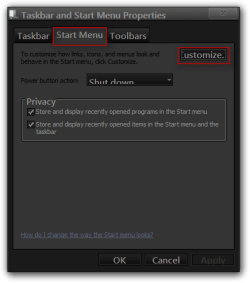
Right click on the taskbar and chose properties
Go to the Start Menu tab then chose Customize
Chose 1 of the settings
OK your way out

Jerry
1.png

2.png
 

My Computer

Computer type
Laptop
Computer Manufacturer/Model Number
Sager NP9170
OS
Win 7 Pro x64 / Win 10 Pro
CPU
Intel(R) Core(TM) i7-3630QM CPU @ 2.40GHz
Motherboard
CLEVO P170EM
Memory
12 GB
Graphics Card(s)
(1) Intel(R) HD Graphics 4000 (2) NVIDIA GeForce GTX 675M
Sound Card
(1) Realtek High Definition Audio (2) Intel(R) Display Aud
Monitor(s) Displays
17.3
Screen Resolution
1920x1080
Hard Drives
(1) Samsung 860 EVO 500GB(OS) (1) Samsung 860 EVO 500GB(Data)
Keyboard
Backlite
Antivirus
MSE, Malwarebytes Pro
Browser
Firefox
Other Info
DESKTOP: Custom-built.
OS: Win 10 Pro x64.
CASE: Rosewill R5.
CPU: Intel I5 4670K CPU @ 3.40GHz.
CPU COOLER: Cool Master Hyper 212 EVO.
MOTHERBOARD: Asus Z87-A.
MEMORY: Kingston HyperX 2x4 GB.
GPU: Nvidia Geforce 650 TI.
PSU: Corsair TX750.
DRIVES: (1) Samsung 840 120 GB SSD (2) Western Digital blue 500 GB 7200 RPM.
Yes, Yes! Now I remember. Thank you very much for your prompt reply.
 

My Computer

Computer type
PC/Desktop
Computer Manufacturer/Model Number
Dell XPS-8500
OS
Windows 7 Home Premium (Retail) Full version - With SP1
CPU
3.10 Gig Intel Core i5-3350P
Motherboard
Dell 0NW73C A00
Memory
8192 Megabytes Usable Installed Memory
Monitor(s) Displays
Samsung SyncMaster [Monitor] (19.1"vis, s/n HVELA10194, Octo
Screen Resolution
1024 X 768
Hard Drives
INTEL SSDSA2CW120G3 ATA Device [Hard drive] (120.03 GB)
INTEL SSDSA2CW080G3 ATA Device [Hard drive] (80.02 GB)
Keyboard
HID Keyboard Device (HP)
Mouse
Dell (came with computer)
Internet Speed
cox high speed
Other Info
The above taken with Bel Arc Advisor
You're welcome
 

My Computer

Computer type
Laptop
Computer Manufacturer/Model Number
Sager NP9170
OS
Win 7 Pro x64 / Win 10 Pro
CPU
Intel(R) Core(TM) i7-3630QM CPU @ 2.40GHz
Motherboard
CLEVO P170EM
Memory
12 GB
Graphics Card(s)
(1) Intel(R) HD Graphics 4000 (2) NVIDIA GeForce GTX 675M
Sound Card
(1) Realtek High Definition Audio (2) Intel(R) Display Aud
Monitor(s) Displays
17.3
Screen Resolution
1920x1080
Hard Drives
(1) Samsung 860 EVO 500GB(OS) (1) Samsung 860 EVO 500GB(Data)
Keyboard
Backlite
Antivirus
MSE, Malwarebytes Pro
Browser
Firefox
Other Info
DESKTOP: Custom-built.
OS: Win 10 Pro x64.
CASE: Rosewill R5.
CPU: Intel I5 4670K CPU @ 3.40GHz.
CPU COOLER: Cool Master Hyper 212 EVO.
MOTHERBOARD: Asus Z87-A.
MEMORY: Kingston HyperX 2x4 GB.
GPU: Nvidia Geforce 650 TI.
PSU: Corsair TX750.
DRIVES: (1) Samsung 840 120 GB SSD (2) Western Digital blue 500 GB 7200 RPM.
Back
Top