start icon now reads S T A R T

desert bum

New member
Member
Local time
1:35 AM
Messages
5
Location
Scottsdale, AZ
I clicked something trying to fix the Expresstion Web 2 operates on Windows 7 Pro. Now the normal start icon on the left side of the task bar shows the old XP flag and reads s t a r t.

Am unable to find the window that allowed, I think four or five options to change how I view Win7 Pro, I clicked the bottom one. That did not help my problem, have been trying to find the windows that allowed me these options, does anyone know about this??
 

My Computer My Computer

At a glance

Windows 7 Pro 64bitAMD Phenom(tn) II x6 1090t processor 3.20 GHz6GB'sBuilt In
Computer Manufacturer/Model Number
I built the desktop computer my self from components
OS
Windows 7 Pro 64bit
CPU
AMD Phenom(tn) II x6 1090t processor 3.20 GHz
Motherboard
ASUS M4A89gtd Pro
Memory
6GB's
Graphics Card(s)
Built In
Sound Card
Built In
Monitor(s) Displays
HP2159m
Hard Drives
105TB and 500GB's
PSU
?
Case
Thermal take V3 Black mid tower gaming case
Cooling
Part of CPU and case.
Hi

Not sure if this helps but found this on Blogsdna:

Most users tend to customize start menu, taskbar, desktop and several other settings. The biggest issue with customization is that often it leads to missing required options after customization. If you have recently customized Windows 7 start Menu and it’s messed up now and you are desperately looking for way to restore Windows 7 start menu default settings then check out below guide.
Restoring Windows 7 Start Menu to default settings is very easy and takes only few clicks check out below step by step guide.
How to Restore Windows 7 Start Menu to Default Settings

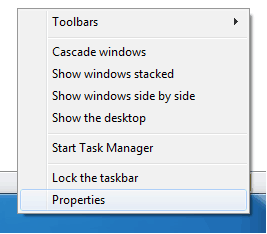
1. Right Click on taskbar and select properties
Properties.png

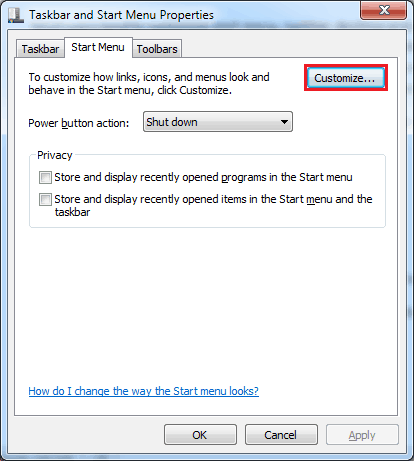
2. Click on Start Menu Tab and click customize button
Taskbar-Start-Menu-Properties.png

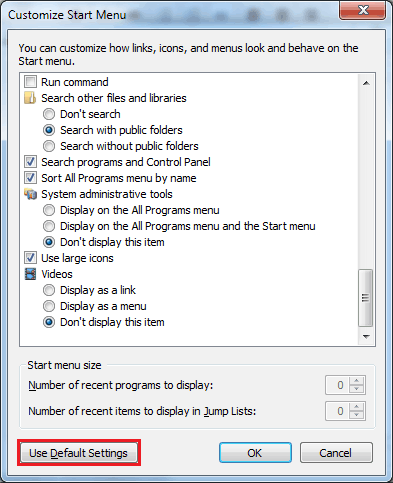
3. Now click on “Use Default Settings” button at the bottom of customize window.
Windows-7-Customize-Start-Menu.png

That’s it, now your Windows 7 start menu is restored to default settings.
 

My Computer My Computer

At a glance

Win7 HP (x64)/Win7 Ultimate (x64)Core i7 9206 x 2GB Corsair XMS3CF HD4890
Computer Manufacturer/Model Number
Custom
OS
Win7 HP (x64)/Win7 Ultimate (x64)
CPU
Core i7 920
Motherboard
Intel X58
Memory
6 x 2GB Corsair XMS3
Graphics Card(s)
CF HD4890
Sound Card
Asus Xonar
Monitor(s) Displays
Dell 2408WFP
Screen Resolution
1920 x 1200
Hard Drives
2 x 150GB WDC Velociraptors (Raid 0)
1 x 1TB Seagate
1 x 1.5TB Seagate
PSU
Corsair HX1000W
Case
Antec 1200
Keyboard
Razer Lycosa/N52te
Mouse
Razer Lachesis
Back
Top