Start menu "All Programs"

ssbtech

New member
Member
Local time
10:00 AM
Messages
55
There are two things I really miss from XP:

1) Start menu - I like the split start menu with the recently used programs on one side and the links to documents, computer, network, etc.. on the other. But XP had this little thing called "All Programs". Clicking on it would show the programs list spread out taking up as much of the screen as it needed to show all the programs.

I am starting to get really annoyed with having all of my program folders crammed into Windows 7's little start menu and having to scroll up and down to look for something.

Is there any way to have XP's "All Programs" view functionality restored?
 

My Computer

OS
7HP

My Computer

Computer type
PC/Desktop
Computer Manufacturer/Model Number
Custom 2014 Upgrade.
OS
Windows 7 Ultimate x64 sp1
CPU
Intel i5 4590 Haswell refresh 3.30GHz(3.7GHz Turbo) Quad.
Motherboard
Gigabyte GA-H97-HD3 LGA 1150
Memory
G.Skill Ripjaws F3-12800CL9D-8GBRL 16GB (4x4GB) (1600MHz)
Graphics Card(s)
Gigabyte GeForce GT 740 4GB
Sound Card
Onboard. Realtek High Definition Audio
Monitor(s) Displays
Asus VW266H x 2
Screen Resolution
1920x1200 @ 60Hz
Hard Drives
Samsung 840 EVO 120GB SSD /
Samsung 850 Pro Series 1TB SSD x 2 /
Western Digital WD Black 1TB /
Western Digital VelociRaptor 150 GB.
PSU
Corsair 650 hx modular
Case
Cooler Master
Cooling
3x fans
Keyboard
Logitech Media Keyboard 600
Mouse
Logitech Performance Mouse MX
Internet Speed
Cable Broadband 100mbs/D, 2mbs/U
Antivirus
MSE, Malwarebytes, AdwCleaner, SUPERAntiSpyware
Browser
Mozilla Firefox, Google Chrome
Other Info
1GB DataRam
I can't give you an answer to your question, but I can give this link that explains the changes to the Start Menu in Windows 7.

What's new with the Start menu?

Personally, I prefer the Windows 7 layout, but of course it's all subjective.

Don't forget though that when you click the Start button the first thing you see at the bottom of the Start Menu is All Programs.

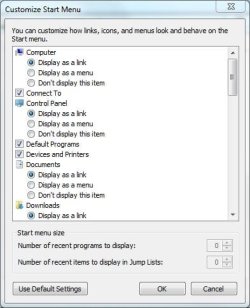
You can also use Right-click the Start Button>Properties>Start Menu tab>Customize, and then customize how links, icons and menus look and behave on the Start Menu.

Capture.JPG
 

My Computer

Computer Manufacturer/Model Number
HP Pavilion Elite 495UK
OS
Windows 7 Ultimate SP1 64-Bit
CPU
Intel Core i7 870 @ 2.93GHz
Motherboard
MSI 2A9C (CPU1)
Memory
8Gb Dual-Channel DDR3 @ 664MHz
Graphics Card(s)
nVidia GeForce GTX 460 1024MB dedicated RAM
Sound Card
Realtek HD Audio
Monitor(s) Displays
HP2310i
Screen Resolution
1920 x 1080
Hard Drives
1x1954GB Hitachi HDS22020ALA 330 (RAID), 1x1954GB Hitachi External for backup and storage
PSU
460W
Case
HP Elite
Cooling
Air cooled
Keyboard
Logitech K750 solar-powered keyboard
Mouse
Logitech Wireless M180 mouse
Internet Speed
2Mb
Other Info
Pure Avanti Flow Internet Radio with iPod Dock, 64Gb iPod, HP USB Speakers, Sony MDR-V500 Headphones, Sony Vaio F-Series Laptop

Thanks but I have already tried that one.

Unlike XP which would spread the columns of programs across the screen, this one still requires oyu to scroll if th elist of programs is longer than the height of your screen.

It also somehow broke the Startup folder functionality - all the programs in my Startup folder now trigger a security prompt and ask for my permission to run before they run.

Not only that, but it screwed up the order of icons in my IE favorites bar.
 

My Computer

OS
7HP
I can't give you an answer to your question, but I can give this link that explains the changes to the Start Menu in Windows 7.

What's new with the Start menu?

Personally, I prefer the Windows 7 layout, but of course it's all subjective.

Don't forget though that when you click the Start button the first thing you see at the bottom of the Start Menu is All Programs.

You can also use Right-click the Start Button>Properties>Start Menu tab>Customize, and then customize how links, icons and menus look and behave on the Start Menu.

View attachment 185009

The first thing I did when I installed Win7 was get rid of the stupid Duplo block sized taskbar, pinned icons and grouped icons in favor of Quick Launch, small icons and "combine when taskbar is full". Moving from Vista to 7 really felt like going from playing with Lego Technic back to playing with Duplo blocks.

I'm also not a big fan of the "Libraries" feature - I much prefer knowing precicely where my files are. Because the Libraries feature gathers files from various locations, it all just seems a bit too "virtual" for me. Too "In the cloud, over there, somewhere" for me.

As for the start menu programs list, the Win7 style might be OK if you have 20 programs, but mine has 144 of them. I hate scrolling.

And please don't remind me about the search feature ;)
 

My Computer

OS
7HP
Probably best if you go back to Windows XP if you dislike Windows 7 so much.

Significantly, Windows 7 sales have now outstripped sales of Windows XP, so Microsoft must be doing something right, but obviously not for everyone, eh?
 

My Computer

Computer Manufacturer/Model Number
HP Pavilion Elite 495UK
OS
Windows 7 Ultimate SP1 64-Bit
CPU
Intel Core i7 870 @ 2.93GHz
Motherboard
MSI 2A9C (CPU1)
Memory
8Gb Dual-Channel DDR3 @ 664MHz
Graphics Card(s)
nVidia GeForce GTX 460 1024MB dedicated RAM
Sound Card
Realtek HD Audio
Monitor(s) Displays
HP2310i
Screen Resolution
1920 x 1080
Hard Drives
1x1954GB Hitachi HDS22020ALA 330 (RAID), 1x1954GB Hitachi External for backup and storage
PSU
460W
Case
HP Elite
Cooling
Air cooled
Keyboard
Logitech K750 solar-powered keyboard
Mouse
Logitech Wireless M180 mouse
Internet Speed
2Mb
Other Info
Pure Avanti Flow Internet Radio with iPod Dock, 64Gb iPod, HP USB Speakers, Sony MDR-V500 Headphones, Sony Vaio F-Series Laptop

My Computer

Computer type
Laptop
Computer Manufacturer/Model Number
Sager NP9170
OS
Win 7 Pro x64 / Win 10 Pro
CPU
Intel(R) Core(TM) i7-3630QM CPU @ 2.40GHz
Motherboard
CLEVO P170EM
Memory
12 GB
Graphics Card(s)
(1) Intel(R) HD Graphics 4000 (2) NVIDIA GeForce GTX 675M
Sound Card
(1) Realtek High Definition Audio (2) Intel(R) Display Aud
Monitor(s) Displays
17.3
Screen Resolution
1920x1080
Hard Drives
(1) Samsung 860 EVO 500GB(OS) (1) Samsung 860 EVO 500GB(Data)
Keyboard
Backlite
Antivirus
MSE, Malwarebytes Pro
Browser
Firefox
Other Info
DESKTOP: Custom-built.
OS: Win 10 Pro x64.
CASE: Rosewill R5.
CPU: Intel I5 4670K CPU @ 3.40GHz.
CPU COOLER: Cool Master Hyper 212 EVO.
MOTHERBOARD: Asus Z87-A.
MEMORY: Kingston HyperX 2x4 GB.
GPU: Nvidia Geforce 650 TI.
PSU: Corsair TX750.
DRIVES: (1) Samsung 840 120 GB SSD (2) Western Digital blue 500 GB 7200 RPM.
Probably best if you go back to Windows XP if you dislike Windows 7 so much.

Significantly, Windows 7 sales have now outstripped sales of Windows XP, so Microsoft must be doing something right, but obviously not for everyone, eh?

I've been tempted to go back to Vista several times...


And I don't think pinned icons is the primary reason people upgrade from XP to 7.
 

My Computer

OS
7HP
You're Welcome
 

My Computer

Computer type
Laptop
Computer Manufacturer/Model Number
Sager NP9170
OS
Win 7 Pro x64 / Win 10 Pro
CPU
Intel(R) Core(TM) i7-3630QM CPU @ 2.40GHz
Motherboard
CLEVO P170EM
Memory
12 GB
Graphics Card(s)
(1) Intel(R) HD Graphics 4000 (2) NVIDIA GeForce GTX 675M
Sound Card
(1) Realtek High Definition Audio (2) Intel(R) Display Aud
Monitor(s) Displays
17.3
Screen Resolution
1920x1080
Hard Drives
(1) Samsung 860 EVO 500GB(OS) (1) Samsung 860 EVO 500GB(Data)
Keyboard
Backlite
Antivirus
MSE, Malwarebytes Pro
Browser
Firefox
Other Info
DESKTOP: Custom-built.
OS: Win 10 Pro x64.
CASE: Rosewill R5.
CPU: Intel I5 4670K CPU @ 3.40GHz.
CPU COOLER: Cool Master Hyper 212 EVO.
MOTHERBOARD: Asus Z87-A.
MEMORY: Kingston HyperX 2x4 GB.
GPU: Nvidia Geforce 650 TI.
PSU: Corsair TX750.
DRIVES: (1) Samsung 840 120 GB SSD (2) Western Digital blue 500 GB 7200 RPM.
Although not a menu, you might want to look at "launchy". It's quicker to start programs from Launchy than from any multi-level menu; small footprint, runs fast, no problems here. It's especially handy for things you don't use regularly and aren't worth putting on a taskbar.
 

My Computer

Computer Manufacturer/Model Number
eMachines ET1831-7
OS
Windows 7 Ultimate
CPU
Pentium Dual-Core CPU E5400 @ 2.70GHz
Motherboard
EMCP73VT-PM
Memory
4096M
Graphics Card(s)
nVidia 8400GS
Sound Card
built-in Realtek
Monitor(s) Displays
Acer 20"
Screen Resolution
1680x1050
Hard Drives
Seagate ST3750528AS ATA 500G
Other Info
Dual-boot with Linux.
Back
Top