Start Menu Color

stereo

New member
Member
VIP
Local time
5:50 PM
Messages
541
Hello.
I found the very nice tool, here on this forum.
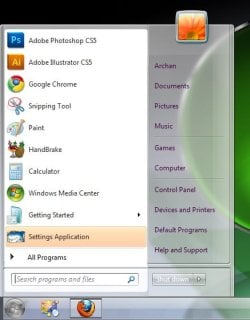
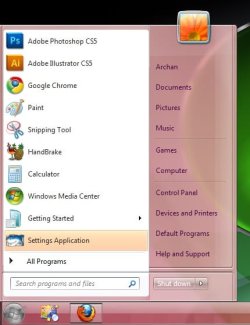
Windows 7 Taskbar Color Changer. Is there any similar program, to change only the Start Menu color ??
See the attached file, please.
There where is the white cross, i wanna change the background color.
Thanks in advance.
 
Last edited:

My Computer

Computer type
PC/Desktop
OS
Windows 7 Ultimate x64
CPU
Intel7 4790K
Motherboard
Gigabyte GA-Z97X UD5H
Memory
8 GB DDR3
Graphics Card(s)
GTX 980Ti G1
Sound Card
SoundBlaster X-FI XtremeGamer
Monitor(s) Displays
Samsung UE40JU6550 UHD
Screen Resolution
3840 X 2160
Hard Drives
1 SSD Intel 330
2 x Western Digital 6400 AAKS
1 x Western Digital 3200 AAKS
PSU
Corsair 750W
Case
Cooler Master HAF 922
Like this ?
1.jpg2.jpg

If so, right click on the desktop and choose personalize . In the coming windoe click on window colors ... you will get the option to change the colors .
 

Attachments

  • sshot-1.jpg
    sshot-1.jpg
    60.7 KB · Views: 8

My Computer

Computer type
PC/Desktop
Computer Manufacturer/Model Number
Self Assembled
OS
Microsoft Windows 10 Pro Insider Preview 64-bit
CPU
Intel(R) Core(TM) i3-4130 CPU @ 3.40GHz
Motherboard
Gigabyte Technology Co., Ltd. B85M-D3H
Memory
Corsair Vengence 4GB x2 (8.00GB Dual-Channel DDR3 @ 798MHz)
Graphics Card(s)
2047MB GeForce GTS 450 (ZOTAC International)
Sound Card
Onboard (Realtek High Definition Audio)
Monitor(s) Displays
LG Flatron E2040T
Screen Resolution
1600x900
Hard Drives
Western Digital 1 TB
Seagate 500 GB
PSU
Corsair VS550
Case
Cooler Master K380
Cooling
Cooler Master Seidon 120V Plus
Keyboard
Logitech MK260r
Mouse
Logitech MK260r
Internet Speed
PMPL Broadband
Antivirus
Windows Defender + MBAM
Browser
Firefox
Other Info
Dell Studio 15" Laptop
Like this ?
View attachment 98310View attachment 98311

If so, right click on the desktop and choose personalize . In the coming windoe click on window colors ... you will get the option to change the colors .
Thanks, Arc
But if i use this options, the taskbar, which is now blue, will change the color, too.
I thought there is a program, similar with Windows 7 Taskbar Color Changer.
Sorry : i modified the first post. Instead " Windows 7 Blue Task Manager " should be
"Windows 7 Taskbar Color Changer"
This program "Windows 7 Taskbar Color Changer" change only the Taskbar color.
Nothing else.
 

My Computer

Computer type
PC/Desktop
OS
Windows 7 Ultimate x64
CPU
Intel7 4790K
Motherboard
Gigabyte GA-Z97X UD5H
Memory
8 GB DDR3
Graphics Card(s)
GTX 980Ti G1
Sound Card
SoundBlaster X-FI XtremeGamer
Monitor(s) Displays
Samsung UE40JU6550 UHD
Screen Resolution
3840 X 2160
Hard Drives
1 SSD Intel 330
2 x Western Digital 6400 AAKS
1 x Western Digital 3200 AAKS
PSU
Corsair 750W
Case
Cooler Master HAF 922
Like this ?
View attachment 98310View attachment 98311

If so, right click on the desktop and choose personalize . In the coming windoe click on window colors ... you will get the option to change the colors .
Thanks, Arc
But if i use this options, the taskbar, which is now blue, will change the color, too.
I thought there is a program, similar with Windows 7 Taskbar Color Changer.
Sorry : i modified the first post. Instead " Windows 7 Blue Task Manager " should be
"Windows 7 Taskbar Color Changer"
This program "Windows 7 Taskbar Color Changer" change only the Taskbar color.
Nothing else.

I know what you want. I knew a software for Beta days. But that does not work in RTM.
 

My Computer

Computer Manufacturer/Model Number
COMPAQ Presario Laptop
OS
Windows 7 Ultimate 64 bit, Mac OS X 10.6
CPU
Intel Pentium Dual Core @2.0GHz
Motherboard
Compaq Generic
Memory
12GB
Graphics Card(s)
NVIDIA Graphics For Mobile 512MB VRAM
Sound Card
IDT High definition Audio
Monitor(s) Displays
Laptop LCD Display
Screen Resolution
1280*800 Bright View Widescreen
Hard Drives
500 GB Primary Master@7200rpm + 1 TB External HDD
Cooling
Direct ; generic fan
Keyboard
Generic Laptop Keyboard
Mouse
Touch Pad
Internet Speed
3.1 Mbps wireless Broadband
Other Info
Generic Dock
Like this ?
View attachment 98310View attachment 98311

If so, right click on the desktop and choose personalize . In the coming windoe click on window colors ... you will get the option to change the colors .
Thanks, Arc
But if i use this options, the taskbar, which is now blue, will change the color, too.
I thought there is a program, similar with Windows 7 Taskbar Color Changer.
Sorry : i modified the first post. Instead " Windows 7 Blue Task Manager " should be
"Windows 7 Taskbar Color Changer"
This program "Windows 7 Taskbar Color Changer" change only the Taskbar color.
Nothing else.

Then you should do as Arc suggested and use the "Windows 7 Taskbar Color Changer" you mention to change your taskbar back to blue.
 

My Computer

Computer Manufacturer/Model Number
Averatec 6130HS-20
OS
Windows 7 Professional 32-bit (6.1, Build 7600)
CPU
Intel(R) Pentium(R) 4 3.00 GHz HT
Memory
2.0 GB
Graphics Card(s)
ATI Mobility Radeon 9600 64MB
Sound Card
Realtek AC'97 Audio
Screen Resolution
1280 x 800
Hard Drives
Seagate 96023A 60GB 7200RPM -
Seagate FreeAgentDesktop 250GB
Cooling
20 Inch Box Fan
Mouse
Targus PAWM10 Wireless Optical Laptop Mouse
Like this ?
View attachment 98310View attachment 98311

If so, right click on the desktop and choose personalize . In the coming windoe click on window colors ... you will get the option to change the colors .
Thanks, Arc
But if i use this options, the taskbar, which is now blue, will change the color, too.
I thought there is a program, similar with Windows 7 Taskbar Color Changer.
Sorry : i modified the first post. Instead " Windows 7 Blue Task Manager " should be
"Windows 7 Taskbar Color Changer"
This program "Windows 7 Taskbar Color Changer" change only the Taskbar color.
Nothing else.

Then you should do as Arc suggested and use the "Windows 7 Taskbar Color Changer" you mention to change your taskbar back to blue.
When i use Windows 7 Taskbar Color Changer, thisprogram is changing ONLY the taskbar color.
I wanna change only the Start Menu color, without anything else.
The skin color is green, see the attached image, please.
At the same time, i have the taskbar color, blue ( see the second image, attached )
And i thought is possible to modify the start menu color, exactly like the taskbar color, without to change the green
 

Attachments

  • skin color.jpg
    skin color.jpg
    2.7 KB · Views: 7
  • taskbar color.jpg
    taskbar color.jpg
    3.8 KB · Views: 8

My Computer

Computer type
PC/Desktop
OS
Windows 7 Ultimate x64
CPU
Intel7 4790K
Motherboard
Gigabyte GA-Z97X UD5H
Memory
8 GB DDR3
Graphics Card(s)
GTX 980Ti G1
Sound Card
SoundBlaster X-FI XtremeGamer
Monitor(s) Displays
Samsung UE40JU6550 UHD
Screen Resolution
3840 X 2160
Hard Drives
1 SSD Intel 330
2 x Western Digital 6400 AAKS
1 x Western Digital 3200 AAKS
PSU
Corsair 750W
Case
Cooler Master HAF 922
Back
Top