
Start Menu Customization Question

Static

New member
Power User
Local time
3:20 PM
Messages
173
Hey guys. My friend is still unconvinced about Windows 7 and I am trying to turn him to the darkside. So, he has some minor caveats and cry-baby like problems. Basically what it comes down to is he needs his computer as he is a doctor and can't "Take a few days or weeks to get acclimated."

So I solved most of his problems in the tutorials section of how to make windows 7 look more like XP or even Windows 2000 (He's a big fan).

but one thing I haven't seen is this. He hates the new start menu. Too complicated too much junk for him. So, how can we turn this beautiful windows 7 into something more like this....


47814128.jpg


Or at the bare minimum, How can we get rid of the gaping void of "Recent Programs" or whatever it is called on the left side so that it's a much simpler rendition he can customize.

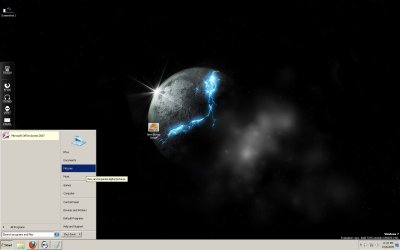
Example of the void I was speaking about. The giant grey hole that is the left side 60%. Get rid of that so that all that is left is that right side customizable list of Rhys, Pictures, Computer, Control Panel. etc:
Screenshot2.jpg
 

My Computer

OS
Windows 7 RC - 7100 64bit
CPU
AMD Athlon(tm) 64 x2 4800+ 2.50Ghz Dual Core
Motherboard
Hewlett Packard
Memory
4 gig Kingston DDR2
Graphics Card(s)
XFX Nvidia GeForce GTS 250
Sound Card
na
Monitor(s) Displays
22" Samsung LCD Syncmaster
Screen Resolution
1680x1050
Hard Drives
300gig Western Digital
PSU
BFG Tech 550watt
Case
Crap stock Dell
Cooling
Side panel open on case, and a box fan blowing in.
Keyboard
G15
Mouse
G9
Internet Speed
Bike Messenger

My Computer

Computer type
PC/Desktop
Computer Manufacturer/Model Number
Self built custom
OS
64-bit Windows 11 Pro for Workstations
CPU
Intel i7-8700K OC'd to 5 GHz
Motherboard
ASUS ROG Maximus XI Formula Z390
Memory
64 GB (4x16GB) G.SKILL TridentZ RGB DDR4 3600 MHz
Graphics Card(s)
ASUS ROG-STRIX-GTX1080TI-O11G-GAMING
Sound Card
Integrated
Monitor(s) Displays
2 x Samsung Odyssey G7 27"
Screen Resolution
2560x1440
Hard Drives
1TB Samsung 990 PRO M.2,
4TB Samsung 990 PRO PRO M.2,
TerraMaster F8 SSD Plus NAS
PSU
Seasonic Prime Titanium 850W
Case
Thermaltake Core P3
Cooling
Corsair Hydro H115i
Keyboard
Logitech wireless K800
Mouse
Logitech MX Master 4
Internet Speed
2 Gb/s Download and 100 Mb/s Upload
Antivirus
Malwarebyte Anti-Malware Premium
Browser
Google Chrome
Other Info
Logitech Z625 speaker system,
Logitech BRIO 4K Pro webcam,
HP Color LaserJet Pro MFP M477fdn,
APC SMART-UPS RT 1000 XL - SURT1000XLI,
Galaxy S23 Plus phone
Hmm to be honest I don't think you can et rid of that area ,atleast as far as I know but you can I believe just pin thoes folders you need to that area!

Thanks,
Kukag
 

My Computer

Computer Manufacturer/Model Number
Custom
OS
Windows 7
CPU
AMD Phenom II X4 940 3.0 Stock
Motherboard
Gigabyte GA-MA78GM-S2H
Memory
G.SKILL DDR2 800 PI Black 4GB+Corsair XMS2 Xtrm Gaming 2GB
Graphics Card(s)
ASUS EN8800GT TOP (Fact OC)
Monitor(s) Displays
Optiquest 20" Flatscreen
Screen Resolution
1680x1050
Hard Drives
Seagate 3.5' 7200RPM 750GB HDD
PSU
Antec NeoHE 550W
Cooling
Stock AMD Phenom HSF
Keyboard
Logitech G15
Internet Speed
Charter HighSpeed 10 Down / 5 Up
Hey guys. My friend is still unconvinced about Windows 7 and I am trying to turn him to the darkside. So, he has some minor caveats and cry-baby like problems. Basically what it comes down to is he needs his computer as he is a doctor and can't "Take a few days or weeks to get acclimated."

So I solved most of his problems in the tutorials section of how to make windows 7 look more like XP or even Windows 2000 (He's a big fan).

but one thing I haven't seen is this. He hates the new start menu. Too complicated too much junk for him. So, how can we turn this beautiful windows 7 into something more like this....


View attachment 30627


Or at the bare minimum, How can we get rid of the gaping void of "Recent Programs" or whatever it is called on the left side so that it's a much simpler rendition he can customize.

Example of the void I was speaking about. The giant grey hole that is the left side 60%. Get rid of that so that all that is left is that right side customizable list of Rhys, Pictures, Computer, Control Panel. etc:
View attachment 30628

That's easy.

1. right click on the start orb
2. properties
3. second tab (startmenu)
4. click customize button
5. see down below startmenu size
6. set both recent apps and recent items from default 10 to 0
7. click ok

good luck
 

My Computer

OS
Win7 Build 7600 x86
CPU
Pentium II 300MHz
Motherboard
Asus
Memory
32mb EDO RAM
Graphics Card(s)
Diamond Viper
Sound Card
Soundblaster 16
Monitor(s) Displays
14" AOC CRT 16K color
Screen Resolution
800x600
Hard Drives
300mb Quantum fireball
PSU
110 Watts
Cooling
Passive
Keyboard
Trust Ergonomic
Mouse
Generic
Internet Speed
256K u 128K d
That's easy.

1. right click on the start orb
2. properties
3. second tab (startmenu)
4. click customize button
5. see down below startmenu size
6. set both recent apps and recent items from default 10 to 0
7. click ok

good luck

All that did was guarantee the area stays blank and has no programs in the empty space. I want to get rid of the empty space altogether. Thanks for the effort tho. My friend went to RTM Today and he is enjoying it more than he thought. Even if this doesn't get solved. Thank you tho.

And he did what the guy above you said, he just changed it to pin what he wanted instead of recent things. He eliminated desktop Icons and put it all there. Whatever works for him.
 

My Computer

OS
Windows 7 RC - 7100 64bit
CPU
AMD Athlon(tm) 64 x2 4800+ 2.50Ghz Dual Core
Motherboard
Hewlett Packard
Memory
4 gig Kingston DDR2
Graphics Card(s)
XFX Nvidia GeForce GTS 250
Sound Card
na
Monitor(s) Displays
22" Samsung LCD Syncmaster
Screen Resolution
1680x1050
Hard Drives
300gig Western Digital
PSU
BFG Tech 550watt
Case
Crap stock Dell
Cooling
Side panel open on case, and a box fan blowing in.
Keyboard
G15
Mouse
G9
Internet Speed
Bike Messenger
Static,

I'm happy to hear that the workaround worked for him. :)
 

My Computer

Computer type
PC/Desktop
Computer Manufacturer/Model Number
Self built custom
OS
64-bit Windows 11 Pro for Workstations
CPU
Intel i7-8700K OC'd to 5 GHz
Motherboard
ASUS ROG Maximus XI Formula Z390
Memory
64 GB (4x16GB) G.SKILL TridentZ RGB DDR4 3600 MHz
Graphics Card(s)
ASUS ROG-STRIX-GTX1080TI-O11G-GAMING
Sound Card
Integrated
Monitor(s) Displays
2 x Samsung Odyssey G7 27"
Screen Resolution
2560x1440
Hard Drives
1TB Samsung 990 PRO M.2,
4TB Samsung 990 PRO PRO M.2,
TerraMaster F8 SSD Plus NAS
PSU
Seasonic Prime Titanium 850W
Case
Thermaltake Core P3
Cooling
Corsair Hydro H115i
Keyboard
Logitech wireless K800
Mouse
Logitech MX Master 4
Internet Speed
2 Gb/s Download and 100 Mb/s Upload
Antivirus
Malwarebyte Anti-Malware Premium
Browser
Google Chrome
Other Info
Logitech Z625 speaker system,
Logitech BRIO 4K Pro webcam,
HP Color LaserJet Pro MFP M477fdn,
APC SMART-UPS RT 1000 XL - SURT1000XLI,
Galaxy S23 Plus phone
That's easy.

1. right click on the start orb
2. properties
3. second tab (startmenu)
4. click customize button
5. see down below startmenu size
6. set both recent apps and recent items from default 10 to 0
7. click ok

good luck

All that did was guarantee the area stays blank and has no programs in the empty space. I want to get rid of the empty space altogether. Thanks for the effort tho. My friend went to RTM Today and he is enjoying it more than he thought. Even if this doesn't get solved. Thank you tho.

And he did what the guy above you said, he just changed it to pin what he wanted instead of recent things. He eliminated desktop Icons and put it all there. Whatever works for him.

Sorry,

Forgot to mention that then the menu will be as big as the right part of the menu.
By switching of those you don't need in the right part, the startmenu will actually shrink.
 

My Computer

OS
Win7 Build 7600 x86
CPU
Pentium II 300MHz
Motherboard
Asus
Memory
32mb EDO RAM
Graphics Card(s)
Diamond Viper
Sound Card
Soundblaster 16
Monitor(s) Displays
14" AOC CRT 16K color
Screen Resolution
800x600
Hard Drives
300mb Quantum fireball
PSU
110 Watts
Cooling
Passive
Keyboard
Trust Ergonomic
Mouse
Generic
Internet Speed
256K u 128K d
Back
Top