Solved Start menu diappears.

sara2012

Banned
Local time
7:41 AM
Messages
16
Dear Friends,
When i click the start button the start menu, the menu opens, but after a few seconds it just closes itself. Also this happens in case of All Programs also. I scanned with anti spyware but nothing detected. My os is win 7 32 bit. Sometimes it works normal Pl help.
 

My Computer

Computer Manufacturer/Model Number
Assembled
OS
windows 7 home premium 32 bit
CPU
Intel
Motherboard
Intel
Memory
2 gb
Graphics Card(s)
Nvidia 8400gs
Sound Card
Built in
Monitor(s) Displays
Samsung
Hard Drives
seagate 160 gb
PSU
circle
Case
circle
Cooling
circle
Have you tried system restore?
 

My Computer

Computer Manufacturer/Model Number
Advent
OS
Dual-boot: Windows 7 HP 32-bit SP1 & Windows XP Pro 32-bit SP2.
CPU
AMD Phenom X4 9550 2.8Ghz
Motherboard
FOXCONN A6VMX (Socket 940)
Memory
4.0GB RAM
Graphics Card(s)
256MB On-board ATI Radeon X1200 Series
Sound Card
UnKnown
Monitor(s) Displays
19" TFT Mointor
Screen Resolution
1400 by 900
Hard Drives
500GB Western Digital WDC
Keyboard
HP Keyboard
Internet Speed
Dial-up via Mobile phone (Three)
Other Info
80GB External Hard-drive.

Also I have an old Windows XP Laptop for backup/occasional use etc.
Yes, I tried system restore also. It happens for sometimes only.
 

My Computer

Computer Manufacturer/Model Number
Assembled
OS
windows 7 home premium 32 bit
CPU
Intel
Motherboard
Intel
Memory
2 gb
Graphics Card(s)
Nvidia 8400gs
Sound Card
Built in
Monitor(s) Displays
Samsung
Hard Drives
seagate 160 gb
PSU
circle
Case
circle
Cooling
circle
You may have pressed F11 at some point by mistake, which auto-hides your Task bar and therefore Start menu:

Right-Click Taskbar > Properties > Taskbar tab;

Make sure the auto-hide box is unchecked.

Hope this helps,

Harry
 

Attachments

  • Taskbar Properties.JPG
    Taskbar Properties.JPG
    39.3 KB · Views: 0

My Computer

Computer type
Laptop
Dear Mr. Harry,
Thank u for replying.
There is no tick mark in Auto Hide taskbar check box. Also pl note that start icon (windows Logo) is visible but start menu flashes for milliseconds when I click this logo or All programs tab.
 

My Computer

Computer Manufacturer/Model Number
Assembled
OS
windows 7 home premium 32 bit
CPU
Intel
Motherboard
Intel
Memory
2 gb
Graphics Card(s)
Nvidia 8400gs
Sound Card
Built in
Monitor(s) Displays
Samsung
Hard Drives
seagate 160 gb
PSU
circle
Case
circle
Cooling
circle
You may want to use System File Checker, which is Windows diagnostic tool:

SFC /SCANNOW within Command Prompt (Use Brink's tutorial to help you)

Tutorial - http://www.sevenforums.com/tutorials/1538-sfc-scannow-command-system-file-checker.html

This will check for any corrupted system files, which may be causing the Start Menu to disappear, and will take around 30 minutes to complete. You may need to insert your Windows installation disc.
 

My Computer

Computer type
Laptop
Tried system file checker with and without win7 dvd. No problems found. Still same problem.
 

My Computer

Computer Manufacturer/Model Number
Assembled
OS
windows 7 home premium 32 bit
CPU
Intel
Motherboard
Intel
Memory
2 gb
Graphics Card(s)
Nvidia 8400gs
Sound Card
Built in
Monitor(s) Displays
Samsung
Hard Drives
seagate 160 gb
PSU
circle
Case
circle
Cooling
circle
Tried system file checker with and without win7 dvd. No problems found. Still same problem.

Try the following;

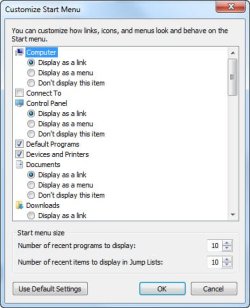
Right click the Start Orb (the round button with the Windows flag) and select "Properties" from the ensuing menu. Next, select the "Start Menu" tab at the top, select "Customize..." and at the bottom of the "Customize" menu select "Use Default Settings"; see attachment. Then reboot the system.

No guarantees on this solving the problem!
 

Attachments

  • Customize settings.jpg
    Customize settings.jpg
    29.3 KB · Views: 1

My Computer

Computer type
PC/Desktop
Computer Manufacturer/Model Number
Custom Built
OS
Windows 7 Professional x64
CPU
Intel i5 quad processor
Motherboard
DP67BG
Memory
16 GB
Graphics Card(s)
Radeon HD 5770
Sound Card
Realtek High Definition Audio
Monitor(s) Displays
Samsung SyncMaster
Screen Resolution
1920X1080
Hard Drives
WD 2TB (SATA Internal)
WD 1TB (USB External)
PSU
Corsair GS800
Case
Tower (Generic)
Cooling
3 Internal Fans
Keyboard
MS Wireless
Mouse
MS Optical Wired
Internet Speed
54 mbps
Antivirus
Emsisoft
Browser
IE-Version 9, Palemoon-Version 24.2.0
Do you have any third party themes installed or anything that modifies the login screen or windows behavior?
 

My Computer

OS
XP / Win7 x64 Pro
CPU
Intel Quad-Core Q9450 @ 3.2GHz
Motherboard
Asus P5-E
Memory
2x2GB GSkill DDR2
Graphics Card(s)
NVIDIA GeForce 8600 GTS (EVGA)
Monitor(s) Displays
Dell 2408WFP
Screen Resolution
1920x1200
Tried system file checker with and without win7 dvd. No problems found. Still same problem.

Try the following;

Right click the Start Orb (the round button with the Windows flag) and select "Properties" from the ensuing menu. Next, select the "Start Menu" tab at the top, select "Customize..." and at the bottom of the "Customize" menu select "Use Default Settings"; see attachment. Then reboot the system.

No guarantees on this solving the problem!

I was thinking of that idea myself, but I thought if the "Auto-Hide Taskbar" is not checked, then it would default settings almost anyway :P
 

My Computer

Computer type
Laptop
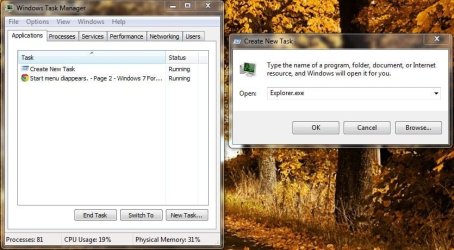
Try opening Task Manager and attempting this method of resetting Windows Explorer which also manages the Task-bar, Start Menu as well as the Windows Explorer of course :P

Right-Click Task-Bar > Start Task Manager > File menu > New Task (Run) > Type (without quotes) "Explorer.exe > OK
 

Attachments

  • Explorer.jpg
    Explorer.jpg
    68.9 KB · Views: 2

My Computer

Computer type
Laptop
No, I have not installed any such software. Now I have formatted c drive and reinstalled win 7. Again facing same problem. Finally I deleted all partitions and again created new partitions. Installed Win7. Hope the problem should not come again. Under observations.
I am in confusion that Even when I reinstalled win 7 after formatting only c drive why the problem was not solved?
 

My Computer

Computer Manufacturer/Model Number
Assembled
OS
windows 7 home premium 32 bit
CPU
Intel
Motherboard
Intel
Memory
2 gb
Graphics Card(s)
Nvidia 8400gs
Sound Card
Built in
Monitor(s) Displays
Samsung
Hard Drives
seagate 160 gb
PSU
circle
Case
circle
Cooling
circle
No, I have not installed any such software. Now I have formatted c drive and reinstalled win 7. Again facing same problem. Finally I deleted all partitions and again created new partitions. Installed Win7. Hope the problem should not come again. Under observations.
I am in confusion that Even when I reinstalled win 7 after formatting only c drive why the problem was not solved?

It is interesting, since the System File Checker could not find any problems with the files within the operating system, therefore the re-installation should be fine.
 

My Computer

Computer type
Laptop
Back
Top