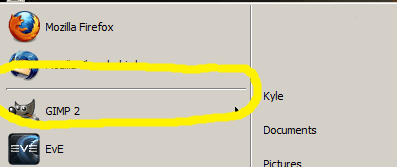
S Sicieler New member Nov 28, 2009 #1 Is there anyway to get a divider between your pinned and unpinned items in the start menu without using the classic theme? -Thanks Guys Attachments Start Menu.png 14.8 KB · Views: 33 My Computer OSWindows 7
Is there anyway to get a divider between your pinned and unpinned items in the start menu without using the classic theme? -Thanks Guys
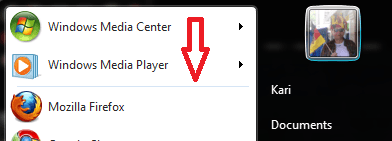
Kari An Angry Old Man Nov 28, 2009 #2 Hi Sicieler, welcome to the Seven Forums. It is there. I'm using a normal Aero theme, you can clearly see the divider. Kari Attachments menu_divider.PNG 30 KB · Views: 14 My Computer Computer typeLaptopComputer Manufacturer/Model NumberHP ENVY 17-1150egOSWindows 10 Pro x64 EN-GBCPU1.6 GHz Intel Core i7-720QM ProcessorMemory6 GBGraphics Card(s)ATI Mobility Radeon HD 5850 GraphicsSound CardBeats sound system with integrated subwooferMonitor(s) Displays17" laptop display, 22" LED and 32" Full HD TV through HDMIScreen Resolution1600*900 (1), 1920*1080 (2&3)Hard DrivesInternal: 2 x 500 GB SATA Hard Disk Drive 7200 rpm External: 2TB for backups, 3TB USB3 network drive for mediaCoolingAs Envy runs a bit warm, I have it on a Cooler Master padKeyboardLogitech diNovo Media Desktop Laser (bluetooth)MouseLogitech Performance Mouse MXInternet Speed50/10 Mbps VDSLAntivirusWindows Defender 4.3.9431.0BrowserMaxthon 3.5.2., IE11
Hi Sicieler, welcome to the Seven Forums. It is there. I'm using a normal Aero theme, you can clearly see the divider. Kari
S Sicieler New member Nov 28, 2009 #3 haha, now that I turn my head upside down and put it below the monitor i can see it Is they're a way to make it more noticeable? My Computer OSWindows 7
haha, now that I turn my head upside down and put it below the monitor i can see it Is they're a way to make it more noticeable?