
inspectorboyd
New member
- Local time
- 9:50 PM
- Messages
- 2
I apologize if this issue has been resolved on this site already. I did a perfunctory search for my problem but found no results.
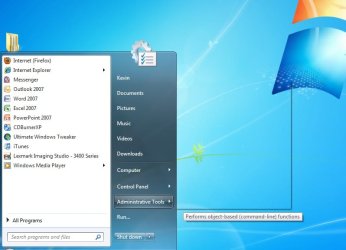
When I go to start and highlight over a link (ex. Administrative Tools, Control Panel, etc.) the resulting expanded list is completely transparent and blended into the desktop background. I'm not explaining adequately but i'll include a picture.
Any help would be greatly appreciated.
When I go to start and highlight over a link (ex. Administrative Tools, Control Panel, etc.) the resulting expanded list is completely transparent and blended into the desktop background. I'm not explaining adequately but i'll include a picture.
Any help would be greatly appreciated.
Attachments
Last edited:
My Computer
- Computer Manufacturer/Model Number
- Lenovo T61p
- OS
- Windows 7 Ultimate 64-bit
- CPU
- Intel Mobile Core 2 Duo T9300 @ 2.50GHz
- Motherboard
- Lenovo 6459CTO
- Memory
- 4GB DDR2 Dual 332MHz 4-4-4-12
- Graphics Card(s)
- NVIDIA Quadro FX 570M 256MB
- Sound Card
- SoundMAX Integrated Digital HD Audio
- Hard Drives
- 160GB Hitachi ATA 7200RPM
